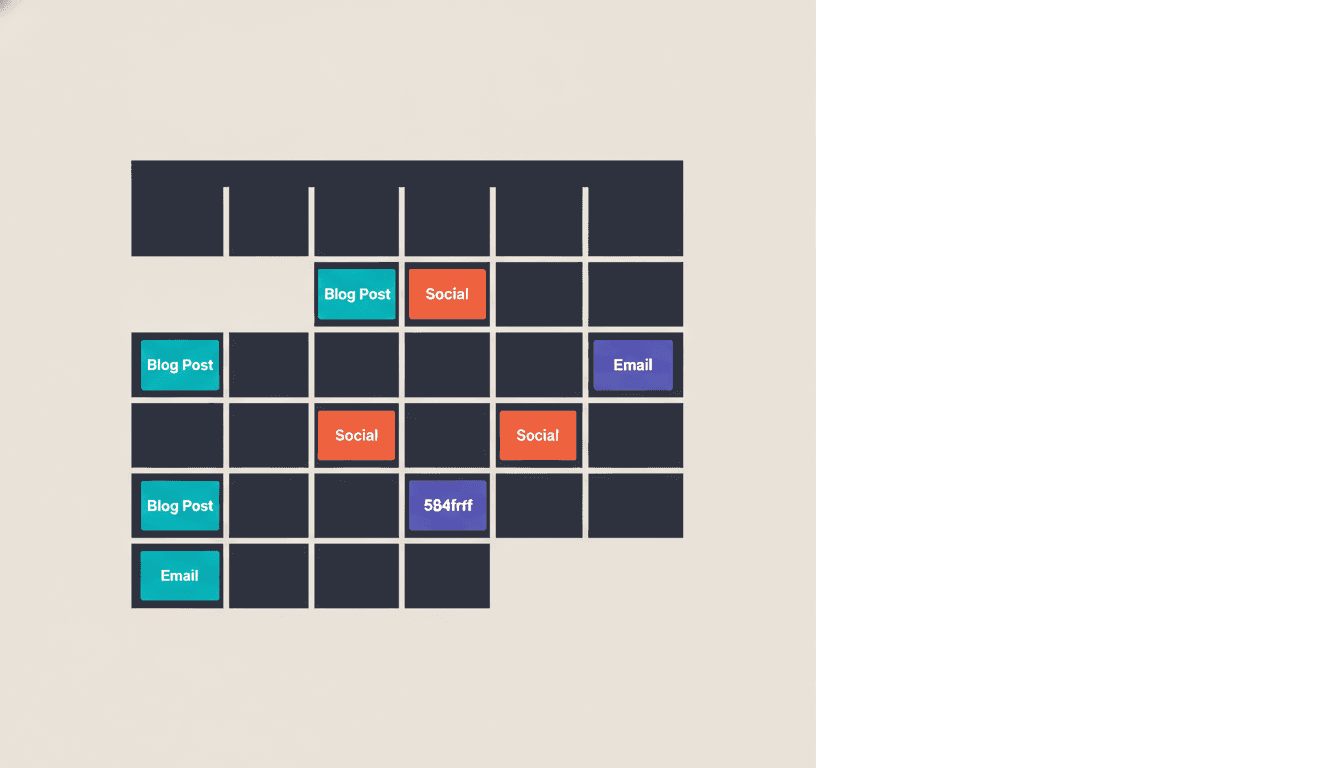
A content calendar is a planning system that maps out what content you will publish, when it goes live, and where it appears. It is the operational backbone of any content plan worth running, turning vague publishing intentions into a scheduled, accountable workflow that teams can actually execute.
If you have ever scrambled to ship a blog post on a Monday morning because nothing was queued, or published three articles on the same topic in two weeks while ignoring a pillar page that needed updating, you already know what a content calendar is supposed to prevent.
Why a Content Calendar Is Not Just an Organizer
A content calendar functions as a strategic alignment tool that connects your SEO priorities to actual publication timelines, prevents topic duplication, and creates accountability across teams. Beyond tracking dates, it bridges the gap between what you plan to publish and what actually ships on schedule, ensuring your content effort compounds toward ranking growth rather than scattering across disconnected initiatives.
Most definitions stop at "staying organized." That framing undersells the real value by a wide margin.
A content calendar solves three concrete business problems that have measurable costs. First, it eliminates decision fatigue. Without a schedule, every piece of content starts with a negotiation about topic, format, and channel. Research by McKinsey on workflow productivity consistently shows that teams spend more time on coordination overhead than on actual work when no shared plan exists. McKinsey research on workflow productivity demonstrates measurable efficiency gains from structured planning. A calendar pre-makes those decisions so writers write and editors edit.
Second, it enforces publishing consistency. A site that publishes four strong articles per month, every month, builds cumulative crawl equity faster than one that ships fifteen articles in January and goes quiet until April.
Third, it enables asynchronous approval. Stakeholders review content on their own schedule rather than holding up a live deadline. That single shift reduces publishing delays for distributed teams more than any tool upgrade.
Also read: The full SEO audit process for a complementary view on measuring content health alongside publishing cadence.
What Is a Content Calendar Used For?
Content calendars serve as the operational hub for publishing coordination, keyword mapping, and team alignment. They prevent duplicate content efforts, track publishing status across multiple channels, ensure consistent posting frequency, and create a shared source of truth for what content is planned, in progress, or live. For SEO teams specifically, they connect keyword research to publication dates and monitor content performance against publishing schedules.
Content calendars serve different functions depending on where they sit in the marketing operation. Here is a quick breakdown of the main use cases.
| Use Case | What It Tracks | Primary Benefit |
|---|---|---|
| SEO editorial planning | Keywords, publish dates, target URLs, internal links | Prevents duplicate topics, closes content gaps |
| Social media scheduling | Platform, post copy, asset status, publish time | Maintains channel consistency, batch-produces content |
| Product launch campaigns | Milestones, content assets, stakeholder sign-offs | Aligns marketing with product timelines |
| Seasonal campaigns | Holiday peaks, promotional windows, lead times | Avoids last-minute production crunches |
| Multi-channel content | Format, channel, repurposing status | Maximizes reach from a single content investment |
For SEO agencies and SaaS brands, the editorial use case is the most valuable. It connects keyword research directly to a publishing schedule, so every piece earns its slot by serving a documented search intent rather than a gut feeling.
What Is a Content Calendar in Marketing?
In a marketing context, a content calendar is the operational layer that sits between your content plan (the strategy) and your content itself (the output). The plan tells you what topics matter and why. The calendar tells you what ships next Tuesday.
This distinction matters because teams often confuse planning documents with calendars. A spreadsheet listing fifty target keywords is a plan. A calendar assigns those keywords to dates, formats, authors, and channels with deadlines attached.
According to HubSpot's 2024 State of Marketing report, brands that document their content strategy are 331% more likely to report content marketing success than those that do not. A content calendar is the documentation layer that makes strategy actionable.
What Goes Into a Content Calendar?
Effective content calendars track essential metadata: publish date, author, target keyword, content type, publishing channel, approval status, and performance metrics. These fields serve distinct purposes—keywords connect to SEO strategy, channel selection determines format, status tracking prevents bottlenecks, and author assignment ensures accountability. The specific fields you include depend on team size and workflow complexity, but each field should answer a operational question required for successful publication.
This is where most guides fall short. The fields you track are not cosmetic; each one serves a functional purpose. Here is a practical metadata checklist.
| Field | Purpose | Example |
|---|---|---|
| Publish date | Creates deadline accountability | 2026-09-15 |
| Author | Assigns ownership, enables E-E-A-T tracking | Priya Mehta |
| Content type | Shapes format decisions and repurposing routes | Long-form guide |
| Target keyword | Ties each piece to search demand | "content calendar template" |
| Channel | Routes distribution correctly | Blog + LinkedIn |
| Target audience segment | Aligns copy tone and CTA | SaaS marketing leads |
| Status | Enables async workflow management | In review |
| CTA | Ensures conversion intent is deliberate | Book a strategy call |
| Internal links planned | Prevents orphan pages, supports site architecture | /blog/keyword-research |
| Performance tag | Connects post-publish data back to the record | Q3 organic traffic |
You do not need every field on day one. Start with publish date, author, keyword, status, and channel. Add the rest as your workflow matures.
For content teams running more than eight pieces per month, tracking internal links planned in the calendar directly prevents the most common technical SEO audit finding: orphan pages with no internal equity flowing to them.
Types of Content Calendars
Content calendars come in four primary structures: editorial calendars (timeline-focused for blog and long-form content), social media calendars (channel and frequency-focused), product launch calendars (milestone-aligned), and integrated calendars (cross-channel synchronization). Each structure prioritizes different metadata and suits different team sizes. Editorial calendars work well for SEO-driven content teams, while integrated calendars scale better for organizations managing multiple content streams simultaneously.
Not all content calendars look the same, and choosing the wrong structure creates more friction than it removes. The four main types each suit a different operational reality.
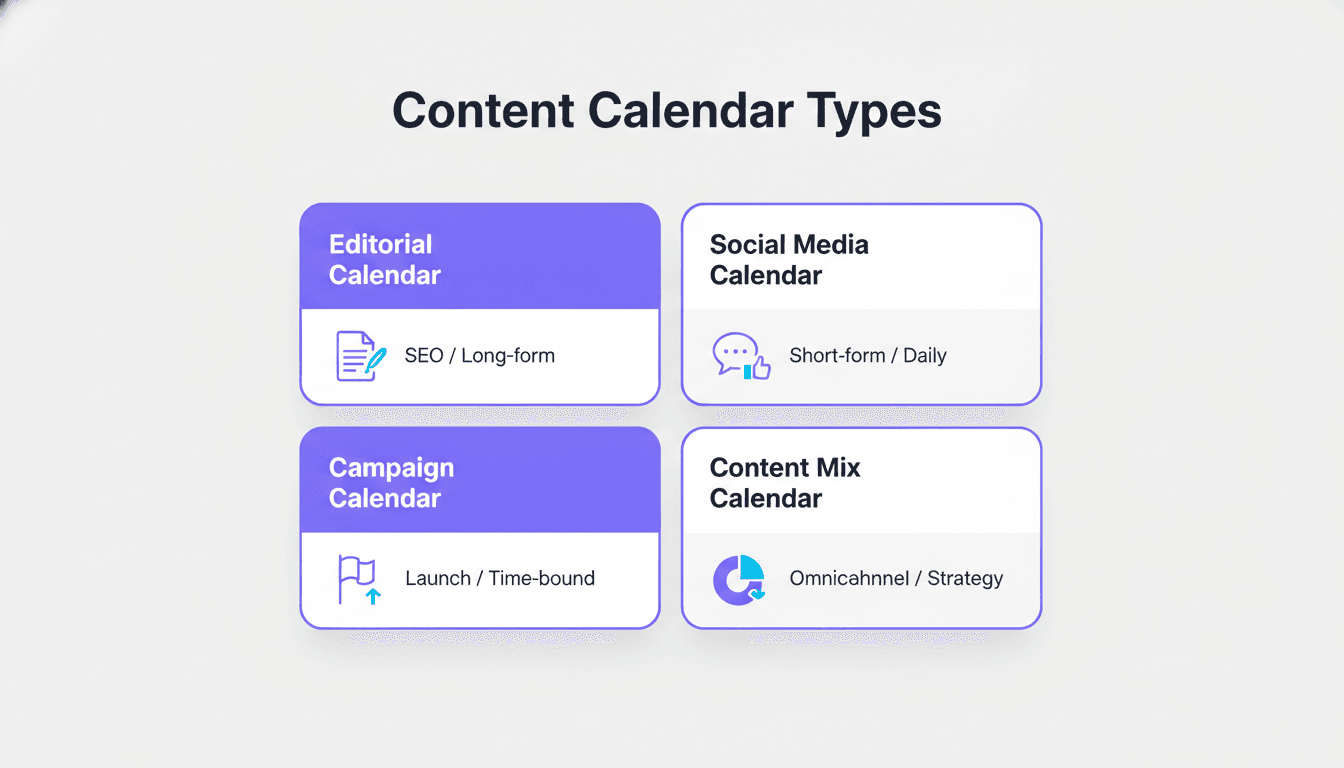
Editorial calendar covers long-form content tied to organic search: blog posts, pillar pages, case studies, whitepapers. Planning horizon is typically four to twelve weeks out. Best for SEO teams managing keyword-driven publishing.
Social media calendar tracks short-form posts, stories, and paid social by platform and publishing time. Planning horizon is one to four weeks. Best for brand managers handling multiple channels with high post frequency.
Campaign calendar maps content assets to a specific launch: product release, seasonal push, or event. Time-bound with a hard end date. Best for growth marketers coordinating cross-functional work.
Content mix calendar combines all channels into a single view, typically used by content directors who need to see how editorial, social, email, and paid assets relate to each other at a glance. More complex to maintain, but it surfaces channel imbalances that individual calendars miss.
For most SaaS and startup marketing teams, the best starting point is an editorial calendar that feeds a lightweight social scheduling layer, not a single monolithic document trying to do everything.
How to Create a Content Calendar in Five Steps
Building a content calendar begins with defining your core metadata fields, then mapping your keyword targets to publishing dates, assigning ownership, setting status tracking stages, and establishing a review cycle. The process does not require complex software—a structured spreadsheet works if it includes keyword assignments, publish dates, author responsibility, and approval checkpoints. Success depends on consistency and clear ownership rather than tool sophistication.
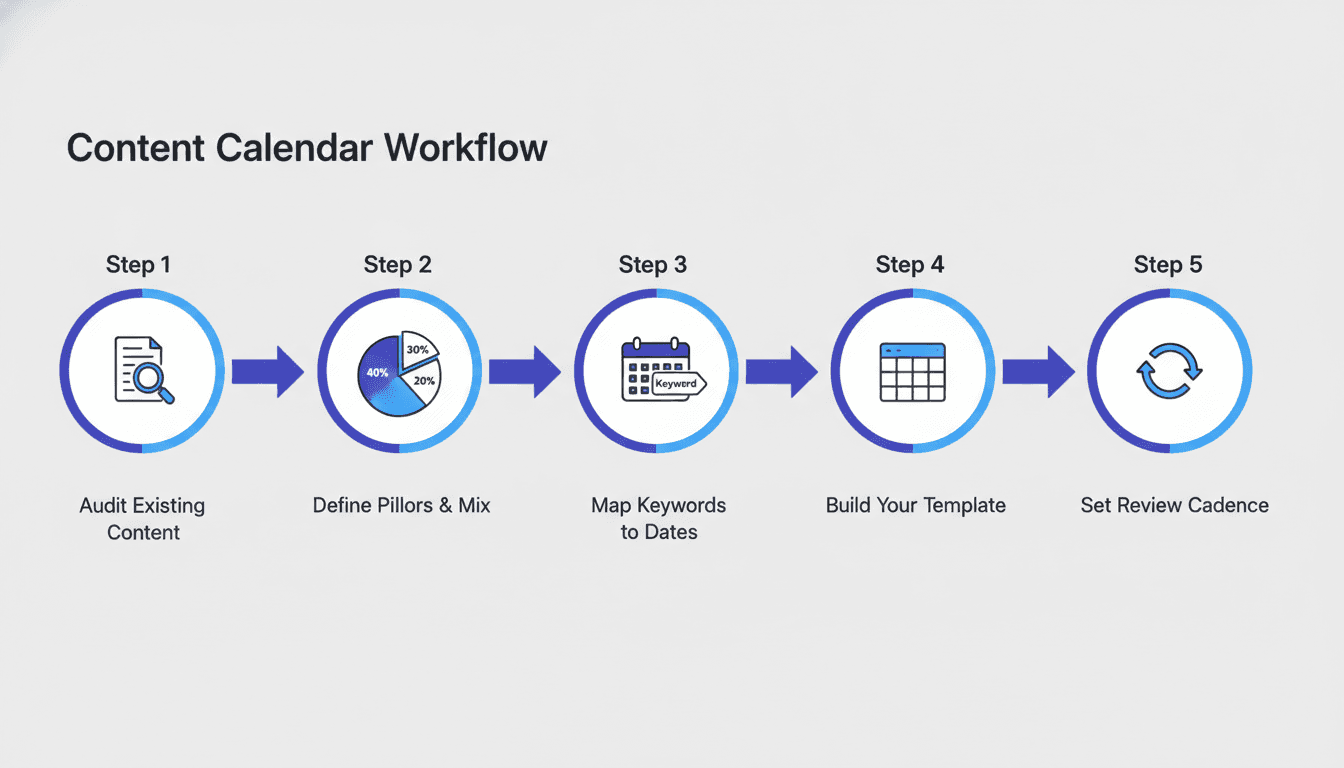
Building a content calendar from scratch does not need a complicated tool. It needs a clear sequence.
-
Audit your existing content. Before planning new content, know what you already have. Find gaps, flag thin pages, and identify what can be updated versus retired. AI-powered content audit tools cut this step from days to hours.
-
Define your content pillars and mix. Pillars are the core topic clusters your brand owns. A SaaS blog, for example, might allocate 40% educational how-to content, 30% product-focused content, 20% customer stories, and 10% thought leadership. Without these ratios, calendars drift toward whatever topic feels interesting that week.
-
Map keywords to dates. Take your keyword research output and assign each target keyword to a specific publish slot. Use keyword research data to prioritize by search volume, difficulty, and business value, not just what the team finds most comfortable to write.
-
Build your template with the core fields. Use a spreadsheet, Notion, Airtable, or a dedicated tool. Add publish date, author, keyword, content type, channel, and status at minimum. Keep the template lightweight enough that someone will actually fill it in.
-
Set a review cadence. A calendar nobody updates is a static document. Schedule a fifteen-minute weekly review to update statuses, flag blockers, and pull the next week's assignments into the active queue. Monthly, review performance data and adjust upcoming content based on what is and is not ranking.
Best Content Calendar Tools 2026
The best tool depends on team size and workflow depth. Google Sheets and Notion provide lightweight structure at zero cost for small teams. Airtable enables relational metadata and custom views for growing agencies. CoSchedule and Semrush Content Marketing Platform integrate SEO data directly into scheduling. The choice should minimize friction—if your team abandons the tool because it's too complex, the tool has failed regardless of its feature set.
The right tool depends on your team size and workflow complexity. Here is a focused comparison of what is actually worth using.
| Tool | Best For | Standout Feature | Pricing Tier |
|---|---|---|---|
| Airtable | Agencies and teams wanting flexible fields | Custom views, relational linking | Free to mid-tier |
| Notion | Solopreneurs and small teams | All-in-one docs + database | Free to mid-tier |
| CoSchedule | Marketing teams wanting automation | Headline analyzer, ReQueue | Mid to enterprise |
| ContentCal (Adobe) | Larger brand teams | Approval workflows, multi-channel | Enterprise |
| Google Sheets | Anyone starting from scratch | Zero cost, infinitely customizable | Free |
| Semrush Content Marketing Platform | SEO-first teams | Keyword integration, topic research | Mid to enterprise |
A common mistake is buying an enterprise tool before your workflow is stable. A Google Sheet with the right fields outperforms a complex tool used inconsistently. Get the fields right first, then migrate to a tool that automates the friction.
For teams evaluating broader SEO software for agencies, look for tools that let you attach content calendar data to keyword rank tracking so you can see a direct line between what you publish and what moves in search.
Content Scheduling Best Practices That Actually Hold
Effective content scheduling requires planning at least four to eight weeks ahead for SEO content to allow research, writing, review, and optimization cycles. Batch similar content types together to reduce context switching. Schedule posts consistently throughout the month rather than front-loading or bunching them. Lock in approval checkpoints before publish dates to prevent last-minute delays. Monitor actual publish frequency against planned frequency to catch workflow breakdowns early.
A few patterns consistently separate effective calendars from ones that become shelf-ware.
Plan further out than feels comfortable. Four weeks minimum for editorial content; eight weeks for anything involving video, design, or external contributors. A Content Marketing Institute 2024 B2B research finding shows that the majority of top-performing content teams plan at least one month in advance. Teams that plan week-to-week report higher rates of missed deadlines and inconsistent publishing.
Assign one owner per piece, not a team. Shared ownership is no ownership. The author is accountable for the draft; a separate editor owns the review; one person owns the publish action. That single rule eliminates most bottlenecks.
Build in a buffer slot each month. Reactive content, industry news, or a fast-moving search trend will appear. If every slot is filled, you either miss the opportunity or break the schedule to chase it. One open slot per four-week block keeps the calendar responsive without making it chaotic.
Feed performance data back into the next cycle. Look at organic traffic, engagement, and conversion data for content published sixty to ninety days ago. Which topics ranked faster than expected? Which formats drove more time on page? Let that data weight your next batch of topic selections. This feedback loop is what separates a calendar from a mere publishing schedule.
Content Workflow Management Inside the Calendar
Workflow management in content calendars defines the operational stages content moves through: research, drafting, internal review, optimization, approval, and publication. Each stage should have a defined owner, clear exit criteria, and a tracked duration to identify bottlenecks. As teams grow beyond three people, unmapped workflows cause delays and duplicated effort. A well-structured calendar makes workflow progress visible and prevents content from stalling in unclear approval stages.
Content workflow management is the operational layer most calendars ignore until the team grows past three people, at which point the absence of it causes real delays.
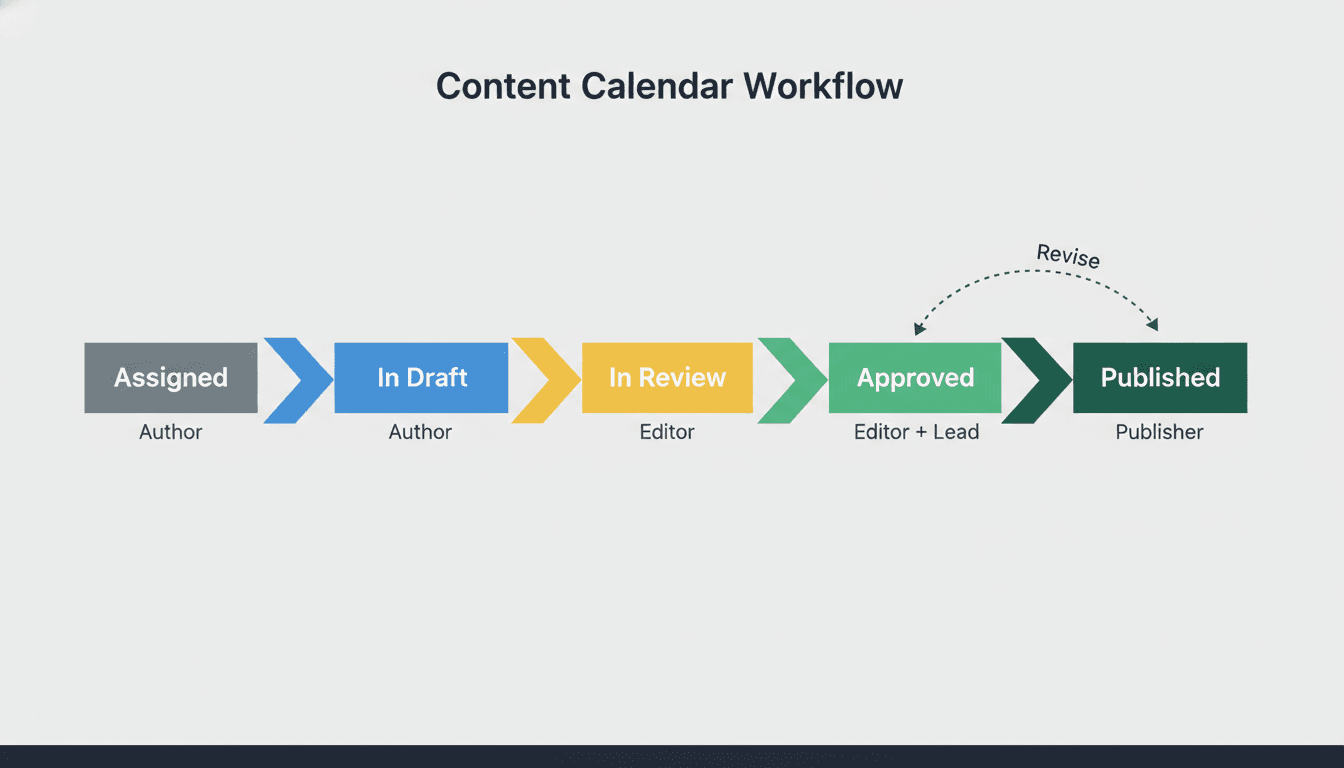
A functional workflow maps five states: Assigned, In Draft, In Review, Approved, Published. Each state transition has a named responsible party and a target timeline. When every piece of content moves through the same five states, a team lead can see at a glance where bottlenecks form without chasing anyone for a status update.
For larger teams, automated status notifications, available in tools like Airtable and CoSchedule, eliminate the check-in meeting entirely. One team member updates a status; the next person in the chain gets a notification. That is the full process.
The key insight most content teams discover late: workflow management is what makes a calendar worth maintaining. Without it, a calendar is just a wish list with dates attached.
Frequently asked questions
What is a content calendar?
A content calendar is a scheduling system that plans what content to publish, on which channel, and when. It typically tracks the topic, author, target keyword, format, and publication date for each piece. Teams use it to maintain publishing consistency, coordinate approvals, and align content output with broader marketing and SEO goals.
What is a content calendar used for?
A content calendar is used to plan, schedule, and manage the production of content across channels. It prevents duplicate topics, closes content gaps identified through keyword research, coordinates cross-functional teams, and ensures content publishes on a consistent cadence, which supports organic search growth and audience trust.
What is a content calendar in marketing?
In marketing, a content calendar is the operational link between a content strategy and actual content production. It turns strategic priorities like target keywords, audience segments, and campaign milestones into specific deadlines, assigned owners, and scheduled publish dates that a team can execute against.
What is a content calendar for social media?
A social media content calendar schedules posts across platforms like LinkedIn, Instagram, and X by tracking the copy, creative assets, posting time, and approval status for each post. It enables batch content creation, prevents channel inconsistency, and gives social teams a clear picture of what is going live without constant manual coordination.
How far in advance should you plan a content calendar?
For SEO-driven editorial content, plan at least four to eight weeks ahead to allow time for research, writing, review, and optimization. Social content can be planned two to four weeks out. Campaign content tied to product launches or seasonal moments needs eight to twelve weeks minimum, especially when design or video production is involved.
What content calendar tools are worth using in 2026?
For small teams, Google Sheets or Notion provide enough structure at no cost. Airtable suits agencies that need relational data and custom views. CoSchedule and the Semrush Content Marketing Platform add automation and keyword integration for mid-size teams. Choose based on workflow complexity first, not feature count.
What should a content calendar include?
At minimum: publish date, author, target keyword, content type, channel, and status. As your workflow matures, add fields for target audience segment, planned internal links, CTA, and a performance tag so you can connect post-publish data back to each piece. The fields you track define the quality of decisions you can make in your next planning cycle.
Key Takeaways
- A content calendar maps what to publish, where, and when; it is the operational layer between strategy and execution.
- The real ROI is not organization but reduced decision fatigue, consistent publishing cadence, and asynchronous approval workflows.
- Start with five fields: publish date, author, keyword, channel, and status. Add more as your team scales.
- Match calendar type to your use case: editorial for SEO, social for channel management, campaign for launches, and content mix for cross-channel visibility.
- Build content pillars with defined topic ratios before filling calendar slots, or the calendar will drift.
- Feed sixty- to ninety-day performance data back into each new planning cycle. That feedback loop is what separates a living calendar from a static spreadsheet.
- The best tool is the one your team actually updates. Start simple.
If you are ready to turn your content calendar into a search-visibility engine, Project Rankup's content strategy and audit services help SEO teams, SaaS brands, and agencies build and optimize publishing systems that compound over time.