A technical SEO audit is a structured review of your website's infrastructure to find anything preventing search engines from crawling, indexing, or ranking your pages. Done correctly, it surfaces the silent problems: crawl errors, duplicate content, slow page speeds, broken redirects, and missing schema markup. Fix the right issues in the right order and rankings move within weeks, often without touching a single piece of content.
Most site owners treat technical SEO as a one-time box to tick. The reality is that it is an ongoing discipline, and 2026 brings updated Core Web Vitals requirements, broader AI crawling behavior, and stricter mobile-first indexing that make a thorough technical check more valuable than ever. This checklist covers every category in the order you should actually work through them.
What Does a Technical SEO Audit Actually Cover?
A technical SEO audit examines five distinct layers of your website, each of which can independently suppress rankings. Thinking of it as "checking for broken links" misses roughly 80% of the work. The five layers are crawlability (can Google reach your pages), indexability (can it store them), rendering (can it understand the content), performance (does it load fast enough), and structure (is the site organized logically).
Here is a map of what each layer contains and where it most commonly fails:
| Layer | What You Are Checking | Common Failure |
|---|---|---|
| Crawlability | robots.txt, crawl errors, redirect chains | Blocked pages, infinite redirect loops |
| Indexability | noindex tags, canonical tags, duplicate content | Self-cancelling canonicals, accidental noindex |
| Rendering | JavaScript-dependent content, lazy-loaded text | Content invisible to Googlebot |
| Performance | Core Web Vitals, TTFB, page size | LCP over 4 seconds, high CLS from ads |
| Structure | URL patterns, site depth, internal links | Orphan pages, keyword cannibalization |
Starting with this map helps you prioritize. A rendering failure on your most important pages is a five-alarm fire. A missing alt tag on a footer logo is background noise. The biggest mistake in an audit is treating every finding as equally urgent and burning time on cosmetic fixes while crawl blockers sit unaddressed.
One thing competing checklists rarely say: not every technical issue needs fixing. Your job is to triage. Issues that affect indexable, revenue-generating pages come first. Issues confined to low-traffic archive pages or staging URLs can wait.
Start With a Site Crawl Before You Fix Anything
Before you change a single file, run a full crawl of your site. A crawl gives you a ground-truth snapshot: every URL, every status code, every redirect, every broken link, every missing meta description. Trying to audit without one is like diagnosing an engine without opening the hood.
Tools like Screaming Frog SEO Spider (free up to 500 URLs) and Sitebulb handle this well. For larger sites, connect the crawl output to Google Search Console for a fuller picture of how Googlebot actually experiences the site versus how your crawler does. Those two data sources do not always agree, and the differences are where the most interesting problems hide.
When reviewing the crawl report, work through these in order:
- 4xx errors - Pages returning 404 or 410 waste crawl budget and break internal link equity. Fix them by redirecting to the correct URL or removing internal links pointing to dead pages.
- Redirect chains and loops - Each hop in a redirect chain dilutes link equity. Chains of three or more hops should be collapsed to a single 301. Loops must be broken immediately; they can prevent indexing entirely.
- Duplicate page titles and meta descriptions - These are a symptom, not the disease. Duplicate titles usually point to URL parameter issues or template problems upstream.
- Missing or duplicate H1 tags - Every indexable page needs exactly one H1. Multiple H1s on a page send a structural confusion signal to crawlers.
- Pages blocked by robots.txt that should not be - A staging environment setting accidentally pushed to production blocks pages more often than most teams realize. Always verify at yourdomain.com/robots.txt after any deployment.
Pair your crawl data with Google Search Console's Coverage report. Pages in the "Excluded" or "Error" categories there are the ones Google is actively struggling with, and they take priority over anything your crawler surfaces independently.
Also Read: Explore the best SEO tools for crawl health and site performance
Core Web Vitals: The Metrics Google Uses to Score Page Experience
Core Web Vitals are Google's three primary measures of user experience, and since becoming a confirmed ranking factor, a poor score actively suppresses pages in search. As of March 2024, Google replaced First Input Delay (FID) with Interaction to Next Paint (INP) as the responsiveness metric, per the official Google announcement on web.dev. A 2026 technical SEO audit must use the new INP thresholds, not the old FID benchmarks.
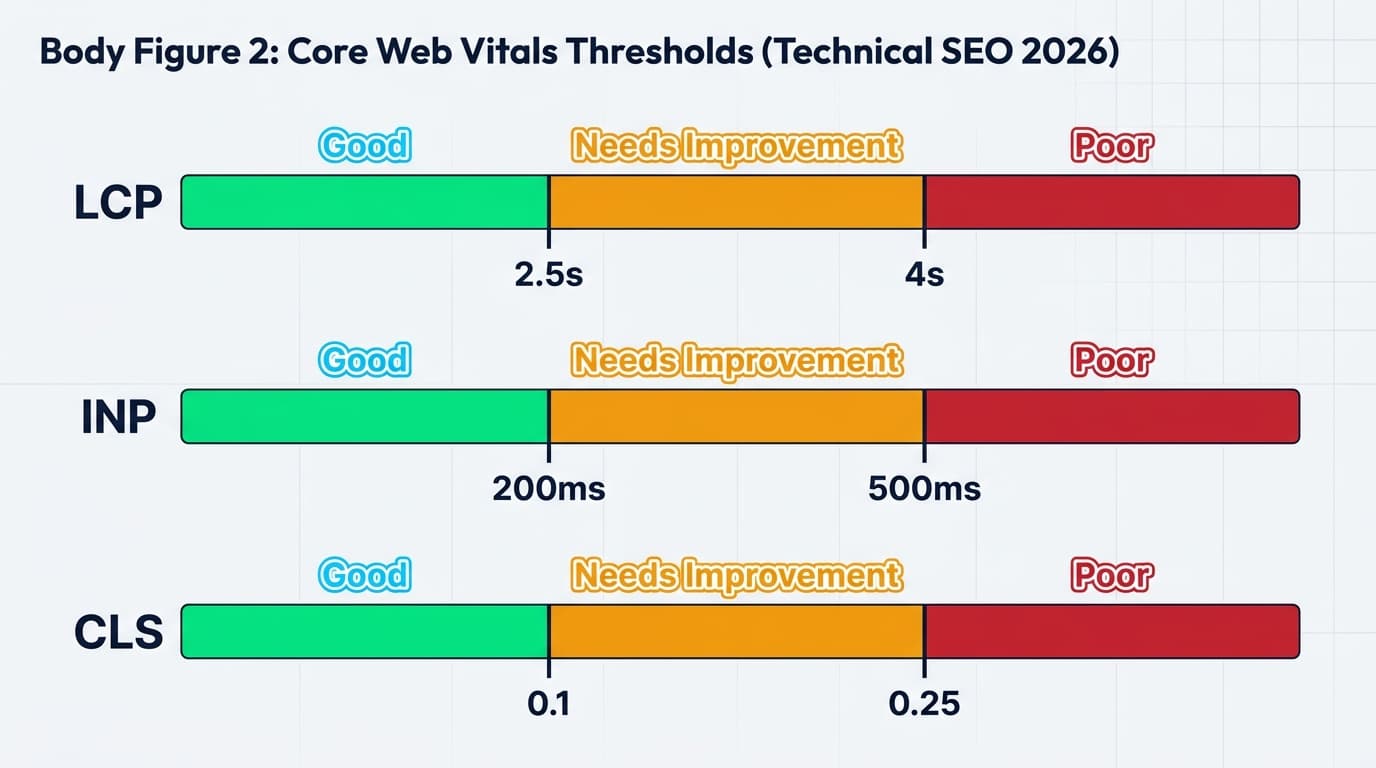
The three metrics and their pass thresholds are:
| Metric | Good | Needs Improvement | Poor |
|---|---|---|---|
| LCP (Largest Contentful Paint) | Under 2.5s | 2.5s to 4s | Over 4s |
| INP (Interaction to Next Paint) | Under 200ms | 200ms to 500ms | Over 500ms |
| CLS (Cumulative Layout Shift) | Under 0.1 | 0.1 to 0.25 | Over 0.25 |
According to the HTTP Archive Web Almanac 2024, 43% of websites had good Core Web Vitals on mobile in 2024, measured with INP. That means more than half of all sites have at least one failing metric right now. If yours is in that half, fixing it is more impactful than any amount of content work.
What actually causes poor scores:
- LCP problems usually come from a hero image that is not preloaded, a slow server TTFB, or render-blocking resources in the head. The fix starts server-side, not inside the image.
- INP problems come from JavaScript executing on the main thread during user interactions. Heavy third-party scripts (chat widgets, analytics bundles, ad tags) are the most common culprits on small business and freelancer portfolio sites.
- CLS problems almost always trace to images without explicit width and height attributes, late-loading ads that push content down, or web fonts causing layout shifts on load.
Before profiling anything, check PageSpeed Insights using your actual URL. It pulls real-world Chrome UX Report (CrUX) data for your specific page, which is what Google uses for ranking decisions, not just the simulated lab score. The gap between lab and field data is often where the real problem lives.
Crawl Budget and Indexability: Are Your Pages Actually Getting Indexed?
Crawl budget is the number of pages Googlebot will crawl on your site within a given timeframe. For a 10-page brochure site, crawl budget is irrelevant. For an e-commerce site with thousands of product pages, a blog with years of archives, or any site that generates URLs dynamically through filters or parameters, crawl budget directly determines which pages get indexed and how fast.
robots.txt tells Googlebot which sections to skip. The Google robots.txt documentation covers the syntax, but the audit task is simpler: verify that the file is not accidentally blocking important directories. Read it line by line at yourdomain.com/robots.txt. Disallowing your entire /blog/ folder because of a leftover staging rule is an error that can persist for months unnoticed.
XML sitemaps signal which URLs you want crawled. A clean sitemap contains only URLs that are canonicalized, indexable, and returning 200 status codes. Including redirects, noindex pages, or 404s in a sitemap confuses Googlebot and wastes the budget you want directed at real content. Per Google's sitemaps documentation, individual sitemap files support up to 50,000 URLs.
Noindex and canonical tags are the most commonly misconfigured elements in a technical audit. A noindex meta tag on a page that should rank is a catastrophic error that is easy to overlook, especially if your CMS applies tags conditionally based on category, tag, or pagination templates. Run a search in your crawl data for all pages carrying a noindex tag, then cross-reference against your most important URLs. Any revenue-generating page on that noindex list becomes your immediate first priority.
Canonical tags pointing to the wrong URL silently redirect ranking signals to a different page, sometimes for years before anyone investigates. Always check that each page's canonical tag points to itself, unless intentional consolidation is the goal.
Site Architecture, URLs, and Internal Linking
Site architecture is an area most beginners underestimate during a technical SEO audit. The depth at which a page sits from the homepage directly affects how much crawl budget reaches it and how much link equity it accumulates. Pages buried five clicks deep from the homepage receive far less crawl attention than pages two clicks away.
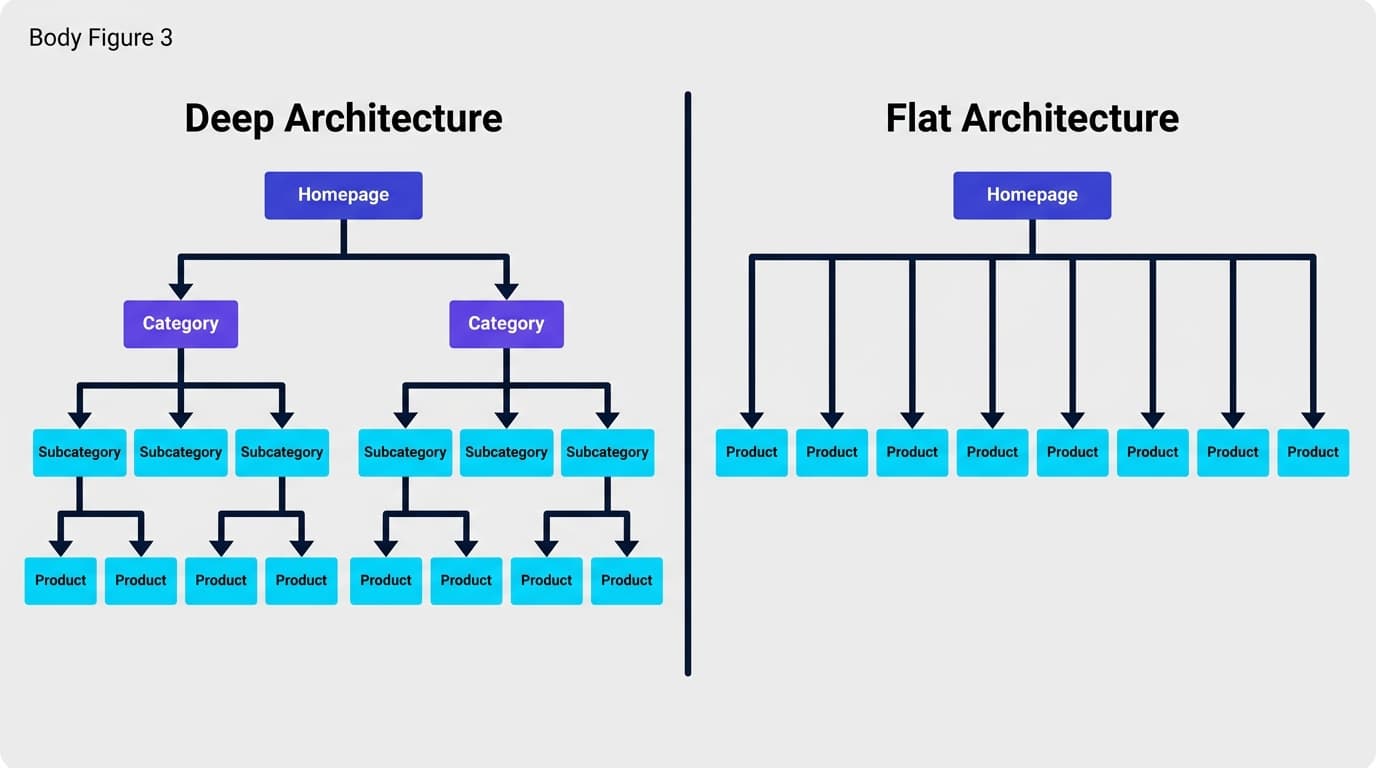
A flat architecture keeps every important page within three clicks of the homepage. That does not mean flattening everything into the root directory: it means your navigation and internal linking strategy creates short paths to your most valuable content. Pairing architecture decisions with AI-driven keyword research helps identify which pages deserve the shortest paths, based on actual search demand.
URL structure best practices for 2026:
- Keep URLs short, lowercase, and hyphen-separated. Avoid underscores, which search engines read as word-joiners rather than word-separators.
- Use one or two descriptive keywords in the slug. Stuffing five keywords into a URL path adds no benefit and makes sharing harder.
- Avoid serving indexed content through URL parameters like /products?id=123. Either rewrite to clean paths or apply aggressive canonical tags.
- Keep URLs stable. Changing a ranked URL breaks backlinks, triggers a re-crawl delay, and requires a redirect chain audit afterward.
Internal linking is both a crawl efficiency signal and a ranking distribution mechanism. Orphan pages (pages with zero internal links pointing to them) are effectively invisible to crawlers unless they appear in a sitemap. During your audit, identify orphan pages in your crawl tool and add at least two contextually relevant internal links to each one. Anchor text matters: descriptive anchor text tells Google what the destination page is about, while generic anchors like "click here" waste that signal entirely.
Structured Data and Schema Markup
Structured data is the machine-readable layer that tells search engines exactly what a page represents, not just what it contains. Implement it correctly and you become eligible for rich results in SERPs: star ratings, FAQ dropdowns, product prices, event dates. In 2026, clean structured data also improves your chances of being cited in Google AI Overviews and other AI-generated answer surfaces.
The HTTP Archive Web Almanac 2024 documents continued year-over-year growth in structured data adoption, with JSON-LD as the dominant format. Google's preference for JSON-LD, confirmed in their structured data documentation, is practical: it sits in the page head and requires no changes to the visible HTML body markup, making it easier to implement and maintain.
Schema types worth prioritizing by site type:
- Local service businesses: LocalBusiness, Service, Review
- Blogs and content publishers: Article, BreadcrumbList, FAQPage
- E-commerce: Product, Offer, Review, BreadcrumbList
- SaaS and software: SoftwareApplication, FAQPage, HowTo
Validate every implementation using Google's Rich Results Test and monitor the Enhancements section of Search Console for errors and warnings. An invalid schema does not break a page, but it forfeits rich result eligibility entirely. Getting structured data right is one of the highest-leverage technical fixes available, particularly for sites targeting informational queries. The guide to ranking in Google AI Overviews covers the content-side requirements that complement clean schema implementation.
How Often Should You Run a Technical SEO Audit?
Technical SEO is not a quarterly project. It is an ongoing monitoring discipline. The right frequency depends on how actively you publish and build:
- Small brochure sites (under 50 pages): Full audit twice a year, plus a quick crawl after any major site change such as a redesign, CMS migration, or hosting move.
- Active blogs and content sites (50 to 500 pages): Full audit quarterly, automated crawl monitoring monthly.
- E-commerce and large sites (500+ pages): Automated crawl monitoring weekly, full structured audit quarterly, with immediate checks after any platform update or code deployment.
The goal is catching regressions fast. A developer pushing a robots.txt change that accidentally blocks your entire site is not hypothetical: it happens regularly. Sites that only audit twice a year find those errors weeks later, after significant ranking damage has accumulated.
Project Rankup is built for this kind of continuous visibility. Instead of pulling reports reactively, you can track ranking movements in real time and see directly how technical changes correlate with position shifts. When you fix a crawl issue and rankings start moving, you want to see that connection clearly rather than guess. See what is included in each plan to match the right audit cadence to your site's growth stage.
Frequently asked questions
What is a technical SEO audit?
A technical SEO audit is a systematic review of a website's infrastructure to identify issues that prevent search engines from crawling, indexing, and ranking pages correctly. It covers crawl errors, page speed, canonical tags, structured data, site architecture, and mobile performance. Most sites have several fixable issues that, once resolved, produce measurable improvements in organic rankings.
How is a technical SEO audit different from an on-page SEO audit?
A technical SEO audit focuses on infrastructure: server responses, crawl access, page speed, structured data, and URL architecture. An on-page SEO audit focuses on content: keyword placement, title tags, headers, and internal anchor text. Both matter, but technical issues create a ceiling that on-page work cannot break through. Fix the technical foundation before optimizing content.
How long does a technical SEO audit take?
A basic technical SEO audit of a site under 100 pages takes two to four hours with the right tools. A thorough audit of a 1,000-page site, including crawl analysis, Core Web Vitals profiling, and schema validation, typically takes one to two full days. Enterprise sites with complex architectures may require a full week for a proper audit with documented and prioritized remediation steps.
What tools do I need for a technical SEO audit?
The minimum toolkit is Google Search Console (free) and a site crawler like Screaming Frog (free up to 500 URLs). Add PageSpeed Insights for Core Web Vitals data and Google's Rich Results Test for schema validation. For ongoing monitoring and rank tracking, Project Rankup connects technical fixes to actual ranking movements, which crawl reports alone cannot show.
Does fixing technical SEO issues guarantee a ranking improvement?
Fixing technical issues removes barriers to ranking; it does not automatically create one. A page blocked by robots.txt will re-enter the index after the block is removed, but its ranking still depends on content quality, backlinks, and relevance. That said, a site with unresolved crawl errors, failing Core Web Vitals, and broken canonical tags cannot rank to its potential regardless of how strong the content is.
How do Core Web Vitals fit into a technical SEO audit?
Core Web Vitals are a confirmed Google ranking factor and a required component of any complete technical SEO audit. The three metrics, LCP, INP, and CLS, measure load speed, responsiveness, and visual stability. According to the HTTP Archive Web Almanac 2024, close to half of all websites fail at least one metric on mobile. Check failing metrics through PageSpeed Insights and Search Console's Core Web Vitals report, then trace each failure to its root cause before applying fixes.
What is the first thing to check in a technical SEO audit?
Start with Google Search Console's Coverage report. It shows exactly which pages are indexed, which are excluded and why, and which have errors. This is the ground truth for how Google currently sees your site. From there, run a full site crawl to surface additional issues that Search Console does not always catch, like redirect chains and duplicate content patterns across URL variants.
Key Takeaways
- A technical SEO audit covers five layers: crawlability, indexability, rendering, performance, and structure. Each one can independently suppress rankings.
- Run a full site crawl before making any changes. Ground truth comes from data, not assumptions about what might be broken.
- Core Web Vitals (LCP, INP, CLS) are a confirmed ranking factor. Nearly half of websites fail at least one metric on mobile, per the Web Almanac 2024.
- Crawl budget matters for sites with hundreds or thousands of pages. Noindex and canonical misconfigurations are the most common and highest-impact culprits.
- Structured data in JSON-LD format enables rich results and improves eligibility for citations in Google AI Overviews.
- Technical audits are not one-time events. Small sites benefit from semi-annual audits; active content sites need quarterly checks plus ongoing crawl monitoring.
- Pair audit findings with rank tracking so you can see which fixes actually move the needle and prioritize the next round accordingly.
Ready to connect your technical audit findings to real ranking data? Get in touch with Project Rankup to see how continuous monitoring changes the audit workflow entirely.