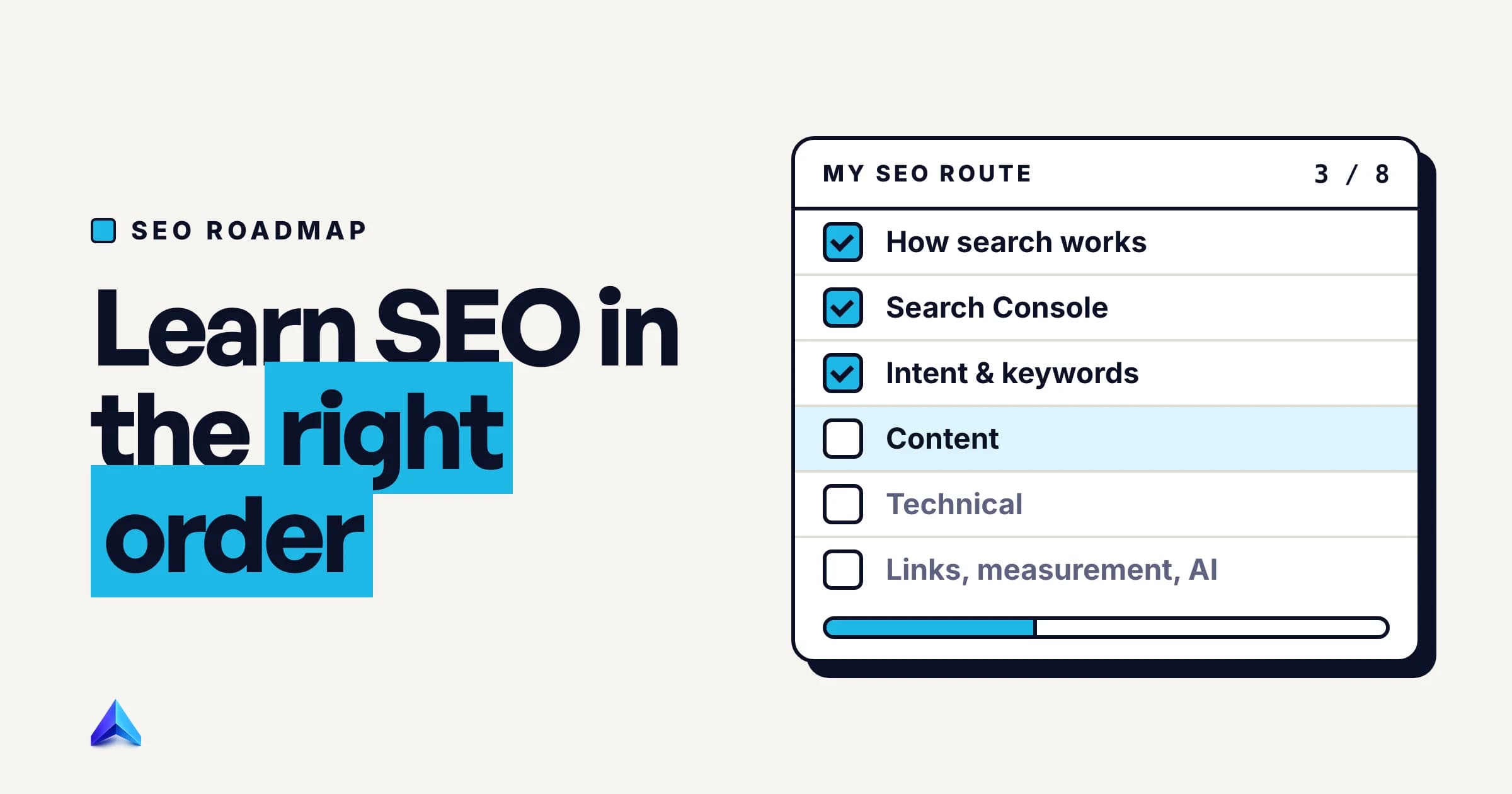
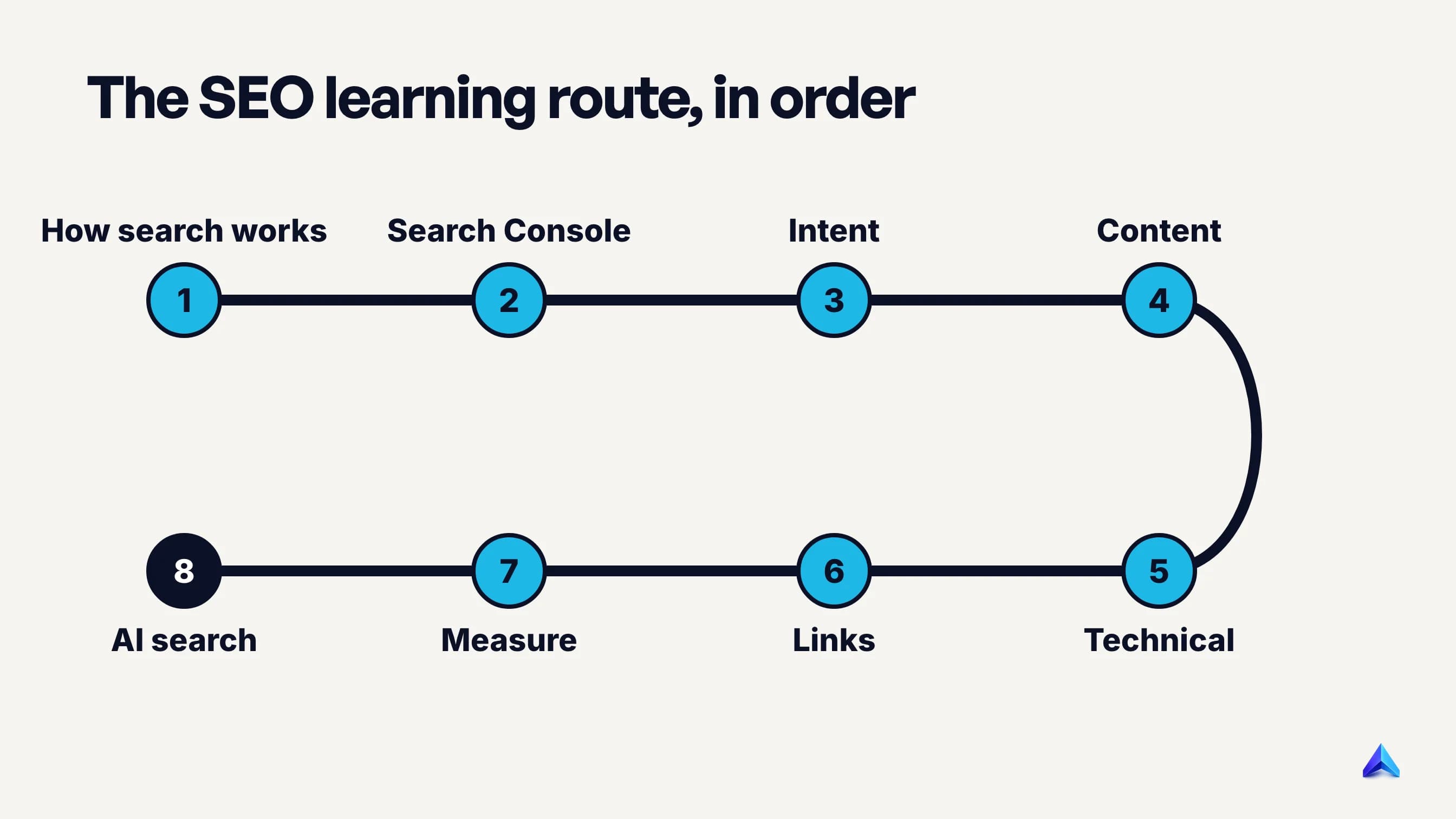
An SEO roadmap is the order you learn the craft in: how Google finds and indexes pages, Search Console, search intent, content, technical SEO, links, measurement, and finally AI search. The order matters because each stage is diagnosed with the one before it. How deep you go at each stage depends on three things: why you are learning, whether you have a site you can change, and how many hours a week you have.
Learning roadmap or project roadmap?
People search "SEO roadmap" for two different things. Some want a learning path: what to study, in what order, to become good at SEO. Others want a project roadmap: a sequenced plan of SEO work for one website, usually with owners and dates.
This page covers the first. If you already know the basics and need to decide what to work on for a specific site this quarter, our guide to building an SEO plan walks through those decisions. The two overlap at one point: the best way to learn SEO is to run a small project roadmap on a real site while you study.
Three questions that decide your route
The eight stages below are the same for everyone. What changes is how far you go into each one. Answer these three questions before you open a single guide.
1. What will you use SEO for? A shop owner in Pune needs enough SEO to get product and category pages found and to brief a freelancer sensibly. Someone applying for an SEO executive role in Manchester needs breadth across every stage and proof they can do the work. A developer needs technical depth. A content writer needs intent and content depth. Same map, different destinations.
2. Do you have a site you are allowed to change? This matters most. SEO is learned by changing something, waiting, and reading the result in Search Console. Without a site, you are memorising other people's conclusions. If you do not have one, build a small one before stage 2: a 10 to 20 page site on a topic you know, on WordPress, Shopify, Webflow or a static site generator, on its own domain (a .in, .co.uk or .com costs little).
3. How many hours a week can you give it? At three hours a week you should go deep on fewer stages and accept a slower loop. At ten hours you can run the whole route in a few months. Hours change the pace, not the order.
How to weigh them: question 2 overrides the others. A career switcher with ten hours a week and no site will learn more slowly than a shop owner with three hours and a live store, because the shop owner gets real feedback from Google every week.
The eight stages, in order
Each stage has what to learn, where to learn it, and a "done when" test. Pass the test on your own site, then move on. Skip a test and you usually end up coming back to it.
Stage 1: How Google finds, indexes and ranks pages
Start with the machine. Google's own explanation of how Search works says it works in three stages: crawling, indexing and serving results, and that not all pages make it through each stage. The same page notes that during the crawl Google renders the page and runs its JavaScript with a recent version of Chrome, which explains a whole class of problems on modern sites.
It also settles a question many beginners are sold an answer to: Google does not accept payment to crawl a site more often or rank it higher.
Done when: given a URL that does not appear in Google, you can say which of the three stages it most likely failed at and what you would check first.
Stage 2: Search Console, on a site you control
Put this second, before keywords, because every later stage is checked here. Google's Search Console getting-started guide gives four steps: verify ownership, make sure Google can find and read your pages, consider submitting a sitemap, and monitor performance. Do all four on your practice site in the first week.
Then learn to read two reports. The Page indexing report shows which URLs are indexed and why the rest are not; statuses like Crawled – currently not indexed confuse almost everyone at first, and our guide to fixing crawled but not indexed pages explains what that one means. The Performance report shows queries, pages, countries, impressions, clicks and average position.
Done when: you can name the ten queries that bring your site the most impressions, the page behind each, and the reason for one excluded status in the indexing report.
Stage 3: Search intent and keywords
A keyword is only useful once you know what the searcher expects to find. Search a query and look at the page types that rank: guides, product pages, category pages, tools, videos, forum threads. That pattern is the intent, and it decides what page you need far more than any keyword tool does.
Learn two numbers next. Search volume tells you demand. Keyword difficulty estimates how hard the top results are to displace, and it only means something when you compare it with your own site's authority. A brand-new site that targets a keyword with KD 70 is choosing to lose. Our keyword research guide covers the mechanics, and tools such as Project Rankup judge difficulty against your own domain so the comparison is done for you.
Done when: for ten queries in your niche, you can predict the type of page that ranks before you search, and be right at least eight times.
Stage 4: Content and on-page SEO
This is where most sites win or lose. Google's starter guide is unusually direct about it: creating content that people find compelling and useful will likely influence your site's presence in search results more than any other suggestion in the guide.
Learn to write a title that matches intent, a first paragraph that answers the query, headings that a skimmer can follow, and internal links that pass readers to the next useful page. Read Google's guidance on helpful, people-first content and use its self-assessment questions on your own pages. For the full process on a single article, see how to write a blog post for SEO.
Done when: you have rewritten one existing page on your site, logged the date, and compared its impressions and clicks four weeks before and after.
Stage 5: Technical SEO
We put technical SEO after content on purpose. Beginners who start here spend months on crawl budgets and schema for a site with twelve pages and no traffic, and the real problem was intent all along. Stage 2 already catches the technical faults that stop indexing. Stage 5 is about understanding them properly.
The core list: HTTP status codes (200, 301, 302, 404, 410, 5xx), redirects, robots.txt versus noindex, canonical tags, XML sitemaps, JavaScript rendering and Core Web Vitals. For the last one, learn the three thresholds from web.dev's Core Web Vitals guide: Largest Contentful Paint within 2.5 seconds, Interaction to Next Paint of 200 milliseconds or less, and Cumulative Layout Shift of 0.1 or less, each measured at the 75th percentile of page loads.
If you are a developer, swap stages 4 and 5. You will learn technical SEO faster than anyone, and you will understand content better once you have seen how pages are fetched and rendered.
Done when: you can audit a 50-page site and rank its problems by how much traffic each one is likely costing. A technical SEO audit checklist is a good scaffold for the first attempt.
Stage 6: Links and authority
Links help Google discover pages and judge their importance, but the starter guide puts them in proportion: Google has many ranking signals, and PageRank is just one of those. Learn what makes a link worth having (a relevant site, a real editorial reason, a page people read) and what does not.
Read the link spam section of Google's spam policies. It defines link spam as creating links primarily to manipulate rankings, and lists buying or selling links for ranking purposes as the first example. A "backlink package" that sells a number of links for a fee fits that definition exactly.
Done when: you can look at a site's backlinks and separate earned links from schemes, and you have earned one real link to your practice site with something worth citing, such as original data, a free tool or a useful local guide.
Stage 7: Measurement and reporting
Search Console tells you what happened in Google: impressions, clicks, click-through rate and position. An analytics tool such as GA4 tells you what visitors did after they arrived. You need both, and you need to know which question each one answers.
Learn to explain a traffic change. A drop can come from lost rankings, from the same rankings with fewer searches (seasonality), from a new feature on the results page taking clicks, or from a tracking fault. Google suggests checking Search Console around once a month, or after you change content, which is a sensible rhythm for a small site.
Done when: you can take a month-over-month drop on your site and say which of those four causes it is, with the report that proves it.
Stage 8: AI search
Learn this last: it is mostly the first seven stages applied to a new surface. Google's documentation on AI features and your website says there are no additional requirements to appear in AI Overviews or AI Mode, nor other special optimisations necessary. To be shown as a supporting link, a page must be indexed and eligible to appear in Search with a snippet.
What is new is the shape of answers: direct opening paragraphs, self-contained sections and clear sources get quoted more easily. Our comparison of AEO vs SEO covers where the two jobs overlap. Then read the crawler documentation for the AI assistants your audience actually uses, and check that your robots.txt treats each one the way you intend.
Done when: you can look at an AI Overview for a query in your niche and explain why each cited page was eligible and why yours was or was not.
How deep to go at each stage, by goal
The matrix below is our recommendation, not a standard. "Deep" means you could teach it. "Working" means you can do it on your own site. "Basics" means you can follow a conversation and brief someone else.
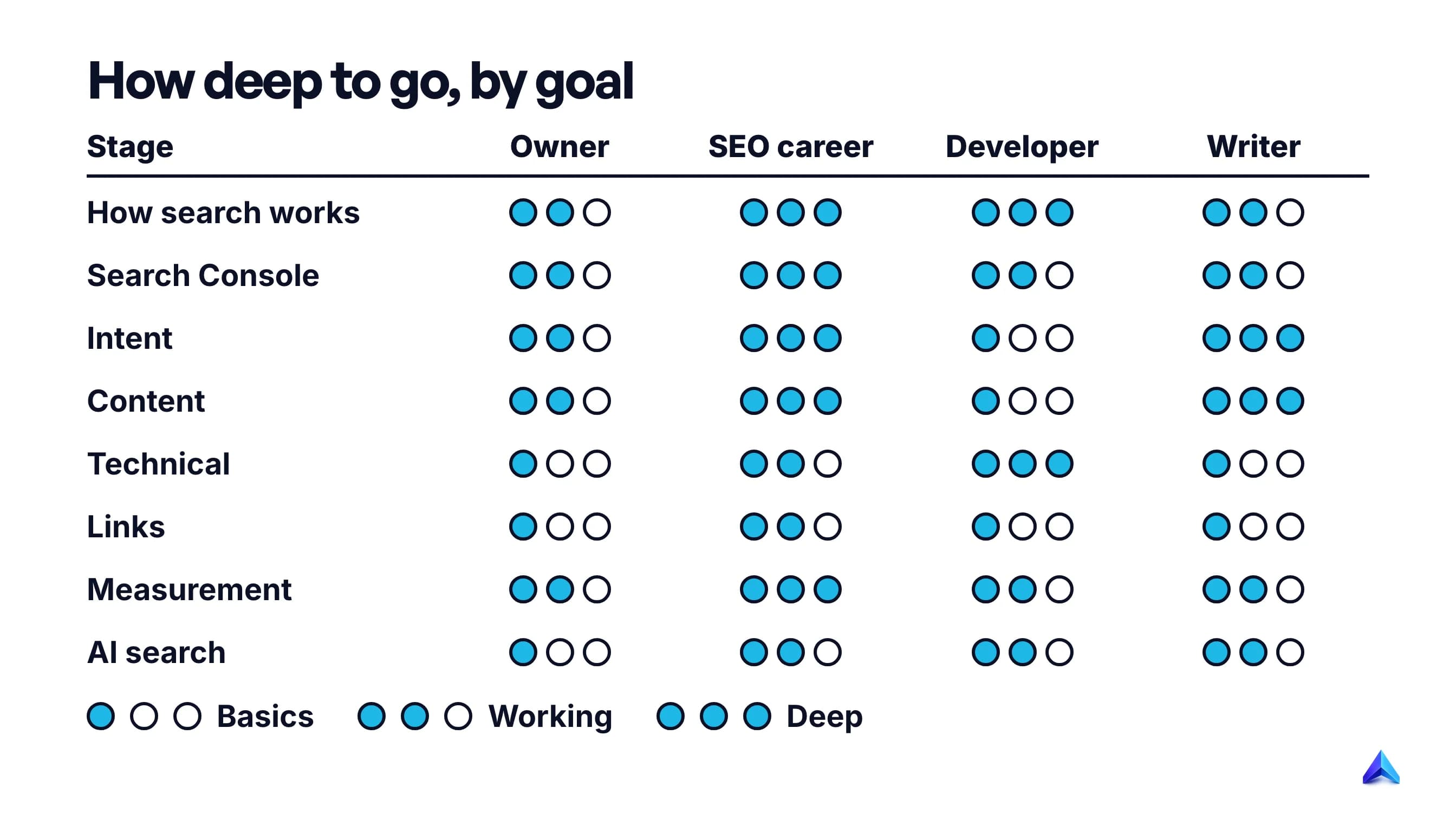
| Stage | Business owner | SEO career | Developer | Content writer |
|---|---|---|---|---|
| 1. How search works | Working | Deep | Deep | Working |
| 2. Search Console | Working | Deep | Working | Working |
| 3. Intent and keywords | Working | Deep | Basics | Deep |
| 4. Content | Working | Deep | Basics | Deep |
| 5. Technical | Basics | Working | Deep | Basics |
| 6. Links | Basics | Working | Basics | Basics |
| 7. Measurement | Working | Deep | Working | Working |
| 8. AI search | Basics | Working | Working | Working |
Three examples show how the table turns into a plan.
A founder selling block-print bedding from Jaipur on Shopify. Her store is the practice site, which is the biggest advantage anyone on this list has. She should spend her first month on stages 2 and 3: confirm every product and collection page is indexed, then find the searches her buyers use ("cotton double bedsheet", not "artisanal textile"). Stage 4 for her means collection pages that answer buying questions, not a blog. She can stop at basics on links and hire for technical work, because she now knows enough to judge the person she hires.
A copywriter in Leeds moving into an SEO executive role. Breadth matters here, because interviews test every stage. He should build a 15-page site on a subject he knows, run it through all eight stages, and keep a change log (see below). The log is the portfolio. A hiring manager learns more from "I rewrote six pages, here are the before and after numbers" than from any certificate.
A developer at a SaaS startup in Bengaluru, working in Next.js. She swaps stages 4 and 5 and goes deep on rendering, status codes, canonicals and Core Web Vitals, because a stray noindex in a shared layout can remove a whole section from Google. Her content stage can stay at basics, as long as she knows enough to stop a marketing teammate's page from being client-rendered behind a login.
What to skip or postpone
A lot of beginner time goes into things Google has said, in writing, do not matter. Google's SEO Starter Guide has a section of exactly these, and it opens with a line worth remembering: there are no secrets in it that will automatically rank your site first.
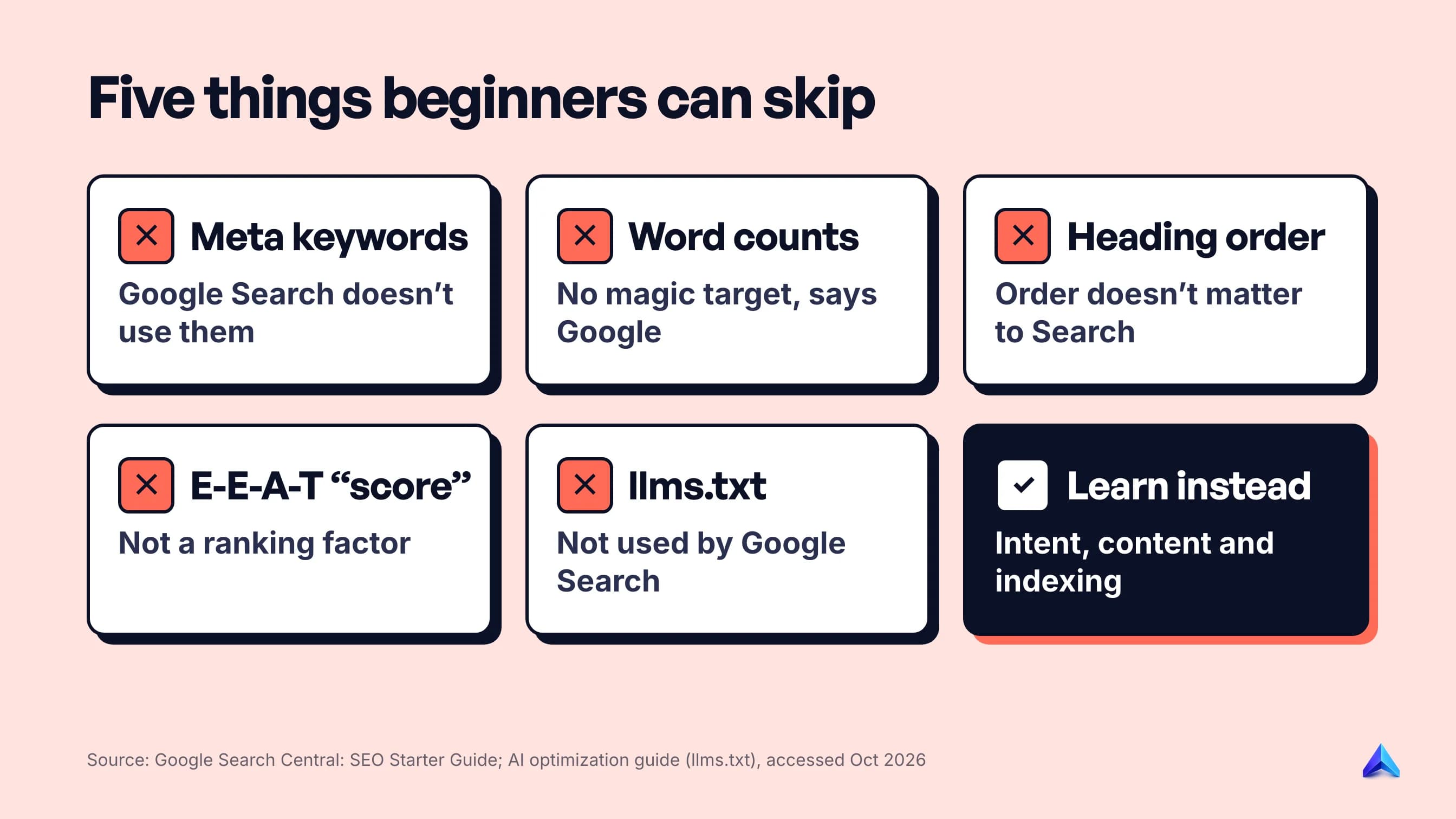
- The keywords meta tag. Google Search does not use it. If a course spends time on it, the course is old.
- Word-count targets. The guide says there is no magical word count, minimum or maximum. Google's helpful content page asks, as a warning sign, whether you are writing to a word count because you heard Google prefers one, and answers: "No, we don't."
- Heading-order rules. Semantic order is good for screen readers, but Google says it does not matter for Search if headings are out of order. Use headings for readers.
- E-E-A-T as a score to optimise. The starter guide lists "thinking E-E-A-T is a ranking factor" as a misconception. Learn what it describes, then show real experience and sources.
- Fear of a duplicate content penalty. Google calls duplicate URLs inefficient, not something that causes a manual action. Learn canonicals in stage 5 and move on.
- llms.txt as a ranking tactic. Google's guide to generative AI search says Google Search does not use llms.txt or other AI text files. Our explainer on what llms.txt is covers who reads it.
Postpone, rather than skip, daily algorithm news. Following every update before you understand stage 1 to 4 teaches you to react, not to diagnose.
How long the roadmap takes
There is no official answer, so treat this as our estimate. At about five hours a week, stages 1 and 2 take two to three weeks, stages 3 and 4 take two to three months together, stage 5 takes one to two months, and stages 6 to 8 take another two months to reach a working level. That is roughly six to eight months to be useful on any small site, and a year or more to go deep on two or three stages.
The slow part is not reading. It is waiting for Google. The starter guide says some changes take effect in a few hours and others take several months, and suggests waiting a few weeks before judging whether a change worked. So run stages in parallel once you have the basics: while a rewritten page from stage 4 is waiting for data, study stage 5.
Practise with a change log
The habit that turns reading into skill is a dated record of every change you make to your practice site and what happened next. A spreadsheet is enough:
| Date | URL | What changed | What I expect | Result after 4 weeks |
|---|---|---|---|---|
| 3 Nov | /guides/kashmir-in-winter | New title and first paragraph answering "is Kashmir worth visiting in winter" | More clicks for the question query | Impressions up, clicks flat; title still weak |
| 10 Nov | /tours/ | Removed noindex left from staging | Page indexed within 2 weeks | Indexed on 17 Nov |
The rows are an illustration, not real data. The column that matters is "what I expect". Writing a prediction before the result arrives shows you which of your mental models are wrong. Four weeks matches Google's advice to wait a few weeks before judging a change.
Free sources for each stage
You can learn every stage from free primary sources. Paid courses can add structure and feedback, but they should not be your source of truth.
| Stage | Start with |
|---|---|
| 1. How search works | Google Search Central: How Search works |
| 2. Search Console | Search Console getting-started guide and the Search Central YouTube channel |
| 3. Intent and keywords | The live search results for your own queries, plus a keyword tool's free tier |
| 4. Content | Google's SEO Starter Guide and its helpful content guidance |
| 5. Technical | Search Central docs on crawling and indexing; web.dev for performance |
| 6. Links | Google's spam policies, link spam section |
| 7. Measurement | Search Console Performance report help pages; GA4 documentation |
| 8. AI search | Google's AI features documentation; each AI company's crawler docs |
When a blog post and a Google document disagree about how Google works, trust the document until a test on your own site says otherwise.
Frequently asked questions
Can I learn SEO on my own?
Yes. Every stage of this roadmap can be learned from free Google documentation and a small site you control. What self-learners usually lack is feedback, so keep a dated change log and compare results in Search Console after a few weeks. That gives you the feedback loop a course or mentor would otherwise provide.
Is SEO hard to learn?
The basics are not hard: most people understand crawling, indexing, intent and titles within a few weeks. What takes longer is judgement, such as knowing which of twenty problems is costing traffic. That comes from running changes on a real site and seeing results, which is why the roadmap puts Search Console second.
Does SEO require coding?
No, but basic HTML helps at every stage. You should be able to read a page's source, find the title, canonical and robots meta tag, and spot content that only appears after JavaScript runs. Developers who move into SEO have an advantage in technical work, and can learn the content side later.
What is the 80/20 rule in SEO?
It is the idea that a small share of your pages and fixes produce most of the results. In practice, it means fixing indexing problems on your most important pages and improving the pages that already get impressions before writing anything new. Search Console's Performance report, sorted by impressions, shows you where that 20% is.
Is SEO still worth learning in 2026?
Yes. Google says there are no additional requirements to appear in AI Overviews or AI Mode, and a page must be indexed to be cited there at all. AI search changes the shape of good answers, but the skills that get a page crawled, indexed and chosen are the same ones this roadmap teaches.
Can I learn SEO from Google?
Largely, yes. Google Search Central publishes an SEO Starter Guide, documentation on crawling, indexing and AI features, and Search Console training videos, all free. Its docs say little about choosing keywords or earning links, so pair them with practice on your own site for stages 3 and 6.