llms.txt is a plain Markdown file at the root of a website (yoursite.com/llms.txt) that gives AI models and agents a short summary of the site and a hand-picked list of its most useful pages. Jeremy Howard proposed it in September 2024. It is optional, and Google Search does not use it. So far, the evidence says it helps AI agents read documentation far more than it helps a site get cited in AI answers.
Most guides stop at the first half of that paragraph. They explain the format, list seven reasons to add the file, and move on. This one also covers what happens after you publish it: who fetches the file, what Google has said about it, and what two large studies found when they went looking for an effect.
What is llms.txt, exactly?
Think of it as a table of contents written for a machine that is in a hurry. A language model answering a question about your product cannot read your whole website in one go. It has a limited context window, and HTML pages are full of navigation, scripts and cookie banners that waste it. llms.txt gives the model a shortcut: here is what this site is, and here are the pages worth reading.
The llms.txt specification is maintained in the open, and its second version says the file is meant to be used on demand, at inference time. In plain terms, an agent reads it while it is helping someone, for example when a coding assistant needs the right page of a library's documentation to get an API call right. That is a different job from training a model, and a very different job from ranking in a search engine.
The idea borrows its location from two files every website already has. robots.txt and sitemap.xml live at the root of a domain, so llms.txt does too. The similarity ends there, which is where a lot of the confusion comes from.
What goes inside an llms.txt file
The format is short, and only one line of it is required. Sections appear in this order:
- An H1 with the name of the site or project. This is the only required part.
- A blockquote with a one or two sentence summary.
- Optional paragraphs or lists with more detail, but no headings.
- H2 sections that list files. Each entry is a Markdown link, optionally followed by a colon and a note.
- An H2 called "Optional" for secondary links an agent can skip when it needs less context.

The spec adds two conventions that matter in practice. First, important pages can have a clean Markdown copy at the same URL with .md added, such as page.html.md, so an agent does not have to parse HTML. Second, a file does not have to sit at the root. One at /docs/llms.txt covers only the pages under /docs/, and when more than one file applies, agents should use the most specific one.
A worked example
Here is a complete file for a made-up invoicing product. It is short on purpose.
# Acme Invoicing

> Acme is invoicing software for freelancers and small agencies in the US, UK and India. It sends invoices, chases late payments and exports to accounting tools.

Acme supports USD, GBP and INR. The API is REST and uses API keys.

## Docs

- [Quick start](https://acme.example/docs/start.md): Create an account and send a first invoice
- [API reference](https://acme.example/docs/api.md): Endpoints, authentication and rate limits
- [Integrations](https://acme.example/docs/integrations.md): QuickBooks, Xero and Zoho Books

## Policies

- [Pricing](https://acme.example/pricing.md): Plans and what each includes
- [Security](https://acme.example/security.md): Data storage and compliance

## Optional

- [Changelog](https://acme.example/changelog.md): Release notes since 2024
A few choices are worth copying. The summary says who the product is for and where, so an agent can answer "does this work in India?" without opening anything else. Every link has a note, because a bare list of URLs tells a model nothing about which one to read. And the changelog sits under Optional, because an agent answering a pricing question does not need it.
Real files range from a few lines to hundreds of links. Stripe's llms.txt file opens with instructions aimed at coding agents, such as checking the package registry for the latest SDK version instead of guessing one, and then lists its documentation as .md links. That is the format working as intended: helping a tool that is already building something on your product find the right page.
llms.txt vs robots.txt vs sitemap.xml
All three live at the root of a domain. They do three different jobs, and only two of them affect Google.

| File | What it does | Read by Google Search? |
|---|---|---|
| robots.txt | Tells crawlers which URLs they may fetch | Yes |
| sitemap.xml | Lists the URLs you want discovered | Yes |
| llms.txt | Summarises the site and links key pages for AI models and agents | No, Google Search ignores it |
The practical consequence trips people up: llms.txt cannot block anything. It describes your site. It does not set rules. If you want to keep AI crawlers away from your content, robots.txt is still the tool.
OpenAI's crawler documentation is a good example of how specific those rules can be. It lists separate user agents with separate jobs. Disallowing GPTBot signals that your content should not be used to train its foundation models. OAI-SearchBot decides whether your pages can appear in ChatGPT search answers. ChatGPT-User covers visits a person triggers inside ChatGPT, and OpenAI notes that robots.txt rules may not apply to those. Each rule is independent, so a site can stay visible in ChatGPT search while opting out of training.
Who publishes llms.txt today
Adoption is real, but concentrated in technical corners of the web. The spec's own page points out that the AI labs publish llms.txt files for their developer docs, including OpenAI, Anthropic and Google's Gemini API, and that documentation platforms now generate one automatically. Plugins exist for content management systems such as Drupal.
The two largest measurements disagree on how common it is, mostly because they sampled different parts of the web:
- Ahrefs found an llms.txt file on 28% of the 137,210 domains in its web analytics product. Ahrefs itself calls that an upper bound, because its customers skew technical and SEO-aware.
- SE Ranking crawled close to 300,000 domains and found the file on 10.13% of them, spread fairly evenly across traffic levels.
Either way, most of the web does not have one, and the sites that do are disproportionately developer tools, SaaS companies and SEO-minded publishers.
Does llms.txt actually work?
That depends on what you want it to do. If the goal is appearing in Google, the answer is documented. If the goal is being cited by AI assistants, two large studies point the same way. If the goal is helping agents that already use your product, the answer is a cautious yes.
What Google says
Google's guide to optimizing for generative AI features in Search names llms.txt in a short list of things site owners can ignore. It says you do not need machine-readable files, AI text files or Markdown versions to appear in Google Search, including AI Overviews and AI Mode, because Google Search does not use them. It adds that keeping such a file for other services is fine and will neither help nor harm your rankings.
Google's people have been saying the same thing for a while. John Mueller has compared llms.txt to the keywords meta tag, the old tag search engines stopped trusting because site owners could write anything in it. The comparison is pointed: a file that only the site owner controls, describing the site in the site owner's words, is easy to game.
The signals are not perfectly tidy. In December 2025 an llms.txt file briefly appeared on Google's own Search Central documentation, apparently from an automated documentation update, and was removed within hours. And Google's Chrome team now checks for the file in Lighthouse, which we come to below. Neither changes what the Search team has written down.
What the server logs show
The most useful data on llms.txt comes from looking at who actually requests it. In June 2026, Ahrefs published an analysis of server logs from 137,000 domains. Of the domains that published a file, 97% received no requests to it at all in May 2026. Nothing fetched them.
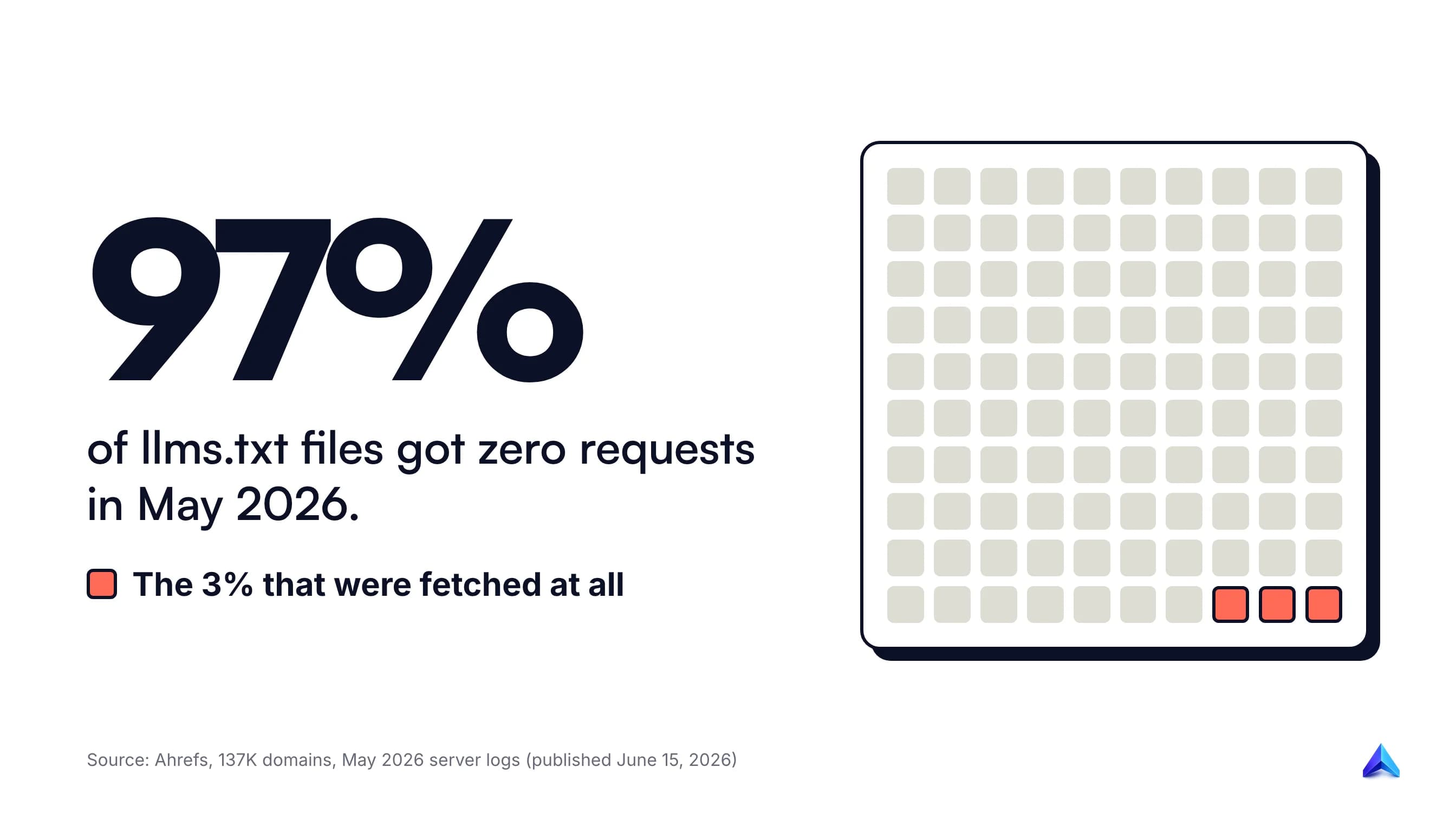
The remaining 3%, roughly 1,100 domains, received all the llms.txt traffic Ahrefs measured. Bots made 96% of those requests, and people made the other 4%.
Who actually fetches the file
The more revealing part is the list of who those bots were.
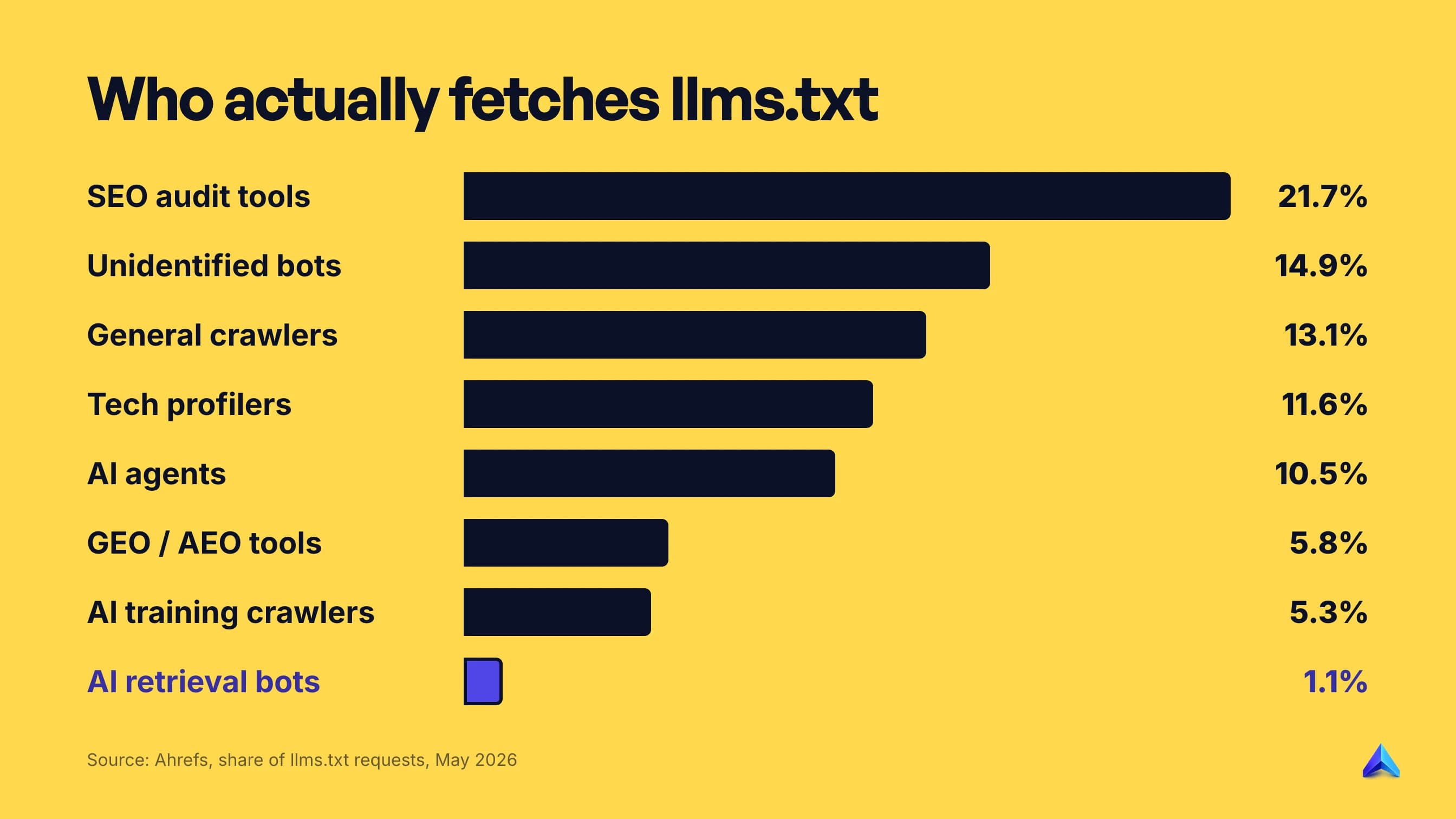
SEO audit tools made the largest share of requests, at 21.7%. In other words, the most common visitor to an llms.txt file is a tool checking whether the file exists. Tools that study the standard itself, such as GEO and AEO tools, research bots and llms.txt directories, made about 12% between them.
The AI numbers are where expectations and reality part ways:
- AI retrieval bots made 1.1% of requests. These are the bots that fetch pages to answer a question in real time, which is the use most people have in mind.
- AI search bots barely showed up. OAI-SearchBot, PerplexityBot and Claude's search crawler made only a couple of hundred fetches between them across thousands of sites. Slackbot, which builds link previews in chat, fetched llms.txt files more often than PerplexityBot did.
- GPTBot was the largest named AI fetcher, at 4.51% of requests. GPTBot is OpenAI's training crawler, not its search bot.
- A coding agent ranked near the top. Claude-Code fetched more often than every AI retrieval bot, assistant and training crawler apart from GPTBot and one other indexer.
- No AI bot asked for a file that did not exist. Requests for missing llms.txt files came almost entirely from people. AI bots did not go looking.
That last finding is the cleanest test of demand. If AI systems relied on llms.txt, they would request it everywhere and get errors on sites without one. They do not.
Ahrefs is open about the limits of its data. Its customers are more technical than the web as a whole, it measured only the root file, it did not check whether files followed the spec, and a fetch does not prove the bot used anything it read. The author's own verdict is blunt: "the cons outweigh the pros right now."
What the citation data shows
SE Ranking asked a different question: do sites with llms.txt get cited more often by AI models? Its study of close to 300,000 domains used both statistical tests and an XGBoost model to measure which factors predicted how often a domain was cited.
Neither method found a link. Removing the llms.txt variable from the model made its predictions more accurate, which suggests the file added noise rather than signal. SE Ranking's conclusion is careful: the file does not seem to affect citation frequency, at least not yet.
Where llms.txt does get used
The file is not useless. It is used by a narrower group than the marketing around it suggests.
Coding agents are the clearest case. When a developer asks an assistant to integrate a payment API, the assistant benefits from a clean list of current documentation pages, and the AI labs publishing files for their own developer docs is a strong hint about who they expect to read them.
Google's Chrome team has also built the file into tooling. Lighthouse added an llms.txt audit under a separate agentic browsing category, not under SEO. The audit only flags a server error when the file is requested. A missing file, a 404, is marked as not applicable, because the file is optional. The documentation describes the purpose as saving agents time they would otherwise spend crawling a site to understand its structure.
So the honest summary is this. llms.txt helps an agent that has already decided to read your site. It does not make an assistant more likely to choose you.
The risks most guides skip
Adding the file is cheap, but it is not free of downsides.
It goes stale. An llms.txt file is a second list of your important pages, maintained by hand unless your platform generates it. When pages move or get retired, the file keeps pointing at them. A list of dead links is worse for an agent than no list at all.
It is an instruction surface. Stripe's file shows that site owners already use llms.txt to give agents direct instructions. That is useful on your own docs, and it is also exactly why Ahrefs recommends treating the file like code. Anything an agent reads and acts on can be abused, so the file should go through the same review as other content that ships to production, and only trusted people should be able to change it.
It can become a distraction. The bigger risk is opportunity cost. Teams that spend a sprint perfecting llms.txt files, Markdown mirrors and "AI-ready" variants are usually not spending it on the content and technical work that does affect AI visibility.
Should you add an llms.txt file?
It takes little time to publish, so the real question is what to expect from it.
| Your site | Add llms.txt? | What to expect |
|---|---|---|
| Developer docs, an API or an SDK | Yes | Coding agents can find the right page faster |
| SaaS product with help docs | Yes, link the docs | Same, for support and integration questions |
| Blog, publisher or content site | Optional | No measured effect on AI citations so far |
| Local business or brochure site | Low priority | Fix crawling, content and reviews first |
Ahrefs suggests a simple first step that most guides leave out: check your own server logs. If you already publish a file, filter the logs for requests to /llms.txt and look at the user agents. If nothing has fetched it in months, you have your answer for your site, whatever the industry average says.
We publish our own llms.txt because it takes minutes to maintain and describes the product accurately for any agent that reads it. We do not count it as part of our AI visibility work.
How to create an llms.txt file
- Write the H1 and the summary. Use your real site or product name, then one or two plain sentences on what it is, who it is for and where it is available.
- Pick 10 to 30 pages that answer real questions. Docs, pricing, key guides and policies. Skip tag pages, paginated archives and thin pages.
- Group them under H2 headings such as Docs, Guides or Policies, and add a short note after each link.
- Put nice-to-have links under "## Optional". Changelogs, long reference pages and archives belong here.
- Upload it to your root so it loads at
https://yourdomain.com/llms.txtas plain text. - Give it an owner. Add the file to whatever process already updates your sitemap or navigation, so it changes when pages change.
If your documentation platform or CMS can generate the file for you, use that. Ahrefs makes the same recommendation, and an automatic file is far less likely to drift out of date.
How to check your file
Open the URL in a browser and confirm it returns your text with a 200 status, not a redirect, a login page or a styled 404. Then run Lighthouse in Chrome DevTools and look at the agentic browsing audits. Finally, check your server logs after a few weeks to see whether anything requests it.
If you already run a technical SEO audit on a schedule, add llms.txt to the same checklist so broken links in it get caught along with everything else.
Common mistakes
- Listing every URL on the site. That is what a sitemap is for. llms.txt is useful because it is curated.
- Links with no notes. A note after each link is what lets a model pick the right page.
- Serving HTML instead of text. Some platforms return the site's 404 template or a redirect to the homepage at
/llms.txt. Check the raw response. - Expecting it to block AI crawlers. It cannot. Use robots.txt.
- Writing marketing copy. The summary is read by a model looking for facts. "The world's leading platform" tells it nothing.
What to do instead if you want AI citations
Google's guidance for AI features comes back to the basics of search: content that adds something beyond common knowledge, a clear technical structure, and pages Google can crawl and index. For measurement, it points to the generative AI performance report in Search Console rather than third-party "AI scores", and it warns that no outside tool has access to Google's internal ranking systems.
In practice, that means:
- Answer the question in the opening lines. Our guide on optimizing content for ChatGPT answers walks through how to structure an answer that can be lifted cleanly.
- Say something the other results do not. Information gain explains why repeating what already ranks gives an AI system no reason to cite you.
- Make sure the page is indexed at all. A page stuck as crawled but not indexed cannot appear in AI Overviews either.
- Treat AEO and SEO as one job. The AEO vs SEO breakdown covers where the two overlap and where they differ.
- Check what Google already shows. Ranking in Google AI Overviews starts with the pages and sources Google already trusts for your topic.
None of that lives in a text file at the root of your domain.
Frequently asked questions
Is llms.txt mandatory?
No. It is an open proposal, not a web standard, and no search engine requires it. Google's Lighthouse audit even marks a missing file as "not applicable" rather than as a failure.
Does Google use llms.txt?
Not for Search. Google's AI optimization guide says Google Search does not use llms.txt or similar AI text files, and that keeping one neither helps nor harms your rankings. Google's Lighthouse tool does check the file, but under agentic browsing rather than SEO.
Do llms.txt files actually work?
They work as a reading aid for AI agents that choose to fetch them, mostly coding and developer tools. Ahrefs found that 97% of files received no requests in May 2026, and SE Ranking found no link between having the file and being cited by AI models.
How do I check if a website has an llms.txt file?
Add /llms.txt to the domain in your browser, for example https://example.com/llms.txt. If the file exists, you will see plain Markdown text. A 404 or a redirect to the homepage means the site does not publish one.
Can llms.txt stop AI companies from using my content?
No. llms.txt only describes your site. To control AI crawlers, use robots.txt rules for their user agents, such as GPTBot for OpenAI's model training and OAI-SearchBot for ChatGPT search.
Does adding llms.txt hurt SEO?
No. Google says Search ignores the file, so it has no effect on rankings either way. The only real risk is maintenance: an outdated file can send agents to pages that no longer exist.
What is the difference between llms.txt and a sitemap?
A sitemap lists every URL you want search engines to discover, in XML, and Google uses it. llms.txt is a short, curated Markdown list of your most useful pages with a summary, written for AI models and agents, and Google Search ignores it.