HTTPS SEO covers three separate effects, and only one of them is a ranking signal. Google confirmed HTTPS as a "very lightweight" ranking signal in 2014. The bigger effects sit elsewhere: Google prefers HTTPS URLs when it picks which version of a page to index, and Chrome warns visitors away from plain HTTP. Most of the SEO risk of HTTPS comes from a botched setup, not from missing the ranking boost.
Most HTTPS SEO advice repeats the 2014 announcement and stops. This guide separates what Google rewards from what protects your traffic, and covers the setup mistakes that quietly undo a migration.
HTTPS and SEO: three different jobs
People use "HTTPS SEO" to mean three things that work through different systems. Mixing them up leads to bad priorities, such as buying an expensive certificate for a ranking boost that does not exist, while an HTTP canonical sits unnoticed in the sitemap.
| What HTTPS affects | Type of effect | How much it matters | Evidence |
|---|---|---|---|
| Rankings | Ranking signal | Very small | Google, 2014 and 2023 |
| Which URL Google indexes | Canonicalization | Large if set up badly | Google's canonical docs |
| Whether visitors stay | Trust and user experience | Large for HTTP-only sites | Chrome's warnings |
| Referral data for sites you link to | Analytics side effect | Minor | Browser referrer rules |
Only the first row is a ranking factor in the strict sense. The second decides whether the right URL is indexed at all, and the third decides whether a click becomes a visit.
Is HTTPS a ranking factor?
Yes, but a tiny one, and Google has never described it as anything else. The more useful question is how Google talks about it now, because its wording changed in 2023.
What Google said in 2014
On August 7, 2014, Google's Zineb Ait Bahajji and Gary Illyes announced that Google had tested secure connections as a signal and was starting to use HTTPS as a ranking signal. They called it "only a very lightweight signal", affecting fewer than 1% of global queries and carrying less weight than signals such as high-quality content. They also said Google might strengthen it over time to push site owners to switch.
Read "less weight than high-quality content" as an instruction about priorities. An HTTPS page with a thin answer still loses to an HTTP page with a better one.
The post also listed setup tips. Most still hold: use 2048-bit key certificates, do not block the HTTPS site in robots.txt, and avoid noindex on HTTPS pages. One has aged badly. It suggested protocol-relative URLs (//cdn.example.com/script.js) for resources on other domains. Today the cleaner choice is a plain https:// address, which is what MDN's mixed content guide recommends for third-party resources.
What changed in 2023
As late as September 2022, Google described page experience as Core Web Vitals plus signals for mobile friendliness, intrusive interstitials and HTTPS.
Then, on April 19, 2023, Google rewrote its page experience guidance and answered the question directly in an FAQ. Asked whether Core Web Vitals, mobile-friendliness, HTTPS and interstitials were still used in rankings, it said: "While not all of these may be directly used to inform ranking, we do find that all of these aspects of page experience align with success in search ranking, and are worth attention."
The same FAQ says there is "no single signal" for page experience, and that the 2021 page experience update "was not a separate ranking system". It describes HTTPS as one of the signals Google's core ranking systems were already considering before 2021.
So the precise reading is this. Google has not said HTTPS stopped being a ranking signal, and it has not said HTTPS still is one in the 2014 sense. Its current page experience page, updated in September 2026, still asks: "Are your pages served in a secure fashion?" Anyone who tells you HTTPS was "removed as a ranking factor" in 2023 is overreading the change. Anyone who sells HTTPS as a ranking lever is overreading the 2014 post.
Does HTTPS still give an edge when almost everyone has it?
This is the strongest argument against caring about HTTPS for SEO, and it is mostly right. A signal that nearly every competing page already has cannot separate those pages.
Chrome's own numbers show how saturated the web is. In an October 2025 post, Chrome's security team said HTTPS navigations climbed from around 30 to 45% in 2015 to the 95 to 99% range around 2020, then plateaued. Counting public sites only, it put Windows at 98% HTTPS, Linux at nearly 97%, and Android and Mac above 99%.
If your US, UK or Indian competitors already run HTTPS, switching gives you parity, not an advantage. Nobody should expect a ranking jump from installing a certificate in 2026.
The argument falls short in one place: it treats HTTPS as an upside you might gain, when it is really a floor you can fall through. Picture the sites still on plain HTTP: a family-run hotel in Shimla, a plumber in Leeds, an accountant whose site was built in 2012 and never touched since. For them the cost of staying on HTTP is not a missed signal. It is the canonical and browser problems below, and those cost far more than a lightweight signal could ever return.
Our position, then: treat HTTPS as hygiene. Get it right once, check it regularly, and spend your ranking effort on content and links. The on-page vs off-page SEO breakdown is a better guide to where ranking effort pays.
How HTTPS decides which URL Google indexes
If your page loads at both http://example.co.uk/menu and https://example.co.uk/menu, Google sees two URLs with the same content and picks one as the canonical. That is the version shown in search results. Google's guide to consolidating duplicate URLs states the default plainly: "Google prefers HTTPS pages over equivalent HTTP pages as canonical."
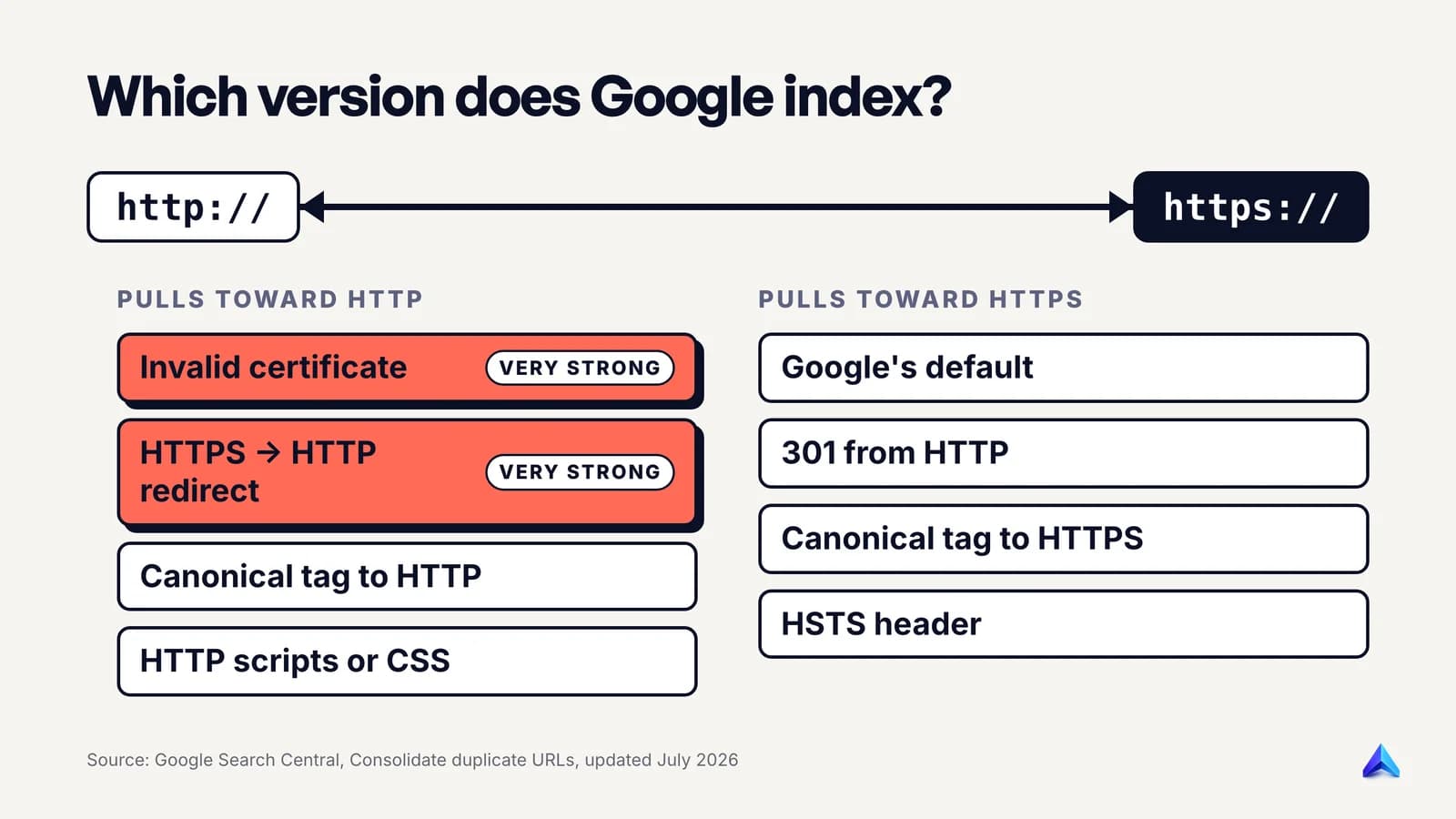
The default has exceptions, and each one is a setup mistake. Google lists four conditions that work against the HTTPS version:
- The HTTPS page has an invalid SSL certificate.
- The HTTPS page loads insecure dependencies, other than images.
- The HTTPS page redirects users to or through an HTTP page.
- The HTTPS page has a
rel="canonical"link pointing to the HTTP page.
Two of these carry more weight than the rest. Google says bad TLS/SSL certificates and HTTPS-to-HTTP redirects "cause Google to prefer HTTP very strongly", and that implementing HSTS "cannot override this strong preference". An expired certificate on a Sunday night is therefore not only a browser warning. It is an instruction to Google to index the insecure version.
To push Google toward HTTPS, the same guide lists three actions: redirect HTTP to HTTPS, add a canonical link from the HTTP page to the HTTPS page, and implement HSTS. It also asks you not to list HTTP URLs in your sitemap or hreflang annotations.
The canonical tag itself is where many sites slip. A template that builds the canonical from the requested URL will echo http:// back on HTTP requests. Our guide to self-referencing canonical tags covers that echo bug and how to hard-code the protocol and host instead.
What Chrome shows visitors on HTTP
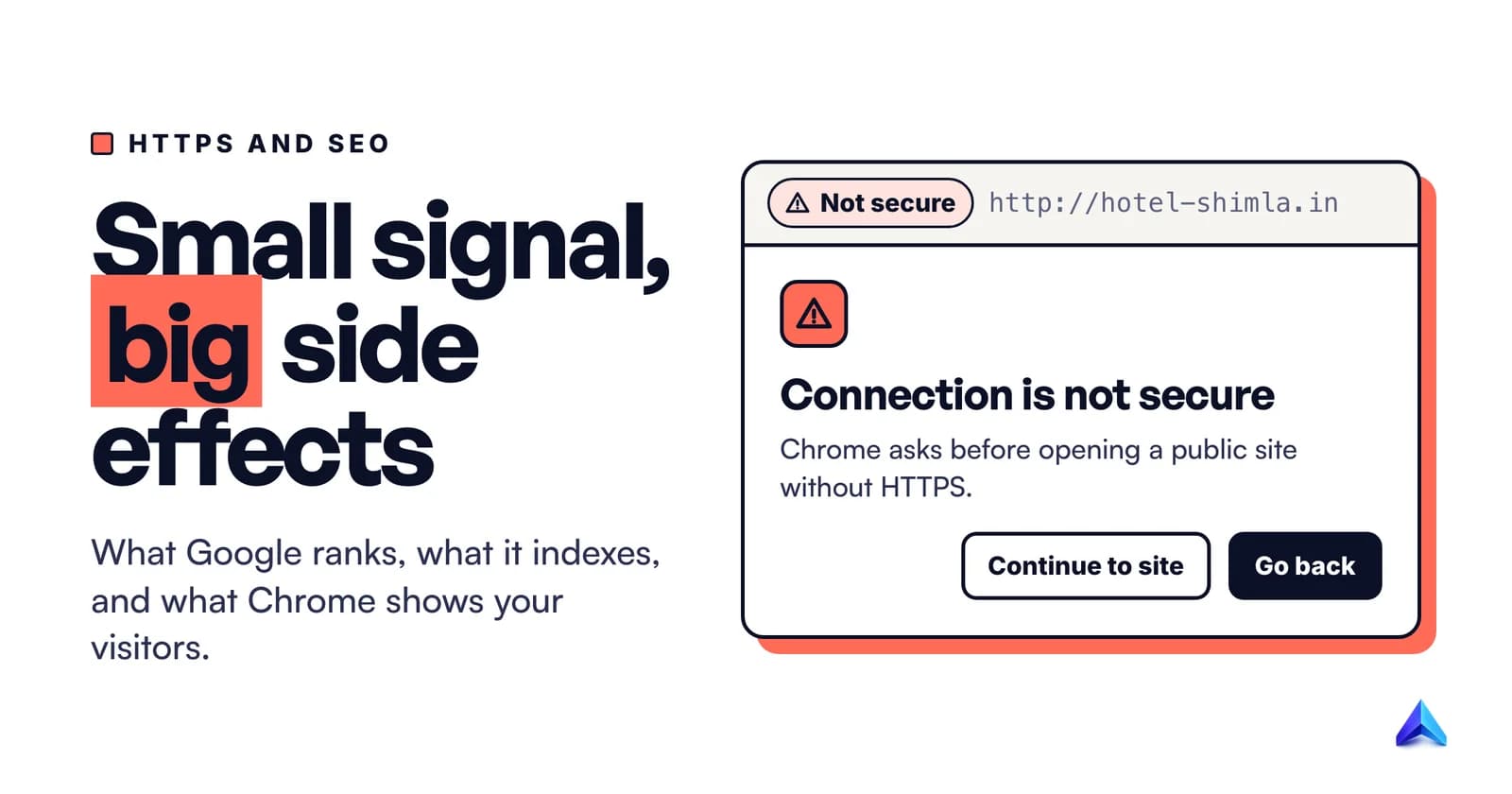
This is a trust and user experience effect, not a ranking one. In February 2018, the Chromium blog announced that from Chrome 68, released in July 2018, Chrome would mark all HTTP sites as "not secure" in the address bar. A visitor deciding whether to type a phone number into your contact form sees that label first.
The next step is stronger. In October 2025, Google's Chrome security team announced HTTPS by default: with Chrome 154, scheduled for October 2026, Chrome turns on its "Always Use Secure Connections" setting for everyone. In Google's words, Chrome "will ask for the user's permission before the first access to any public site without HTTPS." Chrome 147, in April 2026, had already switched it on for the over 1 billion users who opted into Enhanced Safe Browsing.
That means a full-page warning with a "Continue to site" button, shown before your page loads. Users can still turn the setting off, and Google's experiment found the median user saw fewer than one such warning a week. But a searcher who clicks your result and lands on a warning is a lost visit, whatever your ranking.
The same post makes a point most site owners miss. Many HTTP navigations happen only because links still point at http:// addresses that immediately redirect to HTTPS. Those hops were invisible to users. Once the warning is on, any HTTP hop is a potential warning. Old http:// links in your navigation, email footers, Google Business Profile and social bios are worth updating to https:// for that reason alone.
Mixed content: the half-finished migration
A page served over HTTPS can still pull in pieces over HTTP. MDN defines mixed content as "securely loaded web pages that use resources to be fetched via HTTP or another insecure protocol." It is a common sign of a migration that stopped halfway.
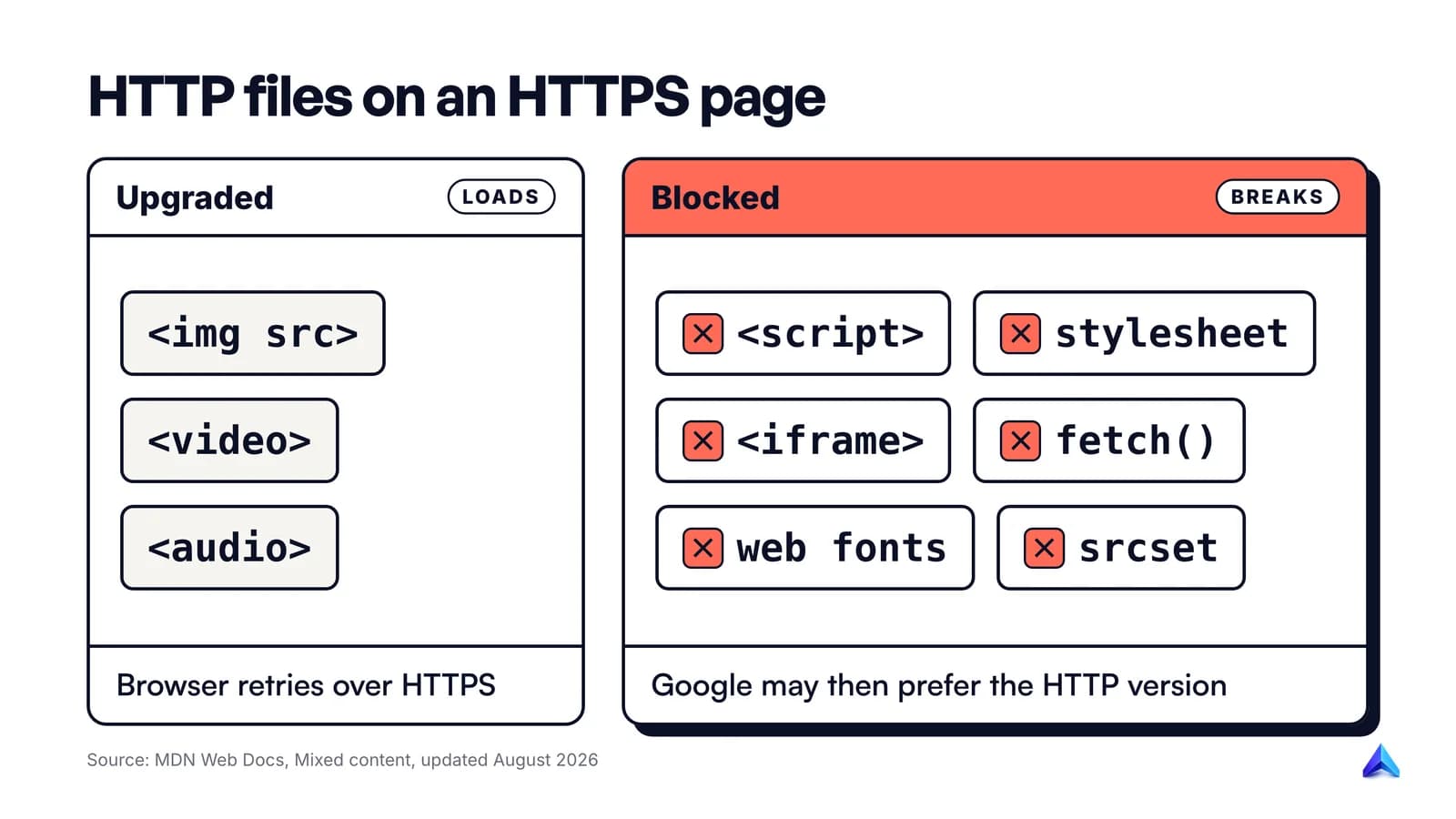
Browsers do not treat all mixed content the same way. According to MDN's mixed content reference, they auto-upgrade image, video and audio requests from HTTP to HTTPS, and block insecure requests for all other resource types. Blocked types include scripts, stylesheets, iframes, fetch() calls and web fonts. A few edge cases catch people out: images set through srcset or a <picture> element are blocked rather than upgraded, and so is any request to a bare IP address instead of a domain name.
That split explains a classic symptom. A Shopify or WordPress site moves to HTTPS, the images look fine, but the menu stops opening or the layout breaks. A theme file is loading jQuery or a stylesheet from an http:// address, and the browser has silently blocked it.
The SEO cost is direct: Google lists "insecure dependencies (other than images)" among the conditions that can make it prefer the HTTP version as canonical.
The fix, in order:
- Serve everything on your own domain over HTTPS, and change internal resource references to
https://or relative paths. - Switch third-party embeds to their HTTPS versions. Old YouTube embeds, map widgets, analytics snippets and font links are the usual culprits.
- Search your database and theme files for
http://with your own domain in it. Hard-coded image URLs in old blog posts are common. - Use the Content-Security-Policy directive
upgrade-insecure-requestsas a safety net, not a fix. MDN notes it upgrades all requests to HTTPS, including blockable ones, but a resource that does not exist on HTTPS will still fail.
To find mixed content, open Chrome DevTools on a few key templates and read the Console. Mixed content warnings name the exact resource URL.
HSTS, and when not to preload
HSTS is a response header that tells browsers to use HTTPS for your site every time. MDN's Strict-Transport-Security reference describes two effects: future HTTP requests to the host are automatically upgraded, and the browser no longer lets users click past certificate errors.
A typical header looks like this:
Strict-Transport-Security: max-age=31536000; includeSubDomains
max-age is in seconds, so 31536000 is one year. includeSubDomains applies the rule to every subdomain. For SEO, HSTS is one of the three ways Google lists to reinforce HTTPS as your canonical, and it removes the HTTP hop for returning visitors.
It has limits. Browsers ignore the header when it arrives over HTTP, and it only takes effect after a first secure visit. The preload list closes that gap by building your domain into browsers, which is why the preload directive exists. MDN says preloading requires a max-age of at least one year and includeSubDomains.
Be careful with preload. The maintainers of hstspreload.org warn that inclusion "cannot easily be undone": removal takes months to reach users through Chrome updates. Before preloading, check every subdomain: the old shop. store, the mail. webmail login, the staging site an agency set up in 2019. Start with a short max-age, raise it over a few weeks, and preload only when you are sure.
Moving from HTTP to HTTPS without losing traffic
Google treats an HTTP to HTTPS move as a site move with URL changes, because every URL changes. Its site move guide covers the full process. Redirect mechanics are covered in what a redirect is and which status code to use, so this section sticks to what is specific to HTTPS.
- Get a valid certificate that covers every hostname you serve. That includes
wwwand non-www, and any subdomain in use. Let's Encrypt, a nonprofit certificate authority, issues free TLS certificates. Google's 2014 tips frame the certificate choice as single, multi-domain or wildcard: a question of coverage, not ranking. - Map every HTTP URL to its HTTPS equivalent. For a protocol change this is usually a one-line rule, but check exceptions such as old PDFs on a separate host.
- Add server-side permanent redirects from HTTP to HTTPS. Google says 301 and other permanent redirects do not cause a loss in PageRank. Redirect each URL to its exact HTTPS twin, not to the homepage, and send
http://straight to the final host in one hop. - Update canonical tags, internal links, sitemaps and hreflang to HTTPS. A sitemap still listing
http://URLs sends Google a conflicting signal. - Fix mixed content before or alongside the switch, using the checks above.
- Verify the HTTPS site in Search Console. Google's site move guide says to verify both the old and new sites. A Domain property is the simplest choice, because the HTTPS report described below only works on Domain and HTTPS URL-prefix properties.
- Skip the Change of Address tool. Google says plainly that you do not need it for HTTP to HTTPS moves.
- Keep the redirects for at least a year. Google's guide says "generally at least 1 year", and longer is better. Plenty of old backlinks will point at
http://forever.
Expect some movement. Google warns of ranking fluctuations while it recrawls the site, and says it can take "a few weeks or more" for the new URLs to show. Messy moves drag on longer, often because of a chain such as http:// to https:// to www, then a trailing slash. If Search Console starts showing redirect errors after the switch, our guide to fixing a redirect error goes through the causes in order.
If you are also changing domain, URL structure or CMS, plan it as a full site migration, and consider doing the HTTPS step on its own first so you can tell which change caused any drop.
How to check HTTPS in Search Console
Search Console has a dedicated HTTPS report. Google's help page says it "shows how many indexed URLs on your site are HTTP vs HTTPS", and lists the reasons a page is still on HTTP. It is available only for Domain properties and HTTPS URL-prefix properties, which is one more reason to set up a Domain property.
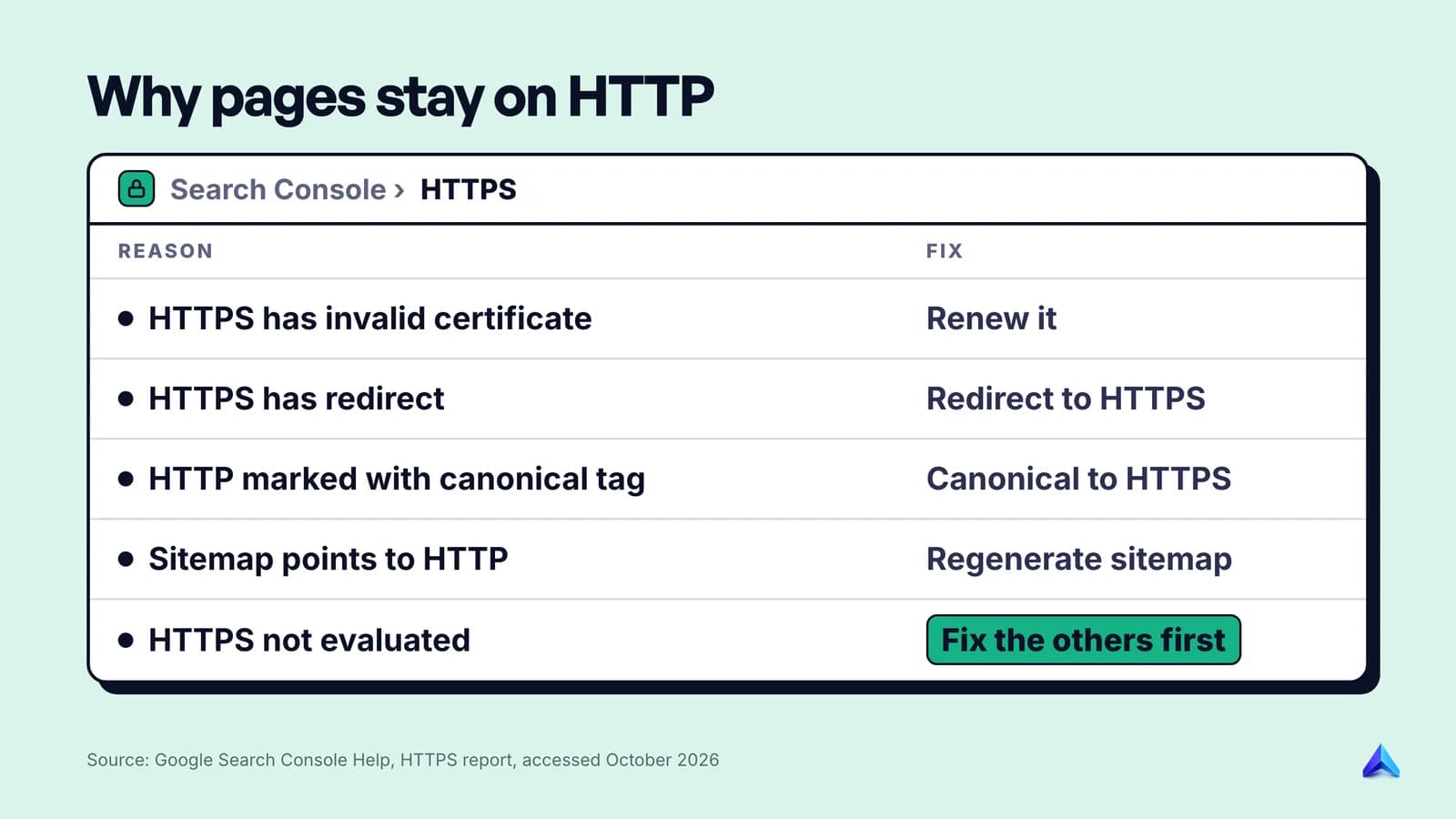
The reasons map closely to the canonical rules above: an invalid certificate (which Google says usually affects the whole site), an HTTPS URL that redirects to HTTP, an HTTP page marked canonical, a sitemap listing HTTP URLs, and an HTTPS URL blocked by robots.txt. "HTTPS not evaluated" is an umbrella for cases where Google could not check the HTTPS version at all.
Google's advice on order is worth following: address every other reason before "HTTPS not evaluated", because fixing those often clears it. Then spot-check individual URLs with URL Inspection to see which version Google chose as canonical. Our guide on how to check if a page is indexed walks through reading that result.
Put the certificate's expiry date and the HTTPS report on the same recurring checklist as the rest of your technical SEO audit. HTTPS can break long after launch, when a certificate fails to renew or a new plugin adds an HTTP resource.
Frequently asked questions
Does an SSL certificate improve SEO?
Only slightly, as a ranking signal. Google called HTTPS a very lightweight signal in 2014, and in 2023 said such page experience aspects may not all be used directly, though they "align with success in search ranking". The bigger SEO value of a certificate is that Google prefers indexing HTTPS URLs and Chrome warns visitors away from HTTP.
Do I need a paid SSL certificate for SEO?
No. Nothing in Google's HTTPS guidance ties rankings to the price or type of certificate. Its 2014 tips frame the choice as single, multi-domain or wildcard, which is about which hostnames are covered. Let's Encrypt, a nonprofit, issues free TLS certificates. What matters for search is that the certificate is valid and renews on time.
Will switching to HTTPS drop my rankings?
It can cause temporary movement. Google's site move guide warns of ranking fluctuations while it recrawls the site and says new URLs can take a few weeks or more to show. Clean one-hop redirects and HTTPS canonicals and sitemaps give Google consistent signals, which keeps that period short.
Do I need the Change of Address tool when moving to HTTPS?
No. Google's site move documentation says the Change of Address tool is not needed for HTTP to HTTPS moves. Verify the HTTPS site in Search Console, ideally as a Domain property, and let redirects do the work.
Should HTTP to HTTPS use a 301 or a 302 redirect?
Use a permanent, server-side redirect, normally a 301 or 308. Google's site move guide says permanent redirects do not cause a loss in PageRank, and its canonical guide lists HTTP-to-HTTPS redirects as a way to make the HTTPS version canonical. A 302 says the move is temporary, which is the wrong message for a protocol change.
Does HTTPS affect referral traffic data?
Yes, for the sites you link to. Browsers' default referrer policy sends no referrer from an HTTPS page to an HTTP destination. If your site is HTTPS and a partner's is still HTTP, your clicks can show up as direct traffic in their analytics. Links between two HTTPS sites keep the referring origin.