A redirect error means something tried to follow your redirects and gave up before reaching a real page. In Google Search Console, "Redirect error" is a reason a URL was not indexed: Googlebot hit a loop, a chain that was too long, an overlong URL or a broken one. In a browser, the same failure shows up as ERR_TOO_MANY_REDIRECTS. Both are fixed the same way: trace every hop, then make the first URL point straight at a page that returns 200.
The two versions are usually one bug seen from two sides. A visitor in Mumbai and Googlebot crawling from the US can hit the same broken rule, and only one of them may notice. This guide covers how to tell which problem you have, the order to diagnose it in, the fix for each cause, and how to prove to Search Console that it is gone.
What a redirect error looks like, and where
You will meet it in one of two places, and the place tells you who is stuck.
| Where you see it | What it says | Who is stuck |
|---|---|---|
| Search Console, Indexing > Pages, under "Why pages aren't indexed" | Redirect error | Googlebot |
| Search Console, URL Inspection | Page is not indexed: Redirect error | Googlebot |
| Chrome or Edge | ERR_TOO_MANY_REDIRECTS | The visitor |
| Firefox | The page isn't redirecting properly | The visitor |
The Search Console version is a row in the Page indexing report with a count of affected URLs. Click it and you get the list. Each URL on that list is the one Googlebot started from, not the hop where things went wrong. That detail shapes the whole diagnosis, because the broken rule is often two or three redirects further along.
The browser version is a full-page error. Chrome and Edge show the code ERR_TOO_MANY_REDIRECTS. Cloudflare's troubleshooting guide quotes the Firefox wording, "The page isn't redirecting properly". Nothing loads, so visitors leave.
MDN's guide to HTTP redirections puts it in one line: redirect responses have status codes that start with 3, plus a Location header holding the next URL. A redirect error is what happens when that sequence never ends on a normal page.
Redirect error vs Page with redirect
These two statuses sit in the same report and get confused constantly. Only one of them is a problem.
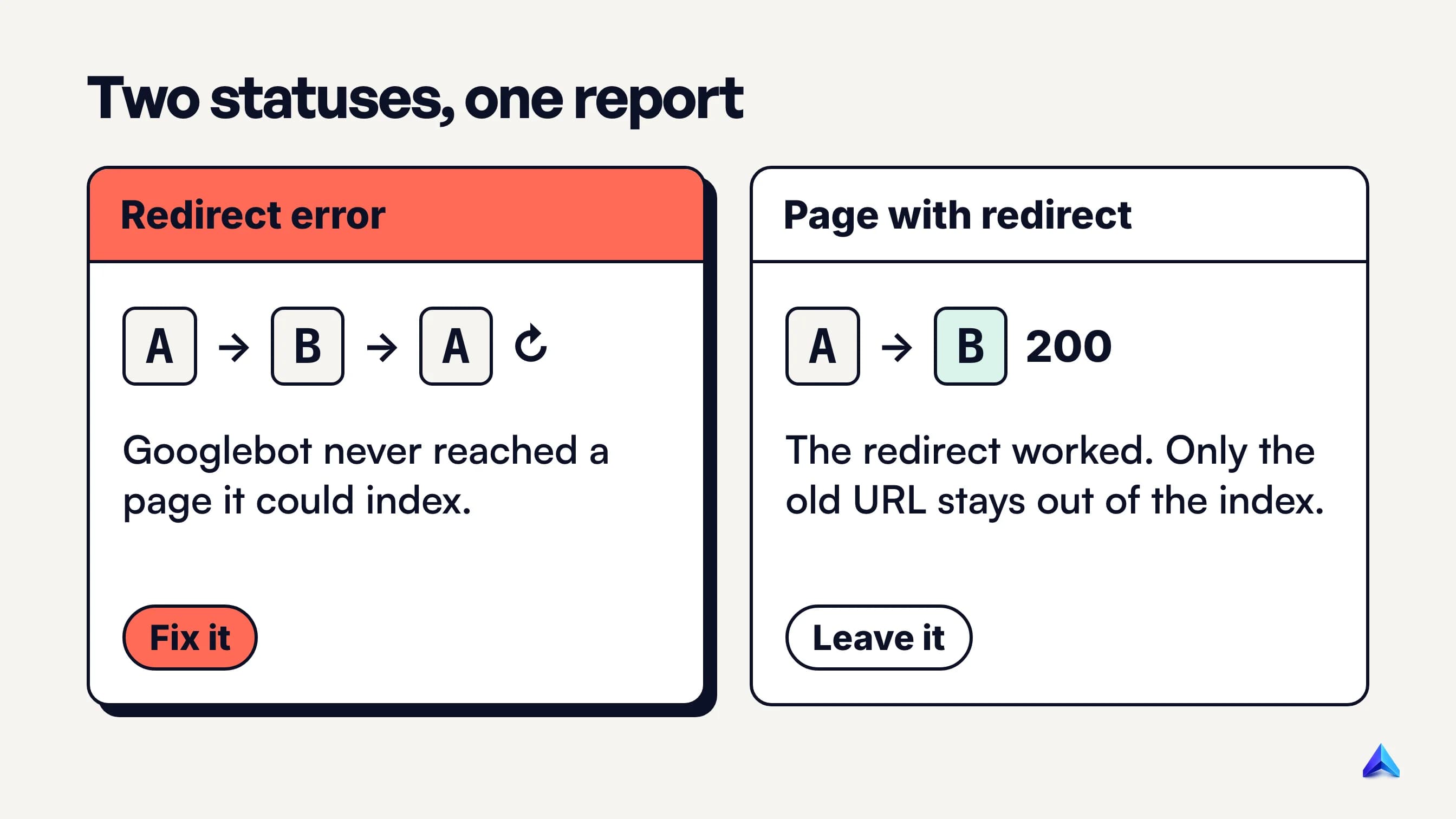
Page with redirect means the redirect worked. Google's help text describes it as "a non-canonical URL that redirects to another page", which is why that URL is not indexed. Its target might be indexed or might not, depending on what Google thinks of the target. If you moved /pricing-2024/ to /pricing/ on purpose, seeing the old URL here is the system doing its job. Leave it alone.
Redirect error means the redirect failed. Googlebot set off from the URL and never arrived anywhere it could index. Nothing at the end of that path gets credit from this route, because there is no end.
The practical test is simple. If the URLs listed under "Page with redirect" are ones you meant to retire, there is nothing to fix. If any URL under "Redirect error" is one you care about, it needs work this week.
One related trap: if your canonical tags point at URLs that redirect, Google receives two contradictory signals. Our guide to self-referencing canonical tags covers how to make the canonical and the final URL agree.
What a redirect error costs you
The cost depends on which URL is affected, so check that before deciding how urgent it is.
- The page is not in Google. A URL with this status is not indexed. If it is the old address of a page that still earns links, those links now lead Googlebot into a dead end instead of to the new page.
- Google throws away what it fetched. Google's documentation on HTTP status codes says any content received from a redirecting URL is ignored and only the final target's content is processed. When there is no final target, nothing gets processed.
- Visitors bounce. If the loop also affects browsers, every visitor who arrives through that URL sees an error page. That includes people clicking your own internal links, emails and ads.
- Crawling is wasted. Every hop is another request. A site with thousands of looping URLs spends Googlebot's attention on requests that produce nothing.
A handful of redirect errors on retired campaign URLs nobody links to is low priority. A redirect error on your homepage variant, a top category or a URL in your XML sitemap is urgent.
Why Googlebot gives up: the four causes Google lists
Google's help page gives four reasons for this status. Each one looks different when you trace it.
1. The chain is too long. By default, Google's crawlers follow up to 10 redirect hops. Most chains come from history rather than from one bad decision: http:// to https://, then to www, then a trailing slash, then a 2023 site migration, then a 2025 category rename. Each step made sense when someone added it. Stacked, they exceed the limit, or come close enough that one more change tips them over.
2. A redirect loop. URL A sends you to B, and B sends you back to A, sometimes with several stops in between. MDN notes that a loop can be spread across several servers that each lack the full picture. In practice that is often a CDN, a web server and a CMS plugin, each adding a rule that looks fine on its own.
3. The URL grows until it is too long. Google lists "a redirect URL that eventually exceeded the max URL length". This happens when a rule appends to the URL instead of replacing it. A rule that adds ?lang=en on every request, or prefixes /en/ without checking whether it is already there, produces /en/en/en/en/... until something breaks.
4. A bad or empty URL in the chain. The Location header points at nothing, at a malformed address like https//example.com, or at a relative path that resolves somewhere unexpected. These usually come from a CMS field left blank or a typo in a redirect plugin.
Loops that only Googlebot sees
This is the cause that confuses site owners most. You open the URL, it loads fine, and Search Console still says redirect error. Usually the redirect logic depends on something about the visitor, and Googlebot does not look like you.
Three facts from Google's own documentation explain most of these cases:
- Googlebot usually looks American. Google's guide to locale-adaptive pages says the default Googlebot IP addresses appear to be based in the USA.
- It sends no language preference. The same page says the crawler sends requests without an
Accept-Languageheader. - It keeps no cookies. Google's JavaScript troubleshooting guide says HTTP cookies are cleared across page loads during rendering.
Now picture a UK retailer on .co.uk that sends US visitors to a .com store, while the .com store sends visitors without a currency cookie back to choose a region. A person in London never sees the problem. Googlebot, arriving from a US address with no cookie, bounces between the two indefinitely. The same pattern hits Indian sites that send overseas IPs to /intl/ and send visitors with no language set back to the root.
Consent banners, A/B tests and login walls cause the same thing when they are built on redirects. Any rule like "if there is no cookie, redirect to set one, then redirect back" is a loop for a visitor that never keeps the cookie.
Google's advice is to treat Googlebot like any other user from the country it appears to come from. For redirects, that means a US visitor with no cookies must still reach a page that loads. Show a banner or a country picker on the page; do not bounce the request.
Diagnose it in this order
The order matters: the cheapest checks rule out the most common causes first.
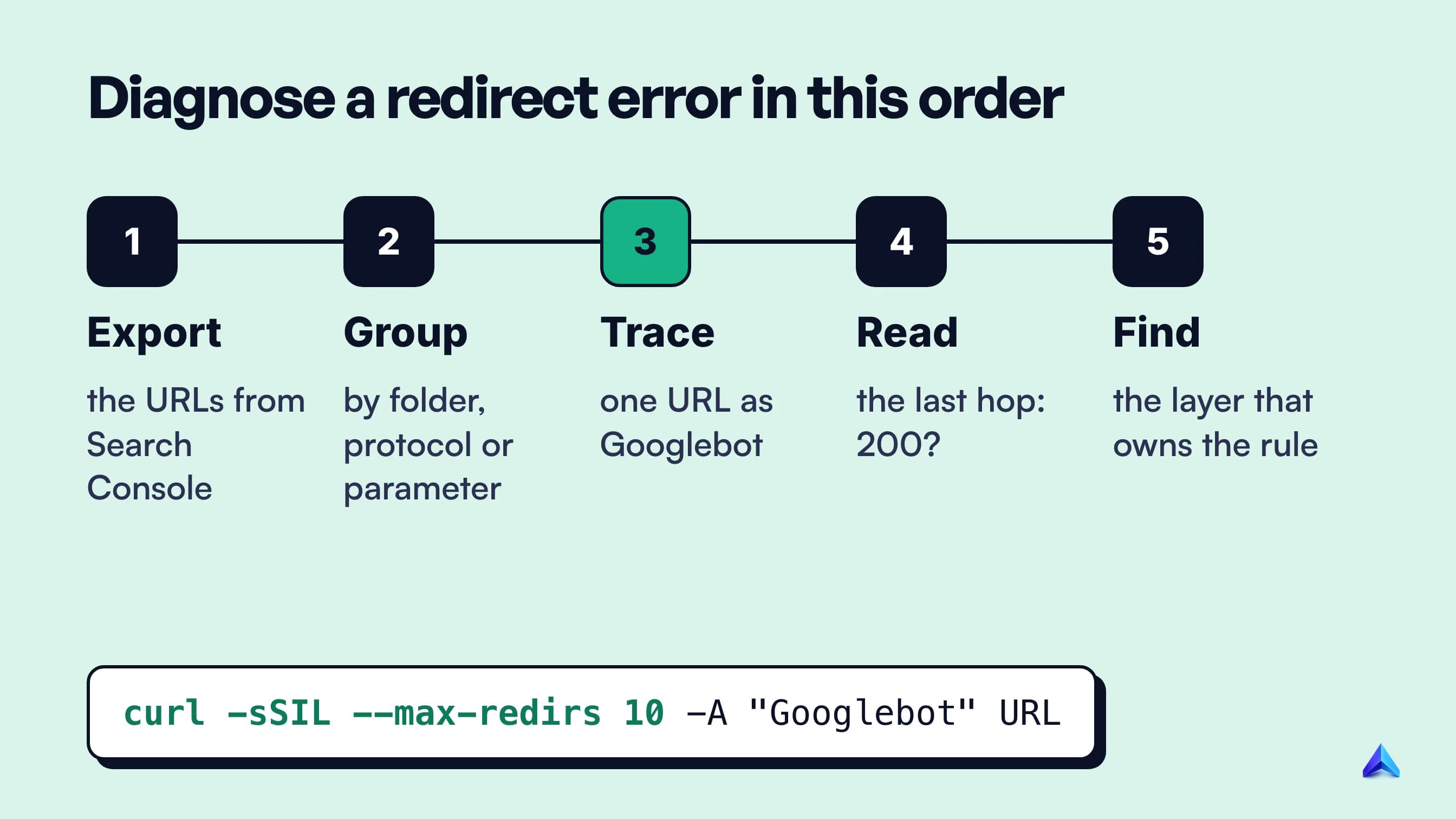
1. Export the affected URLs. Open Indexing > Pages, click "Redirect error", and export the list. Note whether the URLs are in your sitemap: filter the report by "All submitted pages" to see only those.
2. Group them by pattern. Sort the list and look for something shared: one folder, one parameter, all http://, all without www, all old blog dates. Fifty errors with one pattern are usually one rule.
3. Trace one URL as Googlebot would. Use curl, because it shows every hop and, unlike a browser, keeps no cookies between requests:
curl -sSIL --max-redirs 10 \
  -A "Mozilla/5.0 (compatible; Googlebot/2.1; +http://www.google.com/bot.html)" \
  https://example.co.uk/old-page | grep -iE "^HTTP|^location"
--max-redirs 10 matches Googlebot's limit, so if curl stops with Maximum (10) redirects followed, Google is stopping too. A healthy result is short:
HTTP/2 301
location: https://www.example.co.uk/new-page/
HTTP/2 200
A broken one repeats itself, or keeps growing:
HTTP/2 301
location: https://www.example.co.uk/old-page
HTTP/2 302
location: https://www.example.com/?region=us
HTTP/2 302
location: https://www.example.co.uk/old-page
4. Read the last hop. The final status should be 200. A 404 at the end is a different problem: the redirect works but lands on a missing page, so point it at a live one. A 5xx at the end can be the loop itself: MDN notes that when a server detects a redirect loop, it may send back a 500 Internal Server Error.
5. Find the layer that added the bad rule. Redirects on a typical site can come from five places: the DNS or CDN (Cloudflare page rules, "Always use HTTPS"), the web server (.htaccess, nginx return 301), the CMS or a redirect plugin, application code, and the page itself (meta refresh or JavaScript). Compare the server and cf-ray style headers on each hop with curl -I to see which system answered. Fix the rule in the layer that owns it, not by adding a counter-rule somewhere else.
If you only have a browser, the Network tab in Chrome DevTools with "Preserve log" ticked shows the same hops. An incognito window gets you closer to a cookie-free visit, but it still sends your location and language.
How to fix each cause
Once the trace shows the pattern, the fix is usually one of these.
| What the trace shows | Fix |
|---|---|
| A long chain (A to B to C to D) | Point A, B and C straight at D. Update internal links and the sitemap to D. |
| A loop between two rules | Delete or narrow one rule so the pair cannot trigger each other. |
| The URL grows on each hop | Make the rule check whether the prefix or parameter is already there. |
A blank or malformed Location | Correct the target in the plugin, CMS field or server config. |
| Loop only as Googlebot | Remove geo, language or cookie redirects; show a picker or banner instead. |
| Final hop returns 404 | Redirect to the closest live page, or let the old URL return 404 or 410. |
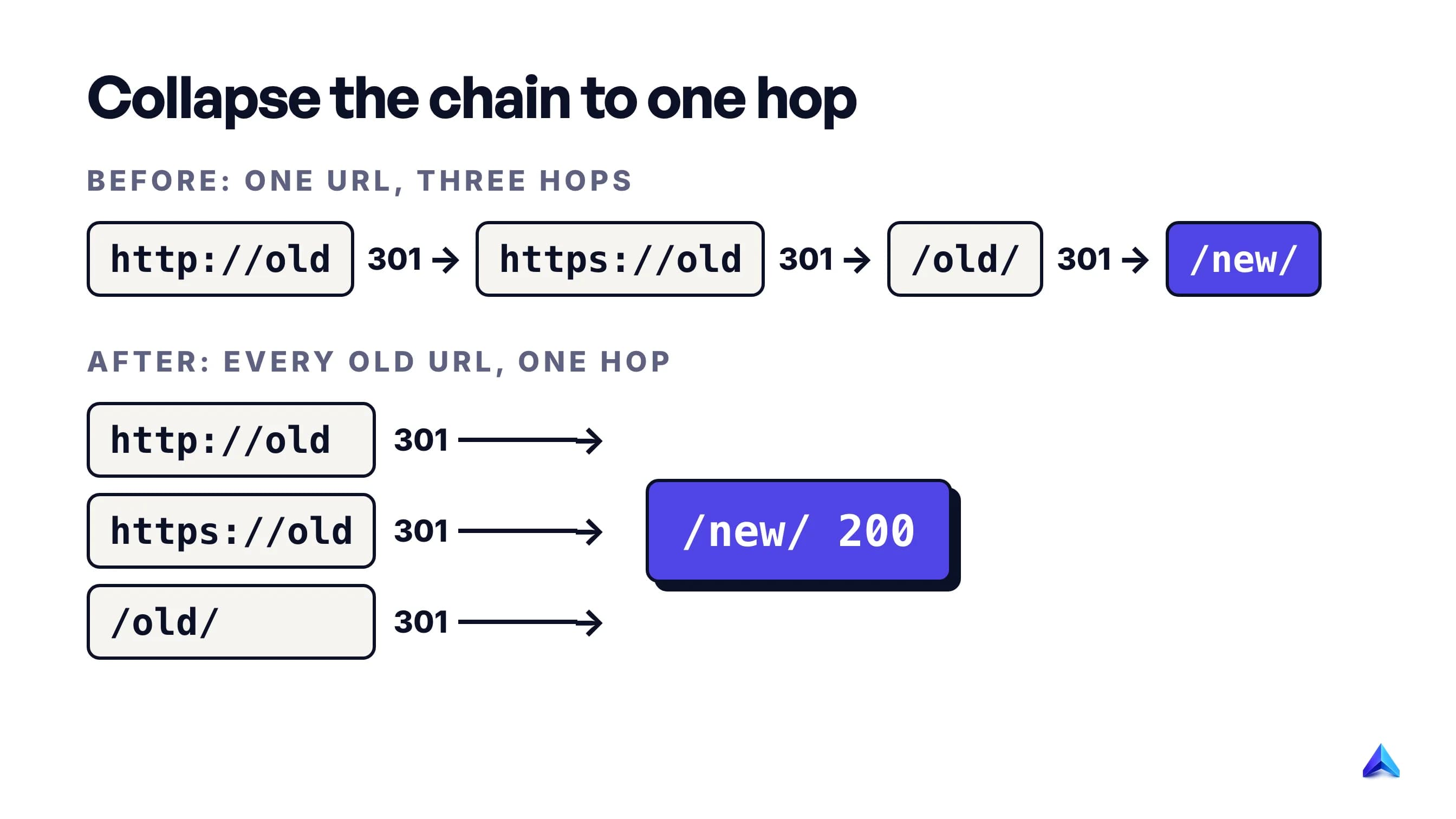
Collapsing chains is the fix people skip, because the chain technically works for browsers. It still costs a request per hop, and it is one change away from Google's limit. When you move a page, find every redirect that points to the old address and repoint it at the new one.
Pick the right status code while you are there. Google's documentation treats 301 and 308 as a strong signal that the target should be processed, and 302 and 307 as a weak one. For a page that has moved for good, use 301. Mixing permanent and temporary hops in one chain makes the intent harder to read.
Prefer server-side redirects. MDN warns that if someone changes the HTTP redirect but forgets the HTML one, the two disagree and can create an infinite loop. One redirect, in one place, is easier to keep correct.
Fixing ERR_TOO_MANY_REDIRECTS in the browser
If you are a visitor, clear the cookies for that one site and reload. A stale cookie that keeps triggering a redirect is a common visitor-side cause, and it explains why the site works in an incognito window but not in your normal one. If it still fails after that, the problem is on the site.
If it is your site, start with HTTPS and domain rules, where many browser-side loops begin:
- Cloudflare set to Flexible. Cloudflare's documentation explains that in Flexible mode it sends requests to your origin over plain HTTP. If your server redirects all HTTP to HTTPS, the two redirect each other forever. The fix is to remove the HTTPS redirect at the origin or switch the encryption mode to Full or higher, which needs a certificate on your server.
- Full mode with an origin that forces HTTP. The reverse case: Cloudflare connects over HTTPS and the origin redirects HTTPS back to HTTP.
- Two systems both forcing a version of the domain. A host panel that forces
wwwand a CMS setting that strips it will bounce each request between them. On WordPress, compare the WordPress Address and Site Address under Settings > General with what your server enforces.
Browsers have their own limit, which is higher than Google's. The Fetch Standard, which defines how browsers make requests, returns a network error once a request's redirect count reaches 20. A chain of 12 hops loads for visitors and still fails for Googlebot. That gap is why "it works for me" is not proof that Search Console is wrong.
What not to do
Some common reactions make the report quieter without fixing anything.
- Don't redirect every broken URL to the homepage. It hides the problem from your own reports and gives visitors and Google a page that does not answer what they asked for. Redirect to the closest equivalent page, or let the URL return 404.
- Don't add a counter-rule to cancel a bad one. Two rules fighting is how most loops start. Remove or narrow the original rule.
- Don't leave redirecting URLs in your sitemap. A sitemap should list final URLs that return 200. Listing old ones keeps sending Google into the chain.
- Don't rely on meta refresh or JavaScript redirects to patch a server redirect. MDN notes that HTTP redirects run first, then JavaScript, then meta refresh, so a client-side patch never sees a server-side loop.
- Don't click Validate fix repeatedly. Google's help says not to click it again until validation has succeeded or failed.
How to confirm the fix
Check three things, in this order.
- Re-run the curl trace for a few URLs from each pattern you found. Every one should end in a single hop, or two at most, on a 200.
- Inspect one URL in Search Console. Run URL Inspection's live test on the final URL and confirm Google can fetch and index it. Once the old URL is recrawled, it should move to "Page with redirect", which is the healthy outcome.
- Click Validate fix on the Redirect error row. Search Console immediately checks a few pages, then works through the rest. Google says validation typically takes up to about two weeks and sometimes longer. You get an email when it passes or fails.
If validation fails, open the details: it lists the URLs that still error, which usually points to a second pattern you missed in step 2. Our walkthrough of Google Search Console for SEO covers where the other indexing statuses live, and if the fixed pages then sit under Crawled – currently not indexed, the redirect is solved and the remaining question is the page itself.
To stop redirect errors coming back, add a redirect check to your technical SEO audit: crawl the site, list every internal link that hits a 3xx, and repoint it at the final URL. Project Rankup's Content Audit Studio checks each URL's response before auditing a page and reports dead ones separately, which catches redirects that end on the homepage.
Frequently asked questions
What is the error code for a redirect?
There is no single code. Working redirects use 3xx status codes, most often 301, 302, 307 and 308. When redirects fail, Chrome and Edge show ERR_TOO_MANY_REDIRECTS, Firefox says the page isn't redirecting properly, and Search Console labels the URL "Redirect error". A server that detects a loop may also answer with a 500.
What does it mean when a website keeps redirecting?
The site is sending your browser in a circle: each response points to another URL, and the sequence never ends on a page. Common causes are conflicting HTTPS or www rules, a CDN and server that disagree, or a cookie-based redirect. Clearing that site's cookies fixes the visitor-side cause. Anything else needs the site owner.
How many redirects are too many for Google?
Google's crawlers follow up to 10 redirect hops by default, then stop and report a redirect error. Aim for one hop from any old URL to its final page. Two is acceptable during a migration. Browsers allow more, up to 20 under the Fetch Standard, so a chain can load for people and still fail for Google.
Can a redirect error hurt my rankings?
It hurts the URL involved, because that URL is not indexed and anything pointing at it leads nowhere. It does not penalise the rest of the site. The damage grows with the importance of the URL: an error on a page that earns links or traffic costs far more than one on a forgotten campaign URL.
Why does my page work in the browser but show a redirect error in Search Console?
Googlebot is a different visitor. It usually crawls from US IP addresses, sends no language header and keeps no cookies between page loads. A redirect based on country, language or a cookie can loop for Googlebot while working for you. Trace the URL with curl and a Googlebot user agent to see what it sees.
How long does it take for a redirect error to clear?
After you fix the redirect and click Validate fix, Google says validation typically takes up to about two weeks, and sometimes longer. Search Console checks a few URLs immediately and emails you when validation passes or fails. A URL can also clear on its own when Googlebot recrawls it, without validation.