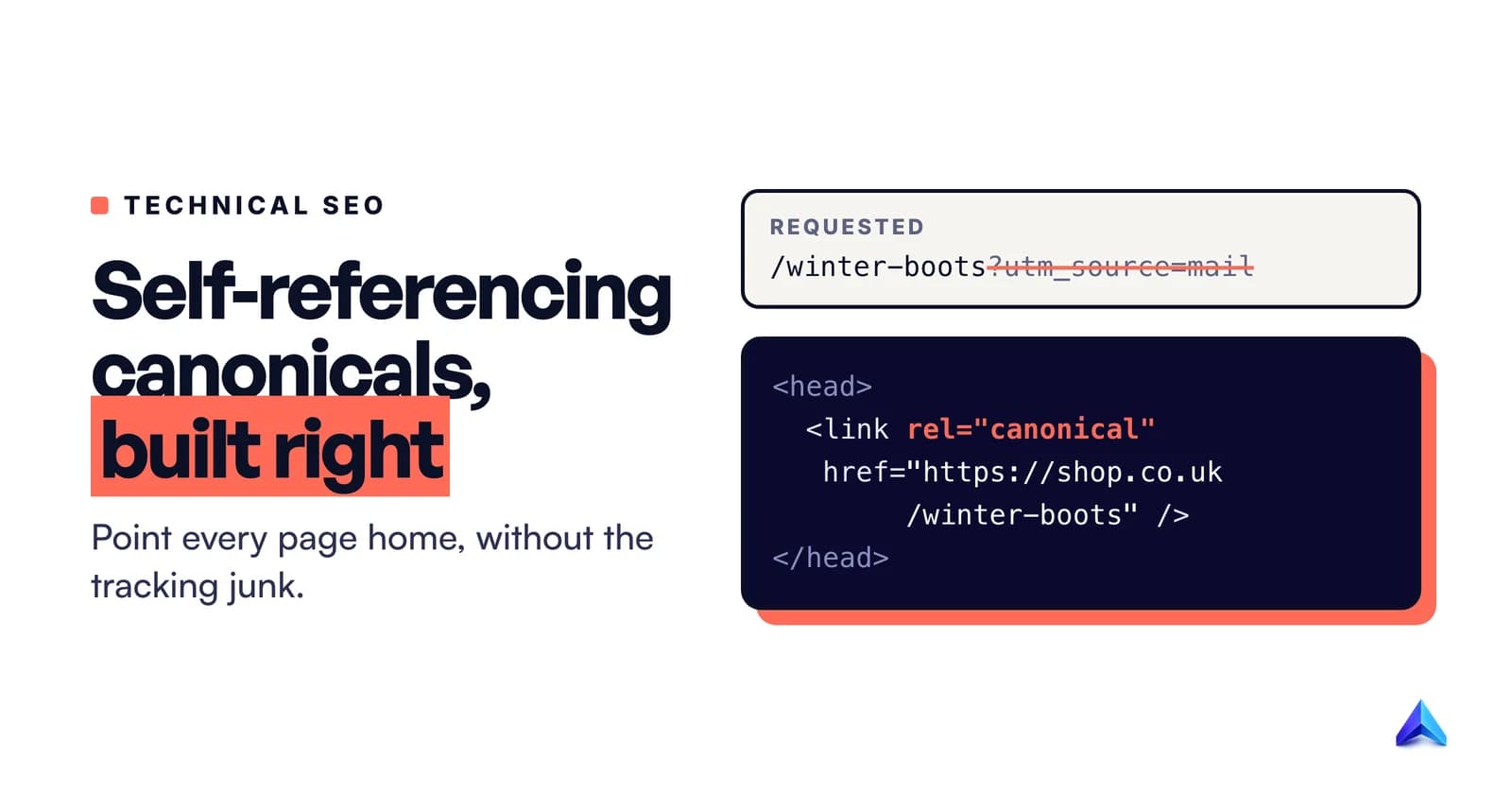
A self-referencing canonical is a rel="canonical" link on a page that points to that same page's URL. Put one on every page you want indexed. Google's documentation now lists it as a "Do", and it costs nothing. The catch is how the tag is built: one that copies whatever URL was requested, tracking parameters included, protects nothing. One that always prints your clean, preferred URL does the job.
That second point is where this guide parts ways with most of what ranks for the term. Nearly every article agrees the tag is good practice. Very few look at what the tag actually says on a live page when someone arrives from a newsletter link, a Google Ads click or a filtered category view. That is where self-referencing canonicals quietly fail.
What a self-referencing canonical tag looks like
A normal canonical tag sits on a duplicate page and points somewhere else. A self-referencing one sits on the preferred page and points back to itself. Both are the same line of HTML inside the <head>:
<!-- On https://www.example.co.uk/guides/winter-boots -->
<head>
  <title>How to choose winter boots</title>
  <link rel="canonical" href="https://www.example.co.uk/guides/winter-boots" />
</head>
The only thing that makes it "self-referencing" is that the href matches the page's own address. Google's John Mueller put the distinction plainly on Reddit in 2021: if <link rel="canonical" href="b.html"> sits on a.html it is a normal canonical, and if it sits on b.html it is a self-referential one.
This is not a hack or an SEO invention. The standard that defines the canonical link relation, RFC 6596, published in April 2012 and co-written by Maile Ohye and Joachim Kupke, lists "be self-referential" among the things a canonical target may do. Search engines were designed to expect it.
Three details in that snippet matter more than they look:
- The URL is absolute. Google supports relative paths such as
/guides/winter-boots, but recommends against them because they cause problems later, for example when a staging site gets crawled and every relative canonical now points at the staging host. - It lives in the
<head>. Google only accepts the element there. A canonical that ends up in the<body>, for example because invalid markup closed the<head>early, is ignored, so the<head>itself needs to be valid HTML. - It has no fragment.
#reviewsor#section-2should never appear in a canonical, because Google generally does not support URL fragments.
For files that have no <head>, such as a PDF price list or a downloadable whitepaper, the same instruction can go in an HTTP response header: Link: <https://www.example.com/downloads/price-list.pdf>; rel="canonical".
Do you need one on every page?
Google's answer used to sound like a shrug. It is now a written recommendation.
In July 2026, Google added a line to its best-practice list for canonicalization. Its guide to specifying a canonical URL now says: "Do include a rel="canonical" link on the canonical page itself (also known as a self-referential canonical)." Search Engine Roundtable reported the change on 13 July 2026 and noted that the advice itself was not new, only its place in the official document.
The same Google page also says something that sounds like the opposite. None of the canonicalization methods are required, and your site "will likely do just fine without specifying a canonical preference", because Google picks the best version on its own when you say nothing.
Both statements are true, and they answer different questions. Is the tag mandatory? No. Should you add it? Yes. Mueller's explanation from 2021 gives the reason better than any summary: "since you don't know how people link to your pages, a self-referential one helps to clean up small mistakes." His example was a link to b.html?utm=cheese. The server shows the same page as b.html, and the self-referencing canonical nudges search engines to keep b.html instead of the tagged version.
So our recommendation is simple: every indexable page should carry a canonical that points to its own clean URL. Pages you do not want indexed, and pages that are genuine duplicates, are the exceptions, and we cover them below.
Our position: the right default, often built wrong
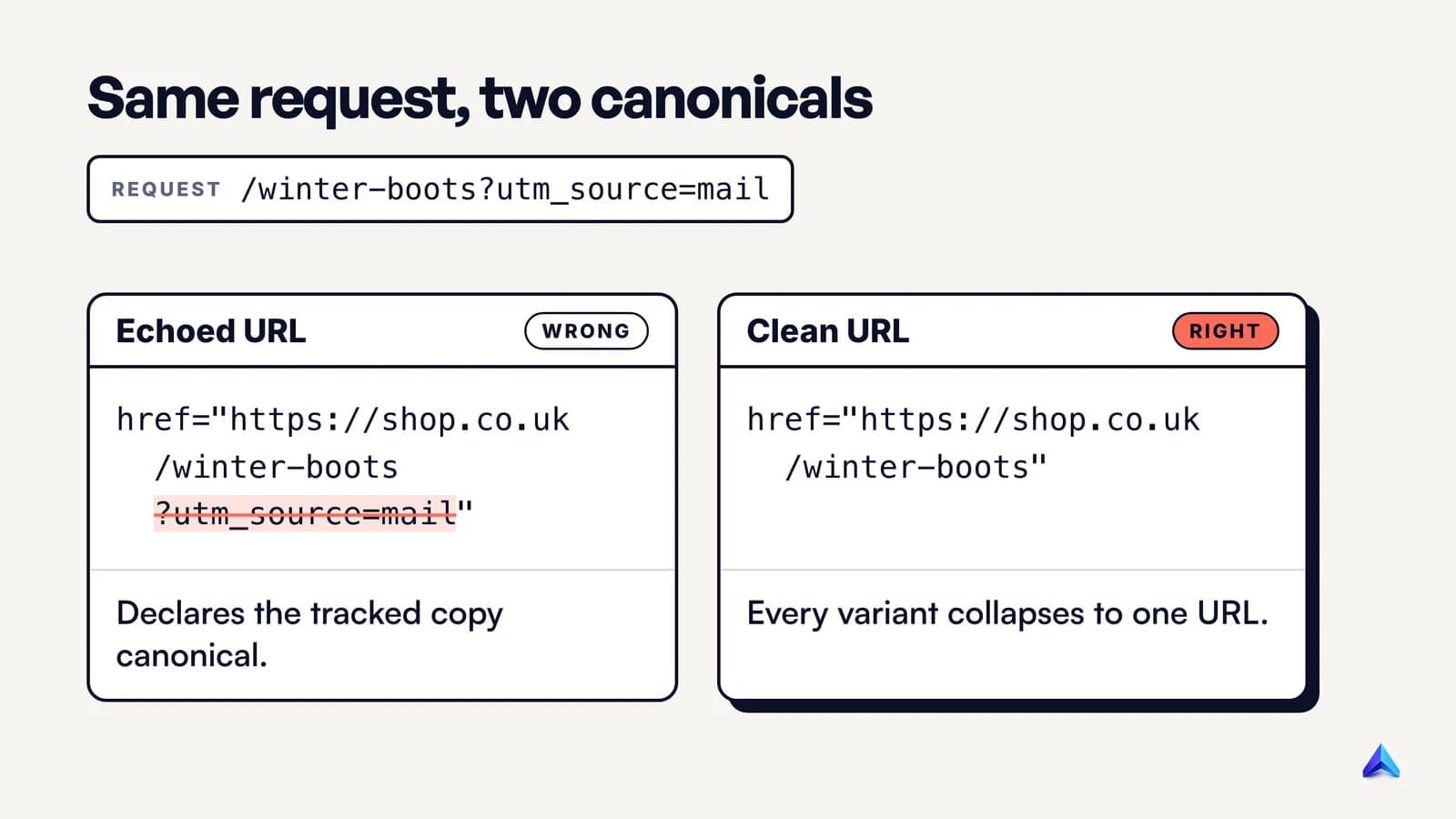
This post argues one thing above all. A self-referencing canonical is only useful when it disagrees with the URL that was requested. If someone lands on /guides/winter-boots?utm_source=newsletter, the tag earns its keep only by saying "the real address is /guides/winter-boots". If it says /guides/winter-boots?utm_source=newsletter, it has confirmed the duplicate instead of collapsing it.
The echo bug
The failure is easy to create. A developer writing a template reaches for whatever variable holds the current URL, prints it into the canonical tag, and the page looks correct in testing, because nobody tests with ?gclid= on the end. In production, the same page now declares a different canonical for every tracking link, sort order and session parameter that reaches it.
Google's own guide uses a gclid ad-click example of exactly this risk. Its preferred product page is https://www.example.com/dresses/green/green-dress.html, and the URL you do not want shown in results is https://example.com/dresses/cocktail?gclid=ABCD. An echoed canonical on that second URL tells Google the ad-tracking version is the one you prefer.
Common places the echo shows up:
- Campaign links. A UK retailer's email goes out with
?utm_campaign=boxing-dayon every link, and each landing page now claims the tagged address as canonical. - Ad clicks. A US SaaS pricing page receives
?gclid=on every paid click. - Variant and filter parameters. An Indian D2C store on a
.indomain serves a kurta at/products/cotton-kurta?variant=4471and a collection at/collections/kurtas?sort_by=price-ascending. - Protocol and host variants.
http://,https://,wwwand non-wwwversions that all render the same page.
The fix is to build the canonical from your own rule for what the URL should be (the route, the slug, the product handle, your one chosen host and https), never from the request. Our own blog shows the intended behaviour: requesting https://projectrankup.com/blog/what-is-llms-txt?utm_source=newsletter on 9 October 2026 returned a canonical of https://projectrankup.com/blog/what-is-llms-txt, with the parameter gone.
Conflicting signals undo a correct tag
A clean self-referencing canonical can still lose if the rest of the site disagrees with it. Google says its canonicalization methods "stack", becoming more effective when they agree. The reverse also holds: signals that point at different URLs make the tag weaker.
The conflicts to look for:
- Sitemap versus tag. Google tells you not to name one URL as canonical in a sitemap and a different one in
rel="canonical". - Internal links. Google asks you to link to the canonical URL rather than a duplicate. If your navigation links to
/kurtas?sort_by=featured, you are voting for the parameter version on every page. - JavaScript rewrites. Google's advice is to set the canonical in the HTML and make sure JavaScript does not change it. If you cannot set it in the HTML, leave it out there and set it only with JavaScript. Two different values, one before rendering and one after, is the worst option.
- Multiple methods. Google supports the HTML element and the HTTP header, but recommends picking one, because using both invites the case where each says something different.
The on-page SEO checklist covers the rest of what belongs in a page's <head>. For canonicals, the rule is consistency: the tag, the sitemap, internal links and redirects should all name the same URL.
The best argument against it, and why it falls short
The strongest case against bothering goes like this. Google treats the canonical as a hint, not a rule. It weighs HTTPS, redirects, sitemaps and the content itself, and it overrides your tag when it disagrees. Clean sites without the tag do fine, so it is busywork.
Most of that is correct. Google's canonicalization documentation says indicating a preference "is a hint, not a rule". Bing's webmaster guidelines say the same thing from another angle: canonical tags "help signal preference but do not replace fixing underlying issues." A self-referencing canonical will not rescue two near-identical location pages or a thin printer-friendly copy. Those need different content, a redirect, or a canonical that points elsewhere.
Where the argument falls short is cost against risk. The tag takes one line in a template. The failure it prevents is real, because a tracked or parameter URL becoming the indexed version splits signals and muddies reporting. Google lists consolidating link signals and simplifying metrics among its own reasons to declare a canonical. And because Google uses the canonical page as the main source to evaluate content and quality, choosing the right URL also decides which version gets judged.
That matters beyond the ten blue links. Google says a page must be indexed and eligible to show with a snippet before it can appear as a supporting link in AI Overviews or AI Mode, so the version that wins canonicalization is the version that can be cited. If you are working on ranking in Google AI Overviews, a stray ?utm_ URL as your indexed page is an avoidable handicap. Bing makes the link explicit: duplicate URLs "reduce Bing's confidence in selecting a URL for grounding results or citations."
So the honest framing is this: a self-referencing canonical is insurance, not a ranking boost. Cheap insurance against a common accident is still worth buying.
When a page should not point to itself
A blanket "self-canonical everything" rule breaks in a few specific places. Use this order to decide which canonical a page should carry.
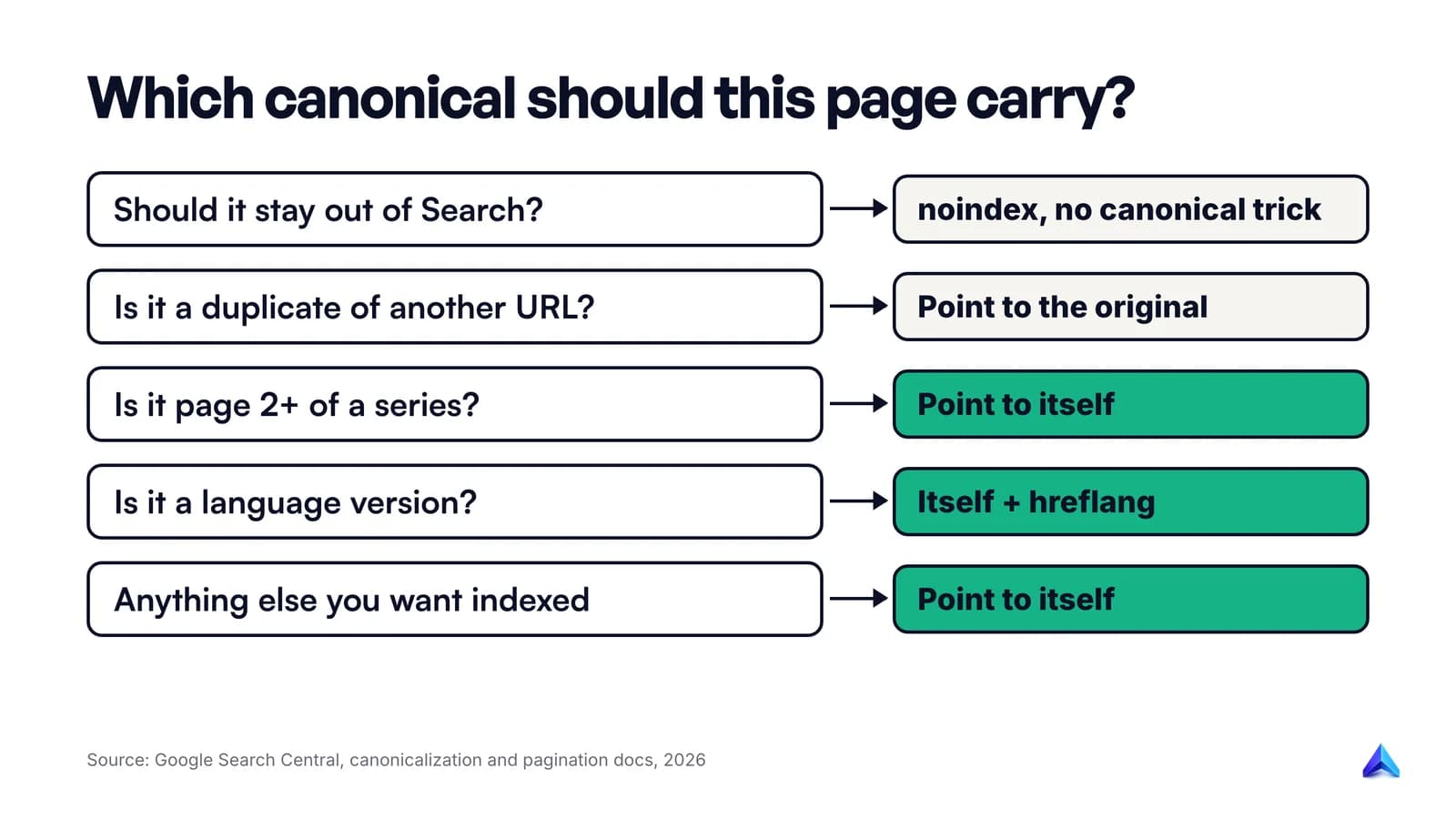
True duplicates should point to the original. A print view, a product reachable under two categories, or a tracking-parameter URL should carry a canonical to the preferred page, not to itself. That is the ordinary, non-self-referencing use of the tag.
Paginated series should self-reference on every page. Category pages and blog archives are where this matters most. Google's pagination guidance is direct: "Don't use the first page of a paginated sequence as the canonical page. Instead, give each page its own canonical URL." RFC 6596 makes the same point in 2012 terms: page 2 should not name page 1 as canonical "because this may cause a loss of data", since the products or posts on page 2 are not on page 1.
Language versions should canonicalize within their own language. If you run English, Hindi and Marathi versions of a page, each one carries a self-referencing canonical and hreflang annotations to the others. Google asks for a canonical in the same language. Pointing the Hindi page's canonical at the English page tells Google the Hindi page is a copy of the English one, which it is not.
Do not use noindex as a canonical tool. Google recommends against using noindex to stop a page being chosen as canonical within a site, because it removes the page from Search entirely. Pick one intent: either the page is a duplicate and points elsewhere, or it should not be indexed at all.
Anything that points off your domain deserves a second look. Google's troubleshooting guide notes that some hacks insert a cross-domain canonical into the <head> or HTTP header, usually pointing at spam. If you find a canonical aimed at a domain you do not own, treat it as a security problem first.
How to add one on WordPress, Shopify and custom sites
The right setup depends on who generates your <head>.
| Platform | What prints the canonical | What to check |
|---|---|---|
| WordPress core | rel_canonical(), only on single posts and pages | Category, tag and archive pages need an SEO plugin or theme support |
| WordPress with an SEO plugin | The plugin, usually on every indexable template | Paginated archives point to their own page, not page 1 |
| Shopify | The theme, using the canonical_url Liquid object | The theme layout actually outputs it, and only once |
| Custom or headless | Your template code | Built from the route or slug, never from the request URL |
WordPress. Core has printed canonicals since version 2.9, but the rel_canonical() function "outputs rel=canonical for singular queries" only. Posts and pages get one. Archives do not, unless a plugin or theme adds it. Check one category page and one paginated archive after any plugin change.
Shopify. Your theme decides. Shopify exposes a canonical_url object in Liquid, described as "the canonical URL for the current page", and the theme is what prints it into the page's <head>. If you have edited theme.liquid or installed an app that injects SEO tags, view the source of a product page and confirm there is exactly one canonical.
Custom builds and headless front ends. Generate the canonical on the server from the same data that builds the page: the site's base URL, the route and the slug. Drop query strings by default, and keep only parameters that genuinely change the content, such as ?page=2. Frameworks that render the <head> on the client should still emit the canonical in the initial HTML.
How to check your self-referencing canonical
A quick test catches most of the problems above. Run it on a home page, an article, a product, a category and page 2 of an archive.
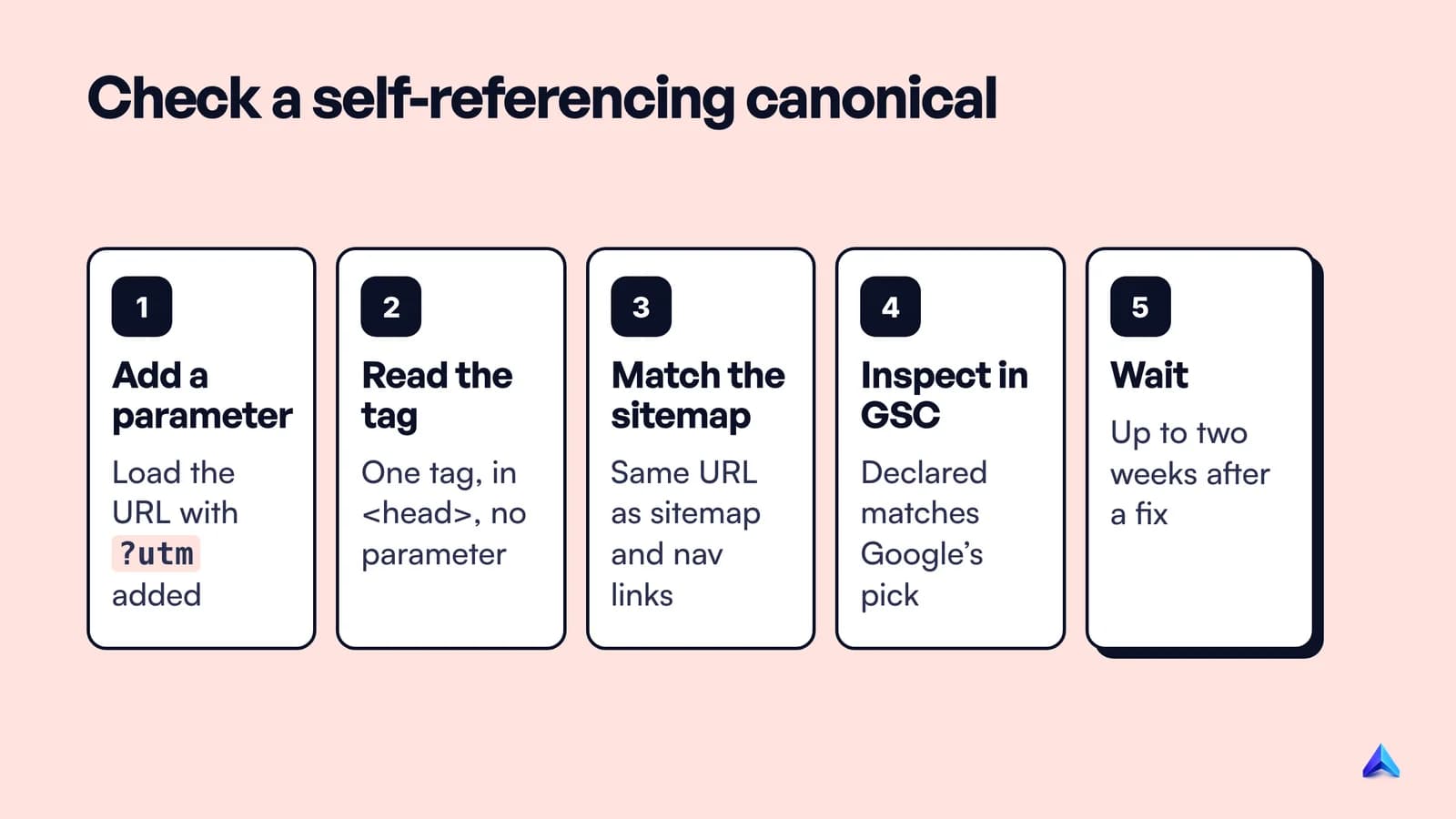
- Request the page with a parameter added. From a terminal:
curl -s "https://www.example.com/guides/winter-boots?utm_source=test" | grep -i canonical. The tag should print the URL without?utm_source=test. - Confirm there is one tag, in the
<head>, with an absolutehttpsURL. View the page source, not the browser inspector, so you see the HTML before scripts run. Then compare it with the rendered version to make sure JavaScript did not change it. - Compare against your sitemap and internal links. The URL in the tag should be the one your sitemap lists and your navigation links to.
- Inspect the URL in Search Console. The URL Inspection tool shows the "User-declared canonical" next to the "Google-selected canonical". If they match, you are done.
- Give it time after a fix. Google's troubleshooting guide says it "might hold pages in a duplicate cluster for up to two weeks" even after you fix the underlying issue.
For a whole site, a crawler that reports canonical URLs per page does the first three steps at scale. Make it part of the recurring technical SEO audit so a template change cannot quietly reintroduce the echo.
What Search Console tells you about canonicals
The Page indexing report sorts canonical outcomes into a few statuses, and most of them are not errors. Google's own help page says that having a page marked duplicate or alternate "is usually a good thing", because it means Google found and indexed the canonical.
Three statuses relate directly to this topic:
- Duplicate, Google chose different canonical than user. You declared a canonical, and Google preferred another URL. Compare the two in URL Inspection. If the page truly differs from the one Google chose, make the difference clearer.
- Duplicate without user-selected canonical. Google decided the page duplicates another, and you had not declared a preference. A correct self-referencing canonical on the preferred page, plus a canonical to it from the duplicates, is the usual response if Google's choice is wrong.
- Alternate page with proper canonical tag. A page correctly points to an indexed canonical, and Google says there is nothing you need to do.
Each of the last two gets its own guide soon. If pages are missing for a different reason, the crawled but not indexed fix covers the quality side, and our Google Search Console guide walks through the reports in general.
Frequently asked questions
Is a self-referencing canonical tag required?
No. Google says none of its canonicalization methods are required and most sites will do fine without them. It still lists a self-referential canonical as a best practice, because it costs one line of HTML and stops tracking or parameter URLs from becoming the version Google indexes.
Do self-referencing canonicals improve rankings?
Not directly. The tag does not add ranking value on its own. It helps Google consolidate signals such as links onto one preferred URL and keeps that URL as the version evaluated for content and quality. Think of it as protection against splitting, not as a boost.
Should paginated pages canonicalize to page 1?
No. Google says not to use the first page of a paginated sequence as the canonical, and to give each page its own canonical URL instead. Page 2 of a category lists different products from page 1, so pointing it at page 1 can keep those items from being found.
Can I use a relative URL in a canonical tag?
Google supports relative URLs, but recommends absolute ones. A relative canonical such as /shoes/ resolves against whatever host serves the page, so a crawled staging or test copy of your site would declare itself canonical. Use the full https:// address of your preferred host.
Does Bing use canonical tags too?
Yes. Bing's webmaster guidelines tell site owners to use canonical URLs, parameter controls and consistent URL structures to consolidate signals. Bing also warns that canonical tags signal a preference but do not replace fixing the duplication itself.
How long does Google take to respect a canonical change?
There is no fixed time. Google has to recrawl the affected pages, and its troubleshooting guide says pages can stay in a duplicate cluster for up to two weeks after the underlying issue is fixed. Check the result in Search Console's URL Inspection tool rather than in live rankings.