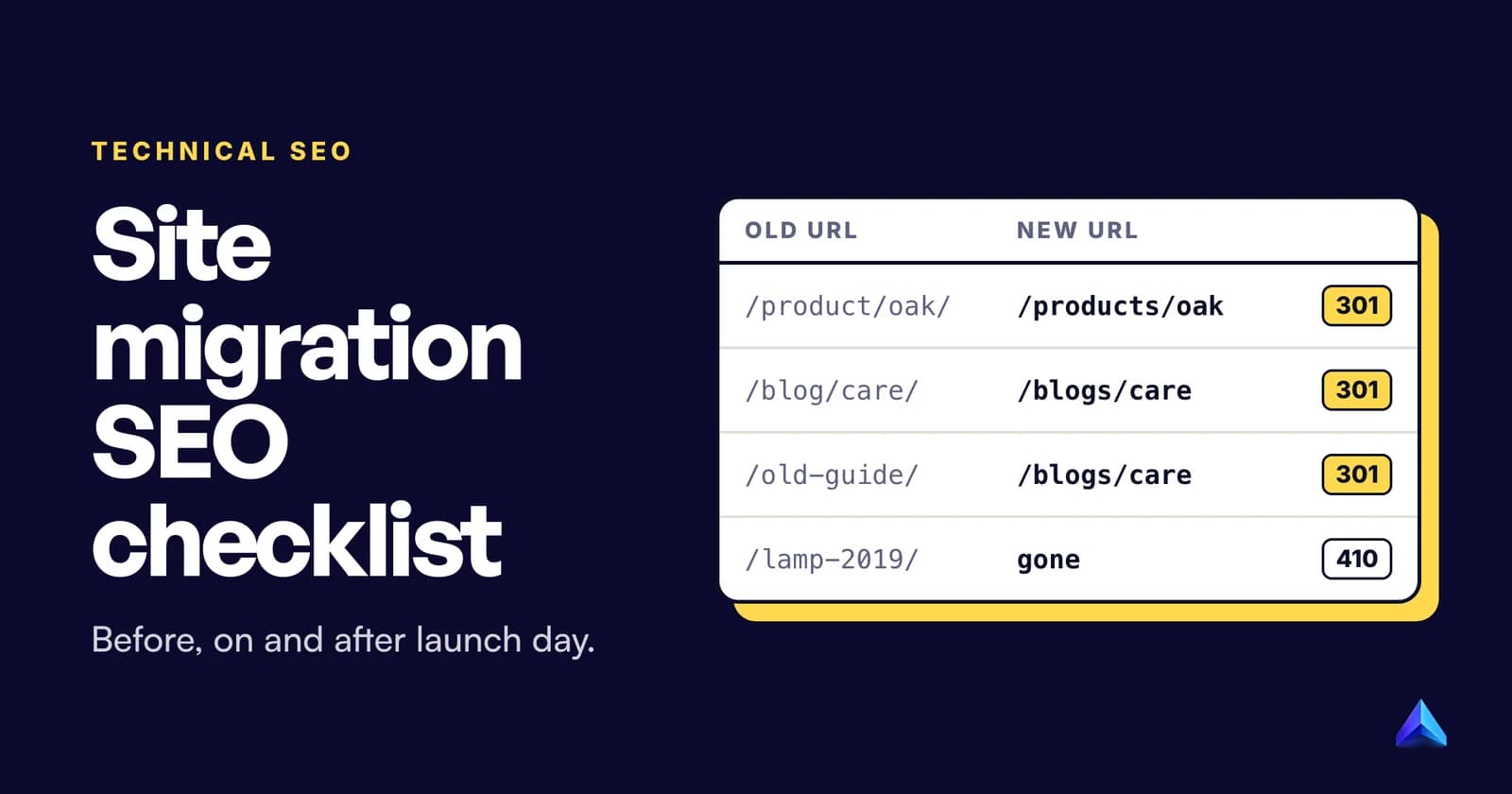
A site migration SEO checklist has three parts. Before launch, you crawl every old URL, record your traffic baseline and build a redirect map. On launch day, you switch on permanent 301 redirects, unblock the new site, and submit a new sitemap. After launch, you watch Search Console for errors and keep the redirects for at least a year.
Order matters more than length. Most traffic lost in a migration comes from a few mistakes: a staging noindex that went live, redirects to pages that do not exist, or everything sent to the homepage. This guide answers the questions in the order they come up, quotes Google where it settles an argument, and ends with a checklist and redirect map template you can copy.
Which kind of site migration are you doing?
The answer decides which half of the checklist applies to you. Google splits migrations into two families. Its guide to site moves with URL changes covers HTTP to HTTPS, domain changes (including merging several domains or hostnames into one) and changes to URL paths. A separate guide covers changing your hosting, where the server or CDN changes but every visible URL stays the same.
In practice, you will be doing one of six things:
- Domain change. A UK shop moving from
brand.co.uktobrand.com, or a rebrand to a new name entirely. - HTTP to HTTPS. Every URL gains one letter. Our guide to HTTPS and SEO covers the parts specific to certificates and mixed content.
- Platform or CMS change. WordPress to Webflow, WooCommerce to Shopify, a custom build to a headless CMS. URLs usually change because each platform has its own patterns, such as the fixed
/products/and/collections/paths on Shopify. - URL restructure. Same domain and platform, new folders or slugs. Changing slugs is often the least necessary migration of all; our view on URL slugs is to write them once and leave them.
- Merging sites. Folding a second brand, a regional site or an old blog subdomain into the main domain.
- Hosting or CDN change. New servers, same URLs.
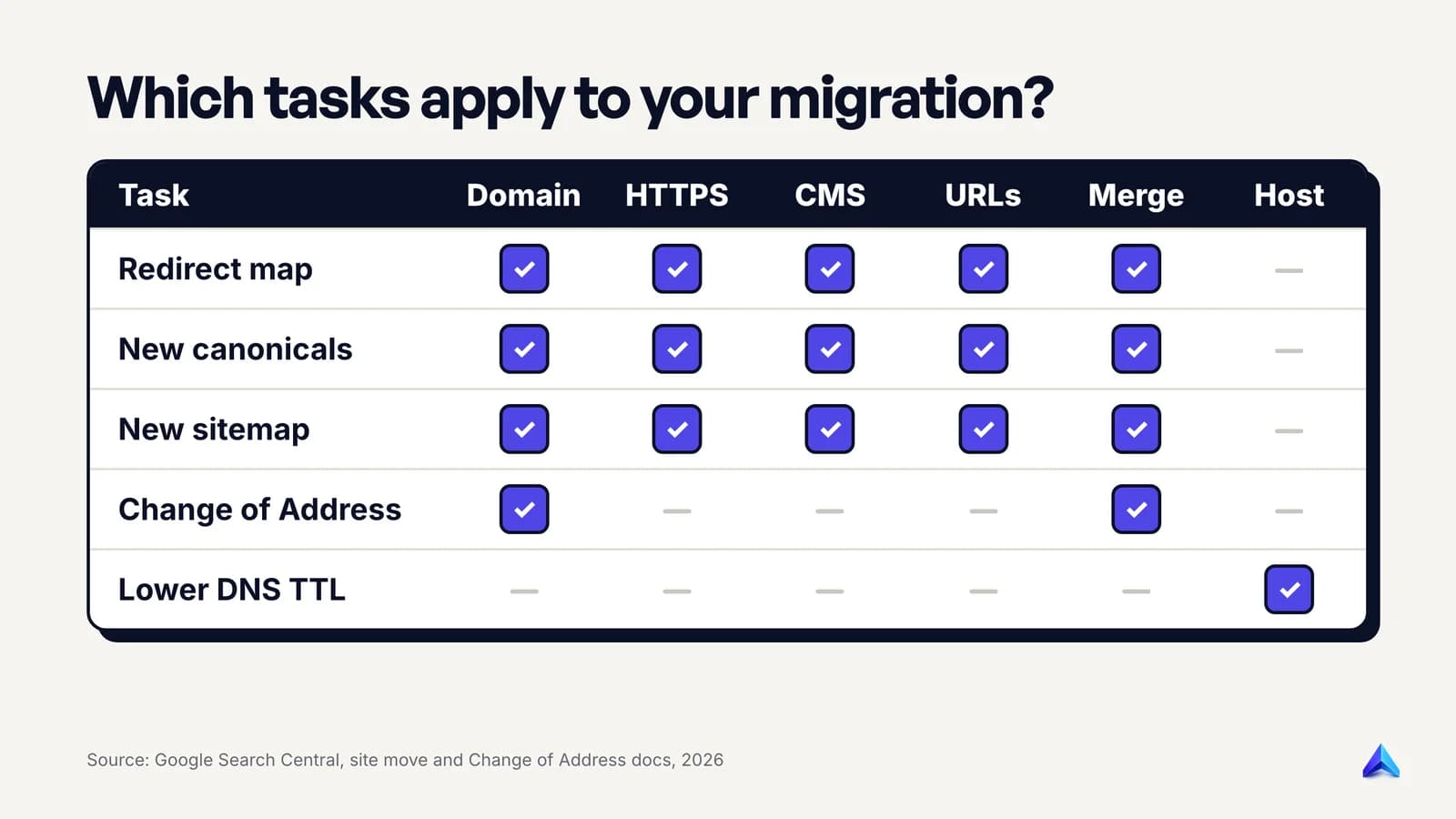
The hosting move is the odd one out. With no URL changes, there is nothing to redirect. Google's hosting guide instead asks you to lower your DNS records' TTL "at least a week in advance of the move", test the new servers on a temporary hostname such as beta.example.com with noindex on it, and make sure your firewall or DoS protection does not block Googlebot. It also warns that crawl rate often dips right after launch and then climbs over the following days. You shut the old hosting down only once its traffic reaches zero. Everything else in this guide is about the five migrations that change URLs.
Will a site migration hurt your rankings?
Expect a wobble, not a collapse. Google's guide says that for medium-sized websites "it can take a few weeks or more for Google to gradually start showing the new URLs instead of the old ones", and longer for large sites. Rankings fluctuate during that window while Google recrawls.
What you do not lose is link value through the redirect itself. The guide is direct: "301 and other permanent redirects don't cause a loss in PageRank." The losses people blame on "migrations" are nearly always self-inflicted: missing redirects, redirects to the wrong place, blocked crawling, or content that changed at the same time as the URLs.
That last cause is the one to plan around. Google recommends changing one thing at a time: if you want a new domain, a new CMS and a new design, do them one after the other. Its Change of Address help page is blunter. Combining a domain move with a redesign of the site's content and URL structure means "you will probably see some traffic loss" while Google relearns each page. If your agency wants to ship a rebrand, a replatform and new URLs in one weekend, push back. When traffic drops, you will have no way to tell which change caused it.
Timing helps too. Launch in your quietest week, so fewer visitors meet any early breakage.
What should you do before the migration?
Most of the work happens here, weeks before anyone touches DNS or redirects. Skipping this phase is how a quick launch turns into a long recovery.
Build a complete inventory of old URLs
You cannot redirect a URL you do not know exists. Pull URLs from every source you have and merge them:
- Your XML sitemaps.
- A full crawl of the live site with a crawler such as Screaming Frog or Sitebulb.
- Search Console's Performance report (Pages tab, longest date range) and the Links report, which shows pages with external links.
- Your analytics landing pages over a full year, so seasonal pages are not missed.
- Server logs, which catch old URLs that still get hits but are no longer linked anywhere.
- Your CMS's own export of posts, pages, products and categories.
Google's guide adds a step many teams forget: include images, videos, PDFs, JavaScript and CSS files. A product PDF that earns links needs a redirect as much as a product page does.
Record your benchmarks
Export the numbers you will compare against after launch: clicks and impressions per page from Search Console, organic sessions and conversions per landing page from GA4, the indexed page count, and positions for your most valuable queries. Save them as files, so the before-and-after comparison later is one spreadsheet, not a scramble through date filters.
Prepare the new site without letting it be indexed
Keep the staging site out of Google with password protection or IP restrictions. A noindex tag works too, but forgotten noindex and robots.txt blocks top Google's own list of common migration mistakes, so if you use one, write down every place it is set. Google's guide says the same thing about robots.txt: if you block all crawling during development, prepare the robots.txt file the live site will need before you start.
Then check the less obvious items Google lists:
- Search Console verification. Verify all variants of the old and new sites (www and non-www, HTTP and HTTPS). If you verify with an HTML file or a meta tag, copy it into the new site, or you lose access to data mid-move.
- Disavow file. If you uploaded one for the old site, Google recommends re-uploading it in the new site's property.
- A domain you bought. Check the new domain's property for a manual action from a previous owner and for leftover URL removals, especially a site-wide one.
- Server capacity. Google says it "will temporarily crawl your new site more heavily than usual" after a migration. If you are on a small shared plan, warn your host.
- Deleted content. Pages you are not moving should return a 404 or 410 on the new site, not a 200 with an error message.
How do you build a redirect map?
A redirect map is a spreadsheet with one row per old URL and the single new URL it should go to. It is the most important migration document, and the one most often half-finished.
For a pure domain change with identical paths, you may not need a row-by-row map at all. Google notes that a wildcard server-side redirect can move example.com/anything to example.net/anything in one rule. Every other migration type needs a real map.
A redirect map template
Copy this into a spreadsheet or a CSV file. The example rows are a UK homeware shop moving from WooCommerce on brand.co.uk to Shopify on brand.com.
old_url,new_url,status,match_type,clicks_12m,ref_domains,owner,tested
https://brand.co.uk/,https://brand.com/,301,one-to-one,8420,61,Priya,yes
https://brand.co.uk/product/oak-shelf/,https://brand.com/products/oak-shelf,301,one-to-one,1310,4,Priya,yes
https://brand.co.uk/product-category/shelves/,https://brand.com/collections/shelves,301,one-to-one,960,2,Priya,yes
https://brand.co.uk/blog/oil-oak-furniture/,https://brand.com/blogs/journal/oil-oak-furniture,301,one-to-one,540,7,Tom,no
https://brand.co.uk/blog/oak-care-2019/,https://brand.com/blogs/journal/oil-oak-furniture,301,merged,85,1,Tom,no
https://brand.co.uk/product/discontinued-lamp/,,410,removed,12,0,Priya,no
https://brand.co.uk/wp-content/uploads/care-guide.pdf,https://brand.com/pages/care-guide,301,one-to-one,210,3,Tom,no
What each column is for:
- old_url / new_url. Full absolute URLs, trailing slash exactly as the old site served it.
- status. 301 for anything that moved, 404 or 410 for anything you are deliberately removing. Google treats 301 and 308 as permanent; 302, 303 and 307 are temporary and tell Google to keep the old URL. Our explainer on what a redirect is covers each status code.
- match_type. one-to-one, merged (several old pages into one) or removed. This makes the risky rows easy to filter.
- clicks_12m, ref_domains, owner, tested. Sort by clicks and links to test the top rows by hand, and record who signed off each row.
Large sites can replace thousands of rows with pattern rules, such as every /product/{slug}/ going to /products/{slug}. Keep the exceptions in the spreadsheet and test a sample of every rule.
Where should each old URL point?
Point each old URL at the closest equivalent page. When nothing equivalent exists, let it go.
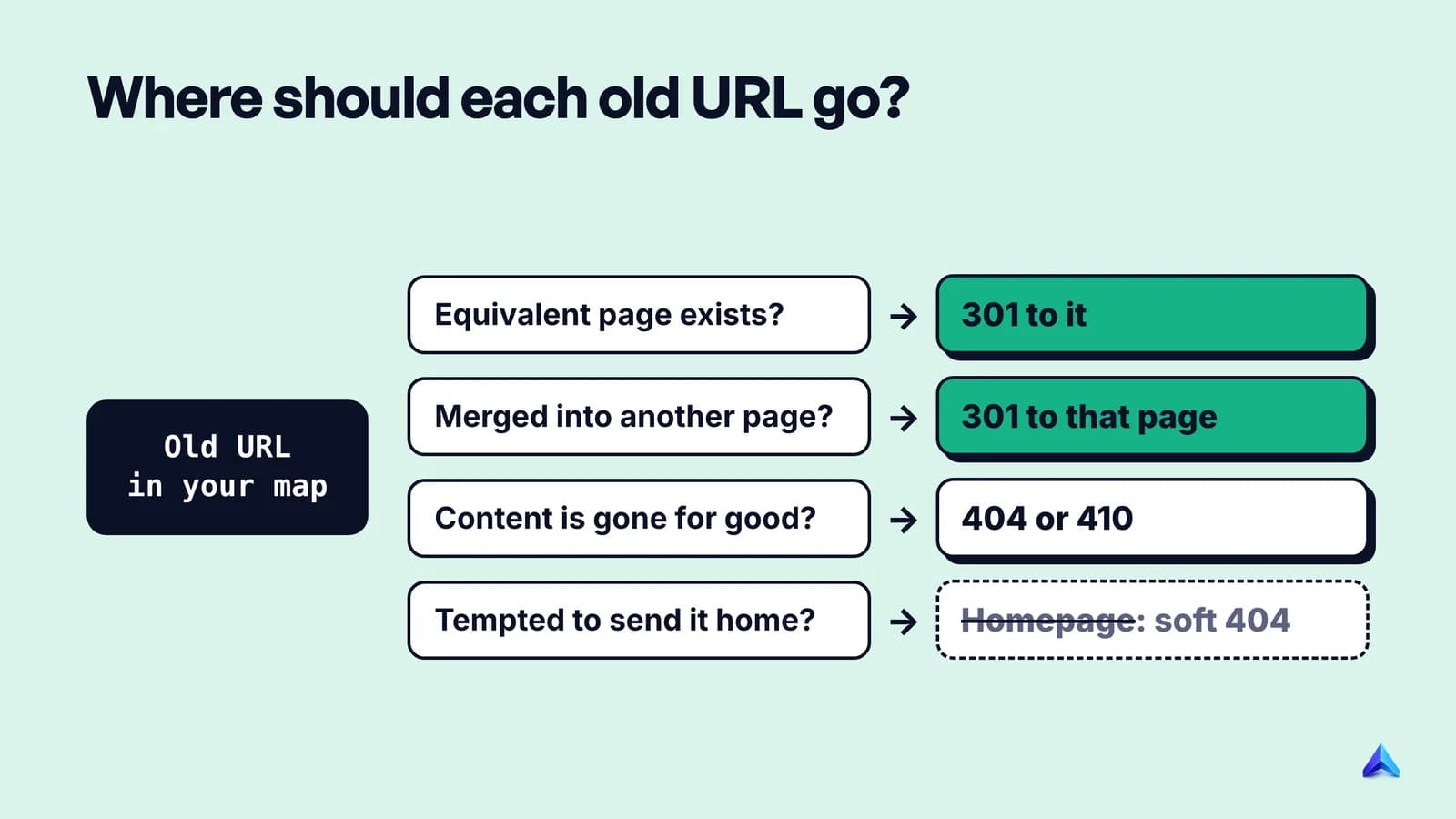
The tempting shortcut is to send every leftover URL to the homepage. Don't. John Mueller of Google said on record that "the 301 redirect from all pages to the home page, that would be something that we see as a soft 404s", as Search Engine Roundtable reported. A soft 404 passes nothing and frustrates every visitor. A 404 or 410 is the honest answer for content that is gone. Our guide to 404 errors explains why a handful of them is normal and harmless.
Two more rules. Redirect straight to the final URL, never through a chain: Google can follow up to 10 hops but advises keeping chains "ideally no more than 3 and fewer than 5", and a site that has migrated twice before often has old chains to collapse. And use server-side redirects where you can. Google's redirects documentation ranks redirect methods by how reliably Google interprets them, with server-side redirects first and JavaScript or meta refresh only as fallbacks.
What happens on launch day, and in what order?
Launch day should be boring, because you rehearsed it on staging.
- Turn on the redirects. Push the server rules or import the redirect map into your CMS or platform redirect manager.
- Remove every block. Take off the staging password, delete
noindextags and headers, and replace the development robots.txt with the production one. Fetch/robots.txton the live domain and read it yourself. - Check canonicals. Every new URL should carry a self-referencing canonical that uses the new domain and protocol. A template still pointing canonicals at the old domain is a common replatforming bug. Hreflang annotations need the same update. Our guide to self-referencing canonicals covers the tag.
- Test the redirects in bulk. Run your old URL list through a crawler in list mode. Every row should return one hop to a URL that answers 200. Use URL Inspection in Search Console to spot-check key pages as Googlebot sees them.
- Submit the new XML sitemap in the new property. Keep a copy of the old sitemap too; it becomes a monitoring tool.
- Use Change of Address if, and only if, the domain changed. See the next section.
- Update the links you control. Internal links in menus, footers and body copy should point straight at new URLs. Then update social profile links and ad campaign landing pages, which Google's guide also lists.
Do you need Google's Change of Address tool?
Only if you moved from one domain or subdomain to another. Google's guide says you do not need it "for HTTP to HTTPS moves, switching between www and non-www on the same domain, or moving paths within the same domain". The Change of Address help page adds hosting changes with no visible URL change to that list. Google works those out on its own.
For a real domain move, the tool has strict requirements that trip people up:
- You must be an owner of both the old and new properties, using the same Google account.
- It works only on domain-level properties such as
example.com, not on a path likeexample.com/shop/. - It does not move subdomains, including
www. Run it for every variant of the old domain (example.com,www.example.com, any regional subdomain), even ones you do not use. - It moves all protocols, so submitting the HTTP version covers HTTPS as well.
- Before it accepts the request, it checks that you own both sites and that a few pages return 301s. Set up redirects first.
You can move a whole domain into a folder on another domain (for example, example.com to example3.com/new/location/). That is useful when merging a regional site into a main one.
Two warnings from the help page matter for merges and rebrands. Do not chain moves: after moving site A to B, you cannot immediately move B to C. And moving several sites into one location at once "can cause some confusion and traffic loss", so Google suggests moving them one at a time and waiting for traffic to settle between each.
What should you check in the weeks after launch?
Check daily for the first week, then weekly until traffic settles. Google's guide says the move happens on a per-URL basis and is only complete once Googlebot has visited every old and new URL at least once.
Sitemaps. Google suggests submitting both the old-URL sitemap and the new one. At first the new sitemap shows almost nothing indexed and the old one shows a lot. Over the following weeks the numbers should cross. Search Console will warn that the old sitemap's URLs redirect; Google says this is normal and you can ignore it.
Page indexing report. Watch the new property for spikes in Not found (404), Soft 404, Redirect error, and Excluded by noindex. If redirect errors appear, our guide to fixing a redirect error works through the causes in order.
Your 404 log. Server logs and your crawler show every old URL that missed the map. Google says it "frequently" sees redirects pointing at wrong, non-existent URLs on the new site. Add a row to the map for each real miss, and ignore junk URLs that never had value.
Redirect chains and loops. Recrawl the old URL list after every batch of fixes, because later one-off redirects stack on existing rules.
Indexing of the pages that matter. Inspect your most valuable pages one by one. Our guide on how to check if a page is indexed covers URL Inspection, the Page indexing report and the API for larger lists.
Traffic against your benchmarks. Compare page by page, not just the sitewide total. A flat total can hide a category that lost half its clicks while the blog grew. If you track pages in Project Rankup, its Rank Tracker reads per-page clicks and positions from Search Console, which makes that comparison quicker; any analytics export works too.
Seeing some old URLs in results after a domain move is normal. Google's redirects documentation says it is "very likely" to show them occasionally as alternate names, and that they fade on their own.
How long should you keep redirects and the old domain?
Keep the redirects for at least a year, and ideally forever. Google's site move guide is explicit:
"Keep the redirects for as long as possible, generally at least 1 year. This timeframe allows Google to transfer all signals to the new URLs, including recrawling and reassigning links on other sites that point to your old URLs."
For users, it adds, "consider keeping redirects indefinitely". Old links in emails, PDFs and forum posts keep sending people to old URLs for years.
There is a second number, and it causes confusion. The Change of Address help page says to "maintain the redirects for at least 180 days", longer if Google Search still sends traffic to them. That is the minimum for the tool's signal forwarding, not a target. After 180 days, Google "does not recognize any relationship between the old and new sites". If the redirects come down at that point, the old domain becomes an unrelated site and every old backlink stops counting toward your new one.
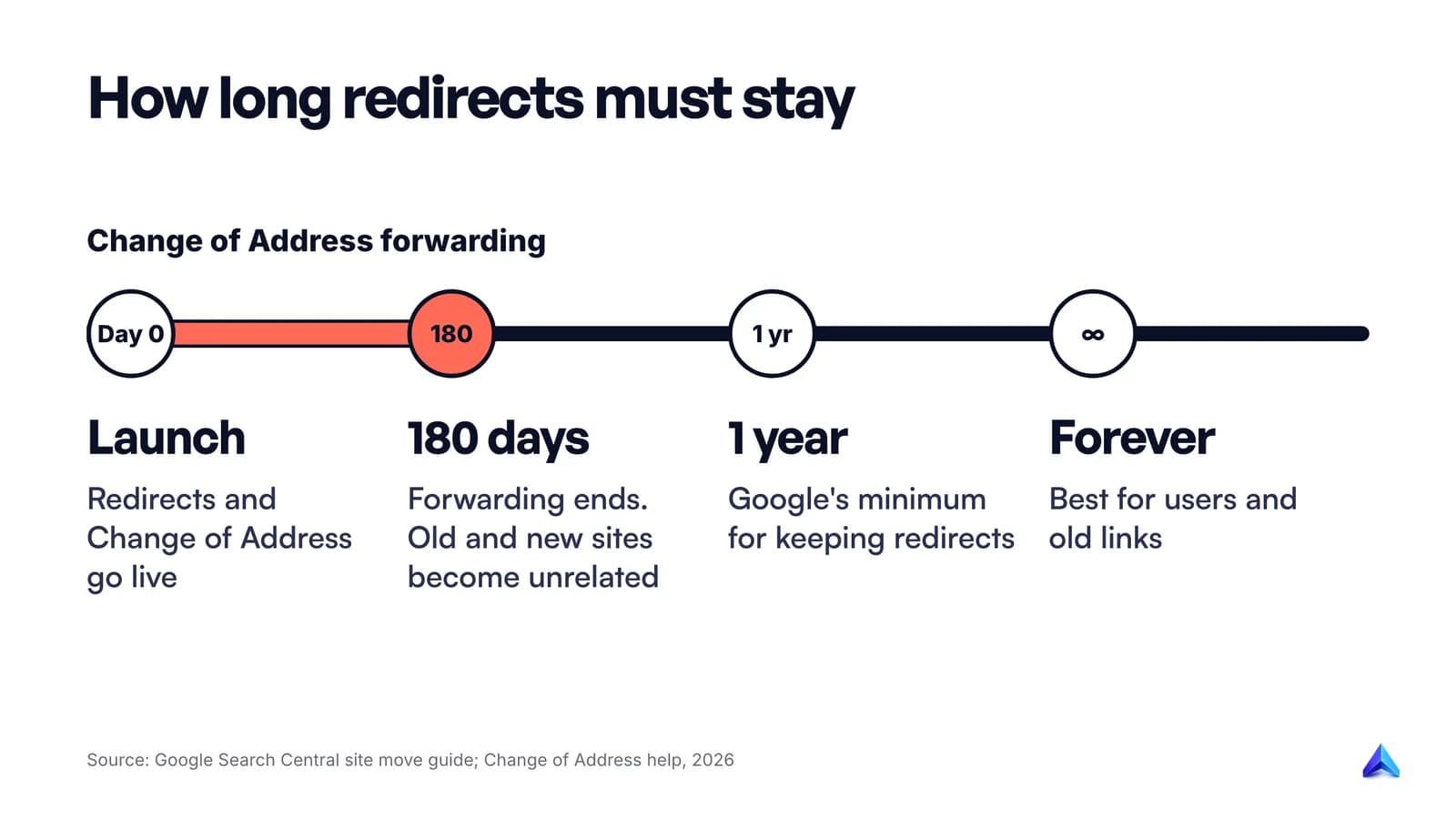
The same page recommends paying for the old domain "for at least a year" so nobody buys it and uses it for spam. In our view, a domain that earned links should simply never lapse. Renewing brand.co.uk costs little next to the risk of someone else owning the redirects to your site.
The copy-paste site migration checklist
Paste this into your project tracker. Items marked with a type in brackets apply only to that kind of move.
## Before launch
- [ ] Decide the migration type; change one thing at a time where possible
- [ ] Pick a launch date in a low-traffic period
- [ ] Merge an old URL list: sitemaps, crawl, Search Console, analytics, logs, CMS export
- [ ] Include images, PDFs, videos, JS and CSS in the inventory
- [ ] Export benchmarks: clicks, impressions, sessions, conversions, indexed pages
- [ ] Build the redirect map (one row per old URL, 301 or 404/410)
- [ ] No homepage redirects for URLs without an equivalent page
- [ ] Block staging with a password or IP allowlist; list every noindex
- [ ] Prepare the production robots.txt
- [ ] Verify every old and new variant in Search Console; copy verification files
- [ ] Re-upload the disavow file to the new property, if you had one
- [ ] (New domain) Check for manual actions and leftover URL removals
- [ ] Warn your host about the post-launch crawl increase
- [ ] (Hosting only) Lower DNS TTL at least a week before; test on a temporary hostname

## Launch day
- [ ] Turn on server-side 301 redirects
- [ ] Remove staging password, noindex and development robots.txt
- [ ] Self-referencing canonicals and hreflang use new URLs
- [ ] Crawl the old URL list: one hop each, every target returns 200
- [ ] Submit the new XML sitemap; keep the old one for monitoring
- [ ] (Domain change) Run Change of Address for every old domain variant
- [ ] Update internal links, social profiles and ad landing pages

## After launch
- [ ] Daily for week one: Page indexing errors, 404 log, redirect errors
- [ ] Watch old and new sitemaps' indexed counts cross over
- [ ] Fix chains and missed URLs after every batch of changes
- [ ] Inspect top pages individually in URL Inspection
- [ ] Compare traffic to benchmarks page by page
- [ ] Ask high-value linking sites to update their links
- [ ] Keep redirects at least 1 year (ideally forever)
- [ ] Keep renewing the old domain
常见问题
Should I use 301 or 302 redirects for a site migration?
Use 301 or 308. Both are permanent, and Google uses them as a signal that the new URL should be the canonical one shown in results. A 302 or 307 is temporary, so Google keeps showing the old URL. Use temporary redirects only when the old URL is genuinely coming back.
How long does a site migration take to recover in Google?
Google says medium-sized sites usually take a few weeks or more before the new URLs replace the old ones in results, and larger sites take longer. Speed depends on the number of URLs and how fast your server responds. If traffic stays well below your baseline long after the new URLs are indexed, look for a missed redirect or indexing block.
Does changing web hosting affect SEO?
Not if the URLs stay the same and the new server is fast and reachable. Google treats it as a move without URL changes: no redirects and no Change of Address. Expect Googlebot's crawl rate to dip briefly after the DNS switch and then recover, and keep the old host running until its traffic falls to zero.
Can I migrate a large site in sections?
Yes. Google suggests large sites can move one section at a time, which makes problems easier to spot and fix. For small and medium sites it recommends moving every URL at once, because that helps its systems detect the move and update the index faster.
Do I lose backlinks when I change domain?
Not if every linked URL has a permanent redirect to its equivalent new page. Google says permanent redirects do not lose PageRank. Use Search Console's Links report to find your most-linked pages, check that each one redirects correctly, and ask the sites that send you the most visits to update their links.