A 404 error means the website you reached is working, but the specific page you asked for is not there. The server answered your request with the HTTP status code 404 Not Found. Usually the link is wrong, the page was moved, or it was deleted. It is not a virus, it is not a problem with your internet connection, and unless you typed the address yourself, it is rarely your fault.
The rest of this guide covers what the code actually is, what to try as a visitor, and, if the broken page is on your own website, which 404s matter for Google and which you can ignore.
What does "404 Not Found" actually mean?
Every time your browser opens a page, it sends a short request to a server and gets a response back. The first line of that response carries a three-digit status code. A 200 means "here is the page". A 404 means "I looked, and I have nothing at this address".
The official definition lives in RFC 9110, the HTTP standard published by the IETF in June 2022. It says a 404 tells you the server "did not find a current representation for the target resource or is not willing to disclose that one exists." Two details in that sentence matter later. A 404 can be a polite refusal as well as a genuine absence. And the standard adds that a 404 says nothing about whether the page is gone for good or only for now.
So the error is narrow. The domain exists and the server is up; only the path after the domain failed.
A worked example
Say a shop in Manchester renames its winter range and the old URL example.co.uk/coats-2025 stops existing. Someone clicks an old link to it from a newsletter. Behind the scenes, the exchange looks like this:
GET /coats-2025 HTTP/1.1
Host: example.co.uk

HTTP/1.1 404 Not Found
Content-Type: text/html; charset=UTF-8

<!doctype html>
<title>Sorry, we can't find that page</title>
...
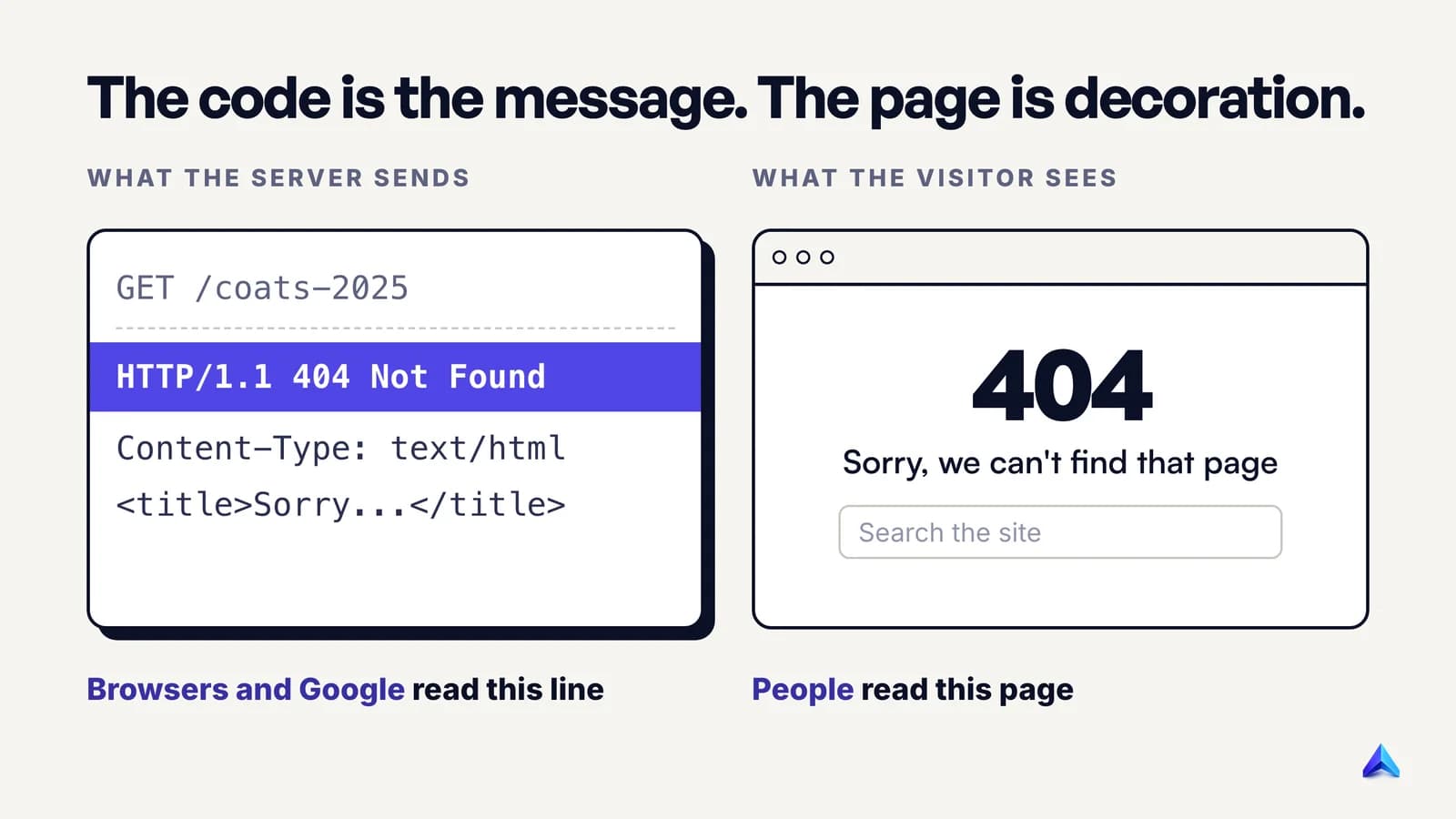
The visitor never sees the top half. They see the HTML at the bottom, which can say anything: "Page not found", a joke, a search box. The status code is the real message; the page is decoration on top of it.
That split explains a common trap for site owners. A page can say "404" in big letters while the server quietly sends a 200 status, telling browsers and Google that everything is fine. Google's own team put it plainly in a 2011 post on 404 errors: a page that says "404 Not Found" is not necessarily returning a 404 response code. We come back to that below.
Why is it called 404?
The number is not a code name or a room number. It is the error's position in a numbering system. HTTP status codes are grouped by their first digit:
- 2xx means success.
- 3xx means the page lives somewhere else (a redirect).
- 4xx means the problem is on the request side: a wrong address, missing permissions, a bad request.
- 5xx means the server itself failed.
Within the 4xx group, 400 is a bad request, 401 means you need to log in, 403 means forbidden, and 404 means not found. The code dates from the web's earliest years. An early W3C list of HTTP status codes, dated 1992, already describes "Not found 404" as the case where "the server has not found anything matching the URI given."
It became famous for a simple reason: it is the error ordinary people actually see. Most status codes are handled silently by the browser. A 404 is the one that lands on screen, on every kind of site, often with the number printed in huge type. Plenty of sites dress their error page up with jokes and illustrations, which only makes the number more recognisable.
What causes a 404 error?
Nearly every 404 traces back to one of a handful of causes:
- The URL was typed or copied wrong. A missing letter, an extra character, a stray full stop at the end of a pasted link. On many servers, paths are case-sensitive, so
/Aboutand/aboutcan be two different addresses. - The page moved without a redirect. A site changed its URL structure, renamed a product or moved its blog to a new folder, and nobody pointed the old address to the new one.
- The page was deleted. The product was discontinued, the event ended, the article was taken down.
- A link somewhere else is broken. Another website, an old email or a social post links to an address that never existed or has since changed.
- Something on the server is misconfigured. A broken rewrite rule or a deployment that left a folder out, most often after a botched migration.
MDN's reference page for the 404 status names the same two leaders: mistyped URLs, and pages that are moved or deleted without redirection. It also notes that links leading to a 404 are often called broken or dead links.
How common is this? More common than most people assume. Pew Research Center studied link rot across the web in 2024 and found that 38% of webpages that existed in 2013 were no longer available, compared with 8% of pages from 2023. Pew counted a page as gone only when it returned one of a short list of definite error codes, and it says the typical visitor would see a variation of "404 Not Found".
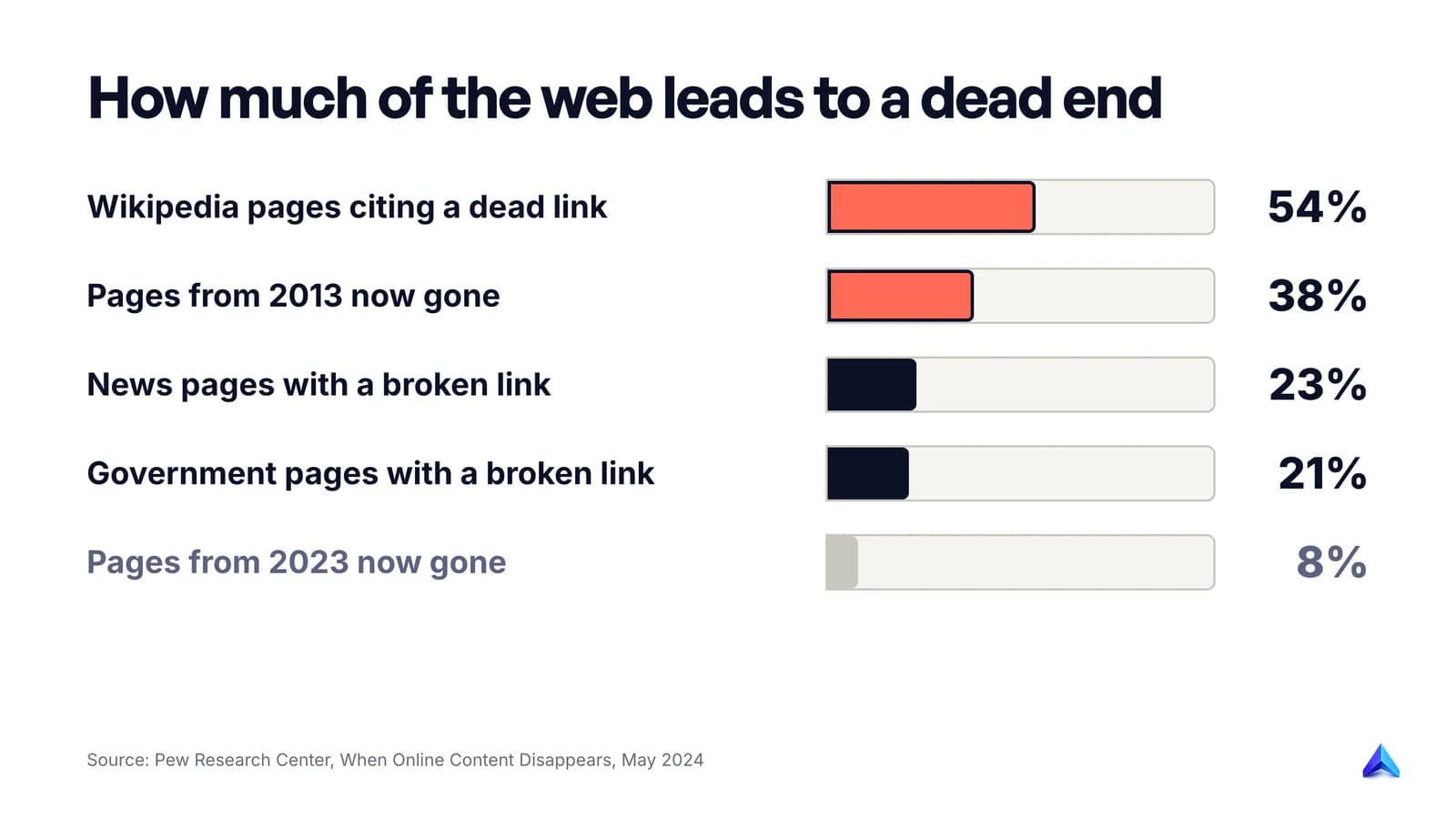
Live pages are full of dead links too: 23% of news webpages and 21% of government webpages contained at least one broken link, and 54% of Wikipedia pages had at least one link in their References section pointing to a page that no longer exists.
Does a 404 error mean you were blocked?
Usually not. A block has its own code, 403 Forbidden, which means the server understood exactly what you asked for and refuses to hand it over. A 404 normally means there is nothing at that address to give.
There is one real exception, and it is written into the standard. RFC 9110 lets a server that wants to "hide" a forbidden resource answer with 404 instead of 403. The logic is privacy: a 403 confirms the thing exists, and sometimes that alone leaks information.
GitHub is the best-known example. Its REST API documentation explains that it returns 404 Not Found instead of 403 Forbidden for private repositories, so that it never confirms a private repository exists to someone without access. So if you get a 404 on a link a colleague swears works for them, check that you are logged in to the right account before assuming the page is gone.
What a 404 does not mean: that your IP address is banned, that your device is infected, or that your connection failed. A dropped connection or a site that is completely down shows a browser error such as "This site can't be reached" instead, because no server answered at all.
How to fix a 404 error when you are the visitor
You cannot change someone else's server, but you can often find the page you wanted. Try these in order; the first three solve most cases.
- Reload once. Rarely, a 404 comes from a half-finished deployment or a caching glitch. The standard allows 404 responses to be cached, so a hard refresh (Ctrl+F5 on Windows, Cmd+Shift+R on a Mac) is worth one try.
- Check the address bar. Look for typos, doubled slashes, a trailing full stop or bracket picked up when the link was copied, and capital letters where the rest of the site uses lowercase.
- Trim the URL back. Remove the last part of the path and load what is left.
example.in/blog/2024/gst-guidebecomesexample.in/blog/2024/, thenexample.in/blog/. You often land on an index page that lists the item under its new address. - Use the site's own search or menu. Search for the product name or article title rather than the old URL.
- Search the web for the page title. A search engine has often already found the page at its new home. Adding
site:example.comto the search keeps results to that one website. - Check an archived copy. The Internet Archive's Wayback Machine stores snapshots of many public pages. Paste the dead URL in and you may find the content as it was, even if the site has deleted it.
- Tell the site owner. If the broken link sits on their own website, a short message with the URL helps them fix it for everyone.
Clearing all your cookies is a common suggestion, but it logs you out of everything and almost never fixes a genuine 404.
404 vs other errors you might see
Several errors look alike on screen. The first digit tells you which side has the problem.
| Error | What it means | Whose problem it usually is |
|---|---|---|
| 400 Bad Request | The request itself was malformed | The link or the app that built it |
| 401 Unauthorized | You need to log in first | You: sign in |
| 403 Forbidden | The server refuses to show this to you | Permissions, region or a security rule |
| 404 Not Found | Nothing exists at this address (or it is hidden) | The link, or the site that moved the page |
| 410 Gone | The page was removed on purpose and will not return | Nobody: it is deliberate |
| 500 Internal Server Error | The server crashed while handling the request | The website |
| 503 Service Unavailable | The server is overloaded or down for maintenance | The website, usually temporary |
| "This site can't be reached" | No server answered at all | DNS, the connection, or a site that is offline |
The 410 row is the close cousin of 404. The standard says 410 is preferred when the owner knows the removal is permanent, and 404 is the right answer when they do not know. The practical difference for search engines is small; a separate guide on 410 versus 404 will cover it in depth.
Do 404 errors hurt SEO?
This is where the second kind of reader comes in: you run a website and Search Console has started listing 404 errors. Short answer: 404s on pages that should not exist do no harm. 404s on pages you care about cost you exactly those pages.
Google has been consistent on the first part for well over a decade. Its 2011 post calls 404 errors "a perfectly normal part of the web" and says that some URLs returning 404 does not affect how a site's other URLs perform in search. There is no sitewide penalty for having them.
The cost is local, and Google's current documentation on how HTTP status codes affect its crawlers spells it out:
- Google does not index URLs that return a 4xx code, and URLs already in the index are removed once they start returning one.
- Newly discovered 404 pages are not processed at all.
- The crawling frequency for a 404 URL gradually decreases.
- All 4xx codes except 429 are treated the same, so a 403 or 410 gets the same outcome as a 404.
So if a product page that used to bring in ₹40,000 a month of orders starts returning 404 after a site rebuild, it drops out of Google and its backlinks stop helping. Nothing else on the site is punished, but that page's traffic is gone until you fix it.
The real SEO risk sits in the other direction. A page that shows "not found" but returns a 200 status is what Google calls a soft 404, and its crawling documentation says Search Console will flag pages whose content looks like an error message while returning success. Soft 404s confuse indexing in a way a clean 404 never does. Our planned guide to soft 404s will cover diagnosis; for now, the rule is that a missing page should return a real 404 or 410.
If you want to see whether a particular URL is in Google's index right now, our guide on how to check if a page is indexed walks through the URL Inspection tool and the site: search.
How to find 404 errors on your own site
Start with the data Google already gives you, then check the pages that matter most by hand.
Google Search Console. Open Indexing, then Pages, and look for the reason "Not found (404)". Google's Page indexing help page explains three useful things about that list. Google may have discovered the URLs from links elsewhere, not from your sitemap. Googlebot will keep trying them for a while, crawling less and less often, because there is no way to make it permanently forget a URL. And the report only shows URLs that returned a 404 in the past month, so an old error can drop off the list without ever being fixed. If you are new to the tool, our Google Search Console guide covers the setup.
Check the status code directly. The page text can lie; the response header cannot. From a terminal:
curl -I https://example.com/old-page
The first line of the output shows the real status, for example HTTP/2 404. In Chrome, you can see the same thing in DevTools: open the Network tab, reload, and read the Status column for the page itself.
Crawl your own site. A site crawler follows every internal link and lists the ones that end in 404. Run one after any redesign, migration or URL change, because that is when broken internal links appear in bulk. A technical SEO audit bundles this check with redirects, canonicals and indexing.
Read your server logs. Logs show every 404 that visitors and bots hit. Sort by count. A dead URL requested hundreds of times a week deserves a redirect; one hit by a single scanner bot does not.
Project Rankup's Content Audit Studio checks each URL's status before it analyses a page, and reports a dead URL as broken instead of auditing an error page as if it were content.
Which 404 errors to fix, and how
Not every 404 is a bug. The question to ask about each one is simple: did a real page live here, and is there a real replacement?
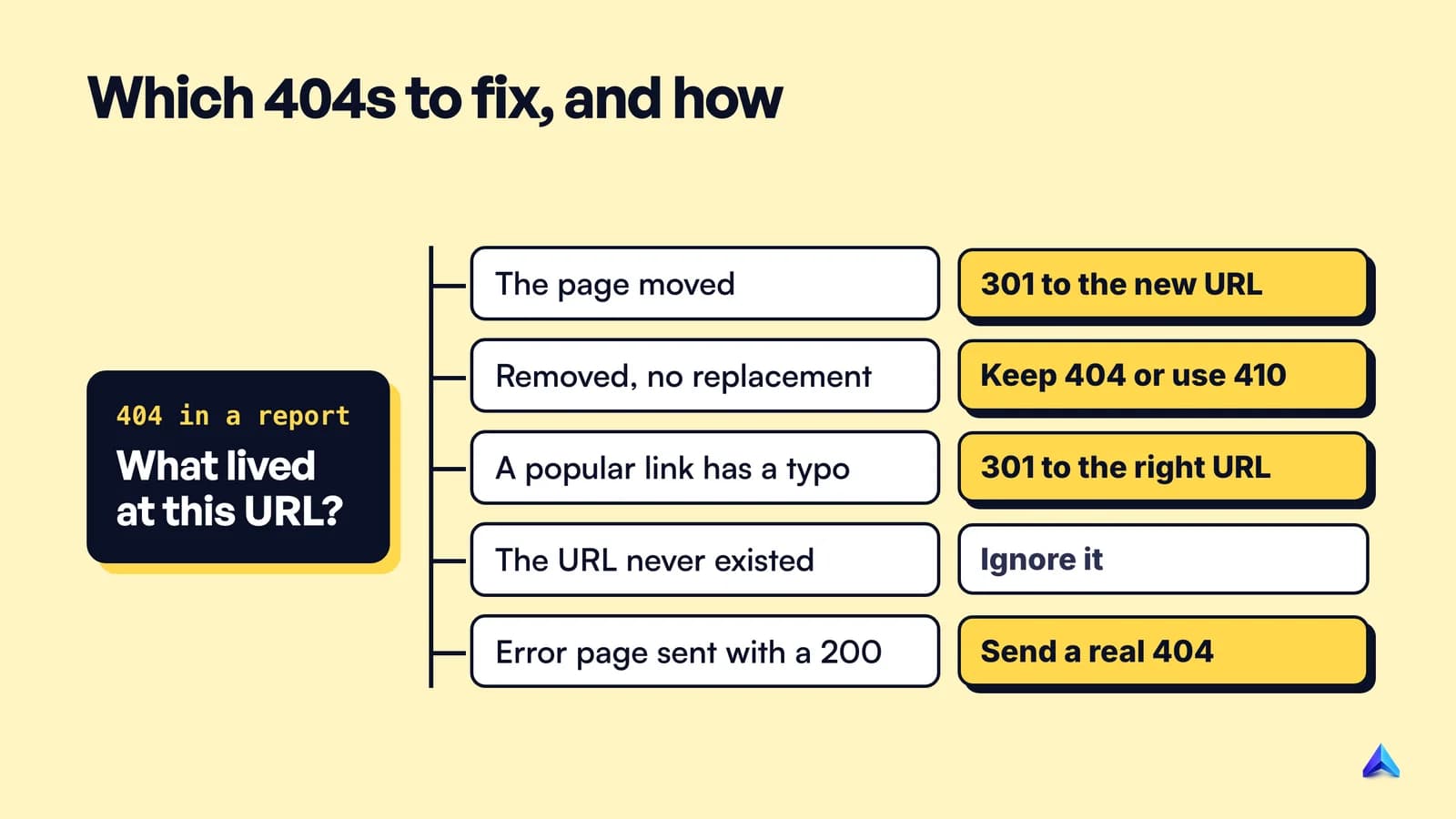
The page moved. Add a 301 (permanent) redirect from the old URL to the new one. Google's Page indexing help says the same thing: if your page has moved, use a 301 redirect to the new location. Point each old URL at its true equivalent, not at your homepage. If redirects start chaining or looping, Search Console reports them differently; our guide to the redirect error covers that case.
The page was deleted and nothing replaces it. Leave the 404, or send a 410 if you want to say the removal is deliberate. Google's 2011 guidance and its current Page indexing help agree that a 404 is not a problem when a page has been removed without a replacement. The URL will drop out of search results on its own over time.
A popular URL was mistyped by someone else. Google's 2011 post recommends a 301 from the misspelled URL to the correct one, so the traffic from that link is captured instead of wasted. This is worth doing only for misspellings that actually get visits.
The URL never existed. Bots probe random paths, scrapers mangle links, and some CMS plugins generate junk URLs. Google says you can safely ignore 404s for URLs that do not exist on your site. Trying to redirect every one of them wastes time and can create soft 404s.
The page says "not found" but returns 200. Fix the server so it sends a real 404 status. A friendly error page is fine; as Google's post puts it, you can return a 404 response code while serving whatever content you want.
Two habits prevent most of these. Pick URLs you will not need to change, which our guide to URL slug best practices covers, and keep a redirect map whenever you restructure a site. A custom 404 page with a search box then catches the visitors who still slip through.
Frequently asked questions
How do I remove 404 error pages from Google?
You usually do not need to do anything. Google removes URLs from its index once they return a 404, and its 2011 guidance says the URL removal tool is not necessary for pages that already return a 404, because they drop out of results naturally over time. Use the Removals tool in Search Console only when something must disappear urgently.
Should I redirect every 404 to my homepage?
No. Redirect a dead URL only when a page with the same purpose exists, and send it to that page. Blanket redirects to the homepage leave visitors on a page that does not answer what they clicked for, and Google lists sending unknown URLs to the homepage as a pattern that can hurt how it understands and indexes your site.
Is a 404 error dangerous or a sign of hacking?
No. A 404 is an ordinary response from a working server, and it cannot harm your device. On your own site, a burst of 404s for odd paths such as /wp-login.php on a site that does not run WordPress usually means bots are scanning for weaknesses. Your server answering 404 to those probes is the correct and safe response.
Can a 404 error be temporary?
Yes. The HTTP standard says a 404 does not indicate whether the absence is temporary or permanent. A page can return 404 for a few minutes during a deployment, while a CMS rebuilds, or because of a caching glitch. If a page you visit often suddenly returns 404, try again later before assuming it has been deleted.
Is "page not found" the same as a 404 error?
Usually, but not always. "Page not found" is the text a site chooses to show; 404 is the status code the server sends. Most sites pair them correctly. Some show "page not found" while sending a 200 status, which search engines treat as a soft 404, and the only way to tell is to check the response code.