URL slug best practices fit in one line: lowercase words, separated by hyphens, in your reader's language, describing the page in a few words, with no dates, IDs or parameters. Get that right when the page is created. Google says keywords in the URL path have hardly any ranking effect, so a slug's real jobs are to be readable and to stay put. Changing an old one is worth a redirect only in a few specific cases.
Most guides treat the slug as a ranking lever, so people go back and "optimise" slugs on pages that were doing fine. Google's documentation points the other way, and moving a URL has a real cost.
What a URL slug is, and what it is for
The slug is the part of a URL that names one specific page, usually the last segment of the path. In https://www.example.co.uk/blog/home-loan-tips, the domain is www.example.co.uk, the folder is /blog/, and the slug is home-loan-tips. Most CMSs generate it from the title of the first draft, which is why so many slugs are a whole headline.
A slug does three practical jobs:
- It tells a person what the page is before they click. That happens in a search result, a WhatsApp preview, a Slack message or a printed brochure.
- It feeds the breadcrumb Google shows in results. Google's SEO Starter Guide says parts of the URL can be displayed in search results as breadcrumbs, and that Google learns those breadcrumbs automatically from the words in the URL.
- It is the page's permanent address. Every internal link, backlink, bookmark and analytics report points at it. That job matters most and gets the least attention.
What Google actually says about slugs
Google publishes a single page on URL structure best practices, last updated in December 2025. It ranks first for this topic and recommends:
- readable words rather than long ID numbers;
- words in your audience's language, including transliterated words;
- percent-encoding for non-ASCII characters in your links;
- hyphens rather than underscores between words;
- as few parameters as possible;
- consistent letter case, because URLs are case sensitive.
Several popular rules are missing from that list. Google's page sets no character limit and says nothing about stop words. It also never calls a keyword in the slug a ranking factor.
On keywords, the Starter Guide is blunt. Under a list of things it says matter less than people think, it states that "the keywords in the name of the domain (or URL path) alone have hardly any effect beyond appearing in breadcrumbs." John Mueller made the same point back in 2016, when he called a keyword in the URL a "very small ranking factor" and said it was not worth restructuring a site to add one.
On length, Mueller answered the question directly in a 2021 Ask Googlebot video. As Search Engine Journal reported, he said URL length doesn't matter because Google uses URLs as identifiers, and that the number of slashes doesn't matter either. The one place he said length plays a role is canonicalization: when Google finds a shorter, clearer URL for the same content, it tends to pick that one to show. He was explicit that this "does not affect ranking."
| Common claim | What Google has said |
|---|---|
| A keyword in the slug helps you rank | Hardly any effect beyond breadcrumbs |
| Shorter slugs rank higher | Length doesn't affect ranking; it can affect which duplicate URL is shown |
| Use hyphens, not underscores | Yes, hyphens are recommended |
| Use lowercase | Yes: /APPLE and /apple are distinct URLs |
| Remove stop words | Not mentioned |
| Use English words in the URL | No: use your audience's language |
Mueller closed that 2021 answer with the most useful line Google has offered on URLs: use a structure that works for you "and which you can keep for the long run."
Seven rules for writing a new slug
On a new page a good slug costs nothing. Each rule below comes with its real reason, because "it helps SEO" is not one anyone can act on. The slug is one small item in a wider on-page SEO checklist, and it is the only item on that list that is expensive to fix later.
-
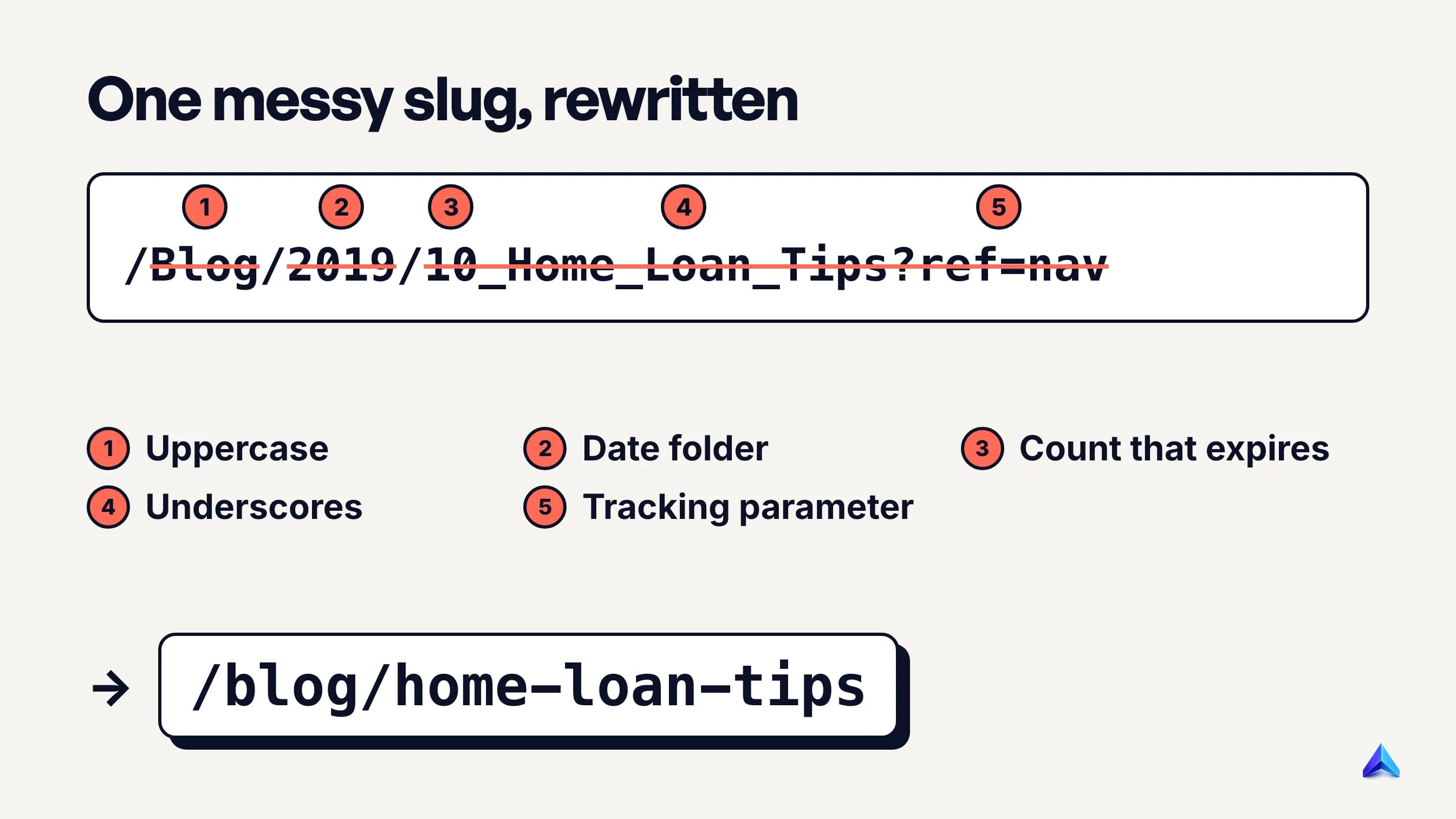
Lowercase everything. Google treats
/Home-Loan-Tipsand/home-loan-tipsas two different URLs. If your server answers both, you have quietly created a duplicate, and links that people type from memory will split between them. Set your CMS or framework to force lowercase, and 301 any uppercase request to the lowercase version. -
Separate words with hyphens. Google recommends hyphens because underscores are commonly used to join concepts, as in a programming function name like
format_date. Joined words such asgreendressare on its not-recommended list too. -
Describe the page, not the keyword list. Name the topic the way a person would say it:
home-loan-tips,gst-invoice-format,vat-registration-uk. If the target keyword is a natural description of the page, it ends up in the slug on its own. If you have to bend the phrase to fit three keywords in, you are writing for a ranking factor Google says barely exists. -
Drop anything that will go out of date. Years (
-2024), counts (10-tips), prices (under-500-rupees) and status words (new,latest) all expire. Update the post for 2027 or add an eleventh tip, and the slug contradicts the page. -
Keep it short enough to read at a glance. Length does not affect ranking, but a slug of three to five words survives being shared, printed and read aloud. Cut words that add no meaning (
a,the,and), but keep the ones that change it.how-to-cancel-a-subscriptionandcancel-subscriptionpromise different pages: a guide, and the cancellation form itself. -
Leave IDs, session values and tracking out of the path. Google's own example of a bad URL is a string of parameters and hexadecimal IDs. Tracking tags belong in the links you share, never in the canonical address. URL parameters for filters and sorting are a bigger subject, covered in a separate guide.
-
Decide your folders before you need them. A
/blog/folder is stable. A/blog/mortgages/folder is a promise that the category will never be renamed. Google's Starter Guide notes that, on sites with more than a few thousand URLs, grouping similar pages into directories helps Google learn how often each section changes. On a 40-page site, extra folders only add places for a URL to break. Pick one form for the trailing slash at the same time; that choice has its own guide.
If you write the slug at the drafting stage, alongside the title and meta description, most of these rules take care of themselves. Our guide on how to write a blog post for SEO puts that step in the order it belongs.
Slugs for Hindi and other non-English audiences
Most slug guides assume an English website. Google's documentation does not. It says to use words in your audience's language "(and, if applicable, transliterated words)", and gives German and Japanese examples. A Hindi-language site in India therefore has three legitimate options, and each has a different cost.
| Slug style | Example | Best when |
|---|---|---|
| Devanagari | /सस्ता-होम-लोन | Readers search in Devanagari and the content is in Hindi |
| Transliterated (Hinglish) | /sasta-home-loan | Readers type Hindi words in Roman script |
| English | /cheap-home-loan | The page is in English, or the audience searches in English |
Match the script your readers actually type in the search box, which you can see in your keyword research and in the queries Search Console reports. Whichever you choose, use it consistently within a section, so one site does not end up with three naming styles.
What percent-encoding does to a Devanagari slug
Google's page adds a technical requirement that matters a great deal for Indian sites: characters outside the ASCII range should be percent-encoded in your link href attributes. Percent-encoding replaces each byte with a % sign and two hexadecimal digits. Most Devanagari characters take three bytes in UTF-8, so each one becomes nine characters.
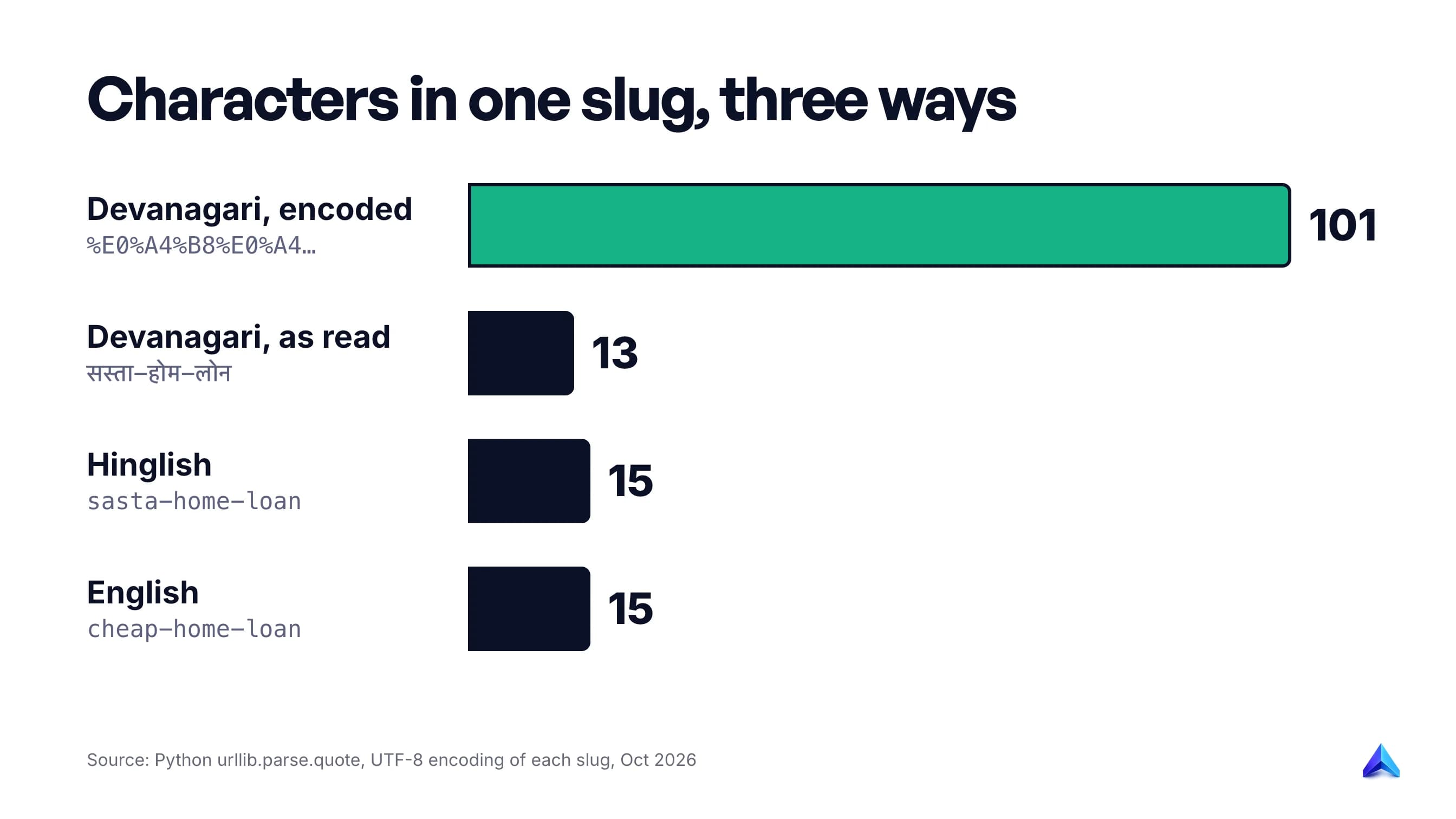
We ran the three example slugs through a standard URL encoder. The Devanagari slug सस्ता-होम-लोन is 13 characters as you read it and 101 characters once encoded. The Hinglish and English versions stay at 15. Browsers display the readable form in the address bar, because modern standards for internationalised addresses allow Unicode characters and define how they map to plain URLs. Server logs, analytics exports, redirect files and many copy-paste targets show the encoded string instead.
None of that is a ranking problem, and Google's Japanese example shows a native-script slug is legitimate. It is an operational one. If a team will maintain redirects, compare URLs in spreadsheets or paste links into campaigns, a 101-character encoded slug multiplies the chance of a typo. For Hindi content where readers search in Devanagari, we would still use Devanagari, with the encoding generated by the CMS and never typed by hand. For Hinglish or mixed audiences, transliteration is the calmer choice.
Our position: a slug is a label, and labels should not move
Put Google's statements side by side and a clear rule falls out. A slug earns almost nothing from its keywords and almost nothing from its length, but its address carries everything the page has collected: links from other sites, internal links, bookmarks, shares, and months of history in your reports. So the slug's quality matters most on the day you publish, and its stability matters every day after.
Changing a URL is not free, even when the redirect is perfect. Google's guide to site moves with URL changes warns that you may see ranking fluctuations while Google recrawls, and that for a medium-sized site it can take a few weeks or more before the new URLs replace the old ones. It also says to keep redirects "for as long as possible, generally at least 1 year" so that Google can transfer all signals, including links on other sites.
Now weigh the gain from swapping /10-tips-for-getting-a-cheap-home-loan-in-2023 for /home-loan-tips. The new slug is nicer. It moves rankings in no way Google acknowledges, and it buys weeks of uncertainty plus a redirect someone must keep alive for a year.
"But keywords in the URL still help a little"
This is the strongest counterargument, and it deserves a straight answer. Google has never said the effect is zero; "hardly any" and "very small" are not "none". A slug also shows up in breadcrumbs, so a descriptive one can make a result look more relevant to a searcher.
Both points argue for a good slug on new pages, which nobody disputes. Neither justifies moving a page that already ranks. A very small gain spread over years does not obviously outweigh weeks of fluctuation now. Mueller's own advice in 2016 was that the factor is not worth restructuring a site for. And if the page sits on page three, its slug is almost never the reason. Content, intent match and links are where that page's problem lives.
When changing an old slug is worth the redirect
There are cases where the slug itself is the problem. We would change an existing slug in these five, and only after confirming that the new address is one you can keep for years.
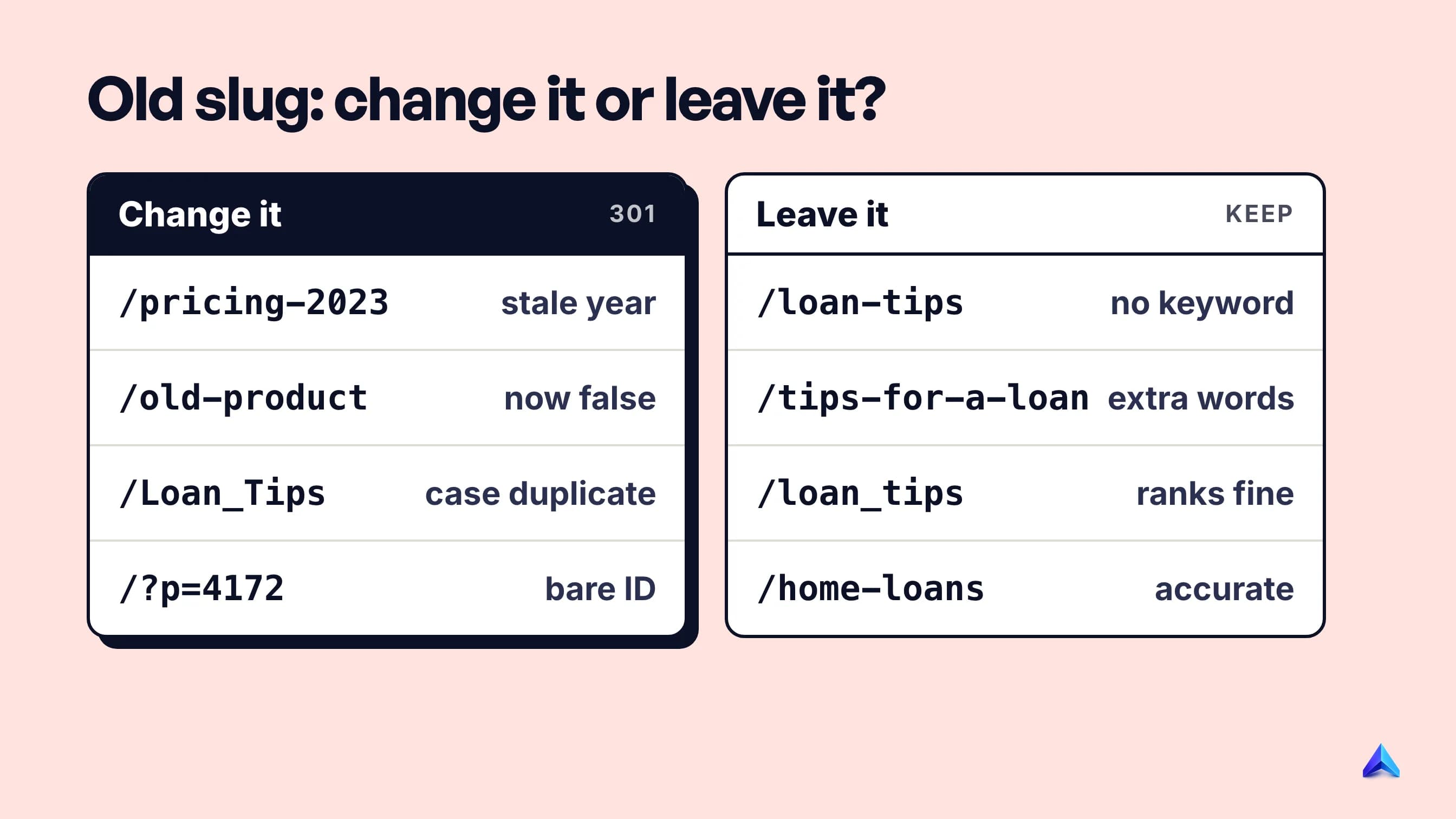
- The slug now says something false. A page about your current plans living at
/pricing-2023, or a product page whose slug names a product you discontinued. Readers see the contradiction in the breadcrumb and in shared links. - The slug carries a year and the page is evergreen.
/best-crm-for-small-business-2022on a guide you update every year. Each refresh will fight that slug, so move it once to an undated address and never again. - Variants are already splitting signals. Uppercase and lowercase versions, or an old underscore URL and a new hyphen URL both answering with a 200. Consolidating them with a 301 fixes a real duplicate, which is a different job from cosmetic tidying. Our guide on self-referencing canonicals covers how to make the surviving URL declare itself.
- The URL is an ID or a query string people see.
/index.php?p=4172or/product?id=88213. Google's documentation puts exactly this kind of URL in its not-recommended column, and people find them just as opaque. - You are already moving URLs. A platform migration, a domain change or a restructure that touches every URL anyway. The fluctuation cost is being paid regardless, so fixing bad slugs in the same move is close to free.
We would leave a slug alone when:
- the only change is adding or reordering a keyword;
- it has a few extra words, or stop words, but describes the page accurately;
- the page is ranking and earning clicks, and nothing in the slug is false;
- nobody can commit to maintaining the redirect for at least a year.
If a slug fails none of the five tests, spend the hour improving the page instead.
How to change a slug without losing what it earned
The mechanics are simple. Doing every step matters more than speed.
- Pick the final address once. Check it against the seven rules above and make sure no other page uses it. Changing a slug twice creates a redirect chain.
- Add a permanent server-side redirect. Google's redirects documentation recommends a permanent server-side redirect (301 or 308) whenever you need to change the URL shown in search results. A 302 is treated as a weak signal, so the old URL may stay in results.
- Point everything at the new URL directly. Update internal links, navigation, the XML sitemap, the canonical tag and hreflang references. Redirects should go straight from old to new. Googlebot generally follows up to 10 redirect hops, but every hop in your own links is avoidable.
- Update the links you control elsewhere. Your Google Business Profile, social bios, email templates, ad campaigns and any partner pages that will make the edit for you.
- Keep the redirect for at least a year. Put it in your server config or redirect manager with a note saying why it exists, so it is not deleted in next year's clean-up.
- Watch the page, not the site. In Search Console, compare the old and new URLs in the Performance report over the following weeks. The old URL can still appear for a while: Google's documentation explains that the redirect source becomes an "alternate name" and may be shown when a query suggests the searcher trusts the old URL more.
For step 6, our guide to Google Search Console for SEO shows how to filter the Performance report by page. Project Rankup's Rank Tracker reads the same Search Console data per page, with clicks and position changes side by side, which makes a before-and-after comparison quicker.
Platform notes
WordPress. When you edit a published post's slug, WordPress core remembers the old one and redirects it to the current permalink through its wp_old_slug_redirect function. That covers posts. Check pages, categories and custom post types yourself, and if you use a redirect plugin, make sure it is not adding a second hop on top of core's.
Shopify. You can create a redirect when you change a URL, and the help centre lists a few catches worth knowing. Redirects only work for URLs that return a 404, so a redirect from a page that still exists does nothing. If you sell through market subfolders such as /en-in/ or /en-gb/, redirects do not automatically apply to them, and each locale needs its own.
Custom sites. Put redirects in the server or edge configuration, not client-side JavaScript. Run curl -I on the old URL to confirm a 301 and a Location header pointing at the final address.
Find the slugs that need attention
Crawl the site and filter the URL list for uppercase letters, underscores, four-digit years and ? in canonical URLs. Apply the five tests above to that shortlist only. It fits naturally into a routine technical SEO audit, so new problem slugs are caught before they collect links.
Frequently asked questions
Does the URL slug affect SEO?
Only slightly as a ranking signal. Google's SEO Starter Guide says keywords in the URL path alone have hardly any effect beyond appearing in breadcrumbs. Slugs matter more for people: a readable slug shows in the breadcrumb, makes a shared link look trustworthy, and gives the page a stable address that can keep collecting links for years.
What is an example of a good URL slug?
In https://example.com/blog/gst-invoice-format, the slug is gst-invoice-format. It is lowercase, uses hyphens, names the topic in three words, and carries no date, number or parameter. A weak version of the same slug would be /blog/GST_Invoice_Format_2024_Complete_Guide?ref=menu.
How long should a URL slug be?
There is no ranking limit; Google's John Mueller has said URL length does not matter for ranking. For readability, aim for three to five meaningful words. That keeps the slug easy to read in a breadcrumb, safe to share in a message and easy to type, while still describing the page clearly.
Should I remove stop words from a slug?
Remove them when they add nothing, as in the-best-way-to-store-coffee becoming store-coffee. Keep them when they carry meaning. "How to", "vs" and "without" often change what the page is about. Google's URL guidance does not mention stop words at all, so this is a readability choice, not a rule.
Is a hyphen or an underscore better in URLs?
Hyphens. Google's URL structure documentation recommends hyphens because underscores are commonly used to join concepts, such as function names in code. If your existing URLs use underscores and the pages perform well, that alone is not a reason to change them and add redirects.
Can a URL slug use Hindi or other non-English characters?
Yes. Google recommends using your audience's language in URLs, including native scripts, as long as non-ASCII characters are percent-encoded in your links. Expect long encoded strings in logs and redirect files: a 13-character Devanagari slug becomes 101 characters once encoded. Transliterated slugs avoid that.
Will changing a URL slug hurt my rankings?
It can, temporarily, even with a correct 301 redirect. Google warns of ranking fluctuations while it recrawls, for a few weeks or more on a medium-sized site, and recommends keeping redirects for at least a year. Change a slug only when it is wrong, outdated or duplicated, not to add a keyword.