To disavow something is to formally deny any connection to it or responsibility for it. In SEO, disavowing means uploading a text file to Google Search Console that asks Google not to count specific links pointing to your site. Google built the tool for one job: cleaning up links you, or someone you paid, built to manipulate rankings. Most sites never need it.
What does disavow mean in SEO?
Outside SEO, "disavow" is an ordinary English verb. A company disavows a rogue employee's comments; a politician disavows an endorsement they never asked for. The idea is the same in search: you are telling Google "these links are not mine, do not hold them for or against me."
In practice a disavow is a list. Each line names a page or a whole domain that links to your site, and Google is asked to ignore those links when it assesses yours. Nothing on the other website changes. The links stay live, people can still click them, and Google's own help page notes that disavowed links will continue to be shown in the Links report in Search Console.
It is also a request, not an order. When Google launched the tool, its announcement and Q&A described a disavow as "a strong suggestion rather than a command", much like a canonical tag, with Google reserving the right to use its own judgment in corner cases.
Three things a disavow is not:
- It is not deletion. The link still exists on the web. Only getting the site owner to remove it does that.
- It is not a nofollow. A nofollow is set by the site that links out. A disavow is set by you, the site being linked to, and only Google reads it.
- It is not a ranking boost. Disavowing a link can only stop it from counting. If the link was helping you, you lose that help.
What is the Google disavow tool?
The Google disavow tool is a page inside Search Console where a site owner uploads that list. Google introduced it on 16 October 2012, in a year when it was sending "unnatural links" warnings through Webmaster Tools to sites that had bought or traded links at scale. The launch post was blunt about the audience: Google said it built the tool "for advanced webmasters only".
In 2012, links pointing at a site could get the whole site penalised, so cleaning up a paid-link history was urgent. In September 2016, Google folded its Penguin link algorithm into the core ranking system and said it now devalues spam instead of demoting the whole site. Since then, most spammy links are simply discounted by Google's systems without anyone filing anything.
A few mechanics most guides skip:
- Owners only. You must be a verified owner of the Search Console property. Full or restricted users cannot upload.
- One list per property. Each upload replaces the previous file completely. There is no "append".
- No Domain properties. Google's disavow links help page states that the tool does not support Domain properties. If your site is only verified as a Domain property (the DNS-verified kind that covers every subdomain and protocol), you need to add a URL-prefix property to use it.
- Per property, plus children. A list uploaded to
example.comalso applies tom.example.com. If you have separatehttp://andhttps://properties, Google tells you to upload a list for each.
The tool lives at search.google.com/search-console/disavow-links, and the help page links to it directly. If you are new to Search Console itself, our guide to using Google Search Console for SEO covers the reports you will actually use every week.
When Google says you should disavow
Google's help page sets two conditions, and both must be true:
- You have a considerable number of spammy, artificial or low-quality links pointing to your site, and
- Those links have caused a manual action against your site, or likely will.
The first condition alone is not enough. Almost every site that has existed for a few years has junk links: scraper sites, auto-generated directories, foreign-language spam pages. That is normal background noise, and Google's 2012 Q&A answered the question "I didn't create many of the links I'm seeing. Do I still have to do the work to clean up these links?" with two words: "Typically not."
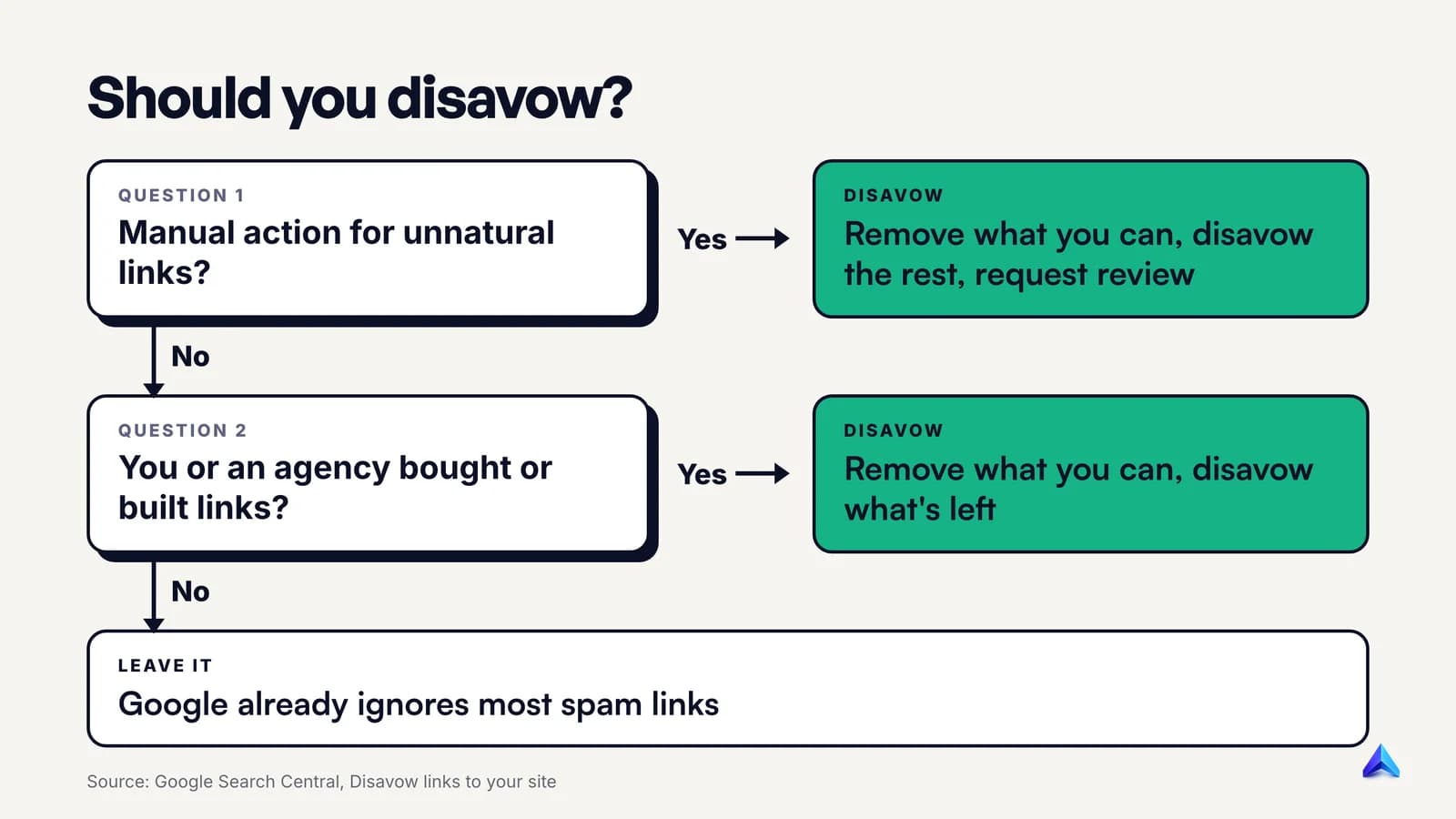
In real life, the two conditions boil down to two situations.
You have an "Unnatural links to your site" manual action. This appears in Search Console under Security & Manual Actions, followed by Manual actions, and Google also sends a message. A human reviewer has decided that links pointing at you break Google's link spam policy. Here the disavow file is part of the fix, alongside removing what you can and filing a reconsideration request.
You know links were bought or built in bulk, and no one has caught it yet. Picture a Pune software company whose previous agency paid for 400 guest posts with exact-match anchors on throwaway blogs, or a Leeds kitchen fitter who joined a link exchange network in 2021. Google's help page names this case directly: you, or an SEO you hired, built bad links through paid links or other link schemes. Disavowing the links you cannot get removed is reasonable insurance before a manual action arrives.
John Mueller, Google's Search Advocate, put the same rule in plainer words at Search Central NYC in 2025, as reported by Search Engine Journal: he would "mostly use the disavow tool for situations where you've been actually buying links and you've got a manual link spam action". He added that you also have to stop buying links, "otherwise that manual action is not going to go away."
What counts as a bought or built link is spelled out in Google's link spam policy. The list includes paying money or sending free products in exchange for links, excessive "link to me and I'll link to you" swaps, automated link-building programs, low-quality directory and bookmark links, and links stamped into the footers or templates of many sites. Paid links are fine when the linking site marks them rel="sponsored" or rel="nofollow".
When disavowing is the wrong move
The reasons people usually give for disavowing are mostly the wrong ones:
- "My rankings dropped, so it must be bad links." Traffic falls for many reasons: algorithm updates, technical faults, seasonality, a competitor publishing something better. Without a manual action, links are rarely the cause, and disavowing will not reverse a drop that has a different cause.
- "A competitor is attacking me." Link spam aimed at a site, usually called negative SEO, is far rarer as a real cause than people fear, and Google's systems discount most of it. Our guide to negative SEO explains how to tell a real attack from noise.
- "I want to keep my profile clean." Mueller was explicit in the same 2025 answer: the disavow tool "is not something that you need to do on a regular basis. It's not a part of normal site maintenance."
- "A tool flagged these links as toxic." Mueller's answer here was short: "internally we don't have a notion of toxic backlinks." A third-party toxicity score is one vendor's estimate, and it can flag harmless links from small or foreign-language sites as easily as real spam. Toxic backlink scores deserve their own post; the short version is that a score is not a manual action.
The risk is real, not theoretical. Google's help page warns that if the tool is used incorrectly it "can potentially harm your site's performance in Google Search results." The easiest way to hurt yourself is exporting every backlink, sorting by a third-party score and disavowing the bottom half, including links from local press, supplier pages and industry blogs that were quietly doing work for you.
If your real problem is that your site has too few strong links rather than too many bad ones, time spent on a disavow file is time not spent on content and outreach. Our breakdown of on-page vs off-page SEO covers where that effort pays off first.
The disavow file format, line by line
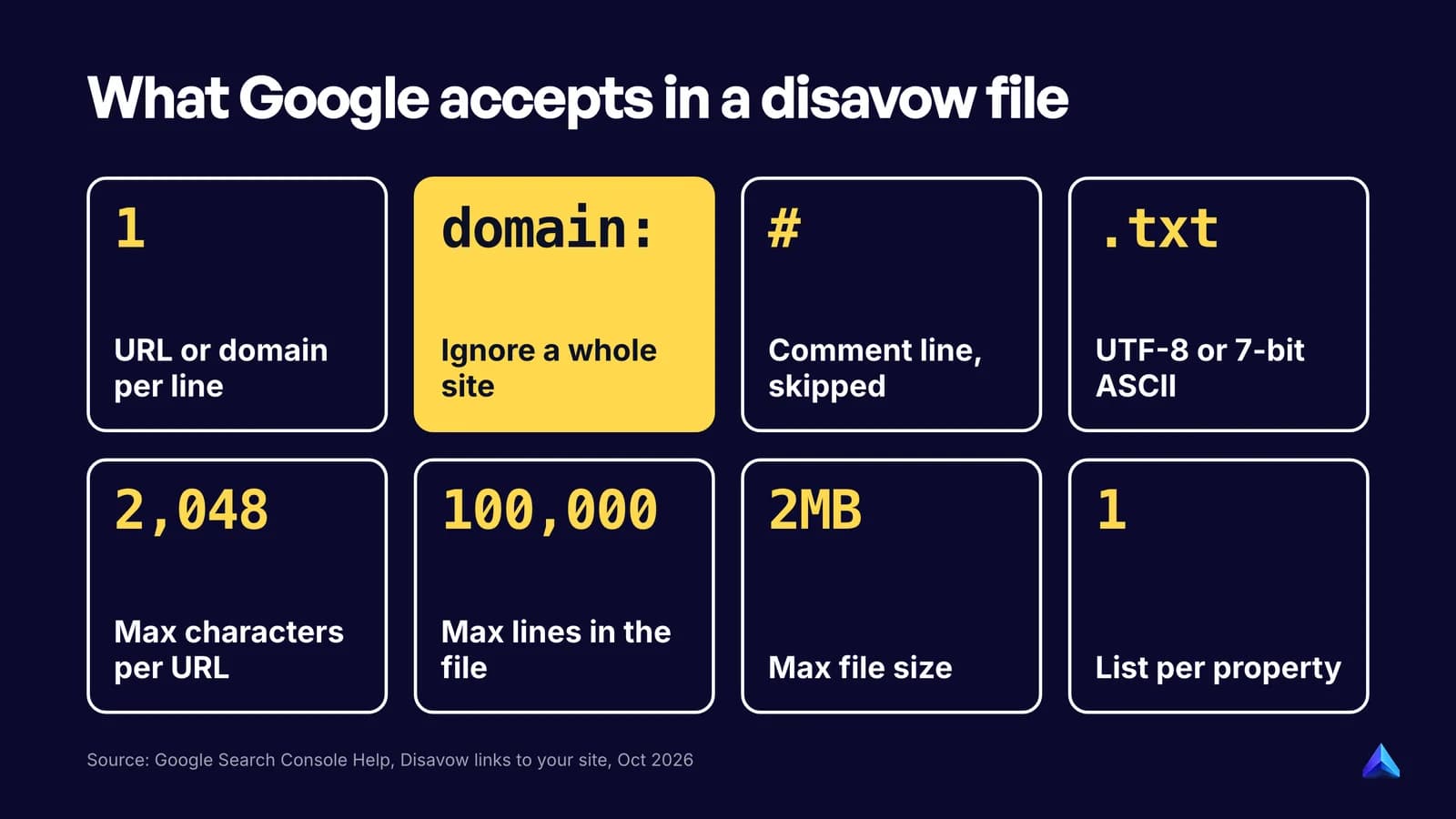
The file itself is a plain text file. Every rule below comes from Google's help page, so a file that follows them will upload without errors.
| Rule | Detail |
|---|---|
| One entry per line | Each line is either one URL or one domain |
domain: prefix | Disavows every link from that domain or subdomain, e.g. domain:example.com |
| No subpaths | You cannot disavow a folder such as example.com/en/ |
| Comments | Any line starting with # is ignored by Google |
| Encoding | UTF-8 or 7-bit ASCII |
| File name | Must end in .txt |
| URL length | 2,048 characters maximum |
| File size | 100,000 lines (blank and comment lines count) and 2MB |
A worked example
Here is a file for a fictional Manchester flooring company, written after its old agency's paid links triggered a manual action. The comments are for the people who will maintain the file, not for Google.
# disavow.txt for https://www.examplefloors.co.uk
# Updated 2026-10-09. Owner: marketing@examplefloors.co.uk

# Paid guest-post network. Emailed 3 times in Sept, no reply.
domain:cheap-guest-posts.example
domain:homeideas-blog.example
domain:best-renovation-tips.example

# Same company, two TLDs: each needs its own line
domain:linkfarm-directory.example
domain:linkfarm-directory.example.in

# Mostly a real site; only these two paid pages link to us
https://www.diy-forum.example/sponsored/flooring-deals
https://www.diy-forum.example/sponsored/oak-vs-vinyl
The choices are deliberate. Whole domains are used for sites that exist only to sell links, because those sites keep creating new pages. Individual URLs are used for the one real forum that sold two sponsored posts, so its other, natural links to the company still count. Every entry has a comment saying why it is there and what was tried first, which is exactly the documentation a reconsideration request will need.
Format traps
wwwand non-wwware different URLs. Google's Q&A says the tool "tries to be granular". If you list individual pages, list the exact version that links to you, or usedomain:instead.- Every TLD is separate. A company that owns
example.comandexample.co.ukneeds two lines. Google answered this exact question with a flat "Yes." - Subdomains on free hosts.
domain:spammer.wordpress.comdisavows only that one blog, not all of WordPress.com. Google warns that on very new or rare hosts, a subdomain entry may be read as the entire domain. - Don't upload the raw export. Google's help page tells you to strip any URLs you do not want to disavow from the Links report export before uploading.
- Keep the old file. Because a new upload replaces the old one, always edit your last version rather than starting over, or you will silently un-disavow everything you left out.
How to use the Google disavow tool
For a site with an unnatural links manual action, the full sequence looks like this:
- Export your links. In Search Console, open the Links report. Google's manual action guidance suggests either Top linking sites, then Export, to group links by host, or Export external links, then Latest links, for a dated list.
- Find the links that break the policy. If the list is long, Google recommends starting with the sites that link to you most and with links created in the last few months.
- Ask for removal first. Contact each site owner and ask them to remove the link or mark it
rel="nofollow". Keep a log of who you contacted and when. - Build the file from what is left, following the format rules above.
- Upload it. Go to the disavow links tool, pick the URL-prefix property, and upload the
.txtfile. If it has errors, you see them immediately and your old list stays in place. - Request a review. Back in the Manual actions report, select Request Review and include documentation of the links you removed and why the rest could not be removed.
Step 3 is the one people skip, and it is the one Google checks. Its manual actions documentation states that "Blindly adding all backlinks to the disavow file is not considered a good-faith effort, and will not be enough to make your reconsideration request successful." It also warns you not to disavow organic links.
If you bought a domain that already had a link problem, say so in the reconsideration request. Google's guidance asks new owners to fix the issues and tell it that they recently acquired the site.
Without a manual action, stop after step 5. There is no review to request, and Google will apply the file as it recrawls.
What happens after you upload a disavow file
Nothing happens on the day. Google applies a disavow as it recrawls the pages in your file, and the help page says it "can take a few weeks" for the list to be incorporated. The 2012 Q&A gave the same reason: Google needs to recrawl and reindex the URLs before the disavowals take effect.
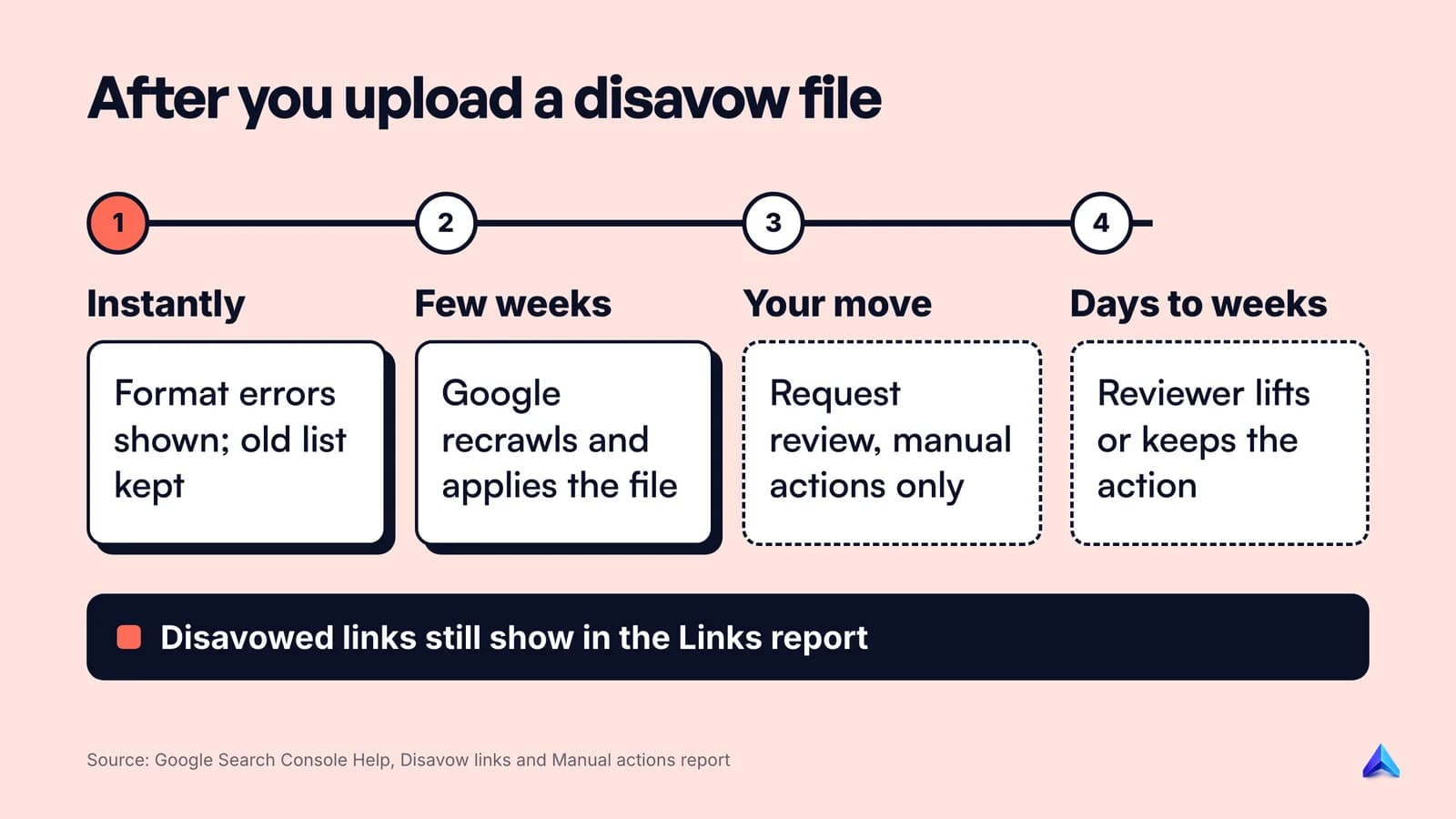
Some practical consequences:
- The links do not disappear from your reports. Disavowed links stay in the Search Console Links report and in every third-party backlink tool. That is expected; it does not mean the file failed.
- Do not expect a ranking jump. If the links were already being discounted, which is the norm since 2016, removing their weight changes nothing. Without a manual action, expect rankings to stay where they were.
- Manual reviews take a while. Google says most reconsideration reviews take several days or weeks, and that link-related requests can take longer than usual. You get an email when Google receives the request and another when the review is complete. Don't resubmit while one is pending.
- A successful review lifts the action. If the reviewer finds the site no longer breaks the spam policy, Google revokes the manual action. Recovery to earlier rankings is not guaranteed, because the bought links that used to help are now gone.
Can you undo a disavow?
Yes, despite what some glossaries claim. To remove a few entries, edit the file and upload the new version; it replaces the old one. To remove everything, open the tool, select the property and click Cancel Disavowals. Either change takes weeks to propagate, the same as the original upload.
Does Bing have a disavow tool?
Not any more. Bing launched a disavow feature in Bing Webmaster Tools in 2012, but in September 2023 it announced it was removing the disavow links feature and its API in October 2023. Plenty of link guides written before then still describe Bing's tool as if it were live.
Bing's reason was that it can now "differentiate between natural and unnatural links" and ignore or discount the unnatural ones without affecting the rest. Two things stayed. The Bing backlinks report still shows inbound links for your site and any other site. And Bing still warns that sites "clearly leveraging Link Schemes, Link Buying, Link Spamming" can be delisted from its index.
So for Bing, there is nothing to upload. The only cleanup that works there is getting bad links removed at the source and not building more.
Disavowing vs removing a link vs nofollow
These three get mixed up constantly, and they are not interchangeable.
| Who does it | What changes | Search engines affected | |
|---|---|---|---|
| Removing the link | The linking site's owner | The link is gone from the web | All of them |
rel="nofollow" or rel="sponsored" | The linking site's owner | The link stays but is marked as not an endorsement | Search engines that honour the attribute |
| Disavowing | You, in Search Console | Google is asked to ignore the link; nothing on the web changes | Google only |
Removal is always the strongest fix, which is why Google asks for a removal attempt before a disavow. Google's 2012 post made a second point that still holds: a removed link also stops potential customers from finding spammy pages that point to your business and drawing their own conclusions.
Disavowing also has nothing to do with the authority scores that SEO tools publish. Disavowed links still count in a tool's Domain Rating or Domain Authority, because those tools cannot see your file. Our comparison of Moz DA and Ahrefs DR explains what those scores measure and why neither is a Google signal.
If a disavow is on your list this quarter only because a tool said so, move it down and put the hours into pages people search for. An SEO plan built around outcomes makes that trade-off obvious.
Frequently asked questions
What is another word for disavow?
Common synonyms are repudiate, disown, deny, renounce and disclaim. All carry the sense of refusing responsibility for, or connection to, something. In SEO the word has a narrower technical meaning: asking Google, through a file in Search Console, not to count specific links to your site.
Can disavowing links hurt your SEO?
Yes, if you disavow links that were helping you. Google warns that incorrect use can harm a site's performance in Search. The usual mistake is disavowing natural links from real sites because a third-party tool scored them as risky. Disavowing genuine spam that Google already ignores does no harm, but it does no good either.
How long does a disavow take to work?
Usually a few weeks. Google applies the file as it recrawls and reprocesses the disavowed pages, so there is no instant effect. If you also have a manual action, the reconsideration review adds several days or weeks on top, and Google says link-related reviews can take longer than other types.
Should I disavow spam links pointing to pages that 404?
No. John Mueller has said that links pointing to URLs that return a 404 on your site are already dropped and "do nothing", and that he would "definitely ignore link-spam to 404s". A link to a page that does not exist passes nothing to your site, so there is nothing for a disavow to cancel.
Can I use the disavow tool with a Domain property?
No. Google's help page says the disavow links tool does not support Domain properties. Add and verify a URL-prefix property for the exact version of your site, such as https://www.example.com/, and upload the file there. If you have separate http and https properties, Google says to upload a list to each.