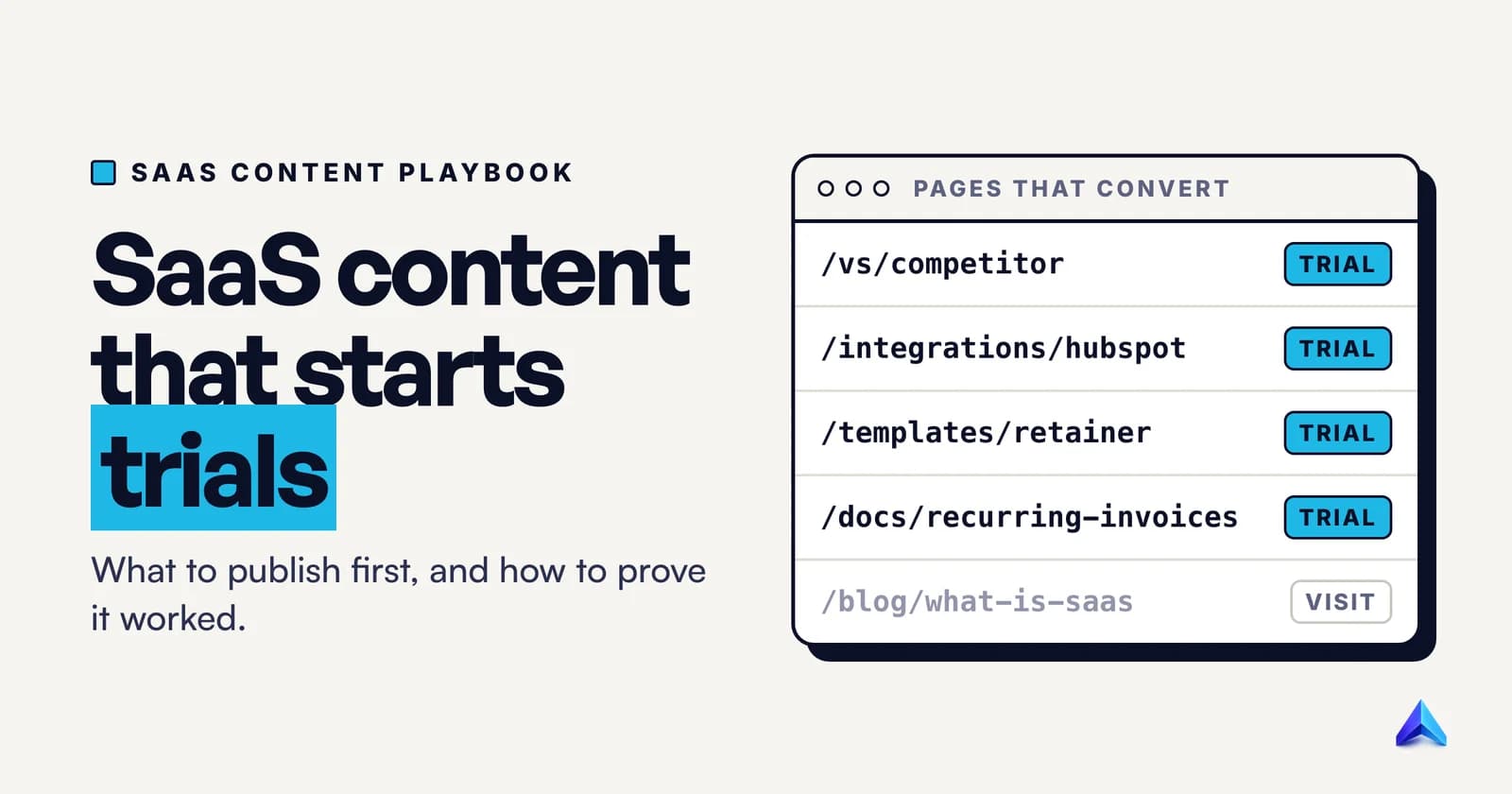
SaaS content marketing is the practice of publishing pages that help software buyers solve a problem and then show your product doing the solving, so readers turn into trials, demos and paying users. It works best when you build from the buyer's decision backwards: comparison, integration and use-case pages first, product-led guides next, broad education last, and every page measured by the sign-ups it starts.
Most guides to content marketing for SaaS list content types and stop. This one gives the seven jobs in the order we would do them, the Google rules that apply to each, and the events that show what is working.
What makes SaaS content marketing different
The product can be shown. A law firm cannot screenshot its advice. A SaaS company can open its own app inside an article and solve the reader's problem on screen. That turns content from "awareness" into a product demo the reader chose to watch.
The conversion is cheap and immediate. A free trial or a freemium plan is one click from the article. A reader can go from "how do I reconcile Stripe payouts" to connecting Stripe inside your app in the same session. Few businesses get that short a path from a blog post to product usage.
Buyers research alone, and increasingly not on Google. G2 surveyed 1,076 B2B software buyers and decision-makers in March 2026 for its Answer Economy report. It found that 51% now start their research with an AI chatbot more often than with Google, up from 29% in G2's 2025 report, and 69% chose a different vendor than they first planned because a chatbot recommended it. G2 sells review-platform presence, so read its conclusions with that in mind. The direction still matters: your content now has to persuade a person reading your page and a model summarising the market for that person.
So a SaaS content program is judged on product usage, not page views. If you are still deciding who owns content versus search on your team, our breakdown of SEO vs content marketing covers that split. This post assumes someone owns both and needs a plan.
Step 1: Score topics by product fit before volume
Keyword tools sort by search volume. For a SaaS company that is the wrong first sort, because a huge topic your product cannot help with brings readers who never sign up.
Score every candidate topic from 0 to 3 on how much your product helps with it:
| Score | Meaning | Example for an invoicing tool |
|---|---|---|
| 3 | The product is the obvious answer | "send GST invoice from Gmail" |
| 2 | The product helps with a large part of the job | "how to chase late payments" |
| 1 | The product can be mentioned but is not needed | "freelance contract template" |
| 0 | No honest product link | "how to become a freelancer" |
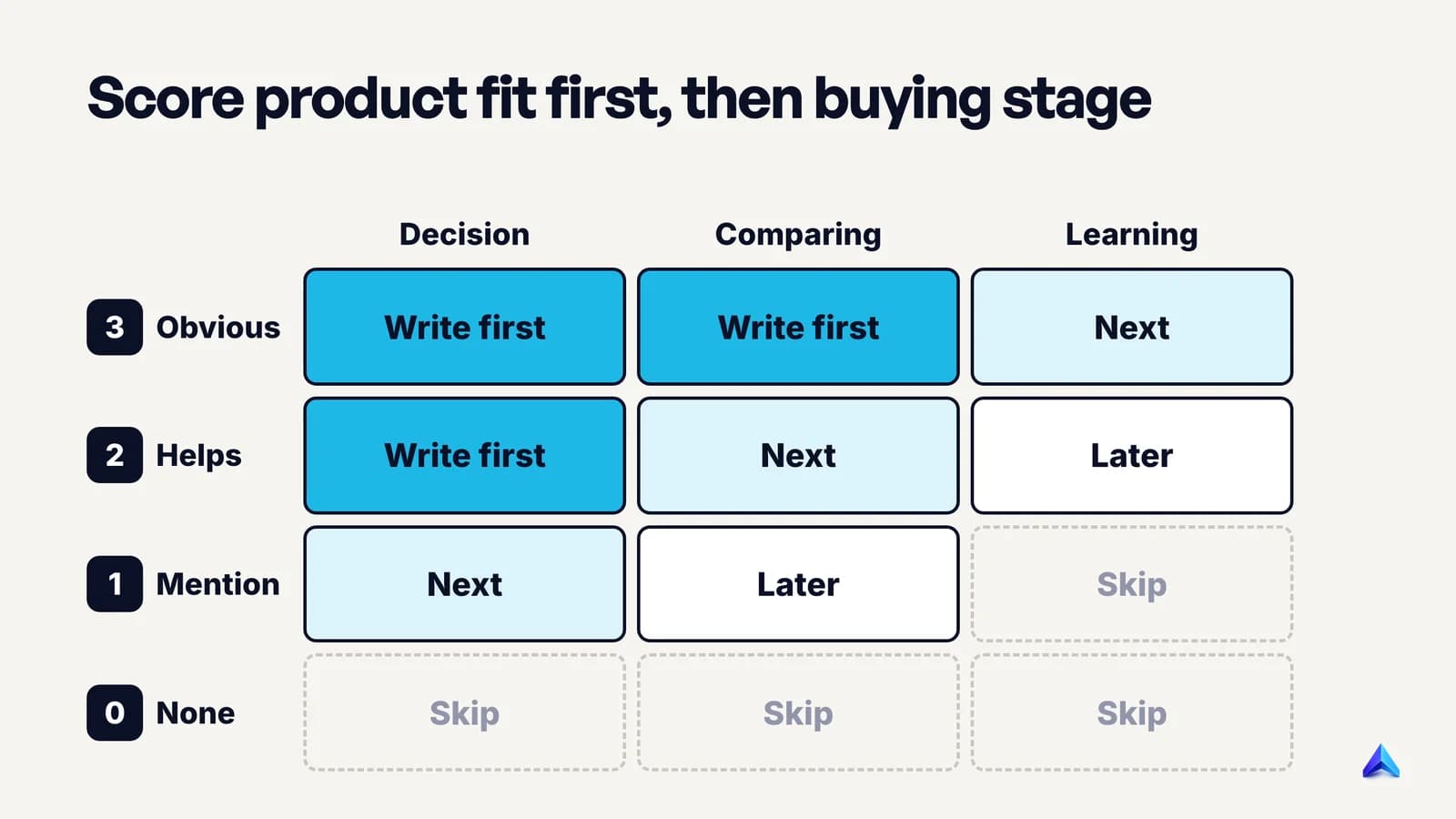
Then cross the score with the buying stage. A topic at fit 3 and close to purchase ("Zoho Invoice alternative") goes to the top of the list even if its search volume looks tiny. A topic at fit 0 never gets written, however big it is. Two filters settle most topics in between.
Can you rank for it? A new SaaS domain has little authority. Compare each topic's keyword difficulty with what your site can realistically win, as our guide to what keyword difficulty really measures explains. A fit-2 topic you can rank for beats a fit-3 topic you cannot.
Is the answer already on the results page? Definitional queries ("what is accounts receivable") are often answered by an AI Overview before anyone clicks. Skip them at first.
Project Rankup tags every keyword as top, middle or bottom of funnel and judges its difficulty against your own domain's authority, which is the same two-filter test done for you. A spreadsheet with four columns (topic, fit, stage, difficulty) does the job just as honestly.
Step 2: Write comparison pages for the buyer who is about to switch
Comparison and alternatives pages are where SaaS content earns its keep, because the reader has a budget and a shortlist. Our SEO for startups playbook covers the basics of making them trustworthy. This section covers which pages to build and what each must contain.
There are three types, and they serve different readers:
- "You vs Competitor". The reader already knows both names. They want the differences that matter to their situation.
- "Competitor alternatives". The reader is unhappy with a tool they use. They want options and a reason to believe switching is safe.
- "Competitor A vs Competitor B", where neither is you. The reader is comparing two incumbents. You can win the page by being the most useful judge, then mention yourself as a third option.
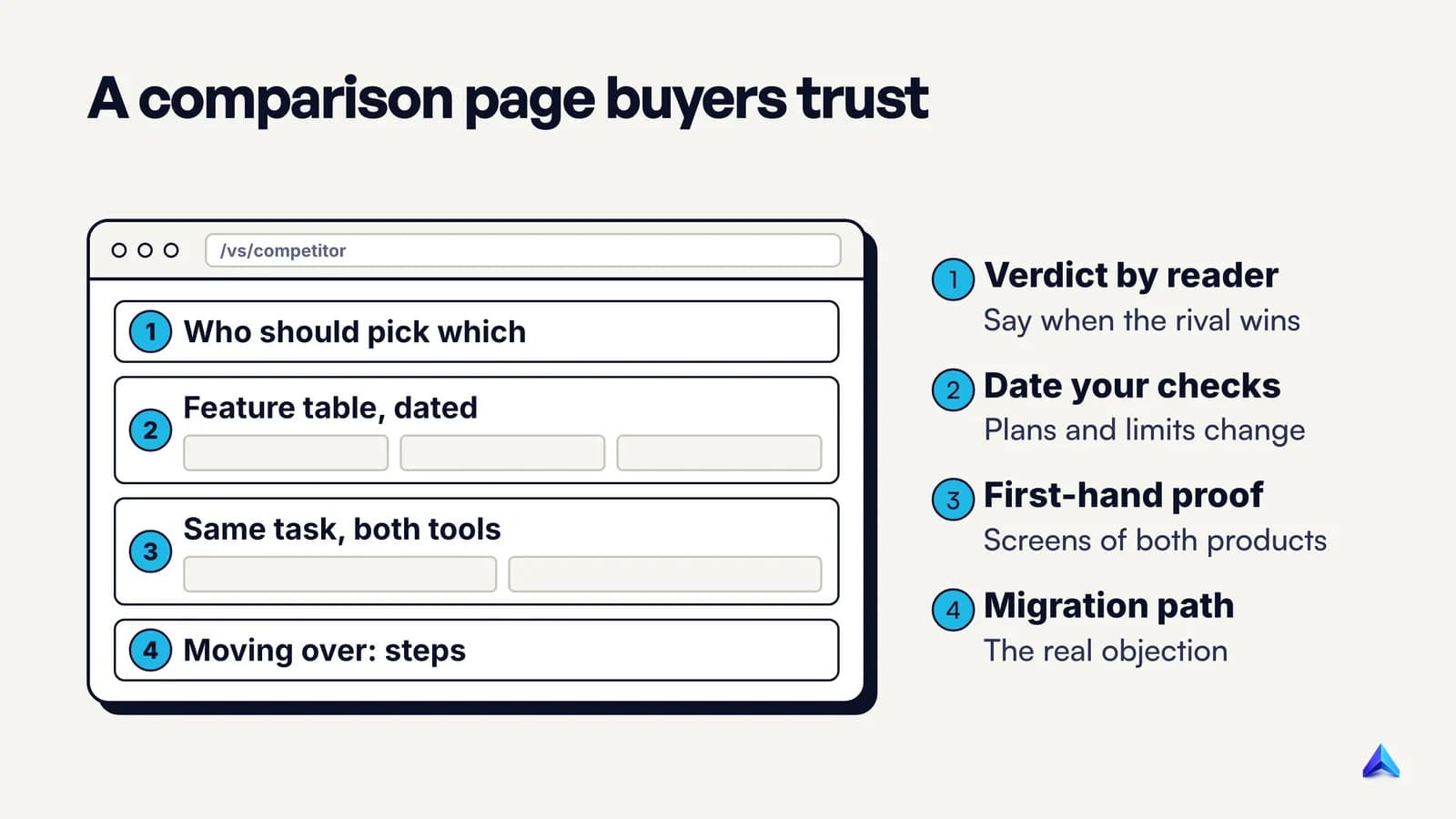
Google's guidance on writing high-quality reviews was written for product reviews, but it is the closest public standard for these pages. Two lines from it are especially useful for software. One asks that when you recommend something "as the best overall or the best for a certain purpose", you "include why you consider it the best, with first-hand supporting evidence". Another asks reviewers to "describe how a product has evolved from previous models or releases". For SaaS that means:
- Evidence you can only get by using both tools. Screenshots of the same task in each product, the number of clicks it took, the plan limit you hit and the date you checked.
- A section for the reader who should not switch. If the competitor suits teams on a specific ERP, or companies far larger than your typical customer, say so plainly.
- A migration section. The biggest objection on an alternatives page is "moving will be painful". Show the import, what carries over, what does not, and how long it took.
- Release history. If the competitor shipped a feature last quarter that closes a gap you used to win on, update the page. A stale comparison is how readers learn not to trust you.
These pages also feed the chatbot problem from earlier. In G2's survey, buyers said citations from a software review site were their top trust signal in a chatbot's answer. Your comparison pages will not replace review profiles, so keep both: honest pages on your own site, and real reviews from customers on the review sites your buyers already use.
Step 3: Build integration, use-case and template pages one at a time
The next layer of SaaS content is pages that describe the product in a specific context: "connect your tool to HubSpot", "invoicing for architecture firms", "free retainer agreement template". These capture searches from people who are close to needing the product, and they scale. That scaling is also where they go wrong.
Google's spam policies define scaled content abuse as "when many pages are generated for the primary purpose of manipulating search rankings and not helping users", and they add that this applies "no matter how it's created". One of the listed examples is using generative AI "to generate many pages without adding value for users". A template that swaps "architects" for "dentists" across 200 otherwise identical pages is that example. Pages built to rank for near-identical queries that funnel visitors elsewhere can also fall under the same document's doorway abuse policy.
The test we recommend is simple: would this page exist if search engines did not? A useful integration page would, because a customer setting up the HubSpot sync needs it. So each page type needs something only it contains:
- Integration pages: what data syncs in which direction, how often, what breaks, setup steps with screenshots, and the plan that includes it.
- Use-case pages: the workflow of that specific customer type, in their vocabulary, with a real example. An architecture firm bills in stages against a fee proposal. A dental clinic does not. If the two pages read the same, one of them should not exist.
- Template pages: a template that is good without your product, downloadable or copyable, plus a short section on how the product fills it in automatically.
Publish in small batches, check which pages earn impressions and sign-ups, and only then build the next batch. Ten strong pages beat two hundred thin ones.
Step 4: Make the product the worked example
"Product-led content" is used loosely. In practice it means one thing: the article solves the reader's problem, and the product appears as the way the author solves it, at the moment it is useful.
Take the query "how to chase late invoice payments". A generic post lists seven tips. A product-led post walks through an actual chase: the polite reminder at day three, the firmer one at day ten, the phone call script at day twenty. Each step shows the reminder being scheduled in the product, with a screenshot. A reader who never signs up still learns the sequence; one who wants it automated sees exactly how.
Three rules keep this honest and readable:
- Teach the method first, then show the tool. If the article only makes sense with your product, it is a landing page, and readers will treat it like one.
- Use real screens with realistic data. A mock-up with "Lorem Ipsum Ltd" tells the reader nothing about the product. A demo account with plausible invoices, in rupees, pounds or dollars to match the reader, does.
- Show the manual path too. "You can do this in a spreadsheet with these columns" costs you nothing and makes the post useful to the reader who is not ready to buy yet.
Your product managers, support staff and power users know these workflows better than any freelance writer, so interview them and capture what they say in a content brief before anyone starts writing. The way we structure that brief-to-draft process is in our guide to writing a blog post for SEO.
Step 5: Run docs and the changelog as a content program
Most SaaS companies treat help docs as support's job and the changelog as engineering's. Both are content, and both answer exactly the long, specific queries that a newer domain can rank for: "export invoices to Tally", "set up recurring billing in ProductName", "API rate limit 429 ProductName".
To make docs work as content:
- Keep them public and crawlable. Docs behind a login cannot rank or be read by AI assistants. Only gate what genuinely needs an account.
- Give every doc page a title that matches the task. "Recurring invoices" is a menu label. "How to set up recurring invoices" is what people type.
- Link docs and blog both ways. The product-led post from Step 4 should link to the detailed setup doc, and the doc should link back to the strategy post for readers who want the why.
- Write for buyers too. Prospects read docs to check the sales page's claims. Clear limits answer them faster than any feature page.
The changelog does a different job. One dated entry per meaningful release, each with its own URL, a plain description of what changed and who it helps, and a screenshot. Each entry doubles as material for email and sales follow-ups. It also keeps comparison pages honest: Google's reviews guidance asks writers to cover how a product "has evolved from previous models or releases", and a public changelog is your evidence when a competitor's page is out of date.
Step 6: Distribute through sales, users and the places buyers ask
B2B SaaS distribution is narrower than consumer distribution, which helps: you only need to reach the people who might buy.
In rough order of return for a small team:
- Sales and success. Send every comparison and migration page to whoever talks to prospects. Ask them which questions came up on calls this week. Those questions are your next topics.
- Your own users. In-app messages and the onboarding email sequence should link to the product-led guides that match each step. Content that helps a trial user activate is worth more than content that brings a new visitor.
- Founder and team posts on LinkedIn. One concrete lesson from an article, written as a post in a person's voice, reaches the people B2B buyers trust more than brand pages. Link the article in a comment or at the end, not as the whole post.
- Integration partners. If you build a page for a HubSpot or Zoho integration, ask the partner to list you in their marketplace and link to it.
- Review sites and communities. Ask happy customers for reviews on the platforms your buyers use, and answer real questions in the communities where your buyers ask them, with a link only when it helps.
Posting every article to every channel on launch day is not on the list. Good B2B distribution matches one page to one moment in the buyer's or user's journey.
Step 7: Measure trials and demos, not traffic
If you measure SaaS content by sessions, you will drift towards broad topics that bring traffic and no users. Measure it by the actions that lead to revenue.
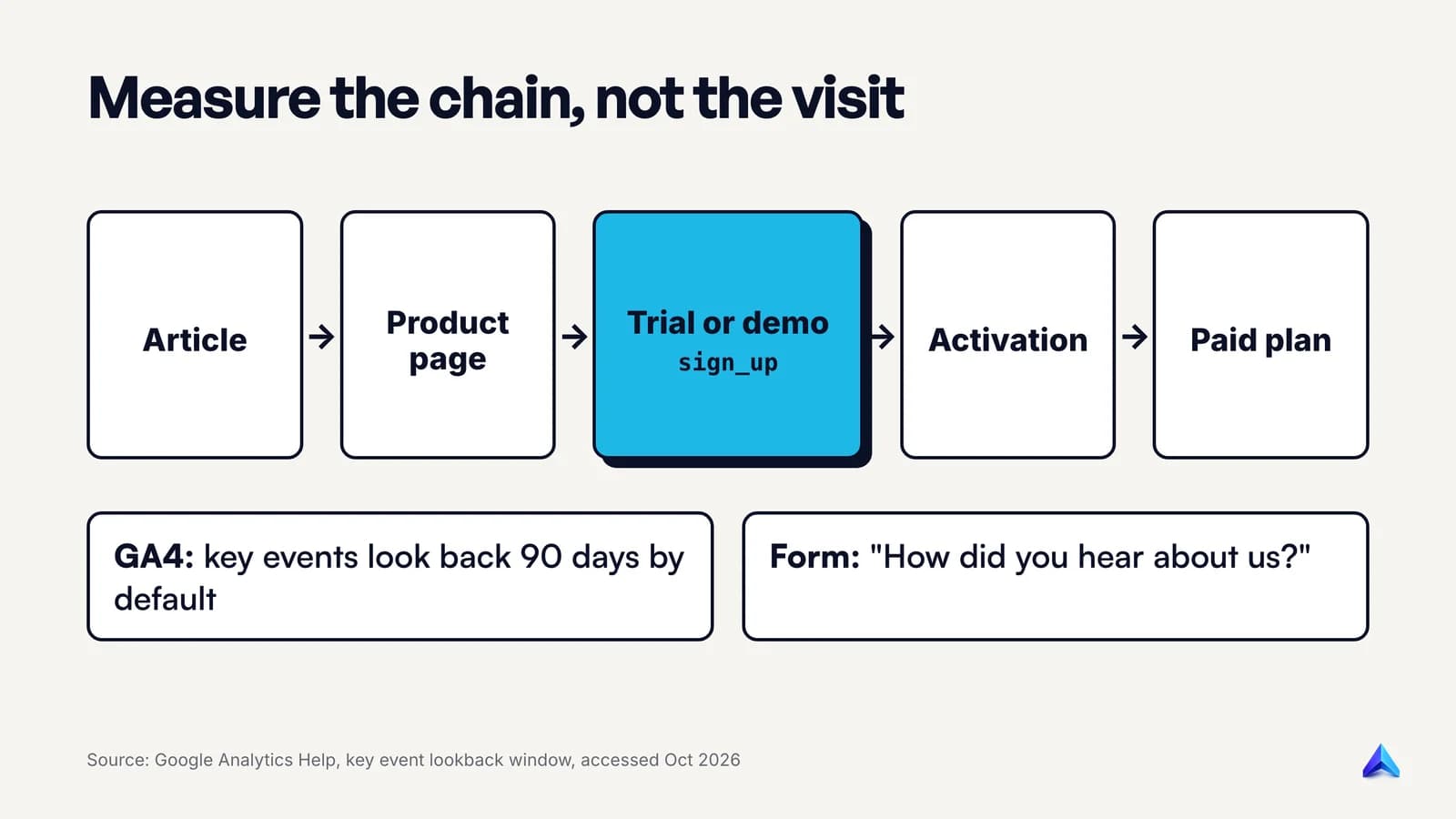
The setup we recommend:
- Mark the right events as key events in GA4. At minimum:
sign_up(trial or free plan started),demo_requestandactivation(whatever your product's "aha" action is, such as first invoice sent). Trackpurchaseorplan_upgradefrom your billing system. - Report on landing page. Use the landing page dimension to see which articles start the sessions that lead to sign-ups. That is the list of pages to update and link to first.
- Check your lookback window. In GA4, the key event lookback window defaults to 30 days for acquisition events like
first_visitand 90 days for all other key events, with 30 or 60 days as alternatives. Google notes that changes "apply going forward". B2B trials often start weeks after the first read, so leave it at 90 unless you have a reason. - Add a "How did you hear about us?" field to the sign-up or demo form. Make it free text, not a dropdown. Answers like "ChatGPT recommended you" or "your comparison with Competitor" show up there long before they show up in analytics.
- Compare cohorts. Look at whether trial users who arrived through content activate and convert at a different rate from other channels. Content that brings users who never activate is a targeting problem, not a success.
Self-reported answers and analytics will disagree. Analytics undercounts chatbots and word of mouth; people forget the article they read three weeks ago. Read both. For the full ROI calculation, including how to handle costs and time windows, see our guide to SEO ROI.
A first 90 days, worked through
Take an invented example: a GST invoicing tool for Indian design and architecture agencies, with one marketer and a founder who can give an hour a week. Competitor names are placeholders.
Days 1 to 30: decision pages.
- Score 40 topic ideas with the fit grid. Keep the fit-2 and fit-3 topics a new domain can rank for.
- Publish "ProductName vs Competitor A", "Competitor B alternatives" and a migration guide from spreadsheets.
- Set up GA4 key events and the free-text "How did you hear about us?" field before the first page goes live.
Days 31 to 60: context pages and docs.
- Publish two use-case pages (architecture firms, design studios) that genuinely differ.
- Publish one integration page for the accounting tool most customers ask about.
- Rewrite the ten most-visited help docs with task-shaped titles and make sure all are public.
Days 61 to 90: product-led guides and distribution.
- Publish two product-led guides from support tickets: "how to raise a GST-compliant invoice for a stage payment" and "how to chase overdue invoices without losing the client".
- Brief sales on all comparison pages, link the guides in onboarding emails, and have the founder write one LinkedIn post per guide.
- Review sign-ups by landing page. Update the page that converts best and drop the topic type that converts worst.
By day 90 this team has about ten pages, each tied to a product action. Traffic will still be small. The question is whether any page has started trials; if none has, revisit the fit scores before writing more. Teams that need a wider view of paid, email and partner channels alongside content can read our older overview of digital marketing for SaaS.
Frequently asked questions
What are some examples of SaaS content marketing?
Common examples include comparison pages such as "Notion vs Confluence", alternatives pages for a competitor's unhappy users, integration pages that explain how two tools connect, free templates with the product as the faster option, product-led how-to guides with real screenshots, public help docs, and a dated changelog that shows how the product has improved.
Is content marketing for SaaS dead?
No, but generic content marketing for SaaS is struggling. Broad "what is" posts lose clicks to AI answers, and buyers increasingly start research in chatbots. Content close to a purchase decision, such as comparisons, integrations, migration guides and product-led tutorials, still drives trials because it answers questions a summary cannot settle for the reader.
How long does SaaS content marketing take to show results?
Expect months, not weeks. Bottom-of-funnel pages can start trials soon after they are indexed, because even a handful of visitors on a comparison page are close to buying. Broad guides take far longer, and a brand-new domain needs time before much ranks at all. Track sign-ups per landing page from day one to catch early signals.
Should a SaaS startup hire a content marketing agency?
Hire one when you already know which topics convert and need more output, not to find your strategy. Agencies can write well, but your product, support and sales teams hold the workflows and objections that make SaaS content convert. If you hire, give the agency direct access to those people and judge it by trials started.
How is B2B SaaS content marketing different from B2C?
B2B SaaS content serves a buying group with a budget and a longer decision, so comparisons, security and integration details, migration guides and proof matter more. B2C SaaS content is closer to consumer marketing: shorter decisions, more emphasis on the free plan, app store presence and social content that shows the product in daily use.