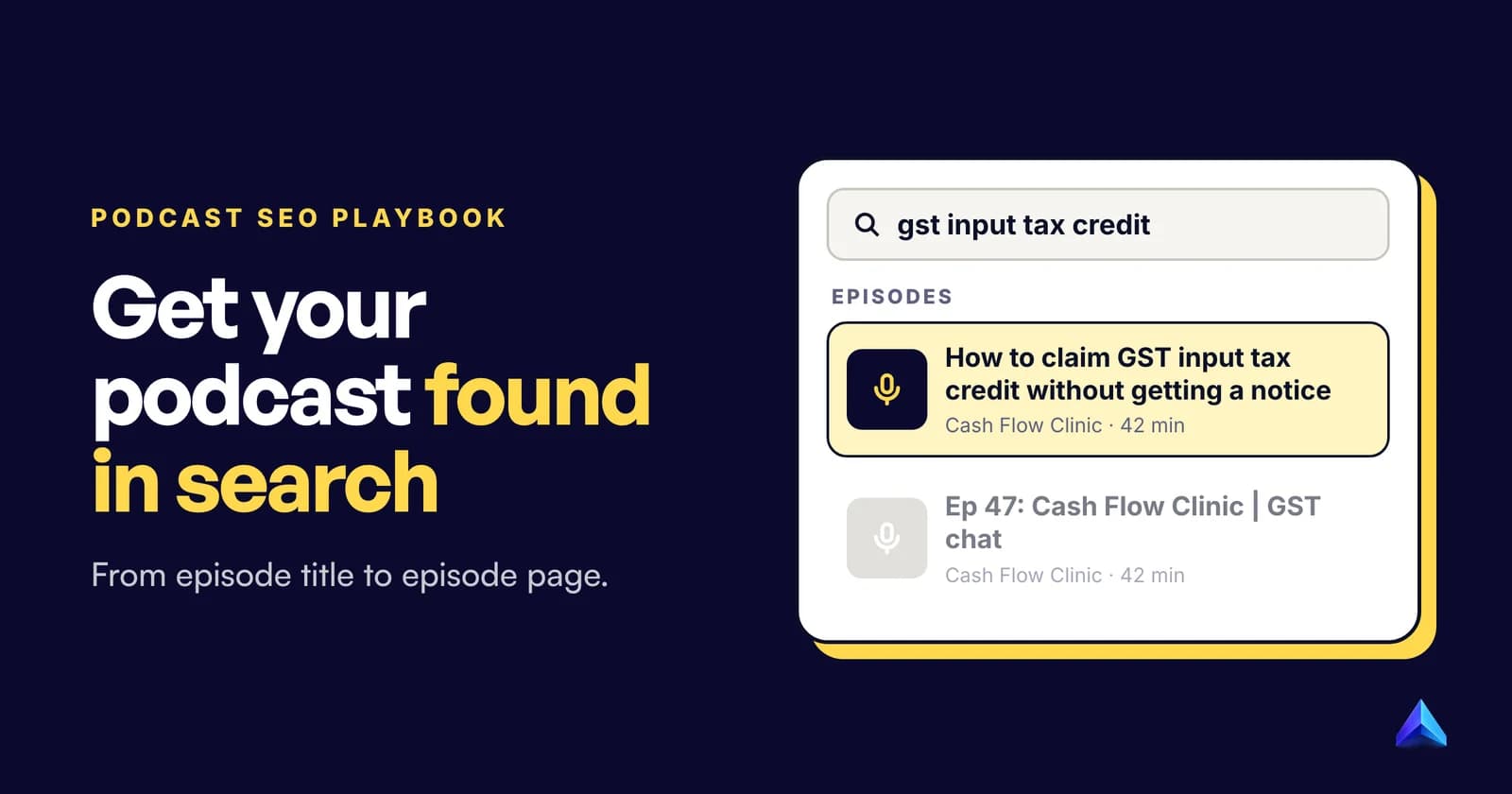
Podcast SEO is the work of making a show and its episodes easy to find in two places: the search bars inside Apple Podcasts, Spotify and YouTube, and Google's ordinary web results. The first runs on titles, feed metadata and listener behaviour. The second runs on web pages, so each episode needs its own page with a transcript. Get the episode title right first, because every platform reads it.
Most guides treat those two jobs as one checklist. They are different systems, and some popular tips (asking for reviews, stuffing the show name) do nothing in one of them. This playbook follows the order the work happens, from topic to measurement.
Where podcasts get found: two kinds of search
A listener who types "gst input tax credit" into Spotify and one who types it into Google are using very different machinery.
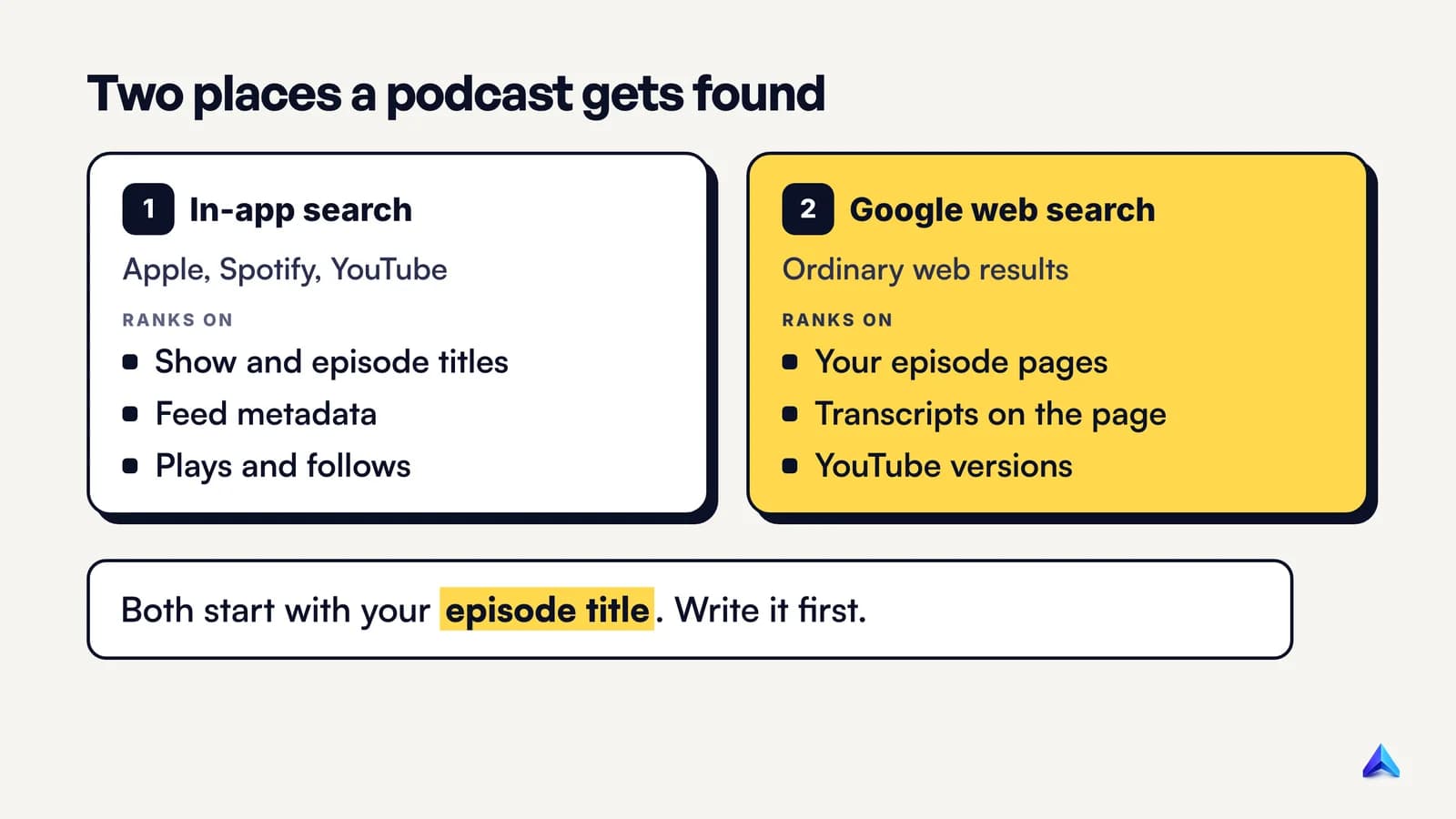
In-app search happens inside Apple Podcasts, Spotify, YouTube and YouTube Music. Each app reads your RSS feed (or the upload itself, on YouTube), indexes what it finds, and ranks results using its own signals. Apple is unusually open about those signals. Its guide to how search works on Apple Podcasts names three main factors: metadata (the show name, channel name and episode title), popularity (followers and plays), and user behaviour (shows that get played or followed from search results).
Google web search no longer has a podcast product to feed. Google Search stopped showing podcast carousels in February 2023, and YouTube announced that Google Podcasts would be discontinued in the US as early as April 2024, with listeners moved to YouTube Music. What remains is the normal web index. An episode reaches a Google results page as a web page, or as a YouTube video.
So a complete podcast SEO plan has two halves: feed metadata for the apps, and episode pages for Google. Steps 1 to 6 below mostly serve the apps. Step 7 serves Google.
Step 1: Find the words listeners actually search
Start before you record. An episode built around a question people already ask beats a vague one that gets a clever title later.
Collect candidate topics from three places:
- The apps' own search suggestions. Type the start of a topic into Spotify, Apple Podcasts and YouTube and note the suggested completions. They show you how listeners phrase things inside the app.
- Google's suggestions and related searches. These show how people phrase the same need on the web, which matters for the episode page in Step 7.
- A keyword tool with volume and difficulty. Volume tells you whether anyone searches the phrase. Difficulty tells you whether your episode page can rank for it. Read our explainer on keyword difficulty before you pick targets, because a new show's website is up against sites with years of links.
Pick one main phrase per episode. The conversation can wander, but the title and the opening of the description should commit to one search need.
Guests are keywords too. People search for names, so an interview with a well-known founder, author or chef is findable by that person's name in every app. Plan the title around the guest when the guest is the draw.
Step 2: Name the show for search
Your show title is the one piece of metadata every platform reads on every result. Apple asks for channel names, show titles and episode titles that are "specific and unique", and tells creators to avoid names that are too generic or too close to existing shows.
Spotify's guide to podcast SEO is more prescriptive. It suggests three to four words, a keyword that reflects the content, no abbreviations or misspellings, and no special characters, which it says confuse search algorithms. Its example of what to avoid is "The Cooking $how Podcast with Steve and Alicia": too long, too generic, and a dollar sign where a letter should be.
A pun only you understand fails the stranger scrolling results, and "The Business Podcast" fails the other way by colliding with hundreds of shows. A workable pattern is a distinctive name plus a plain topic word:
| Weak show title | Why it fails | Stronger version |
|---|---|---|
| The Hustle Hour | No topic, many lookalikes | Cash Flow Clinic |
| Small Biz Talk w/ Priya 🎙️ | Generic, abbreviation, emoji | Founder Finance with Priya Rao |
| The Best Marketing Podcast Ever | Generic words, a claim, no subject | Local Marketing Lab |
Do not pad the title with extra search terms. Apple's content guidelines forbid attempts "to influence search using inaccurate or inappropriate terms", and require that titles and descriptions accurately represent the show. A show title like "Cash Flow Clinic | Accounting | GST | Tax | Bookkeeping" invites rejection or removal rather than rankings.
Step 3: Write episode titles that match a query
This is the highest-leverage field in podcast SEO. Apple ranks on it directly, Spotify and YouTube read it, and it becomes the headline of the episode page Google sees.
Spotify points to the show Grownkid as a model. Episodes called "am i too old to have acne" and "do playful people go on better dates?" are phrased the way a listener would type the question. A title such as "Navigating Adult Acne and Self-Acceptance" is accurate, but nobody searches it.
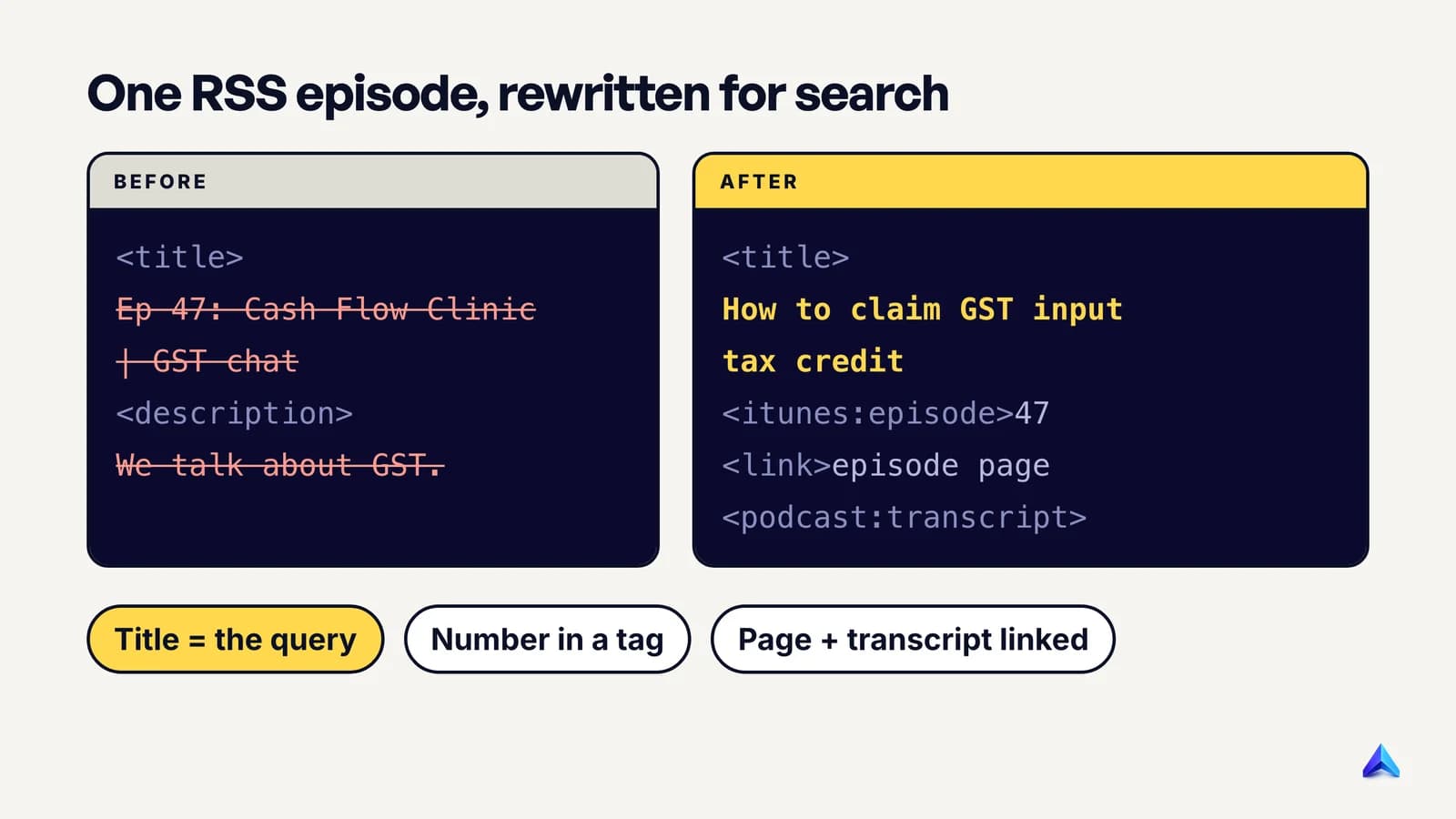
Apple adds rules that most guides skip. In its podcaster's guide to RSS, Apple says the episode title should not contain the episode or season number, because those belong in the <itunes:episode> and <itunes:season> tags, and it should not repeat the show's name. Separating them, Apple says, lets it index and order every show's episodes cleanly.
Worked example: one RSS item, before and after
Take a single episode of a made-up Indian small-business show, written the way many hosting dashboards produce it by default:
<item>
  <title>Ep 47: Cash Flow Clinic | GST chat with our CA friend 🎙️</title>
  <description>In this episode we talk about GST. Enjoy!</description>
  <enclosure url="https://cdn.example.in/ccf/047.mp3" length="48211344" type="audio/mpeg"/>
  <guid isPermaLink="false">ccf-047</guid>
</item>
Every searchable element is wasted. The episode number and show name fill the start of the title, the topic is vague, an emoji sits at the end, and the description says nothing a search engine can match. The same item, rewritten:
<rss version="2.0"
  xmlns:itunes="http://www.itunes.com/dtds/podcast-1.0.dtd"
  xmlns:podcast="https://podcastindex.org/namespace/1.0">
...
<item>
  <title>How to claim GST input tax credit without getting a notice</title>
  <itunes:title>How to claim GST input tax credit without getting a notice</itunes:title>
  <itunes:episode>47</itunes:episode>
  <itunes:season>3</itunes:season>
  <description><![CDATA[<p>Chartered accountant Meera Iyer explains how
  small businesses claim GST input tax credit, the invoice mismatches that
  trigger notices, and what to check before filing each month.</p>]]></description>
  <link>https://cashflowclinic.in/episodes/gst-input-tax-credit</link>
  <enclosure url="https://cdn.example.in/ccf/047.mp3" length="48211344" type="audio/mpeg"/>
  <guid isPermaLink="false">ccf-047</guid>
  <podcast:transcript url="https://cashflowclinic.in/t/047.vtt" type="text/vtt"/>
  <podcast:chapters url="https://cashflowclinic.in/c/047.json" type="application/json+chapters"/>
</item>
What changed, and why:
- The title is the query. A business owner searches "how to claim GST input tax credit", not "GST chat". The added clause ("without getting a notice") states the payoff.
- The number moved to
<itunes:episode>. Apps that show numbers still show 47, and the title now starts with the topic. - The guest has a full name and a job. Named people and topics give every app something specific to match.
<link>points to a real episode page. Apple uses this tag when an episode has a corresponding webpage. That page is Step 7.- Transcript and chapters are in the feed. More on those in Step 5.
- The
<guid>did not change. Apple insists the GUID stays the same even when the title or audio URL changes. Rewrite old titles freely, but never touch the GUID, or apps will treat the episode as new and show it twice.
Step 4: Write descriptions for the platforms that read them
Notice what is missing from Apple's list of main search factors: the description. Apple names the show name, channel name and episode title. Descriptions still matter, but their main jobs are elsewhere.
On Spotify the description does more. Spotify's guide says the first 250 characters are what a listener sees in the app before tapping to expand, and that those characters are often pulled into search snippets. It asks for full sentences, the primary keyword stated plainly, and secondary terms such as specific topics and guest types.
Write every episode description to do three things in the first 250 characters:
- Pick up where the title stopped. Do not restate it. If the title asks the question, the description names what the answer covers.
- Name the guest and the specifics. "Chartered accountant Meera Iyer" beats "our CA friend".
- Say who it is for. "Small businesses filing monthly GST returns" tells an app, a search engine and an AI assistant exactly when to surface the episode.
Below those first lines, add timestamps, links to resources mentioned and a link to the episode page. Apple accepts up to 10,000 characters, with a small set of HTML tags (paragraphs, lists and links) if they are wrapped in CDATA. If you also send the feed to YouTube, note that YouTube rejects <, > and any HTML in titles and descriptions, so check what your host sends there.
The show description follows the same rules at a broader level: topic, host and audience, in sentences rather than a keyword list.
Step 5: Add transcripts and chapters to the feed
A transcript turns an hour of audio into text that a search system can match against. Spotify states it plainly: transcripts let its systems index an episode at the topic and keyword level, rather than only by its title and description. Spotify now generates transcripts, chapters, and guest and topic tags automatically for eligible episodes, so the job there is to switch transcripts on in Spotify for Creators and correct obvious errors.
For other apps, put the transcript in the feed. Apple supports the <podcast:transcript> tag from the open Podcast Index namespace, and prefers WebVTT (text/vtt) over SRT when both are present. A valid type attribute is required. Apple's content guidelines also require transcripts to accurately reflect the episode, so an unedited machine transcript full of misheard names is a compliance problem as well as a quality one.
Chapters help in a different way. They split an episode into labelled segments a listener can jump to, and Spotify says chapters can be recommended on their own. Apple recommends chapter titles of no more than 45 characters. Write them like mini headings: "Which invoices qualify for ITC" works, "Part 2" does not.
The same cleaned transcript does a third job in Step 7.
Step 6: Put the show on YouTube without breaking it
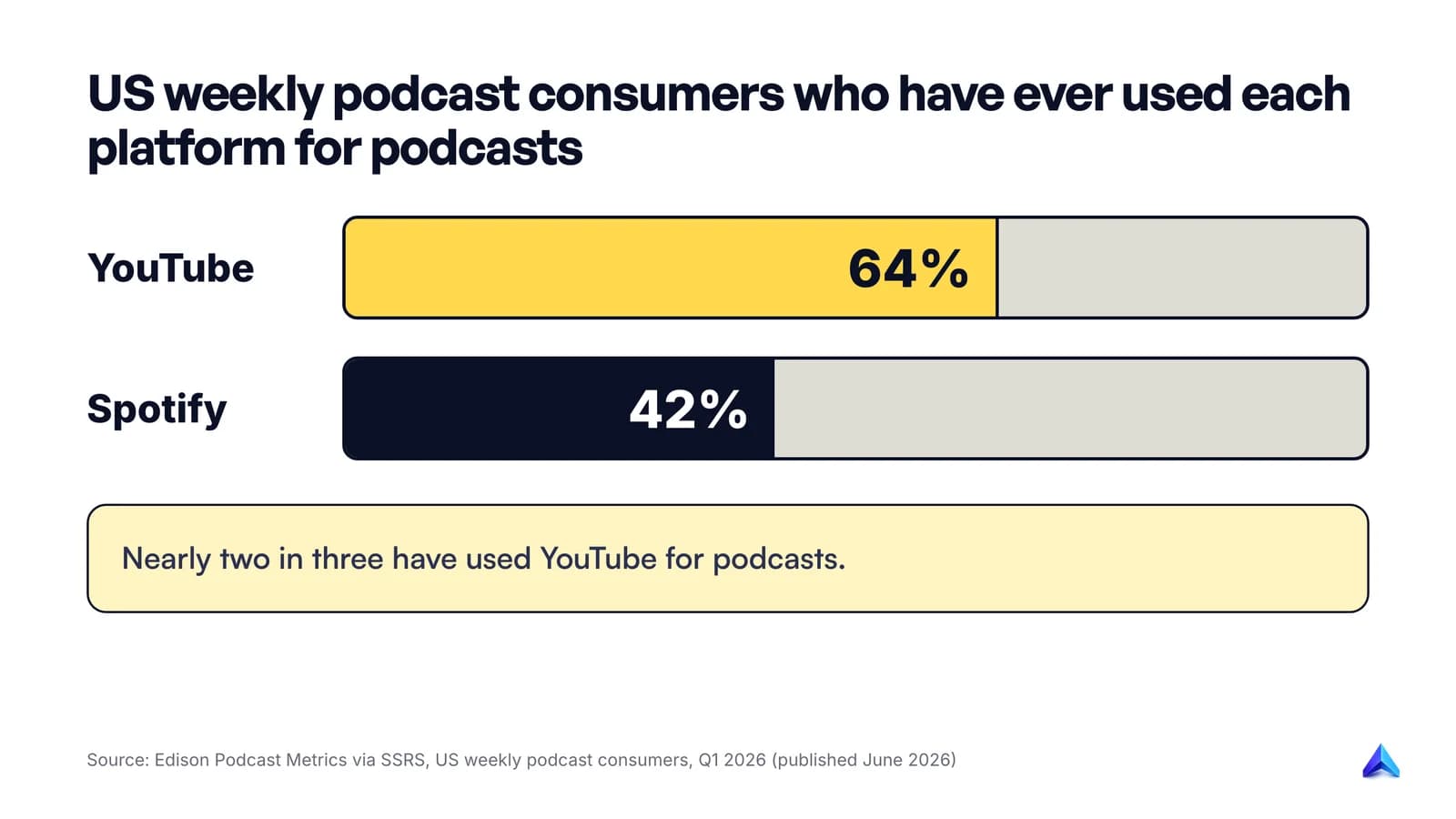
Skipping YouTube means skipping the platform most podcast listeners already use. Edison Research's Podcast Metrics, published by SSRS in June 2026, found that 64% of US weekly podcast consumers have used YouTube to consume podcasts, against 42% for Spotify. In the UK, Edison found in July 2026 that YouTube had just overtaken Spotify as the service listeners use most, 29% to 28%.
An audio-only show has two routes in. The first is a real video upload, edited like any other video. The second is RSS ingestion, where YouTube reads your feed and does the uploading. The YouTube Help page on delivering podcasts by RSS is worth reading in full before you connect a feed, because the defaults surprise people:
- Every episode becomes a static-image video built from your show art.
- The feed reaches YouTube and YouTube Music only. It does not distribute anywhere else.
- Show details do not sync. If you rename the show or change its description in the feed, YouTube does not pick that up. Edit it in YouTube Studio as well.
- Audio cannot be swapped. A re-uploaded audio file in the feed does not update the video. You re-ingest the episode, which creates a new video.
- First uploads are private. YouTube recommends waiting until all selected episodes have uploaded before making the podcast public.
- No ads in the content. YouTube's terms forbid advertisements in RSS-uploaded podcast content, and host-read promotions or sponsorships have to be declared as branded content.
Once episodes are on YouTube, they follow YouTube's own discovery rules for titles, thumbnails and watch behaviour, which our YouTube SEO guide covers. The query-style titles from Step 3 carry straight over.
Step 7: Give each episode a page Google can rank
With podcast carousels and Google Podcasts gone, Google has no podcast-specific door. Your feed alone gives it very little to rank. The way into Google's web results is an episode page on a site you control, and the transcript is what makes that page worth ranking.
A strong episode page contains:
- A title and H1 that match the episode's search phrase. Usually the same words as the episode title.
- A short summary that answers the question in the first paragraph, for readers who will not press play.
- An embedded player.
- The cleaned transcript, or an edited article version of it with subheadings. A raw hour of transcript is better than nothing, but an edited write-up with headings reads better and gives search engines clear sections to quote.
- Guest name, role and links, links to everything mentioned, and links to related episodes.
Give each page a short, readable URL such as /episodes/gst-input-tax-credit, not /episodes/47 or /?p=8123. Our guide to URL slug best practices covers the details. Then put that URL in the feed's <link> tag so the apps point listeners to it too.
Structured data: useful, but no rich result
Schema.org has a PodcastEpisode type, described simply as a single episode of a podcast series, with properties such as partOfSeries, episodeNumber, duration and associatedMedia. Schema.org marks it as part of its "new" area, still open to implementation feedback.
Be clear about what it does in Google. The search gallery that lists the structured data Google Search supports, checked in October 2026, lists a couple of dozen types, including Article, Video and Recipe, but no podcast entry. So PodcastEpisode markup describes the page accurately for any system that reads schema.org, and it will not earn a podcast rich result in Google. If you upload video versions to your own site, Video markup is the type Google does support.
A minimal block for the example episode looks like this:
{
  "@context": "https://schema.org",
  "@type": "PodcastEpisode",
  "name": "How to claim GST input tax credit without getting a notice",
  "url": "https://cashflowclinic.in/episodes/gst-input-tax-credit",
  "episodeNumber": 47,
  "datePublished": "2026-10-06",
  "duration": "PT42M",
  "partOfSeries": {
    "@type": "PodcastSeries",
    "name": "Cash Flow Clinic",
    "url": "https://cashflowclinic.in/"
  },
  "associatedMedia": {
    "@type": "AudioObject",
    "contentUrl": "https://cdn.example.in/ccf/047.mp3"
  }
}
Two problems are common on company sites. An episode page and a blog post often chase the same phrase; pick one page per phrase, as our guide to fixing keyword cannibalization explains. And archives hidden behind a "load more" button leave pages unindexed, so check that each episode page is indexed after publishing.
If episode pages live on your company blog, the Project Rankup Content Audit can score any of those URLs for SEO and GEO and list plain-English fixes, which is a quick way to find the thin ones.
How to tell if podcast SEO is working
Check the two halves separately, since they report in different places.
In the apps: Spotify's guide suggests watching where new listeners come from in Spotify for Creators. If search is a growing source, the metadata work is paying off. Judge it over months, not days.
On Google: Search Console shows whether episode pages appear in results, for which queries, and how often they get clicked. Look for queries that match your episode titles, and for pages getting impressions but few clicks, which usually need a clearer title or a better summary.
When only one half moves, the weak one is usually obvious. AI assistants draw on the same text, and pages that answer a question plainly are the ones AI Overviews tend to quote.
Mistakes that quietly cost you listeners
- Episode numbers and the show name at the start of every title. Apple tells you to move both into tags. The first words of the title should be the topic.
- Chasing reviews for search rankings. Reviews are good for persuading a listener who has found you. Apple states that ratings, reviews and shares are not factored into its search results.
- Keyword-stuffed show names. A pipe-separated list of terms breaks Apple's content guidelines and reads badly in every app.
- Changing GUIDs when you switch hosts. Apps then show old episodes twice.
- Leaving machine transcripts unedited. Misheard guest names and brand names are exactly the words people search for.
- Putting the best episodes behind a paywall. Spotify notes that private and subscriber-only episodes are not publicly accessible, so search engines cannot crawl them. Keep your most searchable episodes public.
- No episode pages at all. Without them, Google has nothing to rank except a hosting platform's generic page and, if you uploaded them, the YouTube versions.
Frequently asked questions
Can a video podcast help SEO?
Yes, mainly through YouTube. A video version puts each episode into YouTube search, and Edison found 64% of US weekly podcast consumers have used YouTube for podcasts. Video does not fix weak titles or thin episode pages, so treat it as an extra surface rather than a substitute.
Do reviews help a podcast rank on Apple Podcasts?
No, not in search. Apple says ratings, reviews and shares are not factored into search results. What it does use is metadata (show name, channel name, episode title), popularity, and engagement such as plays and follows from search. Reviews still help convince a new listener who has found the show.
Does Google still show podcasts in search results?
Not as a podcast feature. Google stopped showing podcast carousels in February 2023 and shut down Google Podcasts in 2024. Episodes now appear in Google as ordinary web pages, such as your episode page or a hosting platform's page, or as YouTube videos.
Should I put episode numbers in podcast titles?
Keep them out of the title text. Apple's RSS guide says episode and season numbers belong in the itunes:episode and itunes:season tags, and that the episode title should not repeat the show name either. Apps that display numbers will still show them, and your title can start with the topic.
How can a podcast improve my website's SEO?
Through the episode pages. Each episode with a summary, an edited transcript and links becomes a page that can rank for its question and earn links on its own. A company podcast published only on hosting platforms adds nothing to its own domain.
How long should a podcast episode title be?
Long enough to state the question and one qualifier, and no longer. Apple Podcasts Connect allows up to 150 characters, but phone screens cut long titles short, so the words at the end are the ones listeners never see. Put the searchable phrase first.