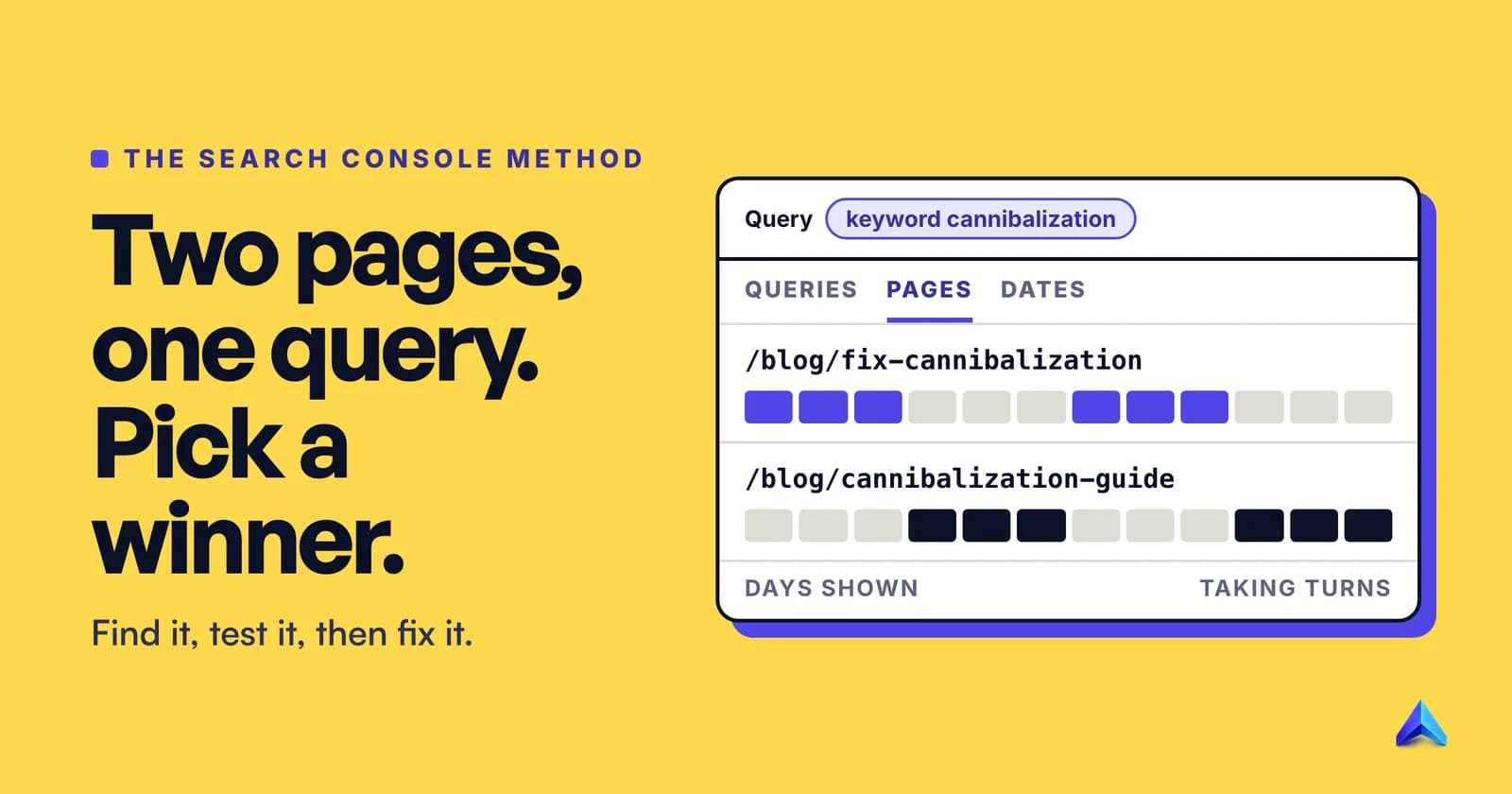
To fix keyword cannibalization, first prove it: in Google Search Console, filter the Performance report to the query and open the Pages tab. If two of your URLs split the impressions and take turns ranking, choose one winner. Merge the weaker page into it with a 301 redirect, or rewrite it for a different intent, then point your internal links at the winner. Canonical tags suit near-duplicates only, and noindex is rarely right.
The order matters more than the fixes. "Merge and redirect" is right often enough to be dangerous: two pages showing for one keyword is sometimes the best result your site can get.
What keyword cannibalization actually looks like
Keyword cannibalization is when two or more of your pages compete for the same query and the same intent, so Google keeps switching between them and neither ranks as well as one stronger page would. The symptom is instability: one week the guide ranks 8th, the next the older post ranks 14th and the guide is gone.
The half people skip is the same intent. A Mumbai accountancy firm with pages for "GST registration fees" and "GST registration process" has two pages that share most of their words but answer different questions, and both deserve to rank for their own searches.
Answering a question posted on Bluesky in September 2025, Google's John Mueller said "If you have 3 different pages appearing in the same search result, that doesn't seem problematic to me", and he added that "pages aren't duplicates just because they happen to appear in the same search results page", as Search Engine Journal reported. In the same reply he endorsed the core of the fix: reduce unnecessary duplication and put that energy into one excellent page.
So three different situations hide under one name:
| What you see | What it means | Action |
|---|---|---|
| Two of your URLs sit next to each other in the top results for a query | Google likes both, and you own two slots | Leave them alone |
| Two URLs alternate, rarely appear together, and both rank lower than you expect | Google cannot decide which page answers the query | Fix it |
| The "wrong" page ranks: a blog post for a buying query, a product page for a "how to" | Your intent targeting is off | Re-target, then link |
There is a ceiling on the first row. Google's ranking systems guide describes a site diversity system that means it "generally won't show more than two web page listings from the same site" in its top results, with exceptions when more are especially relevant.
Step 1: Find the competing pages in Search Console
Search Console shows what Google actually displayed, not what a rank tracker guessed. Google's help centre spells out the clicks in its guide to common Performance report tasks:
- Open Performance → Search results and set the date range to the last 3 months.
- Click the Queries tab and click the query you care about. That filters the whole report to it.
- Click the Pages tab. Every URL listed was shown for that query at some point in the period.
One URL means no cannibalization for that query. With two or more, note each URL's impressions, clicks and average position.
Look at the dates, not just the totals
Totals hide the swapping. Add a page filter for one URL (+ Add filter → Page), open the Dates tab, which groups data by day, week or month, and note the days it earned impressions. Repeat for the other URL.
Impressions on the same days mean Google shows them together: the healthy case. Days that alternate in blocks, one page for a fortnight and then the other, mean Google is rotating them, and that is worth fixing.
Keep one reporting quirk in mind. Google's Performance report documentation says data on the chart is aggregated by property: "if two results from the same site appear for one query, they count as a single impression in the chart total." The Pages tab, by contrast, is aggregated by page. So when your URLs appear together, the page rows add up to more than the chart total, a useful hint in itself.
Widen the net with regex
People type variants: "keyword cannibalisation fix" and "how to solve keyword cannibalization" are the same need. Google notes that regular expressions can match several similar queries, so choose Custom (regex) in the query filter:
cannibali[sz]ation
A page that appears for one spelling only is not a real competitor; one that appears across the whole family is.
Cross-check with a site: search
Search Console only reports pages that were shown. To find pages that target the term but never earned an impression, search:
site:yourdomain.com "keyword cannibalization"
Treat the output as a list of suspects, not proof. It is good at surfacing the forgotten 2021 post, the tag archive and the PDF.
Put it in one sheet
Per query, record every URL shown, its impressions, clicks and position, whether the URLs appear on the same days, and each page's intent. Ten rows of this beat any "cannibalization score". For a full URL list to start from, Project Rankup's free site scan lists up to 3,000 pages grouped by section without running an AI model, which makes it a quick inventory before you open Search Console.
Step 2: Decide whether it is actually a problem
Mueller's advice in that same answer was blunt: "You need to look at the details, you need to know your site, and your potential users." In practice the details come down to four questions, asked in order.
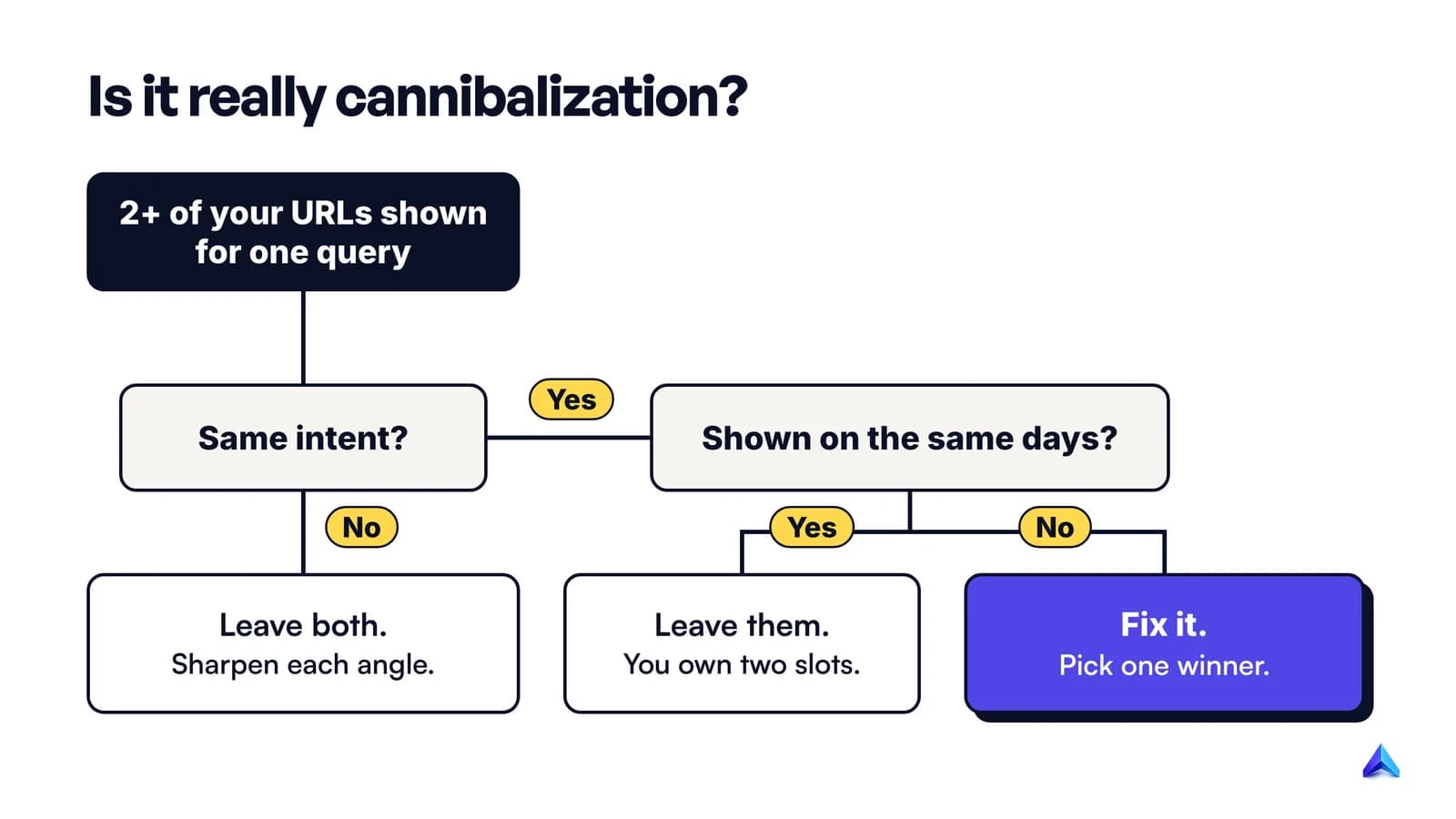
Do the pages serve the same intent? Search the query in a private window and read the top ten. If Google ranks guides, your guide is the right page and your product page is not competing on equal terms. If Google ranks product pages and comparison tables, your guide is the mismatch. Two pages that answer different questions are not cannibalising each other, even when they share a keyword.
Do they appear together or in turns? Together is a win. Turns is the problem. You already have the answer from the Dates tab.
Is either page doing well? If one URL holds most impressions in the top five and the other picks up a handful on page three, there is no fight. The weak page is just weak; merge it for tidiness if you like.
Does the query matter? A query that brings in no leads is not worth a redirect project. Spend the time where sign-ups, calls or sales come from.
A real problem usually has three marks: same intent, alternating dates, and neither page in the top five. If you see all three, carry on. If you see only one, you probably have a content quality issue on a single page, and our guide to writing a blog post for SEO is a better place to start than this one.
Step 3: Pick the page that should win
Most merges go wrong here, because people keep the newest page by default. Judge on evidence instead:
- Search performance. The URL with more impressions and a better position over three months already has Google's preference.
- Links from other sites. Check backlinks in Ahrefs, Semrush or Search Console's Links report. Do not make the best-linked page the one that moves.
- Conversions. If one page brings in demo requests or enquiries in your analytics, it wins unless the numbers above are lopsided.
- The URL itself. A short, durable slug beats one with a year or "v2" in it. Our post on URL slug best practices explains why a slug you never have to change is worth more than a perfect one.
- Completeness. Which page needs less work to become the best answer? That is your editing budget.
Write the decision down next to each pair in your sheet: winner, loser, and which fix the loser gets.
Step 4: Apply the fix that matches the cause
There are five fixes, and they are not interchangeable. The most common mistake is a canonical tag where a redirect belongs.
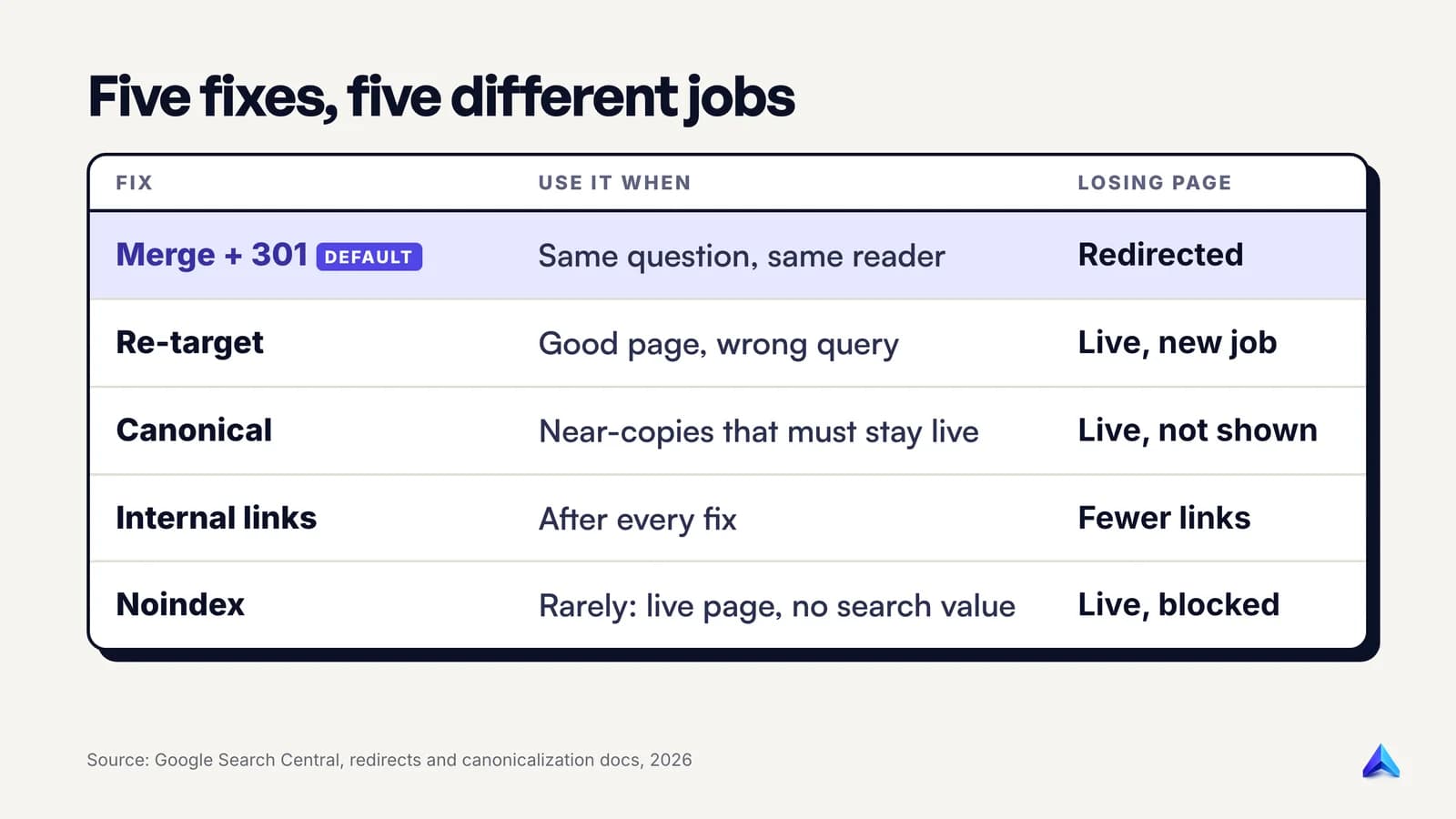
Merge the content and 301 redirect (the default)
When two pages answer the same question for the same reader, merge them. Most real cases end here.
- Move anything useful from the losing page into the winner: a better example, a missing step, a table. Rewrite rather than paste, so the winner reads as one piece.
- Update the winner's title, intro and date so they reflect the expanded page.
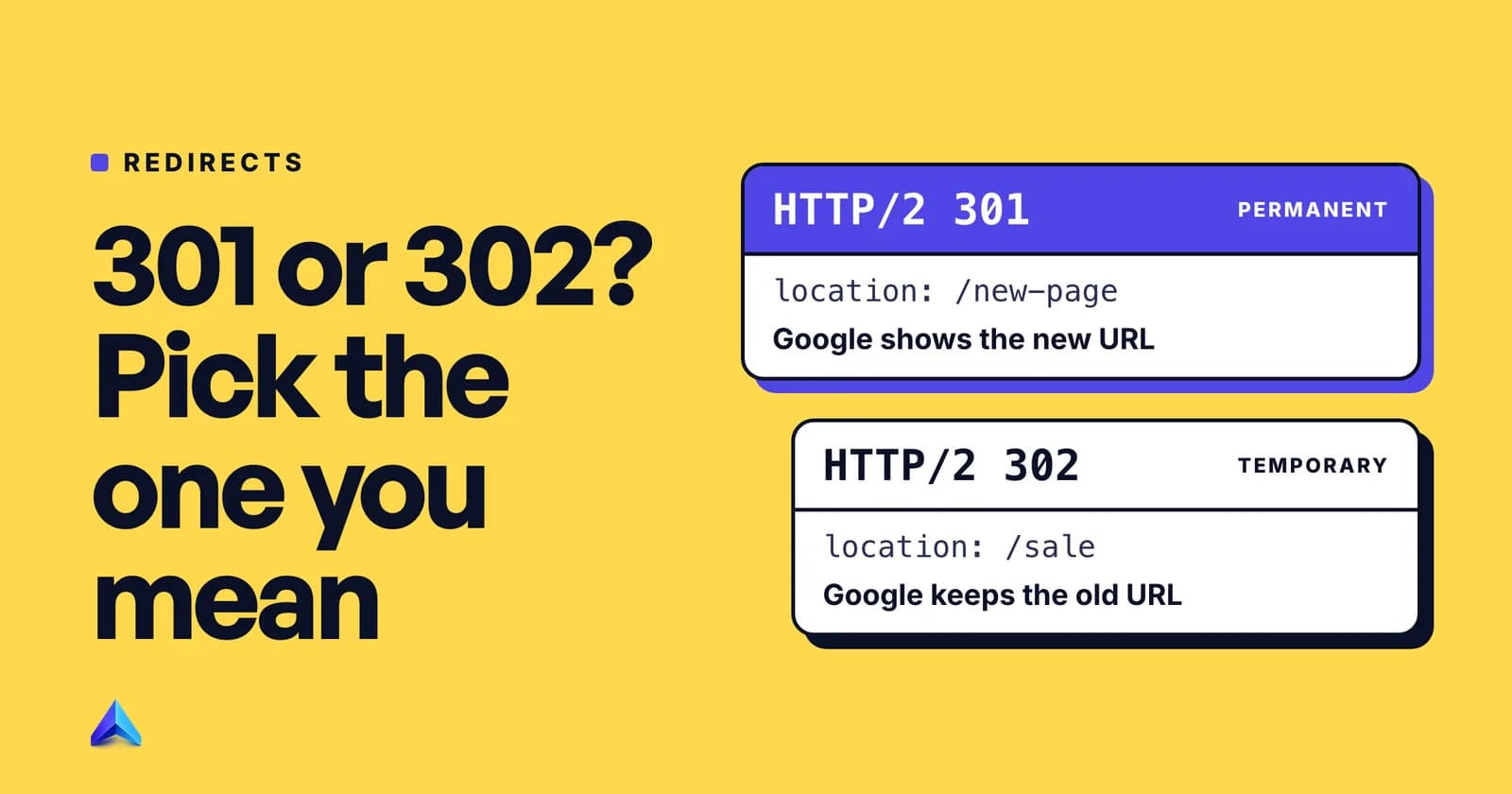
- Set a permanent server-side redirect from the losing URL to the winner. Google's redirects documentation calls this "the best way to ensure that Google Search and people are directed to the correct page", and says the 301 and 308 status codes mean a page has permanently moved. On WordPress, the Redirection plugin or your SEO plugin's redirect manager does this; on Next.js or Vercel, a
redirectsentry in the config; on Nginx, areturn 301rule. - Avoid JavaScript redirects. Google says to use them only if you cannot do server-side or meta refresh redirects.
- Remove the losing URL from your XML sitemap and from navigation menus.
Check the redirect with your browser's network panel or curl -I before you move on. It should answer 301 once and land on a 200. A chain of hops or a loop creates a new problem, which our guide to the redirect error in Search Console walks through.
Re-target the weaker page
Sometimes the losing page is good, just aimed at the wrong query. A UK plumber with a "boiler service London" landing page and a blog post titled "Boiler Service in London: What It Costs" has two pages pulling at one query. The post becomes useful again if it targets "how much does a boiler service cost", with the price question in the title, the H1 and the opening answer, and a link to the landing page for anyone ready to book.
Re-targeting changes the page's job. Rewrite the title tag, H1, first paragraph and subheadings around the new question, and cut the phrases that still pull it towards the old query. Changing only the title rarely moves it.
Use a canonical tag for near-duplicates only
A rel="canonical" tag tells Google which of two or more very similar pages to show, while both stay live for visitors. It fits printer-friendly versions, product variants that differ only by colour, filtered category URLs, and articles you syndicate to another site.
It does not fit two different articles on the same topic. Google's canonicalization guide says it clusters pages that "seem to be the same or the primary content very similar", and adds that Google may choose a different page as canonical than you do. Point a canonical from one 2,000-word guide to another 2,000-word guide with different content, and Google is free to ignore it. Both pages then stay in the index and the fight continues.
Google's guide to consolidating duplicate URLs ranks the methods in order of strength: redirects are a strong signal, rel="canonical" is a strong signal, and sitemap inclusion is a weak one. It also warns against sending mixed messages, such as one URL in the sitemap and a different one in the canonical tag. If the losing page has no reason to exist for visitors, the redirect is stronger and simpler. Our piece on self-referencing canonical tags covers the tag's other job, which is protecting each page from its own URL variants.
Consolidate your internal links
Internal links are your site's own vote. If the old post gets most of the links using the query as anchor text, you are telling Google the wrong page matters.
Find every link to the losing URL in your CMS and point it at the winner. Then review the anchor text. Google's link guidance says good anchor text is "descriptive, reasonably concise, and relevant to the page that it's on and to the page it links to." Use the main query, or a close variant, for links to the winner, and stop using it for links to any other page.
Do this even after a redirect: a direct link is cleaner and takes the old URL off your site entirely.
Noindex, only rarely
A noindex tag removes a page from Google's results while keeping it live. Google advises against it here: "We don't recommend using noindex to prevent selection of a canonical page within a single site, because it will completely block the page from Search." It recommends canonical annotations instead.
Noindex fits a narrow set of pages that must stay live for a business reason and have no search value: a paid-campaign landing page that duplicates your service page, an internal search results page, a thin tag archive. For an article that competes with another article, merge or re-target it. Do not reach for robots.txt or the URL removal tool either; Google's duplicate-URL guide says not to use either for canonicalization.
A worked example from this blog
Two pairs of posts on projectrankup.com overlap in the way this guide describes.
The first pair is /blog/deep-search-ai and /blog/deep-search-ai-explained-seo-aeo-2026. Both carry the identical title and H1, "Deep Search AI Explained: What it Means for SEO & AEO in 2026", both target "deep search ai", and each declares itself canonical. One title and one keyword make it the textbook merge case: Step 2 answers itself, and what remains is picking the stronger URL, the merge and 301, and the internal links.
The second pair is less obvious. /blog/what-is-content-marketing is titled "What Is Content Marketing: 2026 Strategies & Guide", and /blog/what-is-content-marketing-definition-types-how-it-works is titled "What Is Content Marketing? Definition, Types & How It Works". One reads as a strategy guide and the other as a definition, so this pair needs the full Step 2 check first. If the Dates tab shows them appearing together, the right move is to sharpen each one's angle. If they rotate, the strategy material can move into the definition page or be re-targeted at a strategy query.
Neither pair had been merged when this guide was written. The point of showing them is the pattern: one keyword, two URLs, and a title that does not tell Google which page should win.
Step 5: Confirm the fix worked
Fixes take effect only after Google recrawls the changed pages. To speed that up, open the URL Inspection tool in Search Console, paste the winner's URL, and click Request indexing. Inspect the old URL as well, to confirm that Google has seen the redirect.
A few weeks later, go back to the query filter and the Pages tab. Search Console's documentation explains what you should see. The page dimension "groups data by the final URL linked by a Search result after any redirects", and most data is assigned to the page's canonical URL. After a successful merge, the old URL stops appearing for the query and its impressions show up under the winner.
Use Compare in the date filter to set the four weeks after the change against the four before. Google recommends focusing more on trends in impressions and clicks than on position alone: you want one URL holding the impressions and more clicks than the pair earned together.
Three results mean something went wrong:
- Both URLs still appear. The redirect is not live, or the canonical was ignored. Check the old URL with
curl -Iand with URL Inspection. - Neither appears. The winner may have dropped out of the index. Our guide on checking if a page is indexed covers the checks in order.
- The winner ranks, but lower than before. The merge probably lost the section that earned the old page its position. Compare the two versions and put the missing material back.
Stop it coming back
Cannibalization usually starts when someone writes a new post without checking whether an older one already covers the keyword. Four habits stop it:
- Keep a keyword map. One row per URL with the query it owns, checked before every brief. Our keyword research guide covers building the list it starts from.
- Search before you write. Run the Step 1 check on every new target, and update an existing page if one already appears.
- Update, don't republish. A "2026 edition" belongs at the same URL with new content and a new date, not at a fresh slug next to the 2025 one.
- Review quarterly. A regular content audit catches overlap while it is two pages, not twenty.
Frequently asked questions
Is keyword cannibalization a Google penalty?
No. There is no penalty for having two pages on the same topic, and Google's John Mueller said in 2025 that three pages from one site in the same results did not seem problematic to him. The cost is indirect: when Google keeps switching between two similar pages, neither builds a stable position.
Should I use a canonical tag or a 301 redirect for cannibalization?
Use a 301 redirect when one page should stop existing and its content now lives elsewhere. Use a canonical tag only when both pages must stay live and are near-copies, such as product variants or syndicated articles. For two different articles on one topic, the canonical is a weak fix that Google can ignore.
Can two pages from the same site rank for the same keyword?
Yes, and it is often a good result. Google's site diversity system generally limits a site to two listings in the top results, with exceptions when more are especially relevant. If both of your pages appear together for a query, you own two slots and there is nothing to fix.
How long does it take to fix keyword cannibalization?
The edits take an afternoon per pair. The results arrive after Google recrawls the changed URLs, which you can prompt with Request indexing in Search Console's URL Inspection tool. Check the query again a few weeks later and compare the period after the change with the period before.
Does keyword cannibalization affect e-commerce category pages?
It does, usually through filtered and sorted URLs or near-identical categories such as "men's running shoes" and "running shoes for men". Filter URLs are the canonical tag's best use case. Two separate categories that serve the same shopper should be merged into one, with a 301 from the other.