If your website is not showing on Google, one of three things is true: Google has not indexed it, it is indexed but ranks too low for you to find, or you are looking at the map results, which run on a separate system. Most cases come down to a new site, a setting that blocks Google, or a page that ranks on page five. Work through the six checks below in order and you will know which one is yours within an hour.
The order matters. Advice about page speed and blogging is useless while a single checkbox is telling Google to stay away, so rule out the blunt causes first.
First, work out which problem you have
"My website isn't on Google" can mean three different things, and a two-minute test separates them.
Take a made-up Sheffield bakery, Marlow Street Bakery, at marlowstreetbakery.co.uk. The owner runs three searches:
site:marlowstreetbakery.co.uktests whether Google has any pages from the domain at all.- "Marlow Street Bakery Sheffield", the business name, tests whether Google connects the site to the brand.
- "bakery Sheffield", the service and the town, tests whether the site can compete for the searches that bring new customers.
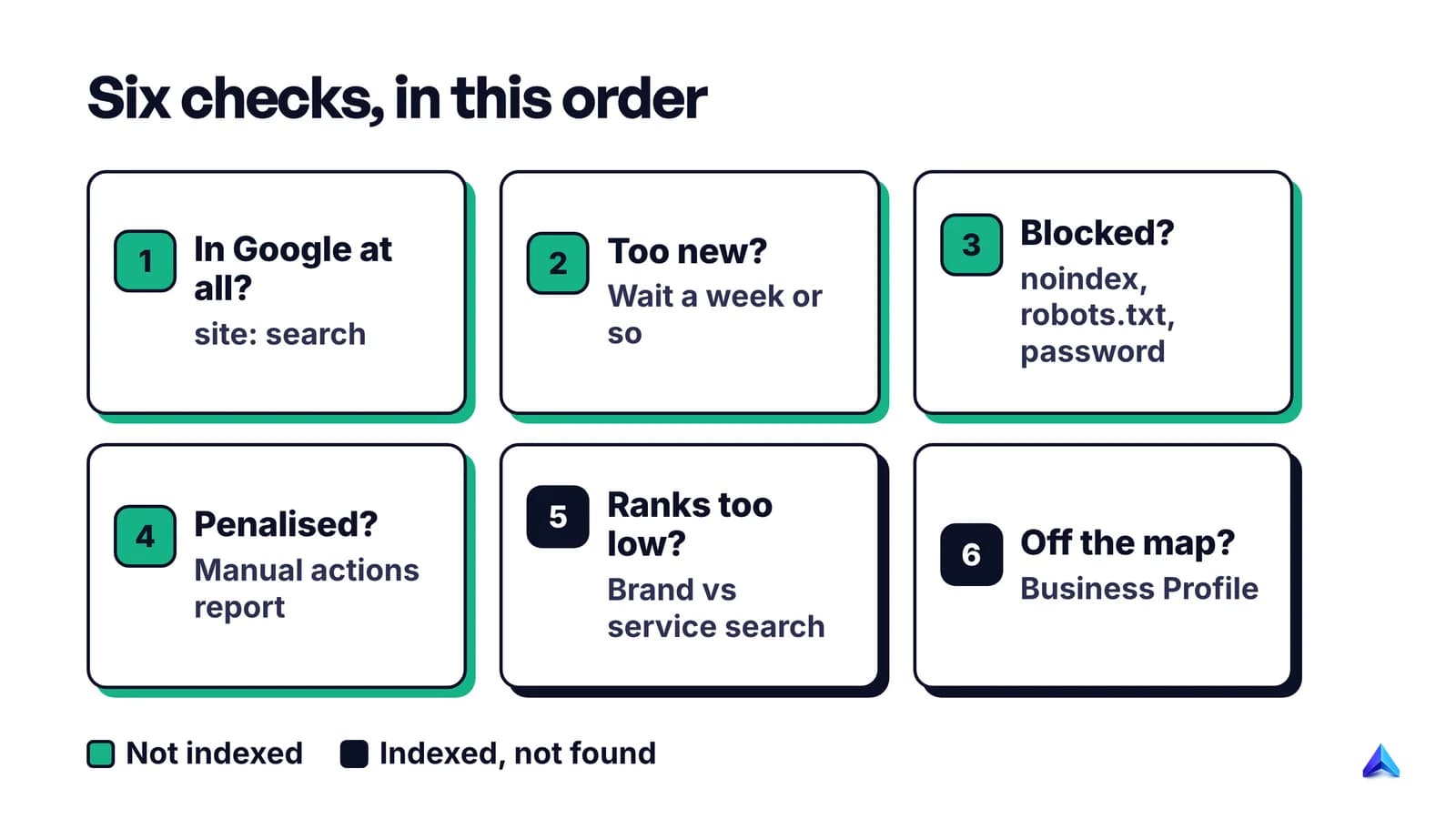
If the first search returns nothing, the site is not indexed, and checks 1 to 4 below apply. If the first two work but the third shows only competitors, the site is indexed and the problem is ranking, which is check 5. If the owner is mostly worried about the map with three businesses and a pin, that is the local pack, and check 6 covers it.
If your brand search works, you are probably in the ranking group. Being findable by your own name is a very different achievement from being found by strangers.
Check 1: Is your site in Google at all?
Google's own SEO Starter Guide says to start here: search for your site with the site: operator, and if results point to your site, you are in the index. If you see your homepage and a handful of other pages, skip to check 5.
If site: returns nothing, or misses the page you care about, confirm it with the URL Inspection tool in Google Search Console, which gives a reason when a URL is not on Google. Our guide on how to check if a page is indexed walks through every method and what each result means, so we will not repeat it here.
One shortcut for small sites. Google's Page indexing report help says that if your site has fewer than 500 pages, you probably do not need that report at all. A few site: searches for your homepage and key pages tell you what you need to know.
If Search Console is not set up yet, set it up now. It is free, and every check below uses it.
Check 2: Is the site just too new?
A new site is the simplest explanation, and the least worrying. Google is a fully automated search engine: its crawlers find the vast majority of pages by following links, not because someone submitted them. A site nobody links to has no way in.
Google's help pages say it "can take a week or so" to start crawling and indexing a new site, and up to a few weeks after a URL is known before Google crawls some or all of it. So a site launched on Monday that is missing on Thursday is normal. A site launched two months ago with nothing in site: is not, and you should move on to check 3.
To speed things up, Google's advice for a new website is specific: request indexing of your homepage first, which should start Google crawling the rest of the site. In Search Console, paste the homepage URL into the inspection bar at the top and select Request indexing. Then submit your sitemap under Indexing > Sitemaps. The Starter Guide is candid that a sitemap is not required, but on a brand new site with no links pointing to it, a sitemap is the fastest way to hand Google your list of pages.
On Wix or Squarespace, Google notes that the host will probably tell Google about new pages once you publish them. A draft or preview link does not count.
The quickest way to get a link that Google will follow is a profile you already need: your Google Business Profile, a trade body or local chamber of commerce directory, a supplier's "where to buy" page. One real link from a site Google already crawls does more than a week of refreshing Search Console.
Check 3: Look for a setting that hides the site
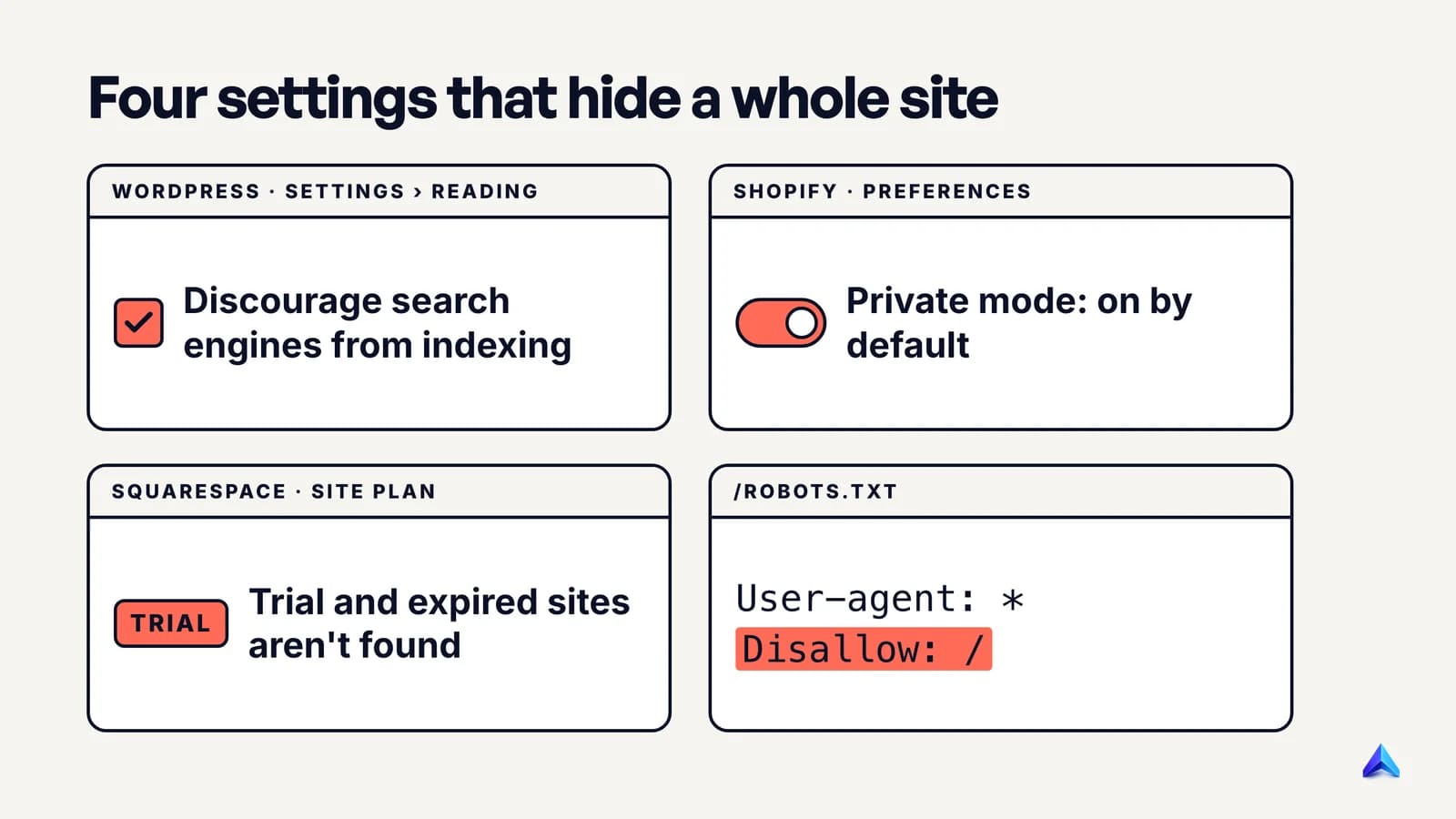
If the site is more than a few weeks old and still not indexed, something is almost certainly telling Google to keep out. Google's technical requirements for appearing in Search are short: Googlebot is not blocked, the page returns an HTTP 200 status code, and the page has indexable content. Most of the settings below break one of those three.
The WordPress "Discourage search engines" box
WordPress has a checkbox under Settings > Reading labelled "Discourage search engines from indexing this site". Since version 5.3, ticking it adds a noindex,nofollow robots meta tag to every page, according to the WordPress documentation for the Reading screen. It is easy to tick during a build and forget at launch, which is why it is the first thing we check on any WordPress site that will not show up.
Untick it, save, then check the page source of your homepage. Search for noindex (Ctrl+F or Cmd+F on the page opened with view-source:). If it is still there, an SEO plugin such as Yoast or Rank Math can add it from its own settings screen, and so can a theme.
Shopify private mode and the password page
New Shopify stores start locked. Shopify's help page on private mode explains that in private mode all of the store's pages are hidden from visitors and search engines, and that every new plan starts in private mode by default. If customers see a password page when they visit, so does Googlebot. Launch the store from Online Store > Preferences once you have completed the setup steps.
Squarespace trials, passwords and hidden pages
Squarespace's own help article on this question is blunt: search engines will not find trial, expired or cancelled sites. A site-wide password or a password on the homepage blocks Google too. Each page also has a Hide this page from search results option on its SEO tab, which is worth checking on your homepage and main service pages.
A robots.txt rule that blocks everything
Open yourdomain.co.uk/robots.txt in a browser. If you see these two lines, Google is told not to crawl anything:
User-agent: *
Disallow: /
Staging sites are often set up with this file, and it can get copied to the live server along with everything else. Delete the Disallow: / line, or change it to Disallow: with nothing after it.
Google's robots.txt documentation adds a twist worth knowing. A blocked URL can still appear in results if other sites link to it, but without a description. If you see your homepage in Google with no snippet underneath, robots.txt is the reason.
Pages that do not return 200
Google only indexes pages that return an HTTP 200 status code. Client and server error pages are not indexed, and redirecting URLs are not indexed either, only the page they redirect to. If your homepage returns a 5xx error to Googlebot because of an overloaded host or a firewall, or loops between http, https and www versions, the site can drop out entirely. Our posts on the redirect error and what a 404 error is cover how to find and fix each.
Sites built with JavaScript frameworks have a related trap: if the HTML your server sends is an empty shell, Google must render scripts before it sees any text. Server-side rendering or pre-rendering avoids that.
A removal request somebody forgot about
Search Console has a Removals tool under Indexing. A request there hides a URL from Google for about six months, according to Google's Removals help. If a previous developer or agency used it on the homepage or a whole prefix, the site vanishes for half a year with no other sign. Open the tool and check the Temporary removals tab.
Check 4: Rule out a manual action or a security warning
A manual action is rarely the explanation for an ordinary small business site, but it takes a minute to rule out. In Search Console, open Security & Manual Actions > Manual actions. A clean site shows "No issues detected".
Google's Manual actions report help explains that a manual action is issued when a human reviewer at Google decides pages on the site break Google's spam policies, and that most of these issues result in pages being ranked lower or omitted from results without any visible sign to searchers. That is why the report matters: you will not spot a manual action by searching.
If you have one, fix every listed issue on every affected page, then select Request Review and describe what you changed. Google says most reconsideration reviews take several days or weeks and asks you not to resubmit while one is pending. If you recently bought a domain or an existing site, Google tells you to say so in the request, because the problem may predate you.
Spam problems are not always manual. Google also detects spam with automated systems, which leave no message in Search Console, and the effect is the same: lower rankings or no rankings at all. If your site once ranked and fell away without a manual action, review the spam policies honestly before blaming a competitor. Our guide to negative SEO covers how to tell a real attack from a self-inflicted problem.
Check the Security issues report on the same menu. If Google decides a site has been hacked or spreads malware, its pages can show a warning label in results or a full-screen warning in the browser, and Google tries to keep hacked content out of results altogether. Hacks are not always visible from the homepage: injected spam pages selling pills or casino bonuses can sit deep in the site.
Check 5: Indexed, but too far down to find
If site: shows your pages and your brand search finds you, Google has your site. It is simply not putting it high enough for the searches you tried, which makes this a ranking problem rather than an indexing one.
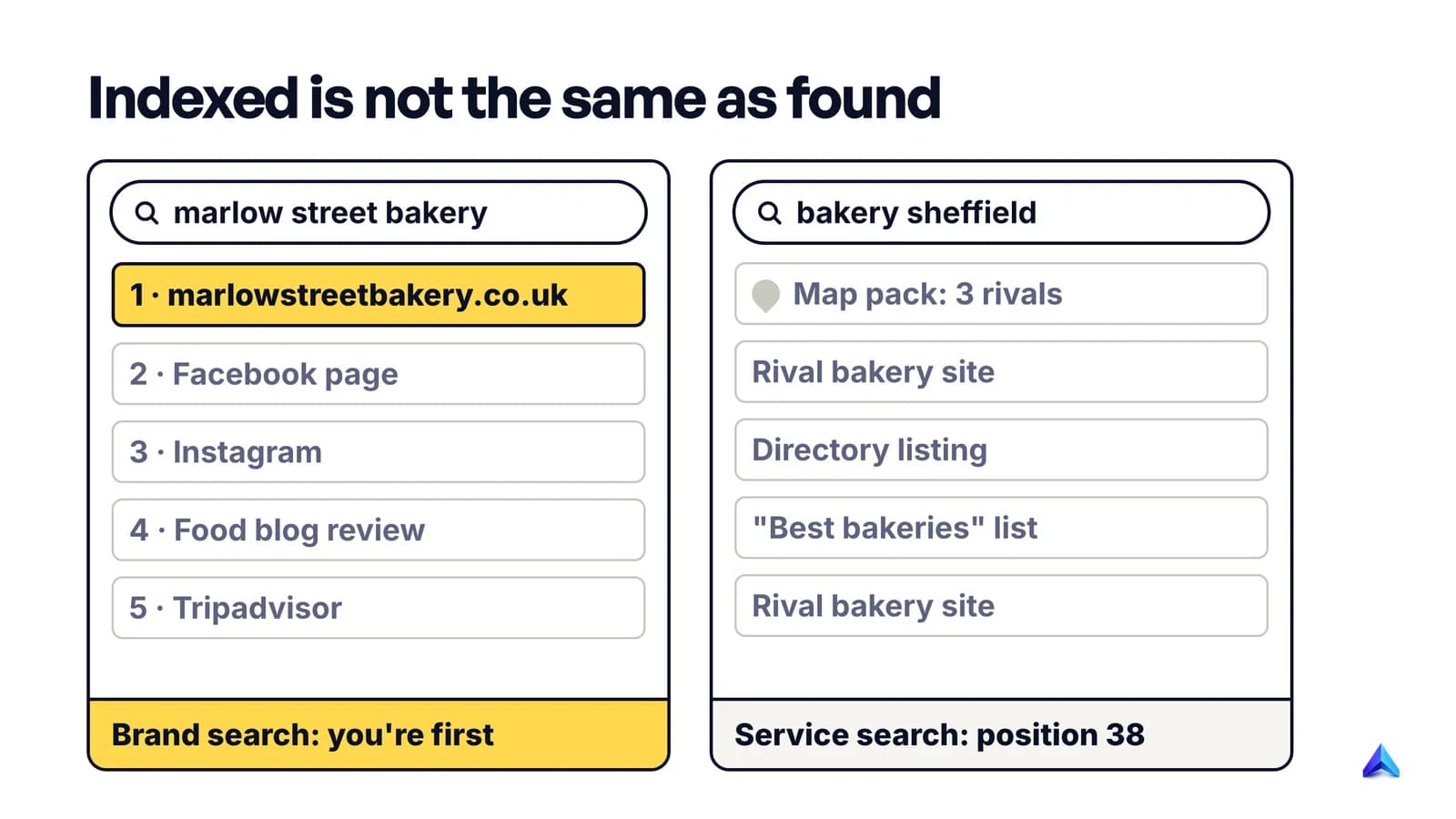
The best evidence is in Search Console's Performance report. Open Search results, set the date range to the last three months and click the Queries tab. Impressions count every time your site appeared in a results page, so any query with impressions is one you rank for, however low. Add the Average position column. A position of 38 means page four, where almost nobody looks.
Google's help for the report warns that you might not see your site when you run a listed query yourself, because results depend on the time, place, device and recent history of the searcher. Your own search from home is one data point, not a verdict. The Queries tab also shows when Google has matched a page to different phrases from the one you care about.
For a new or small site, low rankings usually mean one of these:
- You are targeting phrases you cannot win yet. "Wedding cakes" is contested by national brands. "Wedding cakes Sheffield with gluten-free options" is not. Keyword difficulty explains how to read the competition before you write. Project Rankup's keyword discovery scores difficulty against your own domain's authority, which is the comparison that matters for a young site.
- The page does not answer the search. If someone searching "bakery Sheffield opening hours" lands on a page with no hours, Google has no reason to rank it.
- Thin or near-duplicate pages. Google's help says plainly that it does not index duplicate copies of a page, so ten location pages with the same text and a different town name compete for one slot.
- Nobody links to you. Google primarily finds pages through links from pages it already crawls, and its local ranking help counts links among the signs of a prominent business. A site no one links to starts behind every established competitor.
If Search Console shows individual pages stuck as crawled but not indexed, that is a separate status with its own causes, covered in our guide to fixing crawled, currently not indexed.
Check 6: Missing from the map, not from Google
When someone searches "plumber near me" or "bakery Sheffield", the box with a map and three businesses comes from Google Business Profile, not from your website's rankings. A business can rank first on the map with a weak website, or have a strong website and no map listing at all.
Google's help page on improving your local ranking lists the factors plainly: local results are mainly based on relevance, distance and prominence. It also says three things a small business owner should take literally:
- Verify your business, because a verified profile is more likely to show in results.
- Keep the information complete and accurate, because inaccurate details can stop the profile from showing for relevant searches in your area.
- Prominence draws on how many websites link to your business and how many reviews you have.
Distance you cannot change. If you are on the edge of town, you will not appear for every searcher in the centre, however good the profile is.
For the full UK walkthrough, from the Companies House address trap to which citations matter and the rules on asking for reviews, see our local SEO UK playbook.
What not to do
- Do not pay anyone who promises to "submit you to Google". Google states in its guide to how Search works that it does not accept payment to crawl a site more often or rank it higher. Submission is free in Search Console.
- Do not hammer Request indexing. There is a daily limit, Google says a request does not guarantee indexing, and its help advises against asking for recrawls unless an important change has gone unnoticed for a week or more.
- Do not use robots.txt to hide a page you want removed. Google cannot see a
noindextag on a page it is not allowed to crawl, so the block keeps the page in results instead of removing it. - Do not rebuild the site because it is new. A two-week-old site is not broken. Wait out Google's "week or so" before changing platforms.
- Do not buy links to "kick-start" a new site. Google's spam policies list buying or selling links for ranking purposes as link spam, and a manual action is a far worse position than being new.
How to confirm the fix worked
Once you have changed something, prove it rather than waiting and hoping.
- Run a live test. In URL Inspection, select Test live URL on the homepage. It should report that the URL is available to Google, with crawling and indexing allowed. Note that the live test does not check manual actions, removals or temporary blocks, so those need their own reports.
- Request indexing once for the homepage and your two or three most important pages.
- Wait a few days, then search the exact URL. Google's URL Inspection help calls searching for the page URL the definitive test of whether it appears. Indexing usually takes a day or so after a request, but can take much longer.
- Watch the Performance report. The first impressions are the real sign of recovery. Google's own Starter Guide suggests waiting a few weeks before judging whether a change has helped.
- Keep the cause from coming back. Add "is the discourage box unticked, is robots.txt clean, is there a password page" to your checklist for every redesign, theme change or migration.
If everything here checks out and the site is indexed but still nowhere for the searches that matter, the problem has moved from "can Google see me" to "why would Google pick me". That is a content and authority question, and it takes months, not a setting.
Frequently asked questions
How do I get my website to appear in a Google Search?
Make sure nothing blocks Google, then help it find the site. Verify the domain in Google Search Console, request indexing of your homepage and submit a sitemap. Get at least one link from a site Google already crawls, such as your Business Profile or a trade directory. Google usually starts crawling a new site within a week or so.
Why does my website show up on Google for me but not for my customers?
Google personalises results by location, device, search history and time, so your search and a customer's search can differ. You may also be seeing your site because you visit it often. Check Search Console's Performance report instead: if a query has impressions there, your site is appearing for it, and the average position tells you where.
Can I pay Google to show my website in search results?
Not in the organic results. Google says it does not accept payment to crawl a site more often or rank it higher, and its Business Profile help says there is no way to pay for a better local ranking. You can buy Google Ads, which appear in labelled sponsored slots, but that does nothing for your organic position.
Why did my website suddenly disappear from Google?
Check what changed first. A redesign, plugin update, new theme or host move often switches on a noindex setting, a robots.txt block or a redirect loop. Then open Search Console's Manual actions, Security issues and Removals reports. If all three are clean and nothing changed, compare the date your traffic fell against Google's published list of ranking updates.
Do I need a sitemap for Google to find my website?
No. Google's Starter Guide says a sitemap is not required, and Google finds most pages through links. A sitemap still helps a new site with few links, and Google suggests one when you want many pages indexed. Many website builders and content management systems create it for you.