React SEO comes down to one question: does the HTML a crawler indexes contain your content, your links and your metadata? Google renders client-side React with an evergreen version of Chromium, so a plain single-page app can rank. It still breaks in predictable places: links without an href, hash routes, error pages that return 200, and metadata that only exists after JavaScript runs. Most AI crawlers do not run JavaScript at all.
So the playbook is short. Render the pages that need search traffic on the server or at build time, use real links and real status codes, set metadata per route, and check the rendered HTML in Search Console before you trust any of it. The rest of this guide is the detail behind each of those steps, with code you can copy.
How Google crawls and renders a React app
Google's JavaScript SEO documentation describes three phases: crawling, rendering and indexing. Googlebot first fetches the URL and reads the raw HTML response. For a default client-side React build, that response is mostly an empty <div id="root"></div> and a script tag. Googlebot pulls any links it can find from that HTML, then puts the page in a render queue.
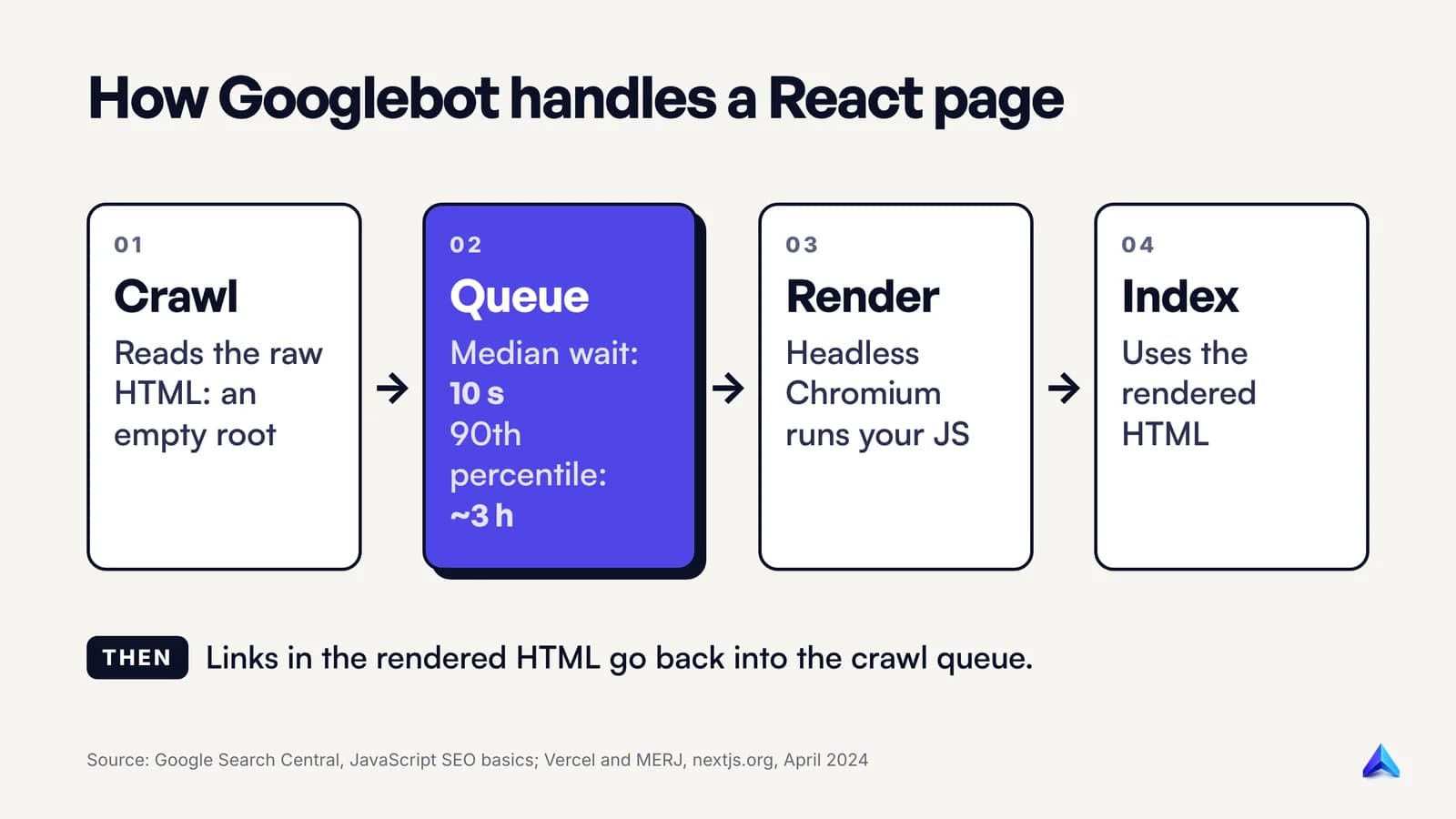
When resources allow, a headless Chromium runs your JavaScript. Google then parses the rendered HTML for links a second time and uses that rendered version to index the page. Every page with a 200 status goes into this queue unless a robots noindex tells Google not to index it.
How long is the wait? Google only says a page can sit in the queue "for a few seconds, but it can take longer than that." The best outside measurement comes from Vercel and the consultancy MERJ, who matched Googlebot crawls to render beacons on nextjs.org in April 2024. Across more than 37,000 crawl and render pairs, the median delay was 10 seconds, the 90th percentile about 3 hours and the 99th percentile about 18 hours. Out of over 100,000 Googlebot fetches, excluding errors and non-indexable pages, every HTML page was fully rendered.
Read those numbers carefully before you relax. nextjs.org is the framework team's own site, a kind test subject, and the same study found URLs with query strings waited much longer: 31 minutes at the 75th percentile, against 26 seconds overall. Do not assume a young site with few links gets the same treatment. The study also found that client-rendered pages have to be rendered before Google can see their links, which gives server-rendered pages "a slight advantage in immediate link discovery". An up-to-date sitemap closed most of that gap.
The renderer is not your browser
Google's renderer behaves like a fresh, empty browser tab on every page load, and that catches React apps built around user sessions. Google's JavaScript troubleshooting guide lists the limits:
- Local storage, session storage and cookies are cleared across page loads. Content that depends on a saved preference or a "returning visitor" flag will not appear.
- Googlebot declines permission prompts, so anything gated behind location, camera or notification access stays hidden.
- It fetches over HTTP only. Content streamed in over WebSockets or WebRTC needs an HTTP fallback.
- It caches aggressively and may ignore your caching headers, so ship fingerprinted bundles such as
main.2bb85551.js, where the file name changes whenever the content does.
One more rule matters more than all of these. If robots.txt blocks your JavaScript bundle or your API endpoint, Google renders the page without it. Disallowing /api/ to save crawl budget can block the very request that fills the page.
Where client-side React still breaks
Google can run your code. That does not mean your code produces a page Google can use. These five failures cause most React SEO problems, and none of them are fixed by "Google renders JavaScript now".
Links that are not links
Google's guide to crawlable links is blunt: Google can generally only follow an <a> element with an href attribute. It names <a onclick="goto(...)">, <span href="..."> and <a routerLink="..."> as formats it will not parse. In React, the usual offenders are clickable cards and buttons that call navigate():
// Google cannot follow this
<div className="card" onClick={() => navigate(`/products/${p.slug}`)}>
  {p.name}
</div>

// Google can
<Link to={`/products/${p.slug}`} className="card">
  {p.name}
</Link>
React Router documents its <Link> as "a progressively enhanced <a href> wrapper", so it renders a real anchor and still handles navigation on the client. Use it, or a plain <a href>, for anything that leads to an indexable page. Keep navigate() for actions such as redirecting after a form submit. A quick test: right-click the element. If the browser offers "Open link in new tab", Google can probably follow it.
Hash routes
Routes like example.com/#/pricing look like separate pages to a person. Google says it cannot reliably resolve URLs built on the part after #, the fragment. Google deprecated its AJAX crawling scheme in 2015 and now tells developers to use the History API for routing instead of fragments. In React Router, that means createBrowserRouter or BrowserRouter, not the hash versions. If you migrate an old hash-routed app, map each old view to a clean path and redirect.
Soft 404s
This one is the most common and the least visible. A React app served from a static host returns the same index.html with a 200 status for every path, then the client router shows a "Not found" component. The person sees an error page. Googlebot sees a successful page with thin content, which Search Console reports as a soft 404, and in the worst case the error page gets indexed. Google's guide spells out the cause: SPAs that handle errors in client-side JavaScript "often report a 200 HTTP status code instead of the appropriate status code."
Google accepts two fixes for client-only apps. You can redirect with JavaScript to a URL that your server answers with a real 404, such as /not-found, or you can add a robots noindex tag to the error view. React 19 makes the second one a one-liner, because a <meta> rendered in any component ends up in the document head:
function NotFound() {
  return (
    <>
      <meta name="robots" content="noindex" />
      <h1>Page not found</h1>
    </>
  );
}
If you control the server, do better and send the real status code. In React Router's framework mode, a loader can throw one:
export async function loader({ params }) {
  const product = await getProduct(params.slug);
  if (!product) throw data("Not Found", { status: 404 });
  return product;
}
Our guide to the 404 error covers when a 404 is the right answer and when a 410 or a redirect fits better.
Metadata that arrives late
In a client-rendered app, the <title> in index.html is often the template's boilerplate until JavaScript replaces it. Google renders the page, so it usually sees the replacement. Anything that reads only the raw HTML does not, and a canonical tag needs extra care: Google says you should not use JavaScript to change the canonical URL to something different from the one in the original HTML. If the shell ships one canonical for every route, leave it out of the shell and set it per route. The section on React 19 below shows how.
Content that waits for someone
Text behind a "Read more" click, a tab that fetches its content on click, or a list that loads on scroll may never reach the index, because Google's lazy-loading guide states that Google Search does not interact with your page. Put the content in the DOM on load and hide it with CSS if the design needs a collapsed state. Google only indexes what is in the rendered HTML, and its documentation says so in plain words: if the content is not visible there, Google will not be able to index it.
Crawlers that do not run your JavaScript
Google is the forgiving case. Vercel's study of AI crawler traffic, published in December 2024 with MERJ, found that "none of the major AI crawlers currently render JavaScript." The list covered OpenAI's GPTBot, OAI-SearchBot and ChatGPT-User, Anthropic's ClaudeBot, Meta-ExternalAgent, ByteDance's Bytespider and PerplexityBot. ChatGPT's and Claude's crawlers did download JavaScript files, 11.50% and 23.84% of their requests respectively, but they did not execute them.
The exceptions were Gemini, which uses Googlebot's rendering infrastructure, and AppleBot, which renders pages with a browser-based crawler. Common Crawl's CCBot, a common source of training data, does not render pages.
The study is almost two years old and crawlers change, so test your own logs rather than treating it as permanent. Still, the practical conclusion is hard to argue with. If a page only exists after ReactDOM.createRoot() runs, ChatGPT search and Perplexity are reading an empty shell. Social link previews have the same exposure; our Twitter Card guide explains why those tags belong in the server HTML. This blog is prerendered for exactly this reason: the article text is in the HTML before any script runs.
Pick a rendering strategy per route
React itself now pushes you toward this decision. In February 2025 the React team deprecated Create React App for new apps and started recommending frameworks such as Next.js, React Router and Expo. Their rule of thumb: "if your app needs routing, you would probably benefit from a framework." The same post makes the SEO-relevant point that even a mostly client-side app often has individual pages that should be statically generated or server-rendered.
That is the right frame. Rendering is a per-route choice, not a per-app one.
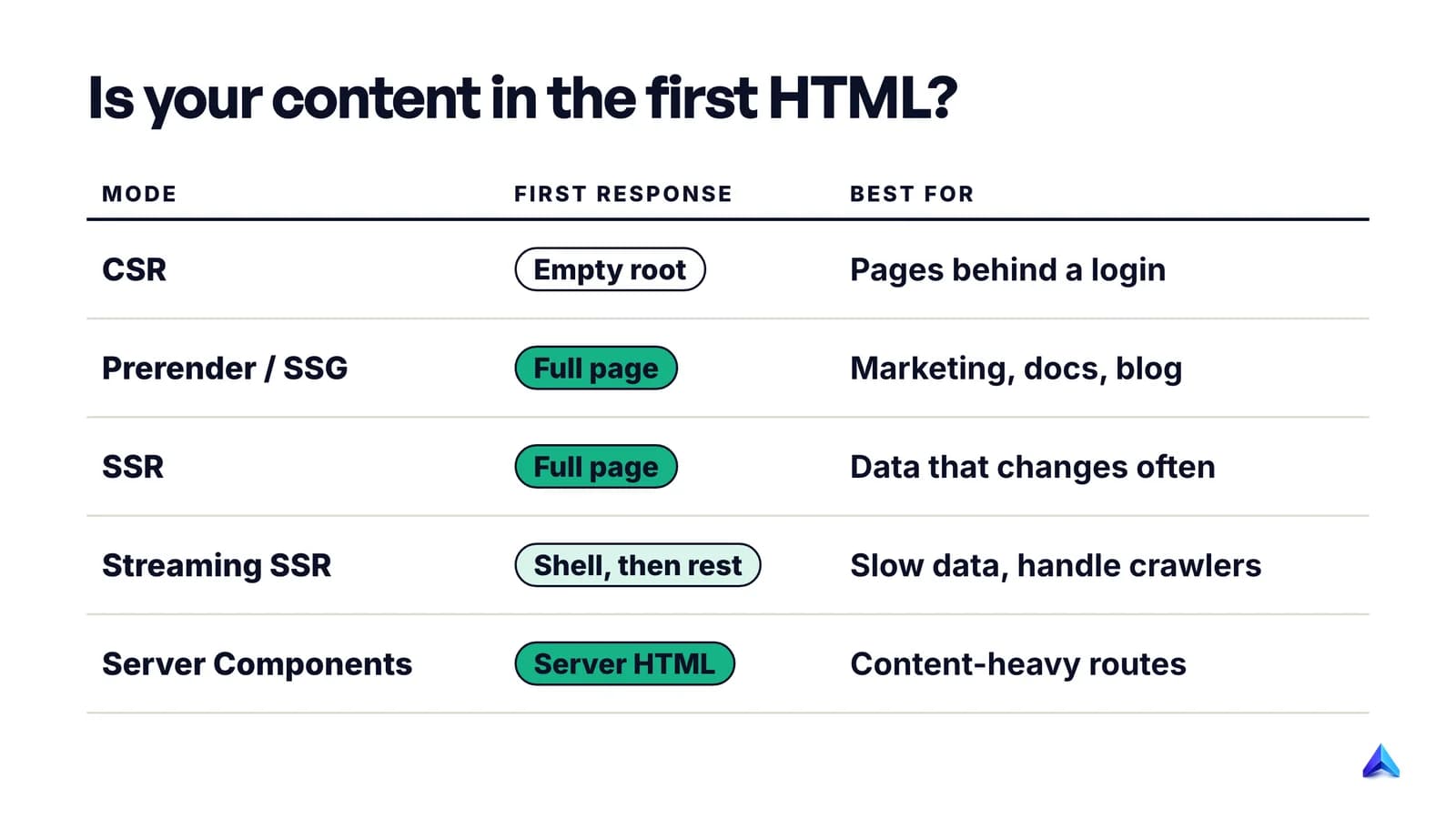
| Strategy | What the first HTML response contains | Use it for |
|---|---|---|
| Client-side rendering (CSR) | An empty root element and scripts | Dashboards, settings, anything behind a login |
| Prerendering / static generation (SSG) | The full page, built at deploy time | Marketing pages, docs, blog posts, landing pages |
| Server-side rendering (SSR) | The full page, built per request | Product and listing pages whose data changes often |
| Streaming SSR | The shell first, then content as data resolves | Large pages with slow data; needs crawler handling |
| React Server Components | Server-rendered HTML, at build time or per request | Content-heavy routes in a framework that supports them |
Google's own guidance lines up with this. It calls dynamic rendering, serving bots a different prerendered version than people get, "a workaround and not a recommended solution", and recommends server-side rendering, static rendering or hydration instead.
The smallest change that fixes most apps
If you have a Vite or React Router SPA and the public pages are a handful of routes, prerendering is the cheapest fix. web.dev defines prerendering as running a client-side application at build time to capture its initial state as static HTML. React Router's framework mode does it with one config entry, and with ssr: false the output still deploys to any static host:
// react-router.config.ts
import type { Config } from "@react-router/dev/config";

export default {
  ssr: false,
  prerender: ["/", "/pricing", "/blog", "/blog/react-seo-checklist"],
} satisfies Config;
Every listed path becomes a real HTML file with its content and links in place, while the app behind the login stays a normal SPA. If your public pages change daily or number in the thousands, move up to SSR. Next.js is one way to get there, and we will cover its specifics in a separate guide on Next.js SEO, as well as the wider topic of SEO for single page applications.
Titles, descriptions and canonicals in React 19
Most React SEO guides still open with React Helmet. Since React 19, released on 5 December 2024, you often do not need it. React now hoists <title>, <meta> and <link> tags to the document <head> from wherever you render them, and the React docs for <title> confirm React "will always place the corresponding DOM element in the document head." The React team says this works in client-only apps, streaming SSR and Server Components.
function ProductPage({ product }) {
  return (
    <article>
      <title>{`${product.name} | Acme`}</title>
      <meta name="description" content={product.summary} />
      <link rel="canonical" href={`https://acme.example/products/${product.slug}`} />
      <h1>{product.name}</h1>
    </article>
  );
}
Two details in that snippet are deliberate.
First, the title uses a template literal. Writing <title>{product.name} | Acme</title> passes React two children, a value and a string, and the docs warn that this "will cause an error". The <title> element accepts a single string only.
Second, render exactly one <title> per page. If a layout and a page both render one, React puts both in the head, and the docs say the behaviour of browsers and search engines is then undefined. Pick one owner, usually the route component.
The <link rel="canonical"> follows the same rule as the others, and our post on self-referencing canonical tags explains why every indexable route should point to itself.
Remember what hoisting does not change. In a client-only app, these tags are created when React renders in the browser. Google will see them after rendering; a crawler that reads only raw HTML will not. That is one more reason to prerender or server-render public pages.
Do you still need a metadata library?
Sometimes. The React 19 announcement itself says libraries can still help with features like overriding generic metadata with route-specific values, and frameworks have their own APIs for this. If your app already uses one consistently, there is no SEO reason to rip it out. For a new project on React 19, start with the built-in tags and add a library only when you need the merging behaviour.
Structured data works the same way. Google says you can generate JSON-LD with JavaScript and inject it into the page, but it has to be tested like everything else, and it is safer in the server HTML for the same reasons as your title.
Streaming SSR without surprising crawlers
Streaming is where React's newer server APIs can trip up SEO without anyone noticing. With renderToPipeableStream, React sends the page shell as soon as it is ready and streams content inside <Suspense> boundaries as data arrives. That is great for people on slow connections. A crawler, though, gets whatever the server sent, in the order it sent it.
React's renderToPipeableStream reference addresses this directly: call pipe in onShellReady to stream, "or in onAllReady for crawlers and static generation." The same page warns about the cost. A crawler handled this way waits for all of your data, some of which might be slow or fail.
The status code is the other trap. Once streaming starts, the headers are gone, so a product that turns out not to exist halfway through the stream is already a 200. Decide the status before the shell is sent:
let didError = false;
const { pipe } = renderToPipeableStream(<App />, {
  bootstrapScripts: ["/main.js"],
  onShellReady() {
    response.statusCode = didError ? 500 : 200;
    response.setHeader("content-type", "text/html");
    pipe(response);
  },
  onError() {
    didError = true;
  },
});
In practice, keep lookups that decide whether a page exists outside Suspense boundaries, so a missing record errors in the shell, where you can map it to a 404 as React's docs show. Stream the slow, non-essential parts: reviews, recommendations, related items. Then make sure the main content does not sit inside a boundary that loads late. React's prerender APIs avoid the problem altogether for static pages, since they wait for all data before returning HTML.
Test before you ship: a React SEO checklist
Nothing above is proven until you have looked at what Google actually received. Run this sequence on one template of each type: home, a listing page, a detail page and a deliberately broken URL.
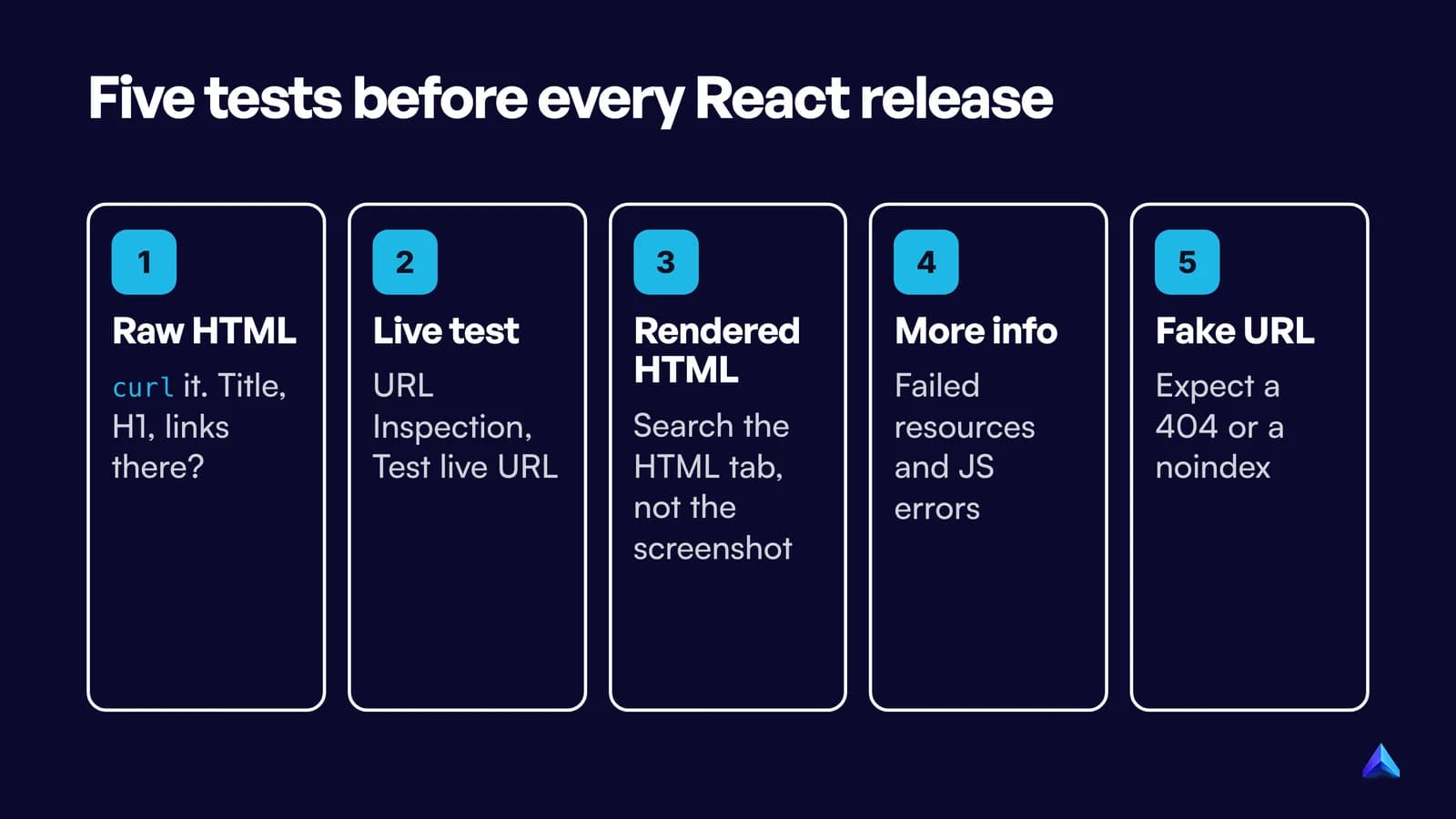
- Read the raw HTML. Run
curl -s https://yoursite.com/pricing | grep -iE "<title|<h1|href="or use View Source, not DevTools. This is what non-rendering crawlers get. If the title, the main heading and the navigation links are missing, those crawlers see nothing. - Run a live test in Search Console. In URL Inspection, enter the URL and click Test live URL. The default view shows the indexed version, which may be weeks old; the live test fetches the page now.
- Read the rendered HTML, not the screenshot. Open View tested page. The HTML tab shows the DOM after rendering. Search it for your title, canonical, body text and internal links. The screenshot can look perfect while the HTML is missing a lazy section.
- Check More info. The same panel lists page resources that failed to load and JavaScript console messages. A blocked API call or an uncaught exception here explains most "rendered but empty" pages.
- Test a URL that should not exist. Request
/products/does-not-exist. You want a 404 status, or at least anoindexin the rendered HTML. A 200 with a "Not found" heading is a soft 404 waiting to happen. - Check your structured data. Google's Rich Results Test renders the page too, and shows whether your JSON-LD survived.
- Confirm indexing over the next weeks. Our guide on checking whether a page is indexed covers the Search Console reports to watch. If pages land in Crawled, currently not indexed, compare their rendered HTML with a page that did get indexed before you blame quality.
Repeat steps 1 to 5 after any change to routing, data fetching or your hosting config. Those are the changes that quietly turn a working React site back into an empty shell.
Frequently asked questions
Is React bad for SEO?
No. React is a UI library; the SEO outcome depends on how pages are rendered and linked. Google renders client-side React, so a well-built SPA can rank. The risks are crawlers that do not run JavaScript, soft 404s and late metadata, which prerendering or server rendering mostly removes.
Do I need Next.js for React SEO?
No, but you need some way to put content in the HTML for public pages. Next.js is one option. React Router's framework mode can prerender or server-render routes, and React's own prerender and renderToPipeableStream APIs work with a custom server. Pure client-side rendering is fine behind a login.
Can Google index a single page application?
Yes. Google queues pages with a 200 status for rendering, runs the JavaScript in a headless Chromium and indexes the rendered HTML. It still needs real <a href> links, History API routes instead of # fragments, and correct status codes for missing pages, or the SPA will be crawled badly.
Do I still need React Helmet in React 19?
Often not. React 19 hoists <title>, <meta> and <link> tags into the document head from any component, in client-only apps and on the server. A metadata library still helps if you want route-level overrides of default tags. Render only one <title> per page either way.
Does a React app built with Vite rank on Google?
It can, but a default Vite React build is client-side rendered, so the server sends an empty root element. Google will render it after a delay; most AI crawlers will not. Prerender your public routes, or move them to a framework that renders HTML on the server or at build time.
How do I see what Google sees on my React page?
Use URL Inspection in Google Search Console, click Test live URL, then View tested page. The HTML tab shows the rendered DOM, and More info lists failed resources and JavaScript errors. Compare it with the raw HTML from View Source to see what non-rendering crawlers receive.