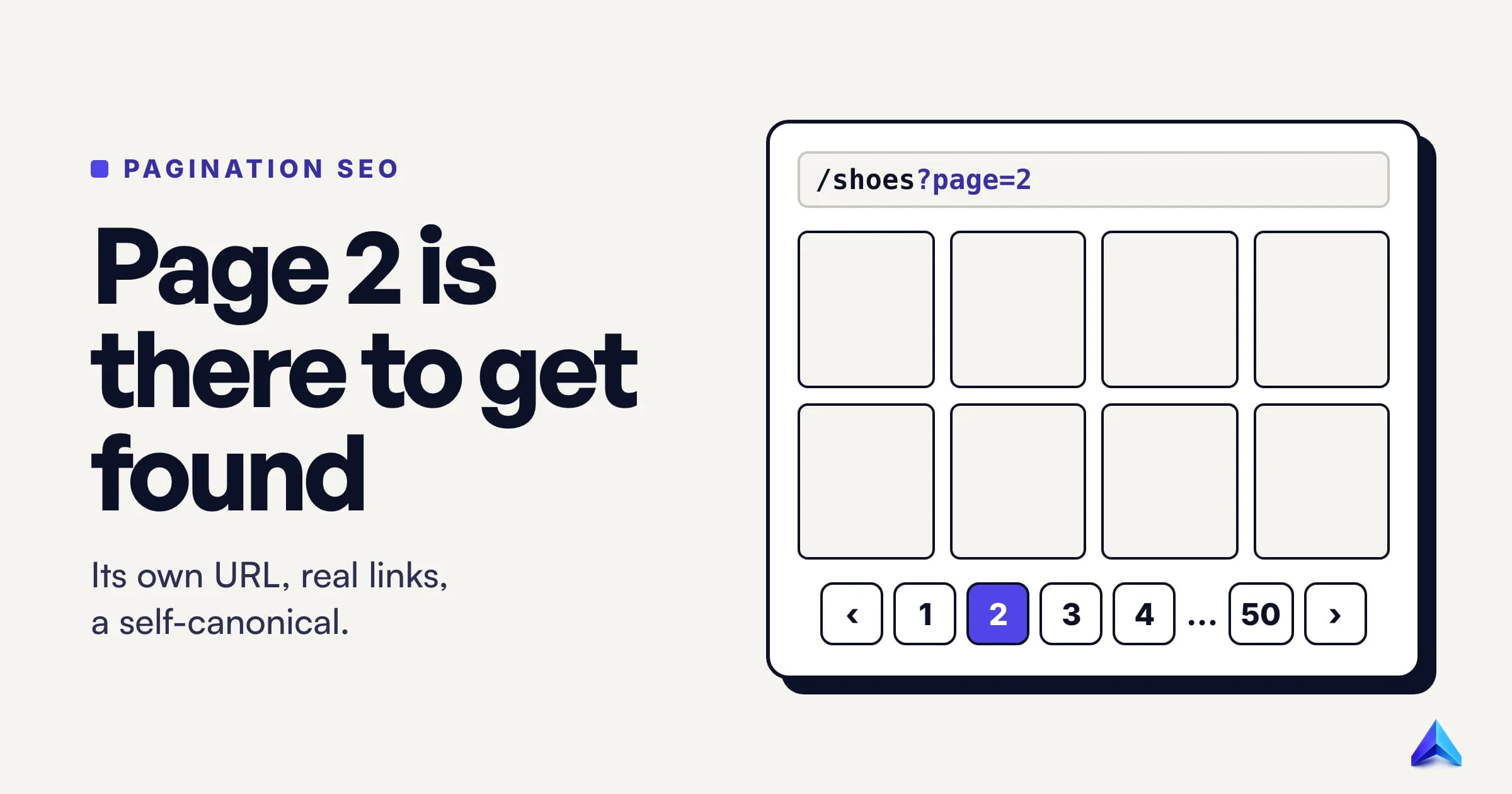
Pagination SEO is the work of making sure search engines can reach every item in a list that is split across pages, such as page 2, 3 and 40 of a category or blog archive. Google's rules are short: give each page its own URL, link the pages with normal <a href> links, let each page canonicalize to itself, and keep sort and filter variants out of the index.
Those rules are easy to follow once you see what pagination is for. Most of the bad advice still circulating comes from treating page 2 as a duplicate-content risk that must be hidden. It is a discovery path. Its job is to get Google to product number 600 or the blog post from 2021, and almost every mistake on paginated pages comes from forgetting that.
Pagination is a discovery problem, not a duplicate-content problem
Think about what a search engine needs from /shoes?page=17. Nobody types a query hoping to land on the seventeenth page of a shoe category. Google rarely wants to rank that URL, and you rarely want it to. What both of you want is for the 24 products linked from it to be found, crawled and indexed.
That changes how every pagination decision should be judged. The question is never "does page 17 look like page 1?" It is "can a crawler get from page 1 to the products on page 17, and does anything on the way stop it?"
Seen this way, the classic fixes look backwards. Canonicalizing page 17 to page 1 tells Google the page is a copy, so it has less reason to keep crawling it. Adding noindex tells Google to drop it. Blocking ?page= in robots.txt stops the crawl outright. Each one was meant to tidy up duplicates, and each one cuts the path to the items deeper in the list.
Google's own wording backs the discovery framing. Its guide to pagination and incremental page loading opens by saying that showing a subset of results helps users, "but you may need to take action to ensure the Google crawler can find all your site content." The whole document is about finding things.
What Google says about pagination now
The current guidance is one page long and was last updated in December 2025. It covers three practices: link pages sequentially, use URLs correctly, and avoid indexing filter and sort variants. Nothing in it asks for special markup.
That is a change. In 2011 Google recommended rel="next" and rel="prev" link elements to tie a series together, and a whole generation of SEO checklists was built on them. On 21 March 2019, John Mueller announced on Twitter that Google "weren't using rel-next/prev in indexing for a number of years now," and the Google Webmasters account followed with "we decided to retire rel=prev/next." The old 2011 blog post now carries a note saying the markup "is not an indexing signal anymore."
So what does Google use instead? Mueller answered that directly in a webmaster hangout the next day. Asked how Google recognizes a paginated series without the markup, he said: "we use the the internal links. Which for the most part that pretty much makes it clear." The hangout transcript on Search Engine Roundtable also records his advice not to rip the tags out, because browsers can use them for prefetching and other search engines might use them.
Bing is one of those engines. Frédéric Dubut, then at Bing, said in 2019 that Bing uses the tags "as hints for page discovery and site structure understanding," while not merging pages in the index or using them for ranking.
Our position: if your templates already output rel="next" and rel="prev", leave them. If they do not, do not spend a sprint adding them. Put that effort into the links themselves.
Why page 50 is the real problem: click depth
If Google discovers a series through internal links, then the shape of those links decides how far a crawler has to walk. This is the part of pagination SEO most guides wave at without measuring, so we did the arithmetic.
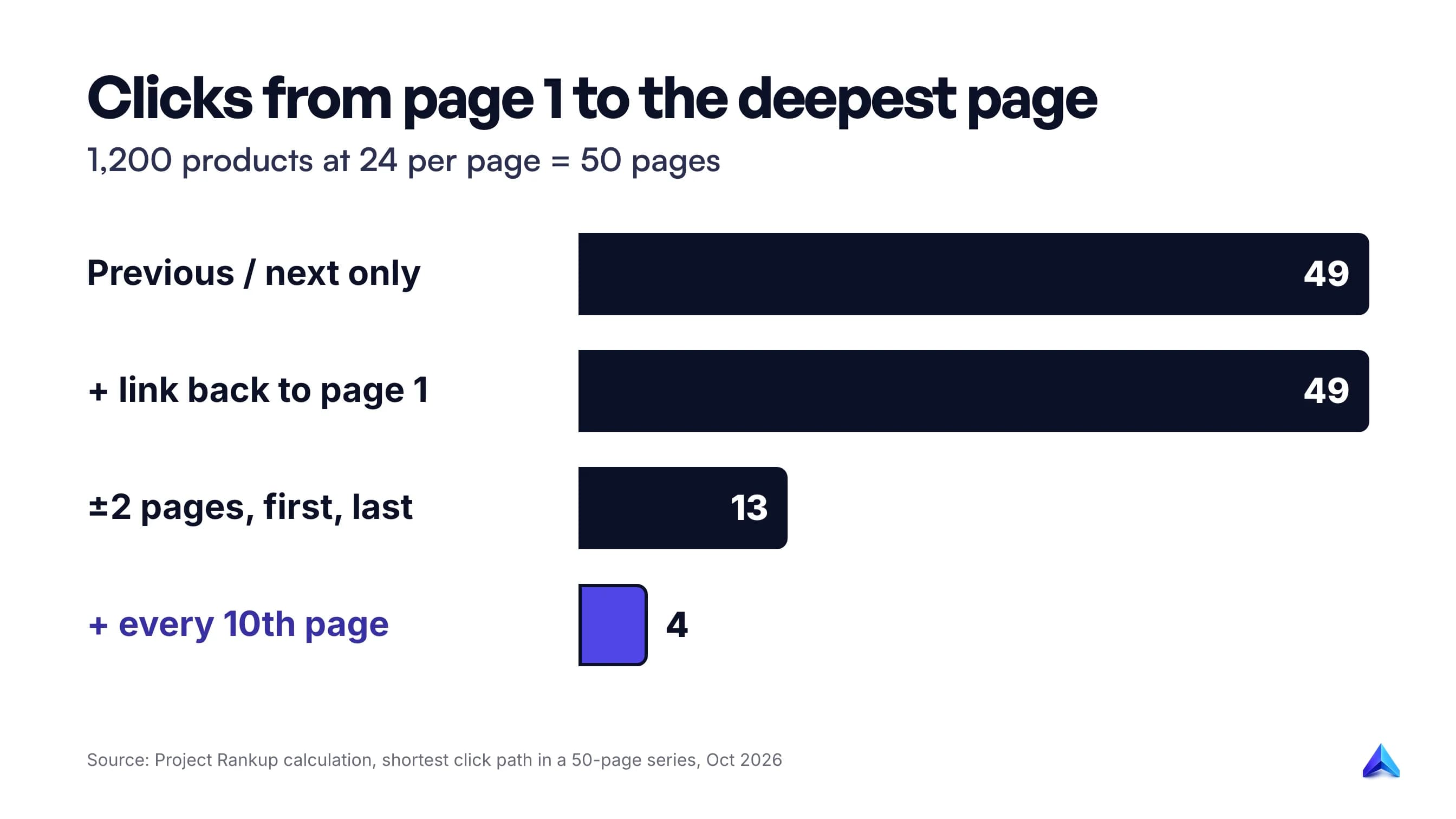
Take a realistic category: 1,200 products shown 24 at a time. That is 50 pages. We counted the shortest click path from page 1 to every other page under four common pagination designs.
| Pagination links on each page | Deepest page | Clicks from page 1 |
|---|---|---|
| Previous and next only | Page 50 | 49 |
| Previous, next, and a link back to page 1 | Page 50 | 49 |
| Two pages either side, plus first and last | Pages 26 and 27 | 13 |
| The same, plus every tenth page (10, 20, 30, 40) | Pages such as 15 and 45 | 4 |
Products sit one click further down. With previous and next links only, the products on page 50 are 50 clicks from the category page, which is itself a click or two from the homepage.
Two things stand out. First, the "link back to page 1" that Google suggests is useful for a different reason, which we cover below, but it does nothing for depth. Second, the biggest gain comes from linking to the last page and to a few fixed waypoints. Going from 49 clicks to 4 costs a handful of extra links in the pagination bar.
Google does not publish a maximum depth, and a deep page is not automatically ignored. But every extra hop is another page that must be crawled before the next URL is even known. Numbered pagination with first, last and a few jump points beats a bare "Next" button every time.
The rules for paginated pages, and why each one exists
Every rule below follows from the discovery idea. If you remember the reason, you will not need the checklist.
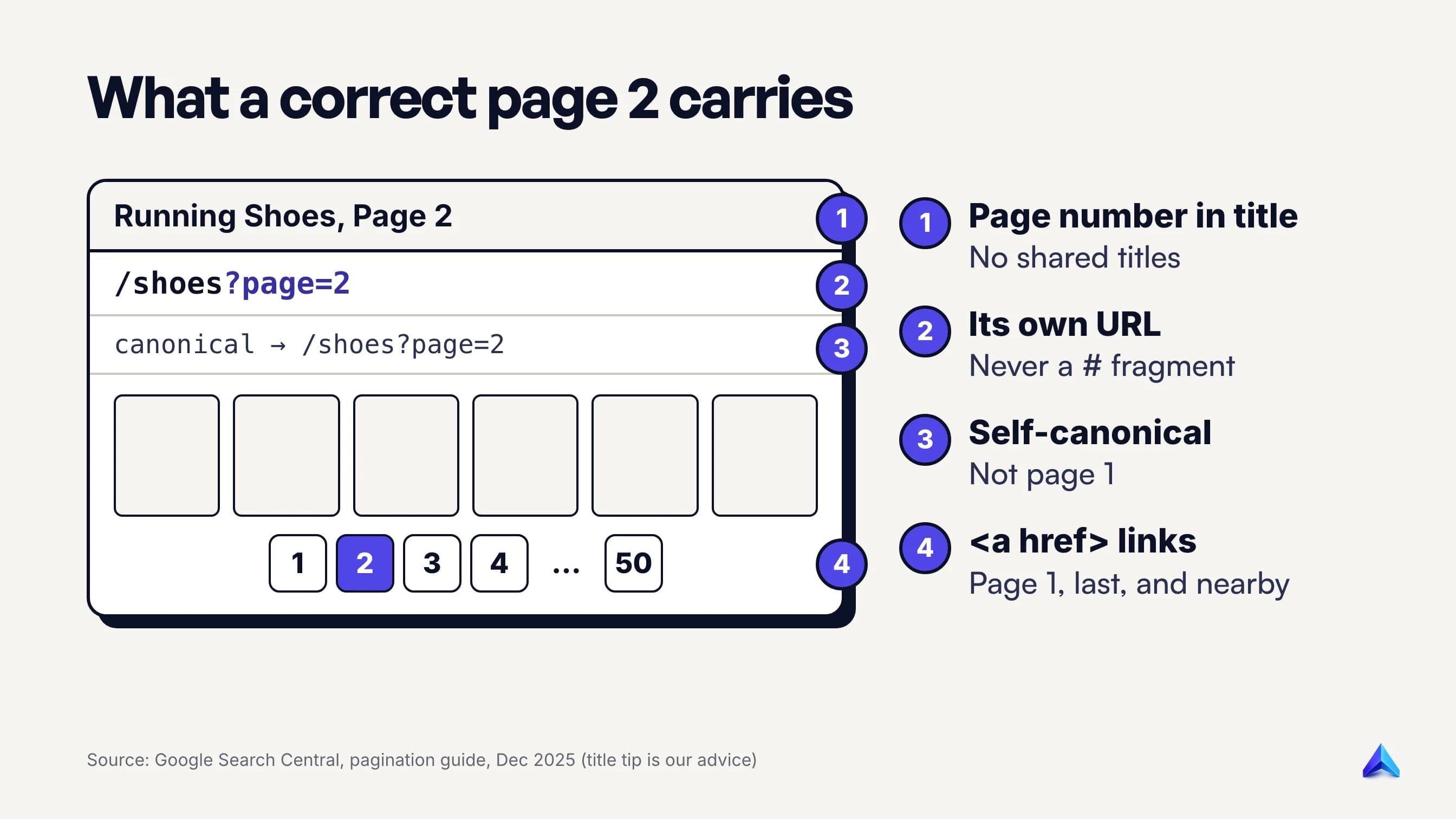
Give every page its own crawlable URL
Google treats each paginated URL as a separate page. Its guide gives ?page=n as an example, and a path such as /blog/page/2/ works just as well. What does not work is a fragment. Google ignores everything after a #, so if page 2 is /shoes#page=2, Googlebot "may not follow the link, thinking it has already retrieved the page."
Make page 1 a single URL. If your platform produces both /shoes and /shoes?page=1, link to /shoes everywhere and point the ?page=1 version at it with a canonical or a 301.
Link pages with real anchor links
Google says it "generally crawls URLs found in the href attribute of <a> elements" and that its crawlers "don't 'click' buttons." A pagination bar built from <button onclick> elements or <span> tags with click handlers looks fine to a shopper and leaves Google with no path at all. Each page should link to the next with an <a href>, and ideally to first, last and a few pages in between.
Google also suggests linking every page in the series back to page 1, which hints that page 1 "might be a better landing page than other pages in the collection." That is the fix for page 2 outranking page 1, not a canonical.
Let each page canonicalize to itself
Google's instruction is explicit: "Don't use the first page of a paginated sequence as the canonical page. Instead, give each page its own canonical URL." Page 2 lists different products from page 1, so it is not a duplicate. If you want to see what a correct self-canonical looks like, and how tracking parameters quietly break one, our guide to self-referencing canonical tags walks through it.
Make page 2 worth landing on
Mueller's advice in 2019 was that paginated pages should "stand on their own," like a category page with "something useful for the user to see there." In practice that means real product cards or post excerpts in the HTML, not an empty grid filled by JavaScript after load.
Add the page number to the title tag and the H1 on page 2 onwards, for example "Running Shoes, Page 2 | Example Store". It costs nothing, stops dozens of pages sharing one title, and tells anyone who lands there where they are. Keep the long category intro text on page 1 only.
Return a real 404 for pages that do not exist
Some templates serve ?page=43 with a 200 status when the category only has 12 pages. Those empty shells are crawlable and pointless. Configure the template to return a 404 when the page number is beyond the last page, and never link to a page with no items.
Which paginated URLs to keep out of the index
The discovery rule has a limit. Some URLs repeat the same items in a different order or a narrower slice, and those are where Google does want you to step in.
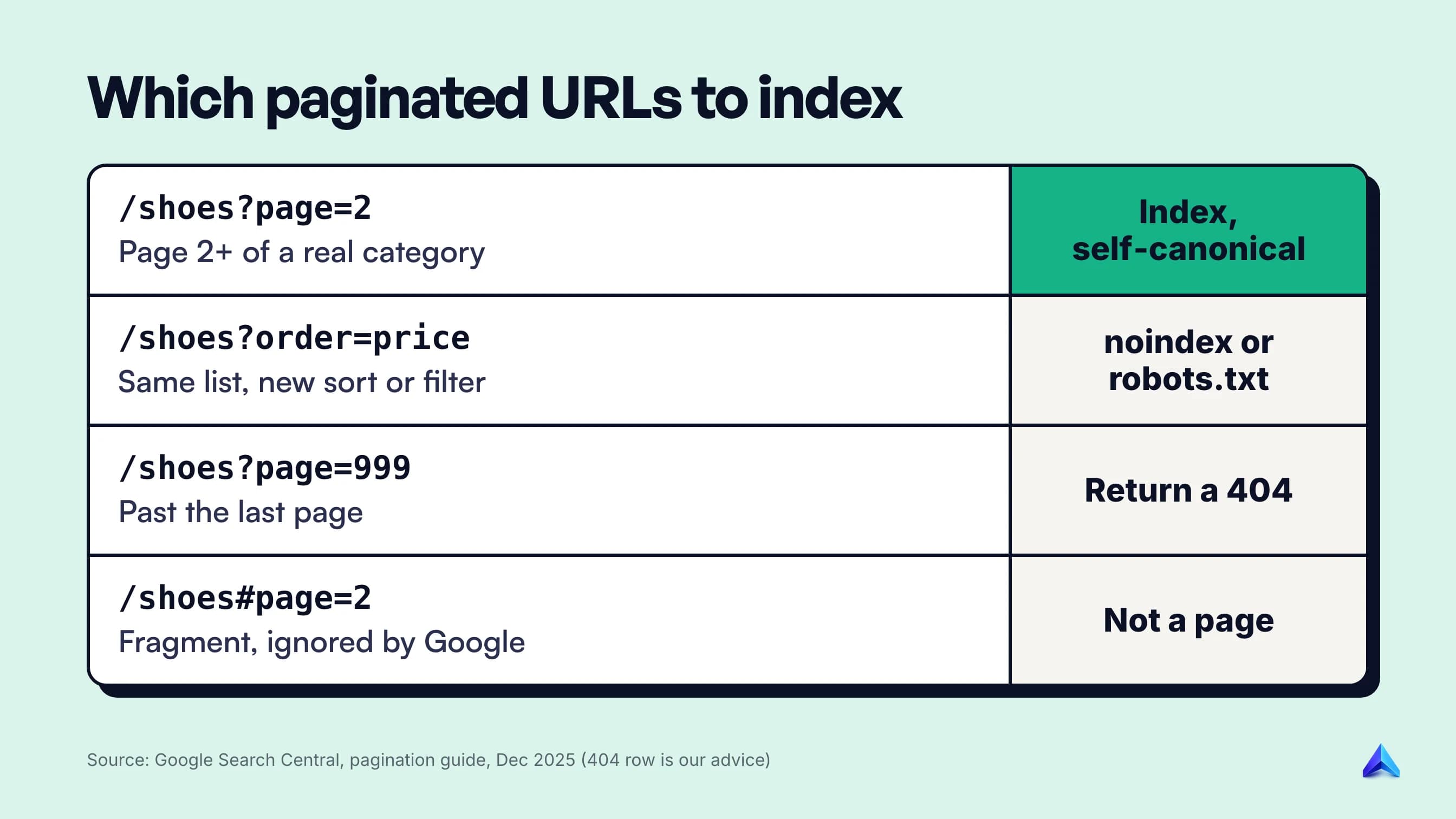
Sort and filter variants. Google's example is ?order=price, the same list ordered by price. For these it recommends the noindex robots meta tag or a robots.txt rule for the URL pattern. The difference matters: noindex lets Google crawl the URL and see the tag; robots.txt stops the crawl, so Google never sees anything on the page. Use robots.txt when the variants are numerous enough to waste real crawling, such as every combination of size, color and price on a fashion catalog.
Tag and author archives that duplicate the main blog. If your blog already paginates every post in date order, a paginated /tag/seo/ archive is a second path to the same posts. Indexing it rarely earns traffic, so noindexing tag archives while keeping the main archive and category pages indexable is a sensible split.
Session IDs, tracking parameters and print versions. These are classic duplicates. Handle them with canonicals to the clean URL, which is a canonical problem and not a pagination one.
Everything else in a paginated series, meaning page 2 onwards of a real category or a real blog archive, stays crawlable, indexable and self-canonical.
The case for noindexing page 2 onwards, answered
Some pagination guides still present noindex, follow on page 2 onwards as a valid strategy, and Reddit's SEO forums keep asking whether it is safe. The argument for it is reasonable on its face: those pages are thin, they repeat titles, they waste crawl budget, and they might compete with page 1. It deserves a proper answer.
"noindex, follow keeps the links working." Only for a while. John Mueller explained in 2017 that when Google sees noindex on a page for long enough, "we will remove it completely. And then we won't follow the links anyway." Long term, he said, noindex, follow "is essentially kind of the same as a noindex, nofollow." On a paginated series, that means the products only linked from deep pages lose their path.
"They waste crawl budget." Google's crawl budget guide is written for sites with more than a million unique pages that change weekly, or more than 10,000 that change daily. It says that if your pages are crawled the same day they are published, "you don't need to read this guide." A shop with 40 categories of 20 pages each is nowhere near that line. The giant catalogs that are near it get far more crawl savings from controlling faceted filter URLs than from hiding page 2.
"Page 2 will cannibalize page 1." It rarely does, because page 2 has weaker internal links and a "Page 2" title. When it does outrank page 1, the cause is usually a broken page 1 canonical or links pointing at page 2. Fix the cause and add the link back to page 1 that Google recommends.
"The pages are thin." Then make them less thin, as Mueller suggested. A grid of 24 real products with prices and names is not thin content in any sense a shopper would recognize.
We would noindex a paginated series in one situation: when the series itself is a duplicate path, such as the tag archives above, and its items are reachable another way.
Load more and infinite scroll
Load more buttons and infinite scroll are usually built with JavaScript, and Google's crawler does not click or scroll. On their own, they hide everything after the first batch.
The fix is to build them on top of normal pagination. Google's lazy-loading guidance asks for each chunk to have "its own persistent, unique URL," sequential links to those URLs, and an address bar updated with the History API as the reader scrolls into a new chunk. A "Load more" control can be an <a href="?page=2"> styled as a button, with JavaScript intercepting the click for shoppers while Google follows the href.
Google's comparison table is also worth reading before you pick a pattern. It notes that load more "can't handle very large numbers of results" and that infinite scroll can cause "scrolling fatigue" because readers cannot tell how long the list is. Classic numbered pagination is the only one of the three that tells people where they are. Infinite scroll has enough detail to deserve its own guide; the short rule is that the crawlable pagination must exist underneath it.
Ecommerce categories and blog archives
Most sites meet pagination in these two places, and each needs slightly different settings.
Ecommerce category pages
Category pages are the ones that matter most, because paginated pages are often the only internal links to long-tail products. A Shopify or WooCommerce store selling kurtas in India or kitchenware in the UK might have 300 items in one category, and only the first 24 are linked from the menu.
- Show 24 to 48 products per page, not 12. Fewer pages means a shallower series.
- Link first, last, two pages either side of the current one, and a few waypoints.
- Index page 2 onwards with self-canonicals; noindex or block sort and filter URLs.
- Submit product URLs in an XML sitemap or a Google Merchant Center feed, which Google lists as a way "to help Google find all of the products on your site." A sitemap does not replace crawlable links, but it covers gaps.
Blog archives
A blog's main archive paginates by date, so older posts drift deeper every time you publish. A post that sat on page 1 in January can be on page 15 by December.
- Keep the main archive and real category archives indexable and self-canonical.
- Decide deliberately about tag, author and date archives; noindex them if they only duplicate the main archive.
- Do not rely on pagination alone for old posts. Link to them from newer articles on the same subject, which gives them a short path and a relevant anchor.
How to check your pagination
You do not need a paid crawler to find the common problems. Five checks cover most of them.
- View source on page 2. Search for
canonical. It should point to the page 2 URL, not page 1. Search fornoindex; it should not be there. - Check the pagination links are anchors. In the HTML source (not the rendered page), the next link should be an
<a>with a realhref, and the URL must not contain#. - Request a page that should not exist. Open
?page=999on your largest category. It should return a 404, not an empty page with a 200. - Inspect a deep product. Pick an item that only appears on the last page of its category and run it through URL Inspection in Search Console. Our guide on how to check if a page is indexed covers what each result means.
- Read the Page indexing report. Look for paginated URLs or deep products under "Crawled – currently not indexed" or "Discovered – currently not indexed". If whole sets of deep products sit there, our post on crawled but not indexed pages explains how to tell a quality problem from a discovery one.
If you run a technical SEO audit on a schedule, add these five checks to it. Pagination templates change whenever a theme is updated, and a broken canonical on page 2 can sit unnoticed for months.
Frequently asked questions
What is pagination in website development?
Pagination is splitting a long list of items, such as products, blog posts, search results or comments, across a series of pages with their own URLs and numbered links between them. It keeps each page fast to load and lets visitors see how many results there are and where they are in the list.
Is pagination bad for SEO?
No. Pagination is neutral when it is built with crawlable links and unique URLs, and helpful on large sites because it gives search engines a path to every item. It causes problems only when it is implemented badly: JavaScript-only buttons, fragment URLs, page 2 canonicalized to page 1, or long-term noindex on the series.
Should paginated pages be indexed?
Yes, for page 2 onwards of real categories and blog archives. Google says each page should have its own canonical URL. Keep sort orders, filters and duplicate archives such as tag pages out of the index with noindex or robots.txt, and return a 404 for page numbers beyond the end of the list.
What is the difference between pagination and lazy loading?
Pagination splits content across separate URLs that load one at a time when a visitor clicks a page link. Lazy loading defers loading content until it is needed, often as the visitor scrolls, on a single page. For SEO, lazy-loaded lists still need paginated URLs underneath so crawlers can reach every item.
Does Google still use rel=next and rel=prev?
No. Google stopped using them as an indexing signal years before it said so publicly in March 2019. Bing has said it uses them as hints for discovery and site structure. They do no harm, so leave existing tags in place, but do not add them expecting a Google benefit.
Should I use a view-all page instead of pagination?
Only for short lists. In 2011 Google said searchers often preferred view-all pages, but its current guidance does not mention them, and it warns that single-page patterns cannot handle very large numbers of results. A view-all page with 1,200 products would be slow for shoppers and heavy for crawlers.