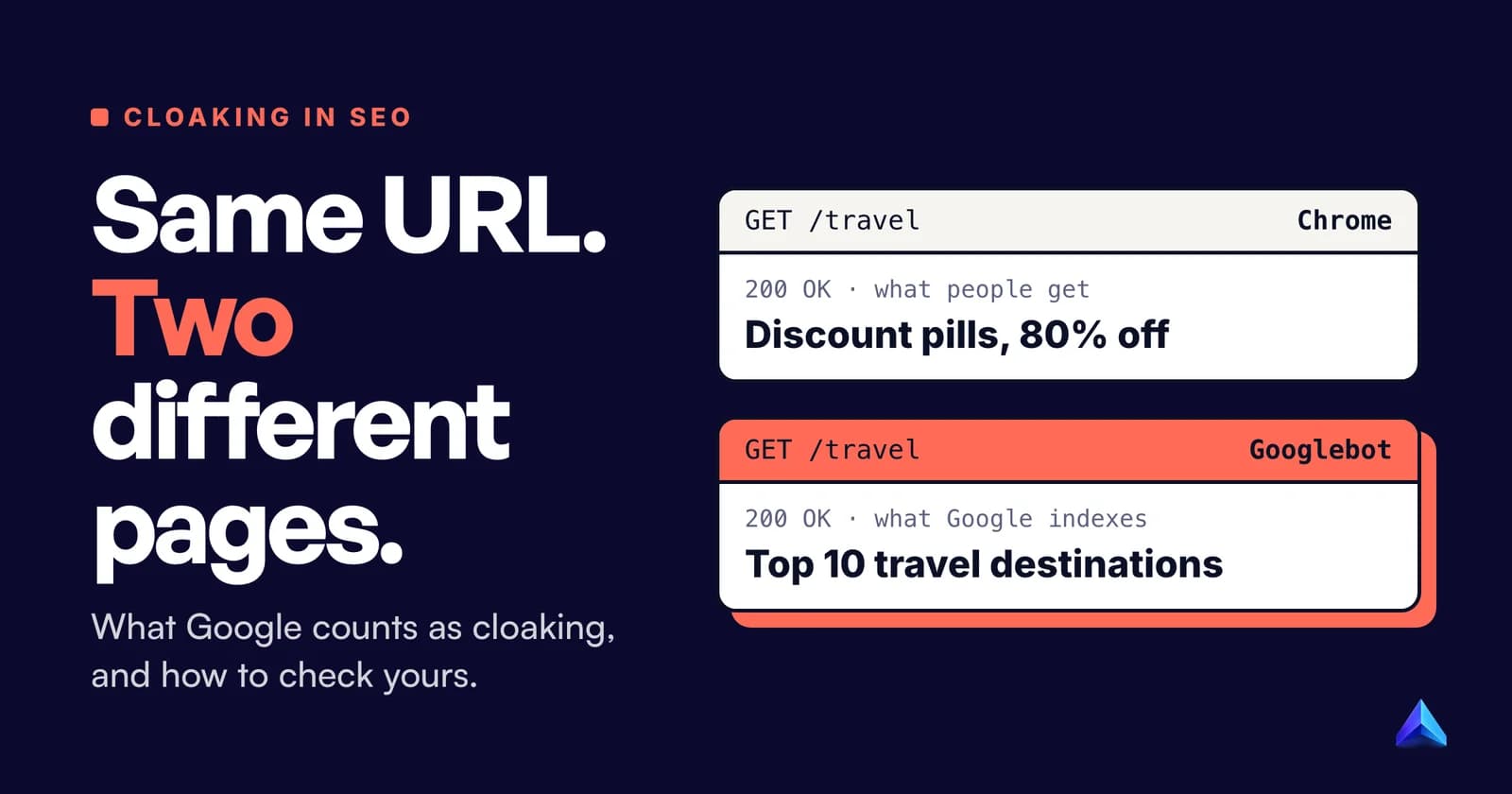
Cloaking in SEO means showing search engines one version of a page and people another, so the page ranks for something visitors never get. Google bans it outright in its spam policies, and a site caught doing it can drop out of search results entirely.
Glossaries stop there. The part that catches honest site owners is the grey zone: paywalls, country redirects and A/B tests also serve Googlebot something different, and Google has written down which are fine. Hacked sites cloak too, and the owner is usually the last to know. This guide covers all three, plus a reliable way to check any page.
What is cloaking in SEO?
Google's own wording is the one that matters, because it is the one enforced. The spam policies for Google web search define it like this: "Cloaking refers to the practice of presenting different content to users and search engines with the intent to manipulate search rankings and mislead users."
The policy gives two examples:
- "Showing a page about travel destinations to search engines while showing a page about discount drugs to users"
- "Inserting text or keywords into a page only when the user agent that is requesting the page is a search engine, not a human visitor"
The definition has two parts. One is a difference between what the crawler and a person receive. The other is intent: the difference exists to manipulate rankings and mislead people. A page that looks slightly different to Googlebot because a cookie banner did not load is not cloaking. A page that swaps a pharmacy spam page for a travel guide is.
Cloaking has a close relative in the same document. Sneaky redirects send a visitor to a different URL "in order to either show users and search engines different content or show users unexpected content". One of Google's examples is a site that shows desktop users a normal page while sending mobile users to a spam domain. Google treats the two together: the manual action for both is called "Cloaking and/or sneaky redirects".
How does cloaking work?
A server can only show different content to Googlebot if it can tell Googlebot apart from a person. Every cloaking method is a way of making that call, and each one reads a different part of the request.
| Signal the server checks | What it looks for | Why cloakers use it |
|---|---|---|
| User agent | Googlebot/2.1 in the User-Agent header | One line of code, but anyone can fake the header |
| IP address | Requests from Google's published crawler ranges, or a reverse DNS name ending in googlebot.com | Harder to spoof than a header |
| Referrer | A Referer header from google.com | Targets people arriving from search, not the crawler |
| JavaScript | Content swapped in by a script after load | Relies on the crawler rendering the page differently from a browser |
| Device | A mobile user agent | Redirects phone visitors only, where the owner rarely looks |
The referrer variant deserves attention because it flips the target. It leaves Googlebot alone and changes what searchers see. Google's hacked-content section describes exactly that: "clicking a URL in Google Search results could redirect you to a suspicious page, but there is no redirect when you visit the same URL directly from a browser." The owner types the address, sees a normal page and assumes all is well.
The IP method matters for an awkward reason. Google publishes how to verify a real Googlebot: a reverse DNS lookup whose name ends in googlebot.com, google.com or googleusercontent.com. That check exists so you can block fake Googlebots. A cloaker can run it too, so only the real crawler gets the doctored page, which is why faking the user agent from your laptop does not always reveal a cloak.
A worked example: one URL, two responses
Picture an online shop selling garden furniture at example.co.uk. Its category page /garden-chairs ranks well. Someone with access to the server adds three lines to the .htaccess file:
RewriteEngine On
RewriteCond %{HTTP_USER_AGENT} (googlebot|bingbot) [NC]
RewriteRule ^garden-chairs$ /seo/garden-chairs-keywords.html [L]
Now any request whose user agent contains "googlebot" or "bingbot" is quietly served a different file, a page stuffed with phrases such as "cheap garden chairs UK" and "best garden chairs 2026". The URL does not change and there is no visible redirect. Everyone else gets the normal product grid.
You can see the difference from a terminal by requesting the page twice, once as a browser and once with Googlebot's user agent:
curl -s https://example.co.uk/garden-chairs | grep -i "<title>"
curl -s -A "Mozilla/5.0 (compatible; Googlebot/2.1; +http://www.google.com/bot.html)" \
  https://example.co.uk/garden-chairs | grep -i "<title>"
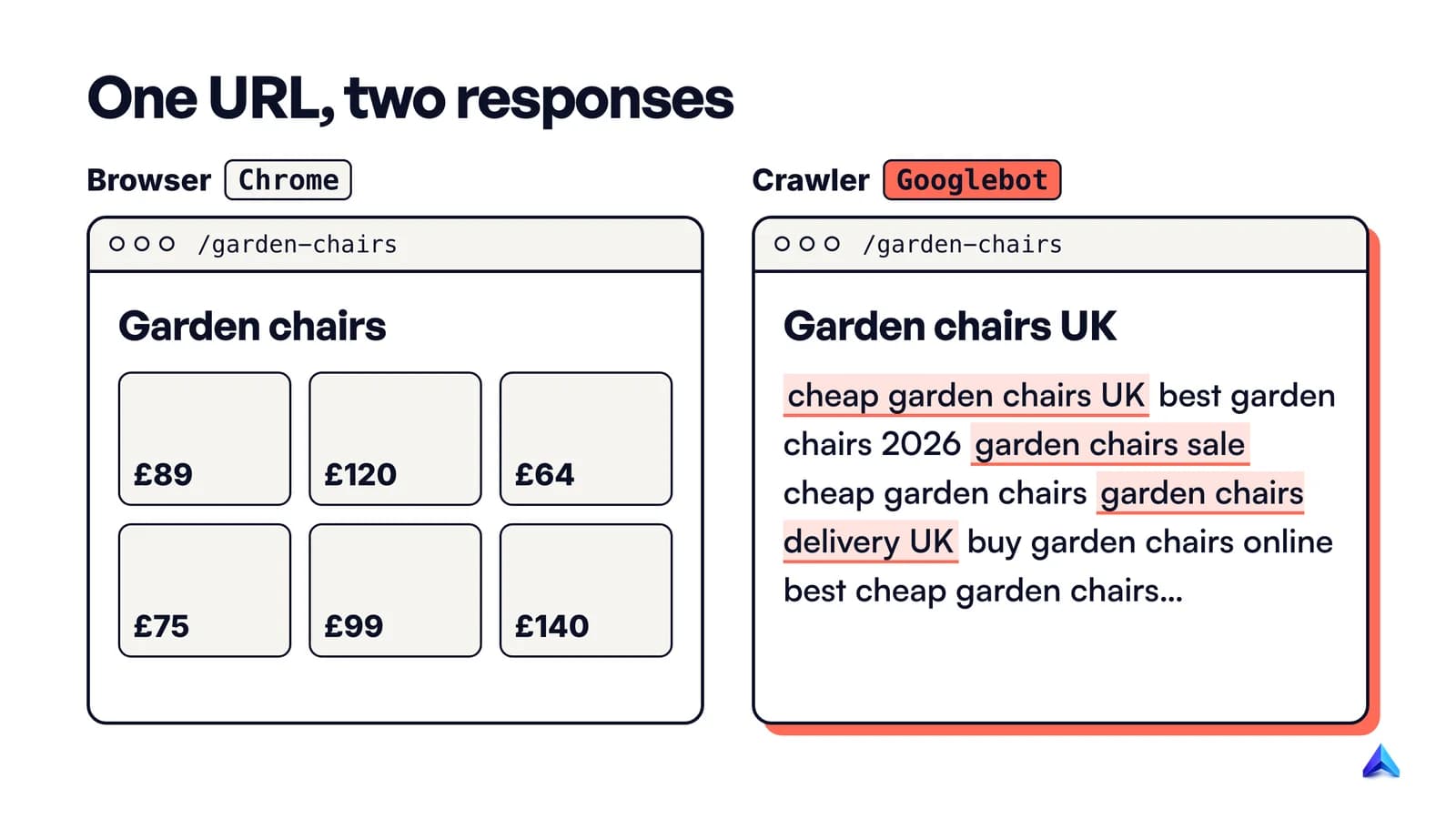
If the two titles differ, the server is branching on the user agent. That matches Google's second example almost word for word. Swap the keyword page for a casino or a pill shop and it matches the first one too. Note how little it takes: no plugin, just write access to one configuration file. That is also why the same pattern turns up on hacked sites.
Is it cloaking? Setups that look similar
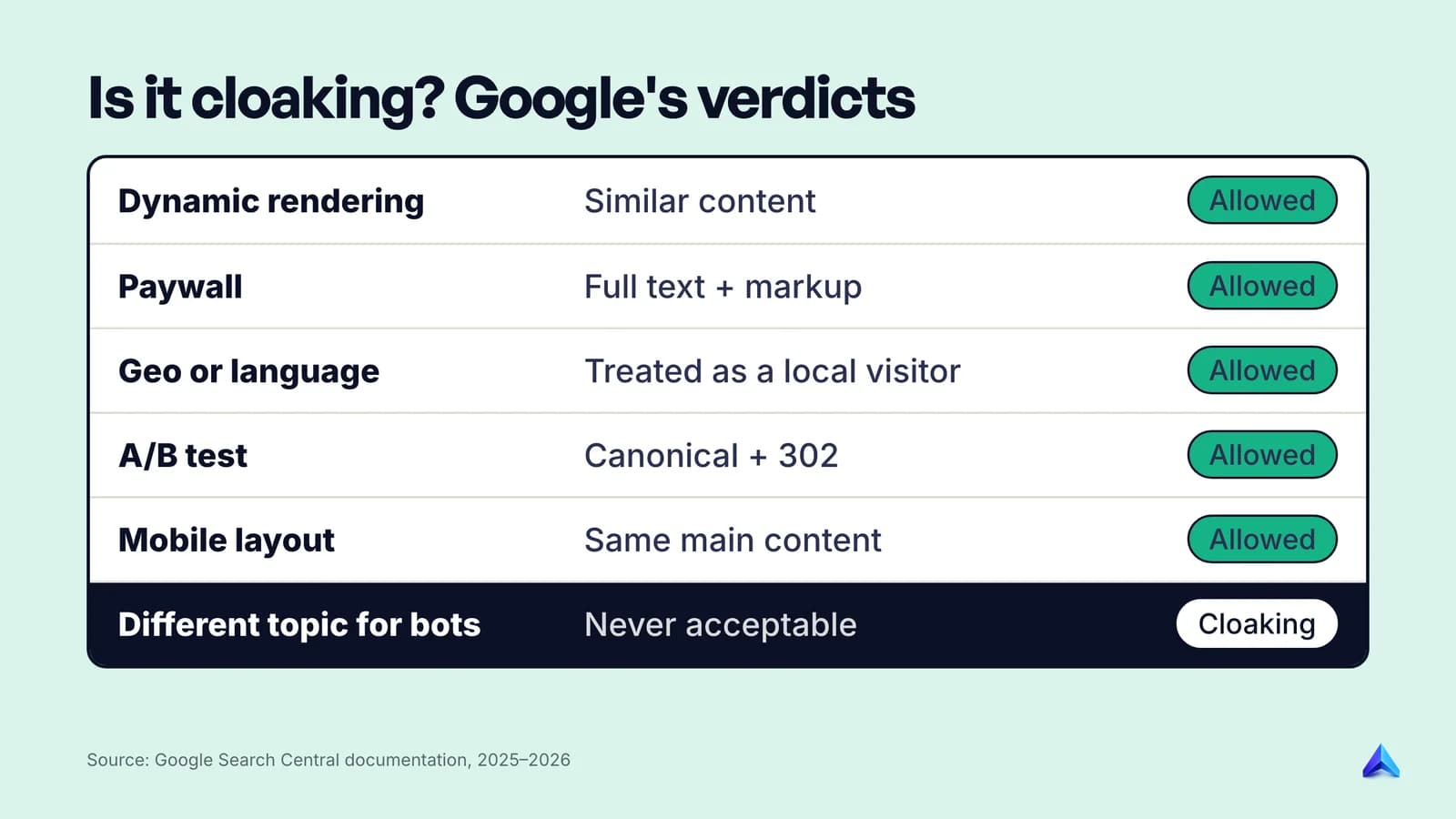
Most sites that serve Googlebot something different are not trying to fool anyone. Google has written specific guidance for the common cases, and the rule underneath all of it is consistent: the crawler may get a different format, but it must get the same content a person would get.
Dynamic rendering
Dynamic rendering means detecting bots and serving them a server-rendered HTML version of a JavaScript page, while people get the normal client-side app. Mechanically, that is the same user-agent branching a cloaker uses.
Google's dynamic rendering documentation says Googlebot "generally doesn't consider dynamic rendering as cloaking" as long as it "produces similar content". It draws the line with a deliberately silly example: serving a page about cats to users and a page about dogs to crawlers is cloaking.
The same page now opens with a warning most glossaries miss. Google calls dynamic rendering "a workaround and not a long-term solution" and recommends server-side rendering, static rendering or hydration instead. Permitted, then, but no longer advised. If you are building a React or Vue site today, render on the server and the question never comes up; our React SEO guide compares the rendering options. If you still run a prerender service, the practical risk is drift: the cached bot version goes stale, and a price or a whole section can differ from what users see.
Paywalls and gated content
A news site that lets Googlebot read the full article while visitors hit a subscription wall is, on the face of it, showing different content. Google's spam policy carves this out: it does not consider it cloaking "if Google can see the full content of what's behind the paywall just like any person who has access to the gated material" and the publisher follows its Flexible Sampling guidance.
There is a second condition in practice. Google asks publishers to mark the hidden section with paywalled content structured data, which it says "helps Google differentiate paywalled content from the practice of cloaking". Without it, a paywall that hands Googlebot the full text looks a lot like the real thing. Treat the markup as mandatory.
Country and language versions
Sites often adapt pages to the visitor's location: prices in pounds or rupees, a different shipping message, a regional store. That is not cloaking, but it trips sites up for one reason. Google's guide to locale-adaptive pages says Googlebot's default IP addresses "appear to be based in the USA" and that it sends requests without an Accept-Language header.
Google's rule is to "treat it like you would treat any other user from that country". A US-looking Googlebot should get exactly what a US visitor gets. Serving it a special all-regions page that no real visitor sees is the wrong answer, and so is a redirect chain it cannot escape. Our guide to redirect errors walks through the loops that only Googlebot hits when geo and cookie redirects are combined.
A/B tests
Testing two versions of a page is normal and allowed. Hiding the test from Google is not. Google's guidance on website testing is blunt: "Don't show one set of URLs to Googlebot, and a different set to humans." It adds that this counts "whether you do it by server logic or by robots.txt, or any other method."
The safe setup has three parts. Point every variant URL at the original with rel="canonical", which Google prefers to noindex for tests. Use a 302 redirect, not a 301, if you send some visitors to a variant URL; JavaScript redirects are also fine. Remember that Googlebot "generally doesn't support cookies", so it will see whatever version a cookieless visitor gets, and that version should be a real, complete page.
Mobile pages and logged-in content
Showing a phone user a simpler layout is fine. Redirecting phone users to a different site is not: it is one of Google's named examples of a sneaky redirect. The test is the same as everywhere else in this section: same topic, same main content, different presentation.
Logged-in content is the easiest case. Google lists "Redirecting users to an internal page once they are logged in" as a legitimate redirect. Googlebot does not log in, so it sees the public version, which is the same thing a logged-out visitor sees.
Hidden text is a different policy
Hidden text, such as white text on a white background or text pushed off-screen with CSS, sits under its own spam policy. Everyone receives the same HTML; the trick is in how it displays. Accordions, tabs and screen-reader text are explicitly allowed.
Cloaking you did not add: hacked sites
Some owners only learn about cloaking when a manual action or a strange search result shows up for a site they never touched in that way. Google's spam policy warns that when a site is hacked, "it's not uncommon for the hacker to use cloaking to make the hack harder for the site owner to detect."
Google's web.dev guide to the cloaked keywords and links hack describes how it plays out. The attacker creates many pages of keyword-heavy gibberish, often in your own template. When you click one, you may see a 404, and the guide's advice is direct: "Don't be fooled!" The page still exists; it is only hidden from you. The hack "uses your .htaccess file", the same mechanism as the worked example above.
Three signs point to this kind of hack:
- A
site:yourdomain.comsearch shows URLs or titles you did not write, often in Japanese, or about pharmacy, casino or replica goods. - Search Console's Security Issues report flags hacked content.
- Clicks from Google search land on another domain, while the same URL typed into the address bar loads normally.
The last one is the referrer cloak from earlier, and it is why owners miss it: they never arrive at their own site from a search result. If any of this sounds familiar, the clean-up is a security job first and an SEO job second. Our guide to negative SEO covers how to tell a hack apart from outside attacks such as spammy links, which need a very different response.
How to check a page for cloaking
Google's own manual action instructions reduce to one idea: compare what Google fetched with what a person sees. The method below follows that order and adds the step most guides get wrong.
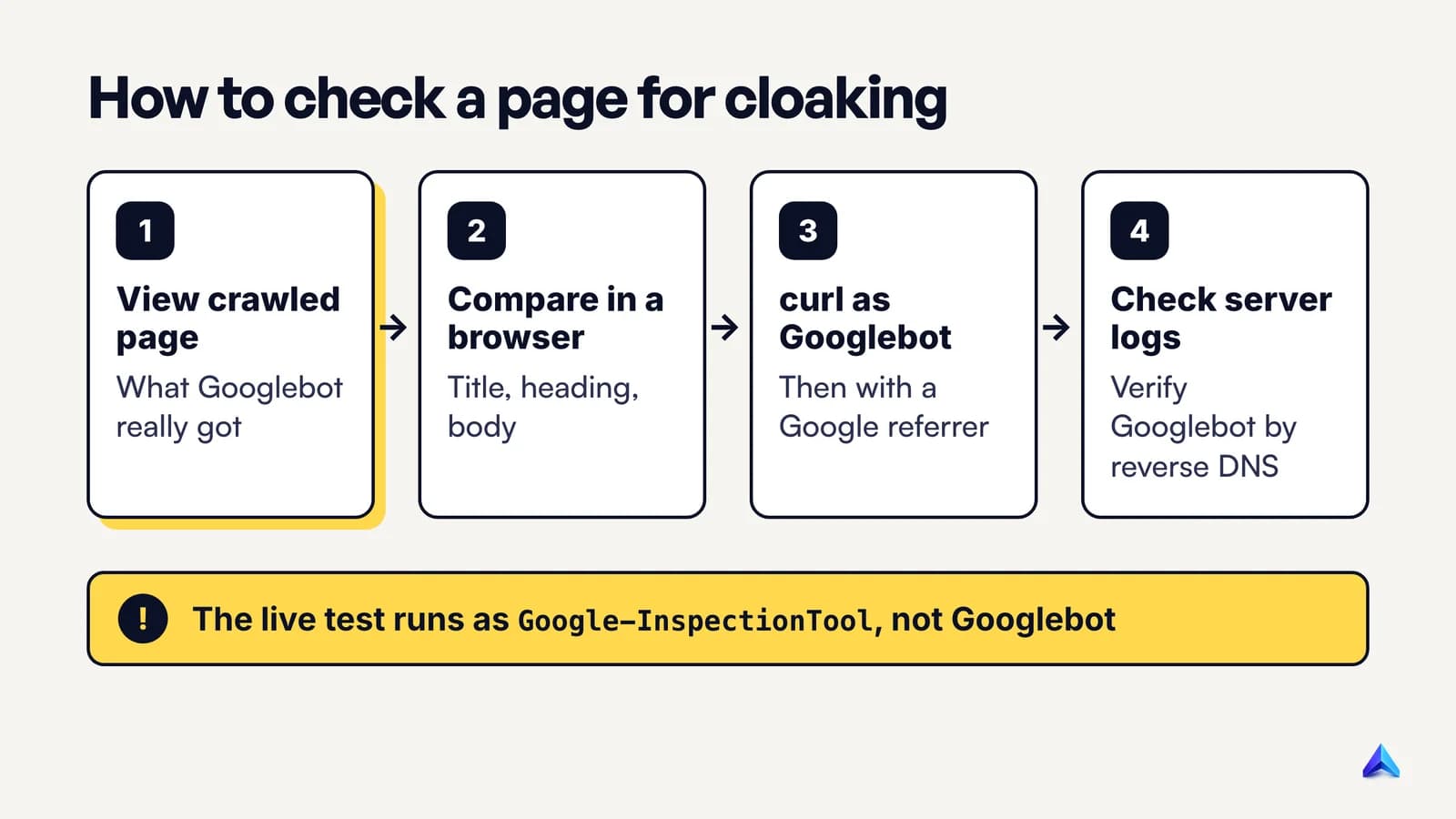
- Open URL Inspection in Search Console and inspect the page. Click View crawled page to see the HTML Google stored from its last real crawl. This is the indexed version, fetched by Googlebot itself.
- Compare it with the page in your browser. Search the crawled HTML for the title, the main heading and a sentence from the body. Missing sections, extra keyword blocks or a different topic all need explaining.
- Run a live test, but know what it can and cannot prove. Test live URL and then View tested page show the current HTML and a screenshot. The live test fetches as Google-InspectionTool, whose user agent reads
Google-InspectionTool/1.0, notGooglebot/2.1. A rule written to catch "googlebot" will not fire for it, so a clean live test does not clear a page. The crawled page from step 1 is the stronger evidence. - Request the page with a Googlebot user agent using the
curlcommands from the worked example. Then repeat with a Google referrer:curl -s -e "https://www.google.com/" https://yourdomain.com/page. Compare titles, word counts and anyLocationheaders. - Check your server logs. Filter for requests claiming to be Googlebot and verify a few with reverse DNS. If verified Googlebot requests return a different response size or status for the same URL than browser requests, a rule is branching on who is asking.
- Search for the files that do the branching. Google's manual action help says these redirects are "often written in JavaScript or in your .htaccess file" and suggests checking your CMS and plugins. On WordPress, look at
.htaccess,wp-config.php, recently modified plugin files and any must-use plugins.
If every check matches, the page is clean. If step 1 differs from your browser but steps 4 and 5 do not, look for something that changed between crawls, such as a stale prerender cache, before assuming bad intent. To confirm the page is indexed at all before you start, our guide on how to check if a page is indexed covers URL Inspection in more detail.
What happens if Google finds cloaking?
Google says it finds spam "through automated systems and, as needed, human review that can result in a manual action", and that sites violating the policies "may rank lower in results or not appear in results at all." There is no official list of how cloaking is detected, and anyone who claims to know Google's exact method is guessing.
When a person at Google confirms it, the Manual Actions report in Search Console shows Cloaking and/or sneaky redirects, with the explanation that your site "may be showing different pages to users than are shown to Google, or redirecting users to a different page than Google saw."
How to recover from a cloaking manual action
Google's manual action help lists the recovery steps. In short:
- Inspect the affected URLs with URL Inspection and compare Google's fetch with what you see.
- Remove whatever serves different content to Google and to people. Google notes this "will require looking through your site's code on the server."
- Look for redirects that send people somewhere unexpected, and for conditional ones. Google's examples are redirects that apply to "only users coming from Google search, or only users coming from a particular range of IP addresses."
- Remove those too, then click Request Review in the Manual Actions report.
Write the reconsideration request like an incident report: what served the different content, how it got there, what you removed and how you will stop it coming back. A vague "we have fixed everything" gives the reviewer nothing to check.
Lifting the manual action only removes the penalty. If the cloaked version existed because the real page was too thin to rank, it still is. Fix the page people see; our breakdown of what Google means by helpful content is a better model for that work than any trick that gets a page past a crawler.
Cloaking aimed at AI crawlers
The same trick now targets AI assistants. In October 2025 the AI security firm SPLX published research it calls AI-targeted cloaking: sites that check the user agent and serve AI agents, such as ChatGPT-User or PerplexityBot, a different page from the one people see.
Two of SPLX's controlled tests stand out. In one, a fictional designer's portfolio looked normal in a browser, while AI agents received a fabricated negative profile, which the AI tools then repeated. In the other, five candidate résumés were scored by OpenAI's Atlas browser against a fictional job posting. One candidate's page served AI crawlers an inflated version. That candidate scored 88 out of 100 and ranked first. Scored on the résumé humans could see, the same candidate got 26 and ranked last.
For site owners, this cuts two ways. First, whatever rules you write for AI crawlers, the content they receive should match the human page. Serving AI bots a separate "optimised" version is the same move as classic cloaking, aimed at a different reader, and it invites the same distrust once platforms start checking. Second, someone else can do this to you: a competitor or a review site can serve AI tools a version of a comparison page that people never see. If your brand matters in AI answers, checking what those tools say about you is now part of monitoring. Our guide to ClaudeBot shows how AI crawlers identify themselves, which is the same information a cloaking rule would key on.
Frequently asked questions
What is cloaking in advertising?
In Google Ads, cloaking means "showing different content on your website to different people or to Google to try to hide things that might break Google Ads' rules." Changing language, offers or location is allowed if the product is the same for everyone. Google treats cloaking as an egregious violation and suspends accounts upon detection, without prior warning.
Is IP delivery the same as cloaking?
No, as long as Googlebot is treated like any other visitor from the same place. Serving pounds to UK visitors and rupees to Indian visitors is fine. Google's rule is that a Googlebot request from a US address gets what a US visitor gets. It becomes cloaking when the crawler gets a version no real visitor ever sees.
What is the difference between cloaking and sneaky redirects?
Cloaking keeps the URL the same and changes what each visitor receives. A sneaky redirect sends the visitor to a different URL, often only for certain devices or visitors arriving from search. Google covers both under one manual action, "Cloaking and/or sneaky redirects", and the fix for each is to remove the conditional logic.
Can a plugin or CDN cause cloaking by accident?
Yes. Prerender plugins, caching layers and bot-protection rules can all serve Googlebot an outdated or different page without anyone intending it. Intent is part of Google's definition, but a large mismatch still needs fixing. Compare the crawled HTML in URL Inspection with the live page after any change to caching or rendering.