The best Surfer SEO alternative depends on which part of Surfer you actually use. To score drafts on a budget, pick NeuronWriter (from $19 a month billed yearly). For premium grading with unlimited users, Clearscope. For one tool from brief to publish, Frase. For topic planning across a whole site, MarketMuse. For tracking AI answers first and writing second, Writesonic. Every price below comes from the vendor's own page, checked on 9 October 2026.
Most "Surfer alternatives" lists are written by a vendor that ranks itself first. The real choice is rarely "Surfer or a Surfer clone". Surfer's plans now cover research, writing, optimisation, publishing integrations and AI-visibility tracking. Most teams lean on one or two of those. Replace the part you use, and you often pay less.
Which Surfer alternative fits the job you use Surfer for
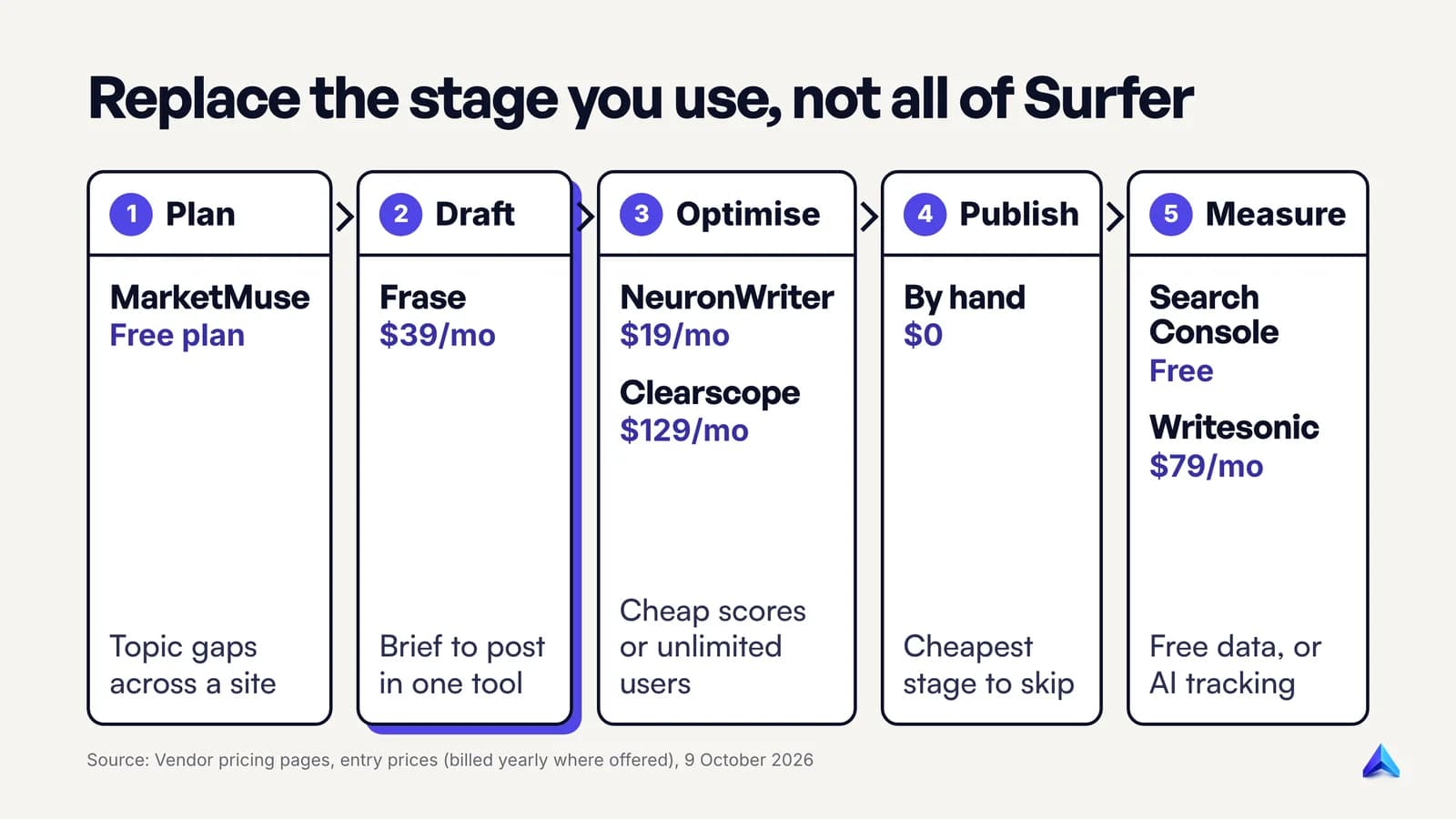
Start with the stage of content work that Surfer is doing for you today. The table gives one pick per job, the entry price shown on the vendor's own pricing page, and the one thing it does better than Surfer for that job.
| If you mostly use Surfer to... | Pick | Entry price (Oct 2026) | What it does better for that job |
|---|---|---|---|
| Plan topics across a whole site | MarketMuse | Free plan; paid plans quoted after a demo | Scores your existing inventory and plans briefs around topic gaps |
| Go from brief to published post in one tool | Frase | $39/mo billed yearly ($49 monthly) | Publishes to WordPress, Webflow, Sanity, Wix or its own free CMS |
| Score drafts cheaply | NeuronWriter | $19/mo billed yearly ($23 monthly) | The lowest entry price here, with a 30-day refund on your first plan |
| Grade drafts for a large team | Clearscope | $129/month | Unlimited users on every plan |
| Optimise inside Google Docs alongside other Semrush tools | Semrush Content Toolkit | $60/mo billed annually | One login if your team already lives in Semrush |
| Track brand mentions in AI answers | Writesonic | $79/mo billed annually | ChatGPT, Gemini and AI Overviews tracked from the entry plan |
| Get research-backed drafts that are checked before they reach your CMS | Project Rankup (our product) | See pricing | A publish-readiness gate that blocks broken drafts |
| Spend nothing | Google's guidance, People Also Ask, Search Console | Free | No subscription, and it forces you to read the results yourself |
Two notes before the detail. "Billed yearly" prices are charged upfront for the year on most of these tools, so compare the monthly price too if cash flow matters. And every vendor here lists prices in US dollars, so UK and Indian buyers should check the final amount at checkout.
What Surfer costs and includes as of October 2026
Knowing what you pay Surfer for makes the comparison honest. Surfer's pricing page lists four main plans, all quoted per month billed yearly:
| Surfer plan | Price (billed yearly) | Documents | AI prompts tracked |
|---|---|---|---|
| Discovery | $49/mo | 120 | Not listed |
| Standard | $99/mo | 360 | 25, refreshed weekly |
| Pro | $182/mo | 360 | 50, refreshed daily |
| Peace of Mind | $299/mo | Unlimited* | 100, refreshed daily |
There is also a standalone tracker, AI Search Analytics, at $82 a month billed yearly for 50 prompts refreshed daily. Surfer says yearly billing saves up to 17% against monthly payments, and that annual credits reset once a year rather than monthly.
On the free question that shows up in Google's People Also Ask box: the pricing page lists no $0 plan. Its sign-up buttons say "Start for Free" and lead to a trial checkout. If you need a permanently free tool, MarketMuse has a free plan, and the free route later in this post costs nothing at all.
So who should stay? If you use the Content Editor daily, publish through the WordPress or Google Docs integrations, and want rank-drop alerts and AI tracking in the same login, Standard at $99 is already a bundle. Switching only makes sense if you are paying for parts you never open.
What a content score can tell you, and what it can't
Every optimisation tool sells some version of a content score. Know what that number measures before you pay for it.
A content score compares your draft with the pages already ranking for your keyword. Surfer's own Content Score study describes a score "from 0 to 100" built from topical coverage, keyword usage, structure and depth. MarketMuse says its score checks a page's "inclusion of the model's subtopics". In plain terms: the tool reads the top results, extracts the terms and subtopics they share, and counts how many of them your draft covers. The LSI keywords idea that still circulates is a cousin of the same logic.
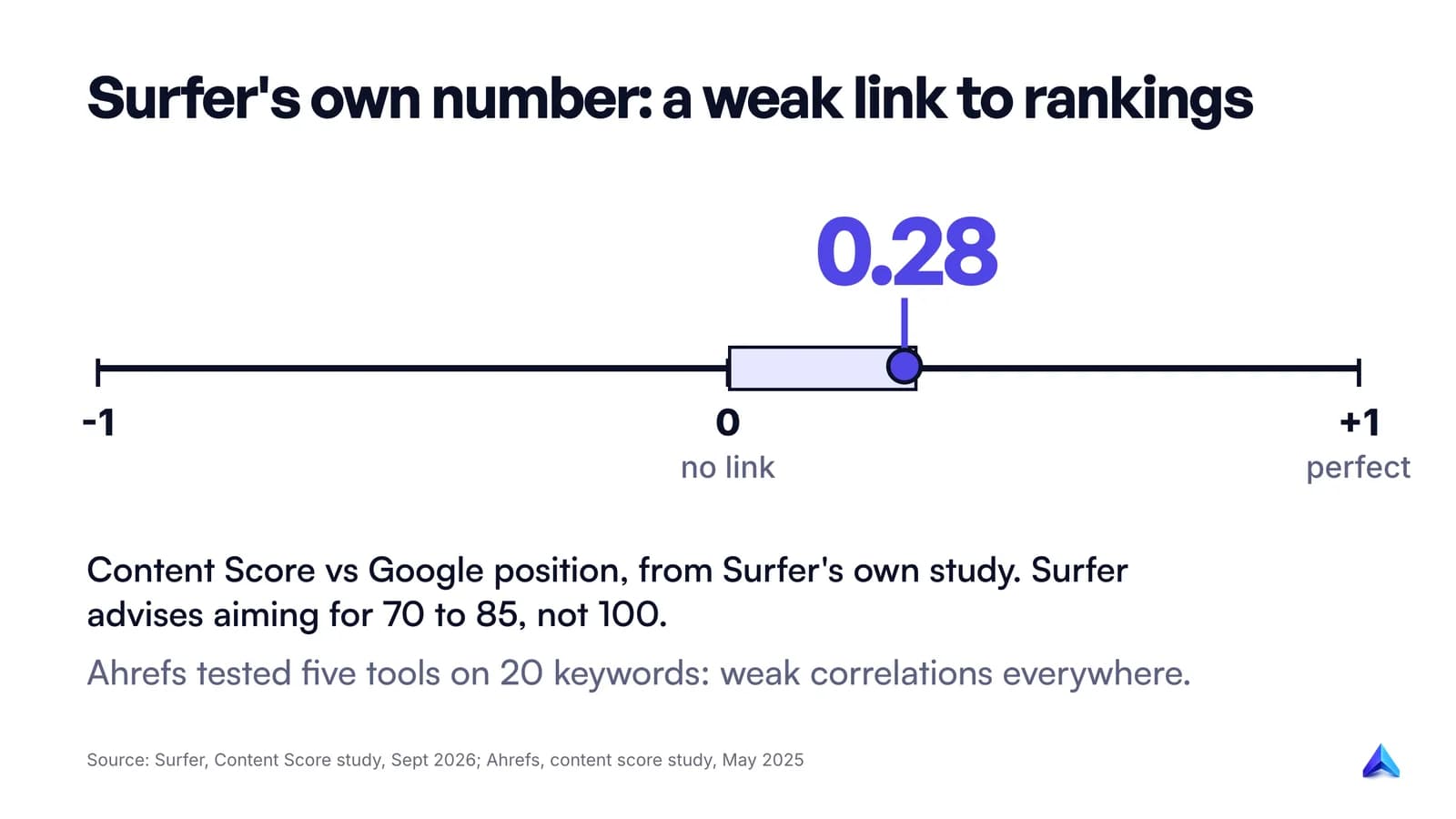
How much does that predict rankings? Surfer's own study analysed 1,000,000 SERP entries across 10,000 queries and found its Content Score correlates with Google rankings at 0.28. On a scale where 1 is perfect and 0 is nothing, that is a weak positive relationship. Surfer itself advises aiming for a score between 70 and 85, not 100.
An independent test points the same way. Si Quan Ong at Ahrefs scored the results for 20 random keywords in Surfer, Frase, NeuronWriter, Clearscope and Ahrefs' own AI Content Helper, and found "weak correlations everywhere". NeuronWriter and Ahrefs' tool did best. The same study notes that in some tools you can paste the whole recommended term list, write nothing else, and get an almost perfect score.
What the score sees
- Whether you mention the terms and subtopics the top pages share.
- Whether your length, heading count and structure sit near the ranking pages.
- Gaps: a subtopic every competitor covers that you skipped.
That last one is the real value: a fast way to spot the section you forgot.
What the score cannot see
- Whether your facts are true.
- Whether you added anything new. Google's helpful content guidance asks: "Does the content provide original information, reporting, research, or analysis?" A score built from existing pages rewards matching them, which Ahrefs bluntly calls "copycat content".
- Whether you matched intent. Most tools in the Ahrefs test gave Reddit, Quora and YouTube results a zero or no score, even though Google ranked them.
- Word count as a target. Google's helpful content page answers its own question about a preferred word count with "No, we don't." Our post on how long a blog post should be goes further into that.
Google's SEO Starter Guide adds the warning that matters most for anyone chasing a green score: "keyword stuffing is against Google's spam policies". It also makes the more useful point that people search with different words for the same thing ("charcuterie" vs "cheese board"), and writing naturally covers more of them. Our guide to helpful content covers what Google's systems reward in more depth.
Our view: treat a content score as a checklist for coverage, stop around the range of the pages that rank, and spend the saved time on the thing no score measures, which is something only you know.
Research and planning: MarketMuse
If you open Surfer mainly to decide what to write next, MarketMuse is built for that stage. It inventories your site, tracks topics and produces content briefs and strategy documents, rather than starting from a single keyword in an editor.
The free plan gives one user 10 queries a month, which is enough to judge its topic model on a few of your own subjects. Paid plans (Optimize, Research and Strategy) are listed with limits but no prices; each button says "Book a demo". As of October 2026, Research includes 3 users and unlimited queries, and Strategy includes 5 users and all nine brief types.
Pick MarketMuse if you run hundreds of pages and the hard question is which topics to cover, update or merge. Skip it if you publish a few posts a month; the strategy layer is wasted on a small site.
Briefs and drafts: Frase, Scalenut, Writesonic, Jasper and Project Rankup
This is the most crowded stage, and the tools differ mostly in how much they do after the draft exists. A good content brief matters more than which tool writes it, so judge each one on the brief it gives you.
Frase
Frase is the closest like-for-like replacement for Surfer's writing side. As of October 2026, per Frase's pricing page, Starter costs $39 a month billed yearly or $49 month to month, for one seat, one site, 10 articles and 50 audit pages a month. It includes SEO and GEO scores, AI visibility on ChatGPT and Google AI, and Content Guard, which watches pages for Google decay and proposes a fix. It publishes to WordPress, Webflow, Sanity or Wix, or hosts the post on FraseCMS. The trial runs 7 days with no card. We are giving Frase a full comparison of its own in a separate guide, so this is the short version: pick it if you want one tool to run the whole loop for a single site.
Scalenut
Scalenut has moved toward AI-search work. Its Starter plan lists at $59 a month, and on 9 October its pricing page showed a limited 60%-off offer at $24. Starter tracks 10 prompts weekly on ChatGPT and Google AI Overviews and creates 5 articles a month. Internal linking and auto-publishing to WordPress and Shopify start on Plus ($89 list). Check which price applies at checkout, because promotional pricing changes.
Writesonic
Writesonic now calls itself an AI search visibility platform, and its pricing reads that way. Starter is $79 a month billed annually and leads with tracking ChatGPT, Gemini and Google AI Overviews for 50 prompts, then adds 15 AI articles and 10 site audits a month. Pick it if the question your boss asks is "are we mentioned in ChatGPT?" and articles come second.
Jasper
Jasper is a marketing AI platform first. Pro costs $59 per seat a month billed yearly ($69 monthly) and centres on brand voice and campaign content. Its GEO agents sit on the custom-priced Business plan. It suits a brand team writing across many channels, not someone who opened Surfer for a keyword-by-keyword editor.
Project Rankup (our product)
Project Rankup fits one job: research-backed blog drafts for your own site that are checked before they publish. It reads your site and two or three competitor homepages once, pulls keyword volume and difficulty from real data, and judges difficulty against your domain's authority so you do not plan posts you cannot rank for. Drafts open with a direct answer, carry FAQ and Article schema, cite dated sources and add internal links from your sitemap. A publish-readiness gate blocks leaked prompt text, cut-off endings and drafts that score below the threshold, and its SEO and GEO scores are repeatable because the same scorer runs every time. WordPress publishing is supported.
The gaps are real. It does no AI-visibility or share-of-voice tracking, which Surfer, Frase, Clearscope, Writesonic, Scalenut and NeuronWriter all sell. It does no link building. It targets 10 countries (including the US, UK and India) and writes in English or Chinese only. Plans are on the pricing page.
Optimising a draft you wrote: NeuronWriter, Clearscope and Semrush
If your writers draft in Google Docs and you only use Surfer's Content Editor to check coverage, you are paying for five stages and using one. Three tools do this stage well on their own. Pair any of them with the habits in our guide to SEO content writing, because the editor will not tell you whether the piece is any good.
NeuronWriter
NeuronWriter is the budget pick, and it came out among the stronger tools in the Ahrefs correlation test. As of October 2026, Bronze costs $23 a month, or $19 a month billed yearly, for 2 projects, 25 content analyses and 5 AI-monitored questions. Gold ($69 monthly, $57 yearly) adds sharing with unlimited team members and integrations with Search Console, WordPress and Shopify. You can test it for 7 days on Gold terms, and the first plan you buy can be refunded within 30 days. For a freelancer or a small agency in India or the UK watching every pound or rupee, it is the easiest switch.
Clearscope
Clearscope is the premium editor. Essentials costs $129 a month for 50 tracked queries, 50 pages, 20 topic explorations and 20 drafts; Business is $399. Every plan has unlimited users and tracks queries in ChatGPT and Gemini, and monthly plans carry no minimum contract. In the Ahrefs test it was the only tool that graded with letters rather than a number. Pick it when many writers and editors need the same grading, because per-seat pricing elsewhere adds up fast. A fuller Clearscope comparison is coming in its own guide.
Semrush SEO Writing Assistant and Content Toolkit
Semrush's ContentShake page now carries the title Content Toolkit, and the toolkit's Base plan is $60 a month billed annually. The SEO Writing Assistant works inside Google Docs, WordPress and Word 365, and checks related keywords, readability, tone of voice and plagiarism. It makes sense if your team already pays for Semrush; on its own it is a narrower editor than NeuronWriter or Clearscope. Our Semrush alternatives guide covers the wider suite.
Publishing and measuring, including AI visibility
The last two stages are where these tools have changed most in 2026. Most tools in this guide now sell an AI tracker: you give it prompts, and it records whether ChatGPT, Gemini or Google's AI features mention your brand.
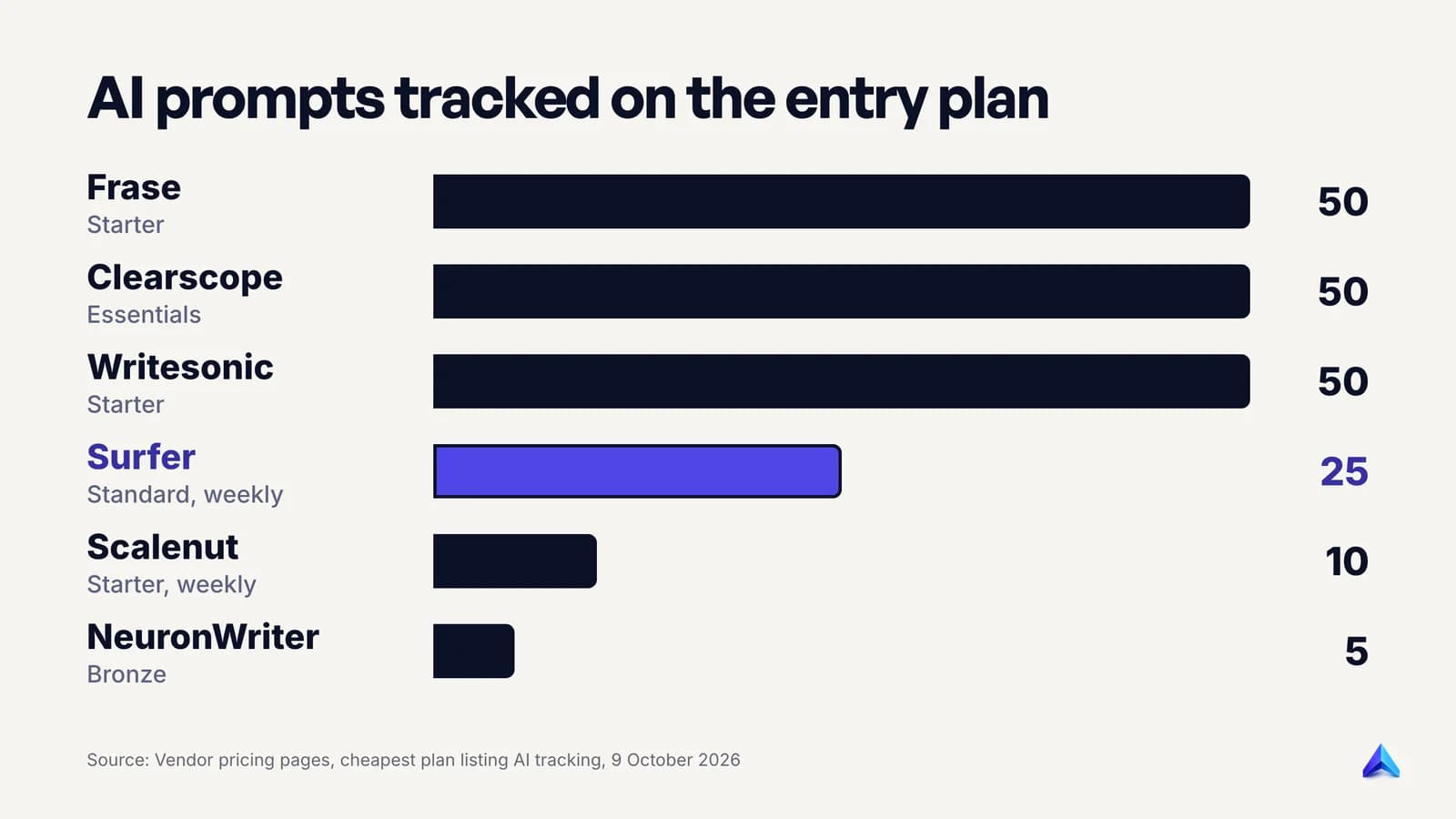
Project Rankup, our product, is not on the chart because it has no tracker. The allowances on entry plans are small. Fifty prompts covers one product line in one market, not a business. Read the chart as a sign of which tools take tracking seriously at the low end, then decide whether you need tracking at all. If you have no AI-visibility goal yet, the cheaper route is to buy a writing tool and measure with Search Console, which is free and shows the queries and pages Google already sends you traffic for.
On publishing: Frase pushes to four CMSs plus its own, NeuronWriter Gold and Scalenut Plus connect to WordPress and Shopify, and Surfer lists WordPress and Google Docs on Standard. Publishing is the cheapest stage to do by hand, so do not pay extra for it alone.
One caution for teams that publish in volume. Google's spam policies define scaled content abuse as many pages generated mainly to manipulate rankings, "no matter how it's created"; our explainer on scaled content abuse shows where the line sits. Google's guidance on AI-generated content is clear that AI use is fine, as long as it is not "primarily to manipulate search rankings".
The free route: Google's guidance, People Also Ask and Search Console
The top Reddit thread for this search asks for a cheaper Surfer, and for a site publishing a few posts a month the cheapest option is no tool at all. This is the manual version of what a content editor automates:
- Search your keyword in a private window in the country you target (google.com, google.co.uk or google.co.in give different results). Note the page types that rank: guides, lists, forums, videos.
- Open the top five results. Write down the subtopics at least three of them cover. That list is your coverage check.
- Copy the People Also Ask questions and expand two or three to load more. These become your FAQ and often your H2s.
- Find the gap. What does none of the five say? A worked example, a real price, a local case, a mistake you have seen. This is the part no content score rewards and Google's guidance asks for.
- Write, then read it aloud. If a phrase repeats in a way you would never say, cut it.
- After publishing, open Search Console's Performance report for that page after a few weeks. The queries it shows are the terms Google already associates with you, which is better data than any term list.
It is slower than a tool and does not scale to a team, but for one founder writing for their own site it is enough.
How to leave Surfer without losing work
Switching mid-contract wastes money, so time it. Surfer's pricing FAQ says you cancel by turning off auto-renewal in the in-app Billing page, and you keep access until the end of the period you paid for. Annual plans are charged upfront and their credits reset yearly, so use the remaining credits on the posts you plan to refresh before the renewal date.
Before access ends, save the keyword lists and guidelines for your best-performing pages, so you can rerun the same keywords in the new tool and compare. Run the same three keywords through your shortlist during the trials (Frase and NeuronWriter both offer 7 days), and pick the tool whose brief you would actually hand to a writer, not the one with the highest score.
常见问题
Is there a free version of Surfer SEO?
Surfer's pricing page lists no free plan as of October 2026. The cheapest plan is Discovery at $49 a month billed yearly, and its "Start for Free" buttons lead to a trial. Surfer does offer free extras, including a Chrome extension and an AI detector. For a free planning tool, MarketMuse has a free plan with 10 queries a month.
Is Surfer SEO any good?
Yes, for coverage checks. Its Content Score finds subtopics the ranking pages share that your draft misses. Its own study puts the score's correlation with rankings at 0.28, which is weak, and it recommends aiming for 70 to 85 rather than 100. It is a useful checklist, not a ranking guarantee.
What is the cheapest alternative to Surfer SEO?
NeuronWriter, at $19 a month billed yearly or $23 monthly, is the cheapest paid content editor in this guide as of October 2026. Scalenut's Starter was showing a promotional $24 a month on 9 October. The free route of reading the results, People Also Ask and Search Console costs nothing.
Does Google penalise content written with AI tools?
No, not for using AI. Google says appropriate use of AI or automation is not against its guidelines. What it acts on is content produced primarily to manipulate rankings, such as pages generated at scale with little value. Content written with any of these tools is judged on whether it helps the reader.
Is SEO dead now with AI?
No, in our view, but the work has changed. AI answers summarise pages, so a page now has to earn both the ranking and the quote: a clear answer early, original detail, and sources a system can check. A good content tool helps with structure and coverage; the original detail still has to come from you.