Since September 15, 2026, new domains onboarding to Cloudflare get new default settings for AI crawlers. Cloudflare sorts those crawlers into Search, Agent and Training, keeps Search allowed, and for sites that say they earn money from ads, refuses AI training and blocks agents on pages that show ads. Existing domains keep the settings they already had.
That is the short version, and it is already different from what most coverage of the change says. Cloudflare announced the defaults on July 1 and then changed how they work on launch day. This guide covers what actually shipped, which named bots fall into each group, who is affected, what it means for your visibility in AI search, and how to check your own setting.
What did Cloudflare change on September 15?
Two things changed on the same day: the starting settings a new domain gets, and what Cloudflare's "block" options do to crawlers that serve both search and training.
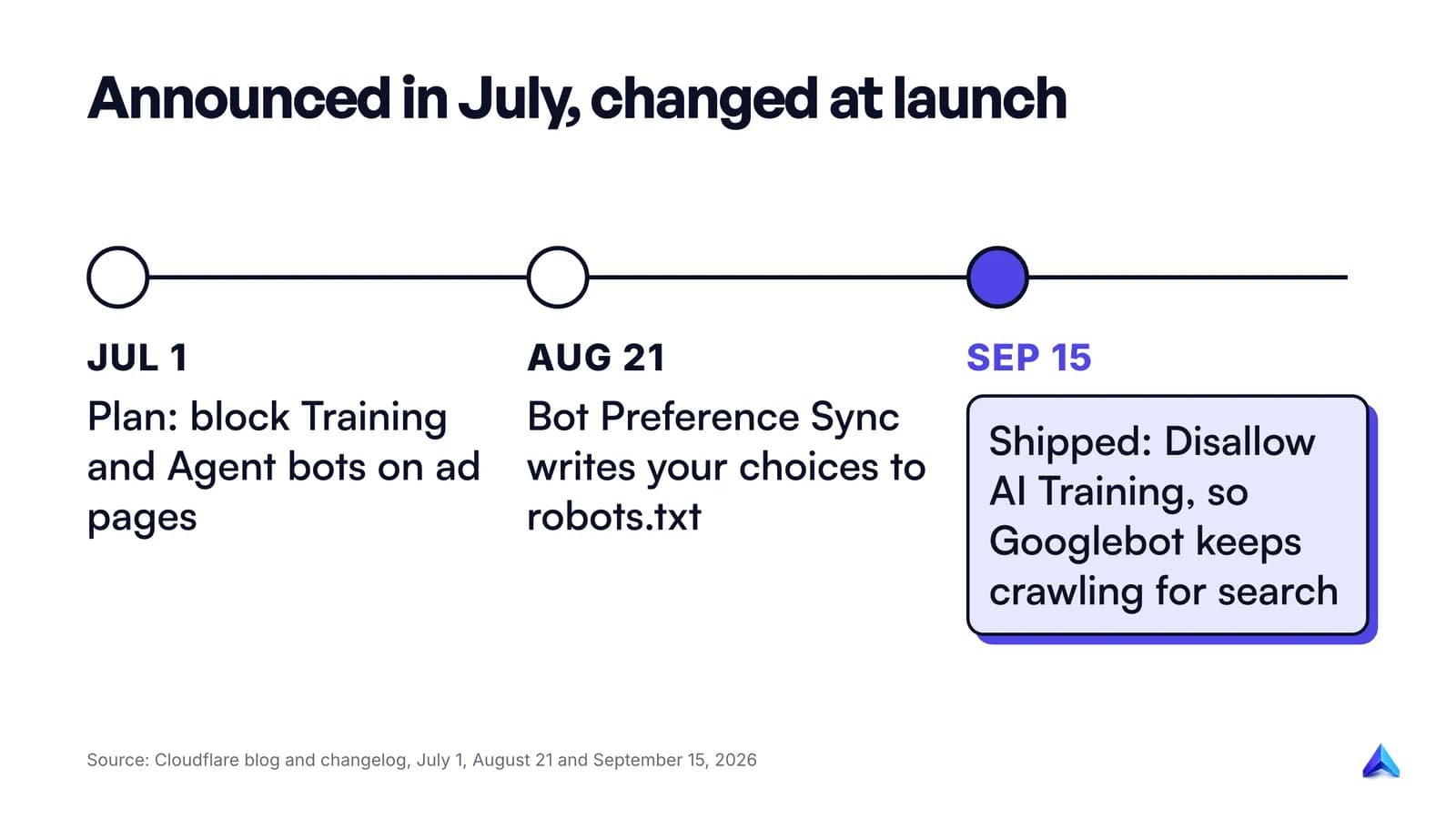
The defaults were first announced in Cloudflare's July 1 changelog entry, which said that "new domains onboarding to Cloudflare receive updated defaults" from September 15, with Training and Agent bots "blocked on pages that display ads, while Search remains allowed." The same entry opened the controls to every plan, "including those on the Free plan."
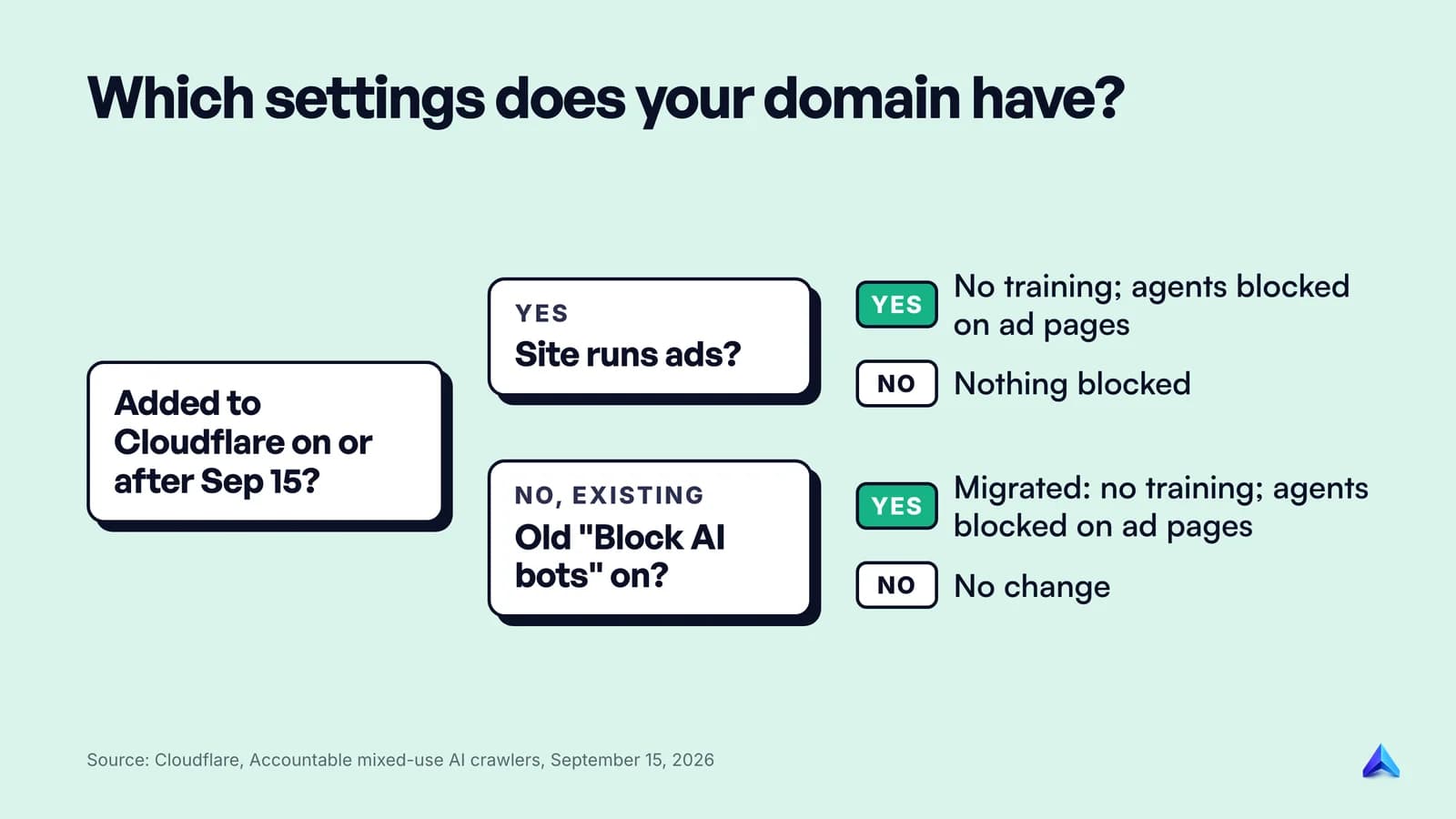
On launch day, Cloudflare published a second post, stay discoverable in search while disallowing AI training, and that is the version now in force. A new domain is offered one of two presets during onboarding, depending on whether the site earns money from advertising:
| Setting | Site without ads | Site monetized with ads |
|---|---|---|
| Bot Preference Sync | Enabled | Enabled |
| Search | Allow | Allow |
| Training | Allow | Disallow AI Training |
| Agent | Allow | Block on pages with ads |
The trigger is a checkbox in the onboarding flow. Cloudflare's Bot Preference Sync announcement quotes it as "I monetize from pages with ads on this domain." Tick it and you get the right-hand column. Leave it and, in Cloudflare's words, new customers "will not have any blocks or disallows added by default." Either way, Cloudflare says you can change any of these settings during onboarding or at any time afterward.
The scale is why this matters even if you have never logged in to a Cloudflare dashboard. Cloudflare describes itself as sitting in front of "more than 20% of web domains." When its defaults move, a large share of new websites start life with different rules for AI bots.
Announced in July, changed in September
The July version blocked Training bots on ad pages. The September version replaced that with a new option, Disallow AI Training, and that swap is the part most write-ups missed.
The difference comes down to crawlers that do two jobs at once. Cloudflare classifies Googlebot, Applebot and Bingbot as mixed-use crawlers: one bot that crawls for search and for AI training. Under the July plan, a Training block would have reached them, because Cloudflare said it would enforce "the most restrictive applicable rules." A site that blocked training could have blocked its own search traffic.
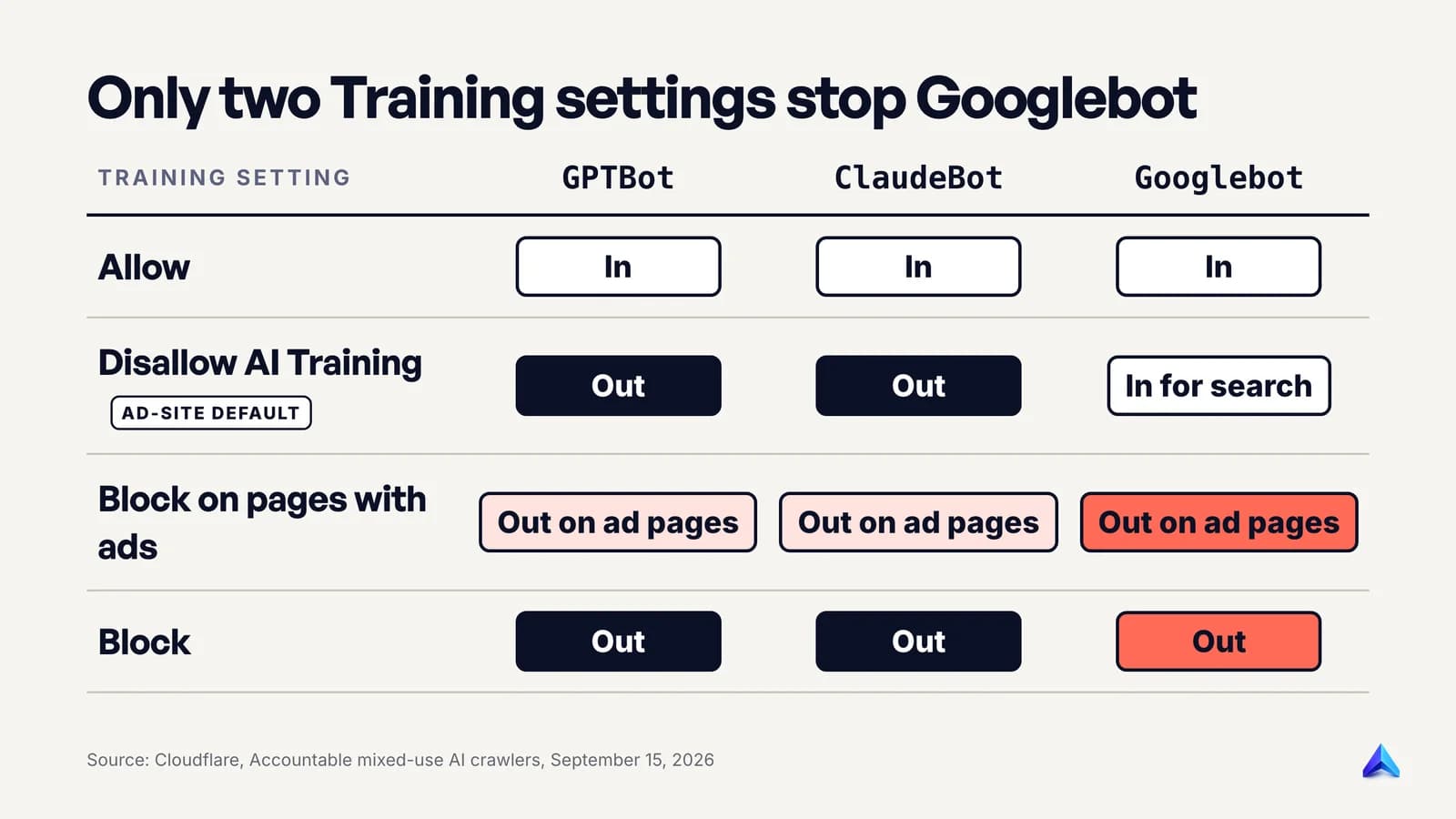
The September post fixes that with four settings for Training instead of three:
- Allow. Every crawler gets in unless another rule blocks it.
- Disallow AI Training. Cloudflare writes a no-training preference into your robots.txt. Mixed-use crawlers that meet its new "Accountable" bar (Apple, Google and Microsoft, so far) stay allowed for search. "Every other training crawler is blocked, including the training-only crawlers run by Amazon, Anthropic, Meta, and OpenAI."
- Block on pages with ads. Crawlers, mixed-use ones included, are blocked on pages Cloudflare detects as serving an ad.
- Block. Every training crawler is blocked everywhere, mixed-use ones included.
The ad-supported preset uses option 2, not option 3. So the default does not block Googlebot. What can block it is a setting you choose: Cloudflare says plainly that selecting Block "will stop Applebot, Bingbot, and Googlebot from reaching your site, search included." Block on pages with ads does the same on ad pages.
One loose end: Cloudflare's own Block AI Bots documentation still carried the July wording when we read it on October 9, 2026. If you are reading the docs and the blog side by side and they disagree, the September 15 post describes what launched.
Search, Agent and Training: which bots land where
Cloudflare classifies bots by what they do on your site, not by whether they count as "AI." Its definitions are short:
- Search covers crawlers that "index your content so they can answer questions about it later." The deal is that you get referral traffic back.
- Agent covers "automated activity acting in real time on a person's behalf, such as chat fetch bots and browser-use agents." Someone asked a chatbot a question and the bot is visiting your page right now to answer it.
- Training covers crawlers that "take your content to train or fine-tune a model."
Cloudflare also says "a single bot can have more than one behavior," which is exactly why Googlebot is the hard case.
Its AI Crawl Control bot reference lists the major crawlers with an older set of labels: AI Crawler, AI Assistant, AI Search and Search Engine. Cloudflare's Radar bot directory now shows those same bots under the new names, with AI Crawler pages labelled Training and AI Assistant pages labelled Agent, and Cloudflare's verified bots documentation says AI search and traditional search "are treated as Search behavior." Mapped across, the main operators look like this:
| Operator | Training | Search | Agent |
|---|---|---|---|
| OpenAI | GPTBot | OAI-SearchBot | ChatGPT-User |
| Anthropic | ClaudeBot | Claude-SearchBot | Claude-User |
| Perplexity | (none listed) | PerplexityBot | Perplexity-User |
| Meta | Meta-ExternalAgent, FacebookBot | (none listed) | Meta-ExternalFetcher |
| Others | Bytespider, CCBot, Amazonbot, Google-CloudVertexBot | (none listed) | DuckAssistBot, MistralAI-User |
| Mixed-use | Googlebot, Bingbot, Applebot (Search plus Training) |
Two patterns stand out. OpenAI and Anthropic each run three separate bots, one per job, which makes them easy to treat differently. Cloudflare has pushed for exactly this, saying it "strongly encourage[s]" any company that searches, acts as an agent and trains "to separate the automation into three separate crawlers." Google, Apple and Microsoft do not split their main crawler, so the opt-out runs through something the crawler honours instead. Google uses the Google-Extended token in robots.txt, Apple uses Applebot-Extended, and Microsoft uses the NOARCHIVE meta tag.
If you want the full picture of one operator's bots, our guide to ClaudeBot and Anthropic's other two crawlers walks through all three, including how to verify them by IP.
Who is affected, and who is not
Most sites already on Cloudflare saw no change at all. Cloudflare's answer to "what do you need to do?" is "Nothing, in almost every case. Your current settings carry over on their own."
The detail depends on where your domain started:
- New domains added on or after September 15, 2026. These get one of the two presets above. Ad-supported sites start with Training disallowed and Agents blocked on ad pages. Sites without ads start with nothing blocked.
- Existing domains that never touched the AI controls. If the old one-click "Block AI bots" switch was off, Search, Training and Agent all migrated to Allow. Nothing changed.
- Existing domains that had "Block AI bots" switched on. These were migrated to Search Allow, Training Disallow AI Training, and Agent Block on pages with ads. That last part is new behaviour: chat fetchers such as ChatGPT-User and Claude-User now get blocked on your ad pages.
- Existing domains that had already set the granular controls. Search and Agent choices carried over unchanged. A Training choice of Block or Block on pages with ads moved to Disallow AI Training.
Picture two sites set up in October 2026. A recipe blog in Pune that runs display ads ticks the monetization box during onboarding. From day one, GPTBot and ClaudeBot are refused, Googlebot and OAI-SearchBot still crawl, and ChatGPT-User cannot fetch a recipe page that carries ads. A London accounting software startup with no ads skips the box and starts with every category allowed, so all of those bots get in.
"Pages with ads" is a page-level test, not a site-level one. Cloudflare says it can "detect which pages serve ads" but has not published how it does that. A news site whose homepage and articles run ads but whose subscription page does not would see agents blocked on the first two and allowed on the third.
What it means for AI search visibility
The defaults leave AI search alone. That is the most useful thing to understand, because "Cloudflare blocks AI" headlines suggest the opposite.
AI answer engines find your pages through Search crawlers, and Search stays on Allow in both presets. Cloudflare's own data shows almost nobody turns it off: "less than 1% of Cloudflare sites choose to block Search bots," against "17% of sites" that block training in some way.
Search access is the part to protect. OpenAI's crawler documentation is blunt about what happens if you lose it: "Sites that are opted out of OAI-SearchBot will not be shown in ChatGPT search answers, though can still appear as navigational links." Block the Search category in Cloudflare and you get that result across every operator at once.
Training is a separate decision with a separate outcome. Disallowing GPTBot "indicates a site's content should not be used in training generative AI foundation models," per OpenAI, and has nothing to do with ChatGPT search. Google says the same of its token: Google-Extended "does not impact a site's inclusion in Google Search nor is it used as a ranking signal in Google Search." So the ad-supported preset's Disallow AI Training costs you nothing in Google Search. Our explainer on how AI Overviews work covers where Google's AI summaries find their sources.
The Agent block is the one with a real, smaller cost. When someone asks ChatGPT about your page and it tries to open the live URL, ChatGPT-User makes that request. Block agents on ad pages and that live fetch fails on those pages. OpenAI says "ChatGPT-User is not used to determine whether content may appear in Search," so you stay in its search results. What you lose is the moment where a person asks an assistant to read your page for them. For an ad-funded publisher, that visit showed no ads anyway, which is Cloudflare's whole argument.
Where sites really lose AI visibility is the Block setting for Training. Choose it and Googlebot, Bingbot and Applebot are stopped along with GPTBot, which shuts the door on Google, Bing and Apple search, not only on training. If your site has quietly dropped out of Google, a stray Cloudflare Block is now one of the checks in our list of reasons a website is not showing on Google.
How to check and change your setting
The settings live per domain. Cloudflare's documentation gives the path as Security Settings > Configure AI bot policies. In practice:
- Log in and open the domain. Each zone has its own controls, so a company with a
.comand a.co.ukhas two sets to check. - Go to Security, then Settings, and find the AI bot policies. You will see Search, Training and Agent, each with its own selector.
- Read Training first. If it says Block, Googlebot, Bingbot and Applebot cannot reach the site. Unless you mean to leave Google, change it to Disallow AI Training.
- Check Search. It should say Allow unless you have a specific reason to vanish from search engines and AI answers.
- Decide on Agent. Allow if you want chat assistants to read your pages live. Block on pages with ads if you run ads and see agent fetches as lost impressions.
- Open your live robots.txt in a browser and confirm it says what you just chose (next section).
To see the effect, use AI Crawl Control, which Cloudflare offers on all plans. Its dashboard shows which AI services access your content and how often. If a bot you meant to block is still getting through, or one you allowed never shows up, revisit the settings and any custom WAF rules.
Do not test by sending requests with a faked user agent from your laptop. A request that says "GPTBot" from your home IP is not a verified bot to Cloudflare, so the result tells you nothing about how the real crawler is treated.
The robots.txt side
Cloudflare now writes part of your robots.txt for you. The feature is Bot Preference Sync, on by default for new domains, and it replaces the older Managed robots.txt option, which is being deprecated.
Sync prepends a block to whatever file you already serve. Cloudflare says "any existing Disallow directives are maintained," and marks the block with comment lines so you can find it. Cloudflare's published example uses placeholder bot names; this illustrative version swaps in real ones:
# BEGIN Cloudflare Bot Preference Sync
User-agent: GPTBot
User-agent: ClaudeBot
User-agent: Google-Extended
Disallow: /
...
# END Cloudflare Bot Preference Sync
The real list comes from the bots Cloudflare tracks and changes over time, so read your own file rather than copying this one. The pattern is what matters: training crawlers and opt-out tokens (Cloudflare's placeholder is MixedUseBot-Extended) get a Disallow: /, while a mixed-use crawler's main search token stays open. The older Managed robots.txt added a Content Signals line, Content-Signal: search=yes,ai-train=no, which states a similar preference in a newer, still-developing format.
Two limits matter.
First, robots.txt is a request, and Cloudflare says so: a directive "cannot identify who is crawling, determine why they are crawling, or stop a crawler that ignores it." The enforcement happens at Cloudflare's edge, where it can tell a real GPTBot from an impostor. The file and the edge rule are meant to say the same thing, which is the reason Sync exists.
Second, Bing is a gap for now. Microsoft is building support for a robots.txt no-training preference, "targeted for early 2027," and until then Cloudflare says Disallow AI Training "will not automatically convey a no-training preference to Bing." Bing's current route is the NOARCHIVE meta tag.
If you already maintain AI rules by hand, compare them with the synced block after you change a setting. A hand-written Allow for a bot that Sync now disallows sends crawlers a mixed message. Our llms.txt guide explains why a separate llms.txt file does not change any of this: it describes your site and blocks nothing.
What we would set, by type of site
The defaults are reasonable starting points. They are not the right answer for everyone, and the best setting depends on how the site makes money.
| Your site | Search | Training | Agent |
|---|---|---|---|
| Ad-funded publisher or blog | Allow | Disallow AI Training | Block on pages with ads |
| Subscription or paywalled publisher | Allow | Disallow AI Training | Your call |
| SaaS, D2C store or B2B services | Allow | Allow | Allow |
| Local business (a Manchester plumber, a Delhi clinic) | Allow | Allow | Allow |
| Documentation for a developer product | Allow | Allow | Allow |
For most businesses, AI assistants describing your product accurately is marketing. A Shopify store in Jaipur wants a chatbot to open its product page when a shopper asks about it, so blocking agents works against it. Publishers are different: their pages are the product, and an assistant that reads the article for the reader takes the ad impression with it.
The one setting we would avoid on almost any site is Block for Training. It looks like the strongest privacy choice, and it costs you Google, Bing and Apple search in exchange for very little that Disallow AI Training does not already cover.
What is still unknown
Four parts of this are not settled:
- How ad pages are detected. Cloudflare has not documented the method, so you cannot predict with certainty which of your pages count.
- Which bots are in the synced list on a given day. It comes from Cloudflare's tracked bots and is updated periodically.
- Bing's no-training support. Promised for early 2027.
- AI summaries. Cloudflare says its goal is to let site owners control "how much of your content is included" in AI summaries "by early next year," set once on Cloudflare. No setting exists yet.
Check your Training setting today. If it says Block, that is the one line on the page that can take a site out of Google.
Frequently asked questions
Does Cloudflare block Googlebot by default?
No. The default for ad-supported new domains is Disallow AI Training, which keeps Googlebot, Bingbot and Applebot crawling for search while publishing a no-training preference. Googlebot is only blocked if you select Block, or Block on pages with ads, for Training, or block the Search category. Check the Training selector if you are unsure.
Will blocking AI bots on Cloudflare hurt my SEO?
Blocking training-only bots such as GPTBot or ClaudeBot has no effect on Google rankings. Google states that Google-Extended does not affect inclusion or ranking in Search either. The risk is the Block setting for Training, which also stops Googlebot, and blocking the Search category, which removes you from AI search answers.
Are AI crawler controls available on Cloudflare's free plan?
Yes. Cloudflare opened the Search, Agent and Training controls to all customers on July 1, 2026, including the Free plan, and says the September 15 settings are available on all plans. AI Crawl Control, which shows which AI services visit your site, is also listed as available on all plans.
What happened to the "Block AI bots" toggle?
Cloudflare is deprecating it in favour of the separate Search, Training and Agent controls. Domains that had it switched on were migrated to Search Allow, Training Disallow AI Training, and Agent Block on pages with ads. Domains that had it off were migrated to Allow on all three.
How do I allow GPTBot through Cloudflare but block other AI crawlers?
The category controls work on groups, not individual bots. Set Training to Allow, then add a custom WAF rule that blocks the specific user agents you do not want, or turn off Bot Preference Sync and write your own robots.txt. Bot Management customers can target bots by detection ID instead.
Does blocking agents remove my site from ChatGPT search?
No. OpenAI says ChatGPT-User is not used to decide whether content appears in ChatGPT search; that is OAI-SearchBot's job, which sits in Cloudflare's Search category. Blocking agents on ad pages only stops ChatGPT from opening those pages live when a user asks it to.