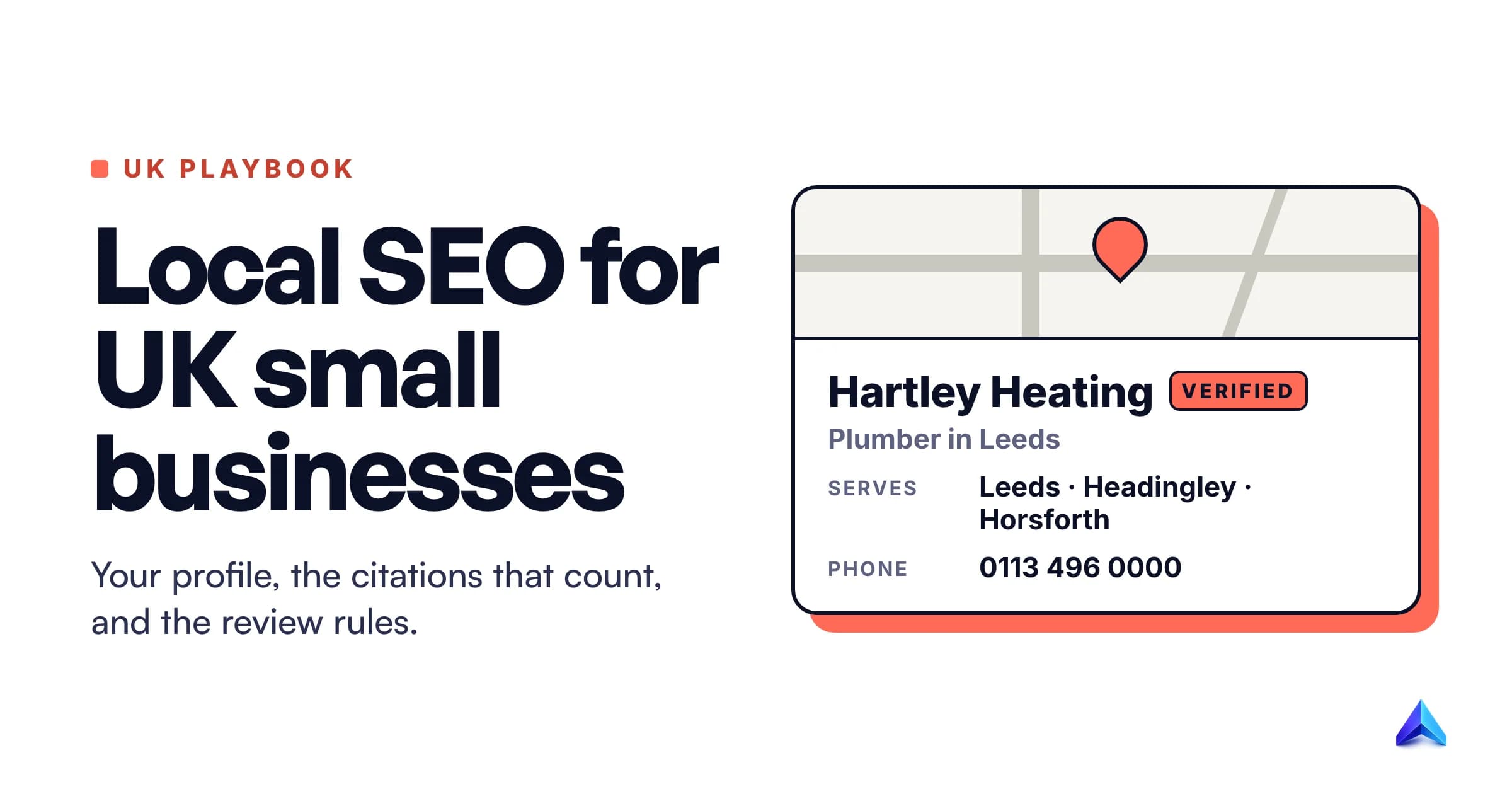
Local SEO in the UK comes down to five jobs you can do yourself: settle one version of your business name, address and phone number, set up a verified Google Business Profile that follows Google's rules, list the same details on the handful of UK directories that matter, collect reviews within the law, and make your website say what your profile says. None of it needs an agency. Most of it needs care.
It is written for the café in Bristol, the electrician covering three Leeds postcodes and the two-partner accountancy in Stirling, and it covers the UK-only parts: Companies House names, registered offices and the 2024 law on fake reviews.
How Google decides who shows up locally
Google publishes the answer, and it is short. Its guide to local ranking says local results are mainly based on three things:
- Relevance: how well your profile matches what someone typed. Complete, detailed information helps Google make the match.
- Distance: how far you are from the searcher. If they do not share their location, Google uses what it knows about it.
- Prominence: how well known you are. Google says this draws on how many websites link to you and how many reviews you have, and that more reviews and positive ratings can help.
The same page states there is no way to request or pay for a better local ranking, which rules out a whole category of offers in UK inboxes. Distance you cannot change short of moving premises, so the work splits cleanly: relevance is accurate, complete information, and prominence is reviews, links and mentions in the right places.
Step 1: Fix your name, address and phone number first
Every local SEO guide mentions NAP consistency (name, address, phone). The UK has three specific ways to get it wrong, and they all come from company paperwork rather than marketing.
Your name: trading name, not the Companies House name
A limited company has a registered name at Companies House, such as "Hartley Heating Services Ltd". Customers know it as "Hartley Heating". Google's Business Profile guidelines say your name should reflect your real-world name as used on your shopfront, website and stationery, and they list "Ltd" as an irrelevant legal term you can only include if your signage, cards and invoices consistently show it. One of Google's own examples of an unacceptable name is "LAZ Parking Ltd".
The penalty for stuffing extras into the name is suspension, not a lower ranking. "Hartley Heating Leeds Boiler Repair" is the sort of name that gets a profile pulled.
Sole traders have a simpler version of the same choice. GOV.UK says you can trade under your own name or a separate business name, and that a sole trader's name must not include "Ltd" or "limited". Pick the name on your van, and use it everywhere.
Your address: the registered office trap
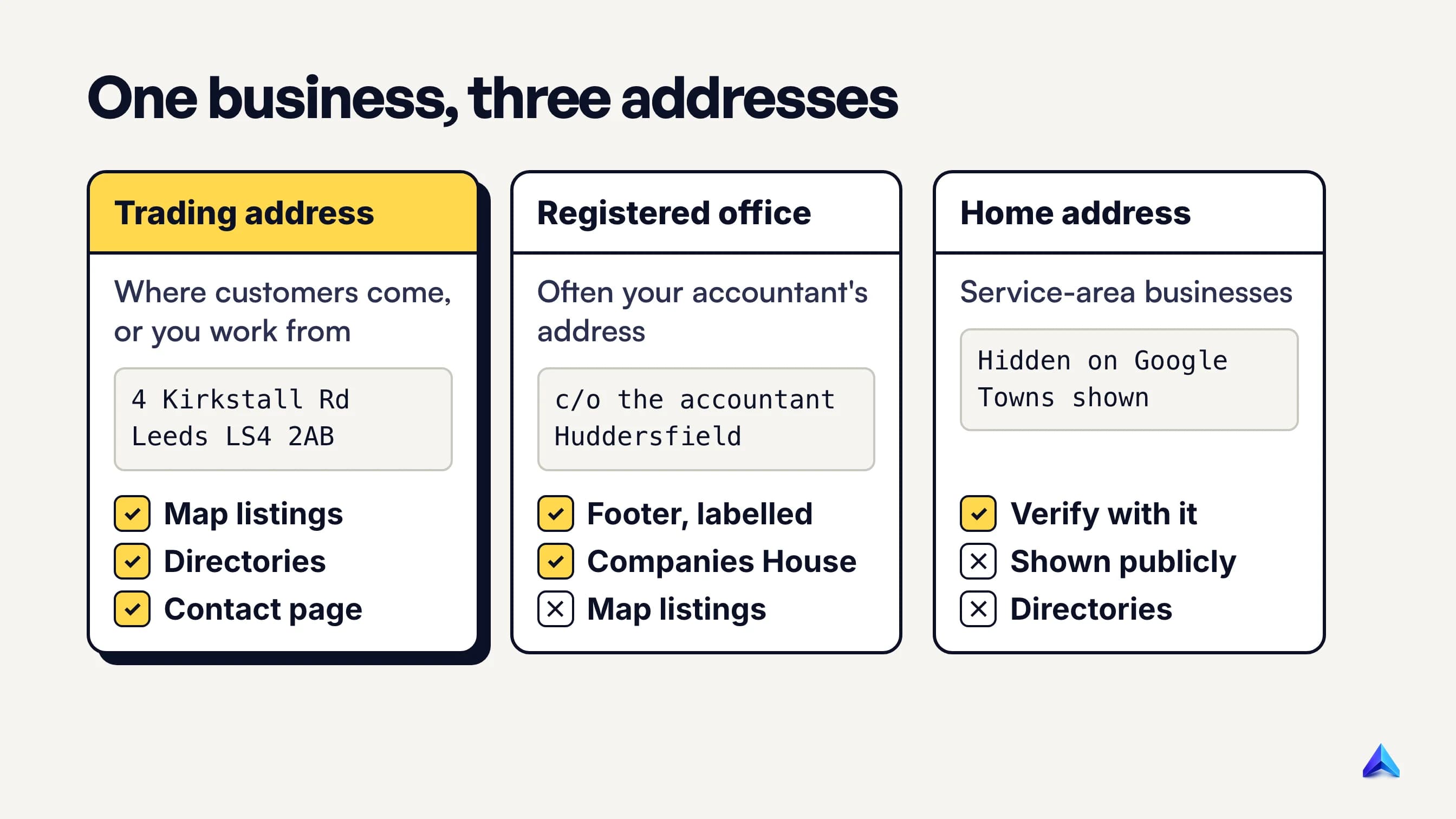
In our view this is the most common UK listing error, and a legal requirement causes it. GOV.UK's rules for running a limited company say your website must show your registered number and your registered office address.
Many small companies use their accountant's address as the registered office. So the footer and Companies House both say Huddersfield, any directory that copies them lists you there, and the real shop is in Halifax.
Label things clearly. Put the trading address in the main contact block as plain text, and put the registered office in a separate line in the footer that says "Registered office" next to the company number. Never use the registered office on Google or a directory unless customers actually visit it.
Your phone number and postcode
Pick one phone number and one way of writing it, then copy it everywhere. A local landline (0113 for Leeds, 0161 for Manchester) signals a local business to people reading the listing. For your website's structured data, Google asks for the country code, so it becomes +44 113 and so on.
Copy your address exactly as the Royal Mail Postcode Finder returns it, including the space in the postcode (LS6 2AB, not LS62AB). Keep flat, unit or floor numbers on their own line. Google's guidelines want suite and unit details in address line 2, not crammed into line 1.
Two addresses never work. A PO box is not acceptable, and a virtual office (a rented postal address you do not operate from) is not eligible for a Business Profile at all. A desk in a co-working space only qualifies if it has clear signage, receives customers and is staffed by your team during opening hours.
Step 2: Set up Google Business Profile properly
This is the listing in the map pack and on Google Maps. If you do one thing from this guide, do this.
- Claim or create the profile at business.google.com using an email address you will still have in five years. A personal Gmail that leaves with an employee takes your listing with it.
- Verify it. Google picks the methods it offers you, and you cannot change them. If video verification is available, Google recommends it. You film one continuous, unedited clip on your phone showing where you are, proof the business exists and proof you manage it. For a trade, Google suggests things like your tools or unlocking a van with your branding on it. Phone verification fails if your line goes through an automated menu, because those systems cannot receive the code.
- Choose your primary category carefully. Google tells you to use as few categories as possible and to finish the sentence "This business IS a", not "this business HAS a". A plumber who also fits boilers is a plumber with a secondary category, not a list of every job.
- Fill in everything that applies. Hours, bank holiday hours, phone, website, services, attributes such as wheelchair access, and a description written for a customer. Google's ranking page says complete and accurate profiles are more likely to show for relevant searches.
- Add real photos. The outside of the premises as a customer approaches it, the inside, the team, finished work. Stock images add nothing.
Bank holidays deserve a specific mention. England and Wales, Scotland and Northern Ireland each have their own dates on GOV.UK. Setting special hours before each one stops the "closed when Google said open" reviews that follow every Easter Monday.
If you work at customers' homes
Trades, cleaners and mobile hairdressers are service-area businesses in Google's terms: you go to the customer. Google's service area guidance is specific:
- If you do not serve customers at your address, remove the address from the profile. You still verify with it, but it stays private.
- You can set up to 20 service areas, defined by towns, cities or postcodes. A radius around your base is no longer allowed.
- The overall area should be within about two hours' driving of where you are based.
- A service-area business gets one profile for the whole area. A second profile for the next town over breaks the rules.
A hybrid business, such as a garage that also does call-outs, can show its address and a service area. Google adds one catch: without permanent signage at the address, you count as a service-area business.
Be realistic with the list. A Leeds electrician who lists LS1 to LS29, Bradford, Wakefield and York will not suddenly rank in York, because distance still applies. Choose the areas you genuinely cover and want more work from.
Step 3: The UK citations that are worth your time
A citation is any listing of your name, address and phone on another site. What counts is consistency and real referrals, not volume: fifty listings with three versions of your address do more harm than ten that match.
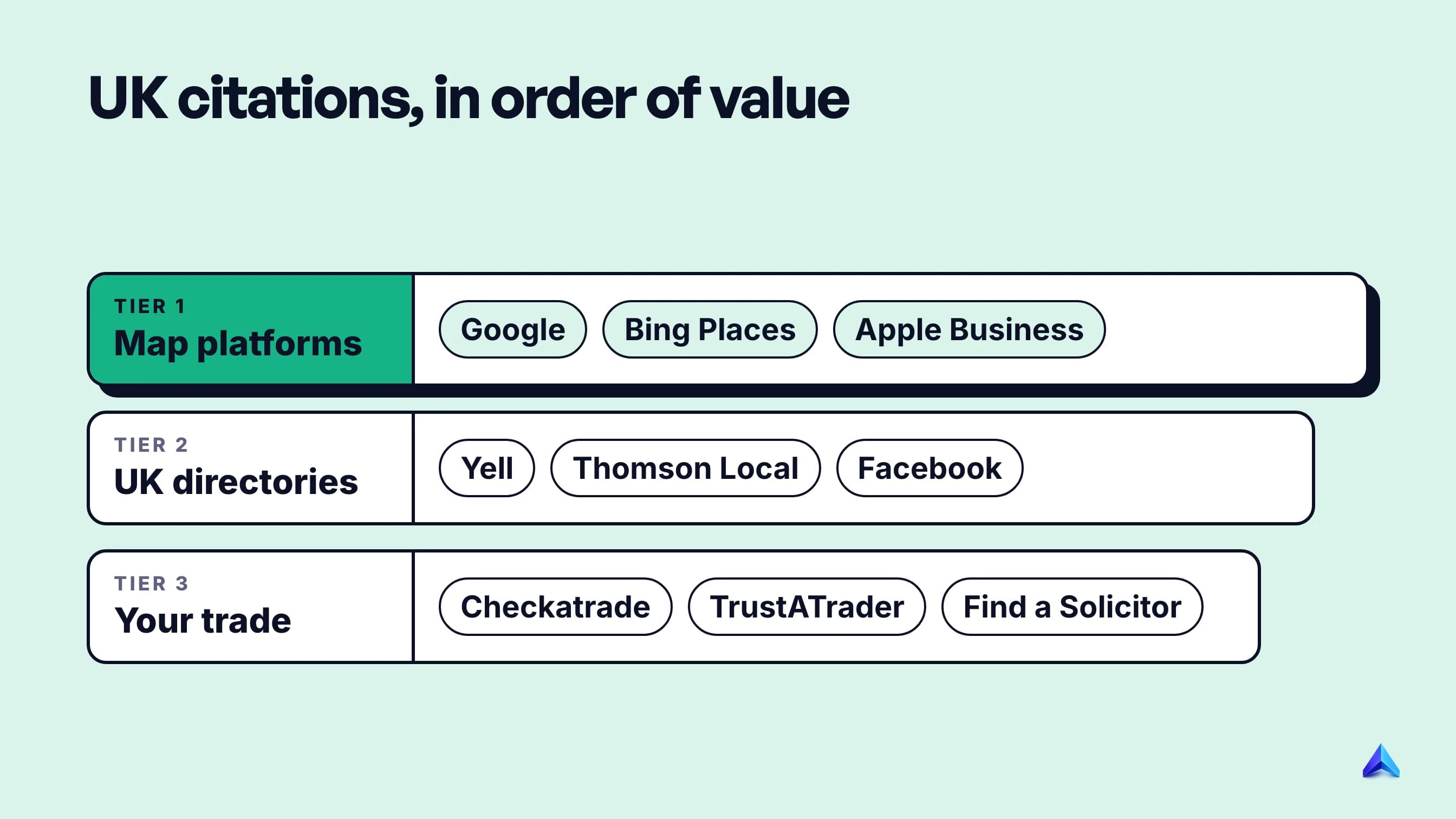
Tier 1: the other map platforms. These are the maps people use when they are not on Google, so they matter more than any directory.
- Bing Places for Business is free and powers Bing search and Bing Maps. Its October 2025 redesign improved importing listings from Google, so if your Google profile is right, copying it across takes minutes.
- Apple Business replaced Apple Business Connect in April 2026. Apple's announcement says it is free, that existing Business Connect data moved across, and that businesses need to claim their location on Maps. Your place card then shows across Apple Maps, Safari and Spotlight, which is where iPhone owners who use Apple Maps will find you. Many UK guides still send readers to Business Connect.
Tier 2: general UK directories. Yell and Thomson Local are the long-standing UK names, and both offer basic listings. Add Facebook, because it is one more place where your hours go out of date. Do these once, carefully, and stop. Paid upgrades on general directories rarely earn their cost for a small local firm.
Tier 3: your trade or profession. This is where citations still bring work, because customers search these sites directly.
- Trades: Checkatrade and TrustATrader are paid memberships with their own review systems. Pick the one your local competitors and customers actually use rather than joining both by default.
- Professions: the regulator or trade body's own "find a member" search, such as the Law Society's Find a Solicitor for law firms.
- Hospitality: TripAdvisor and the booking platform you already use.
Record every listing in a spreadsheet: the login, the exact details used and the date you checked it. When you move or change number, that sheet saves a weekend.
Step 4: Reviews, and the UK law you can now break by accident
Reviews feed prominence directly, and they are now regulated in a way that catches small businesses who mean well.
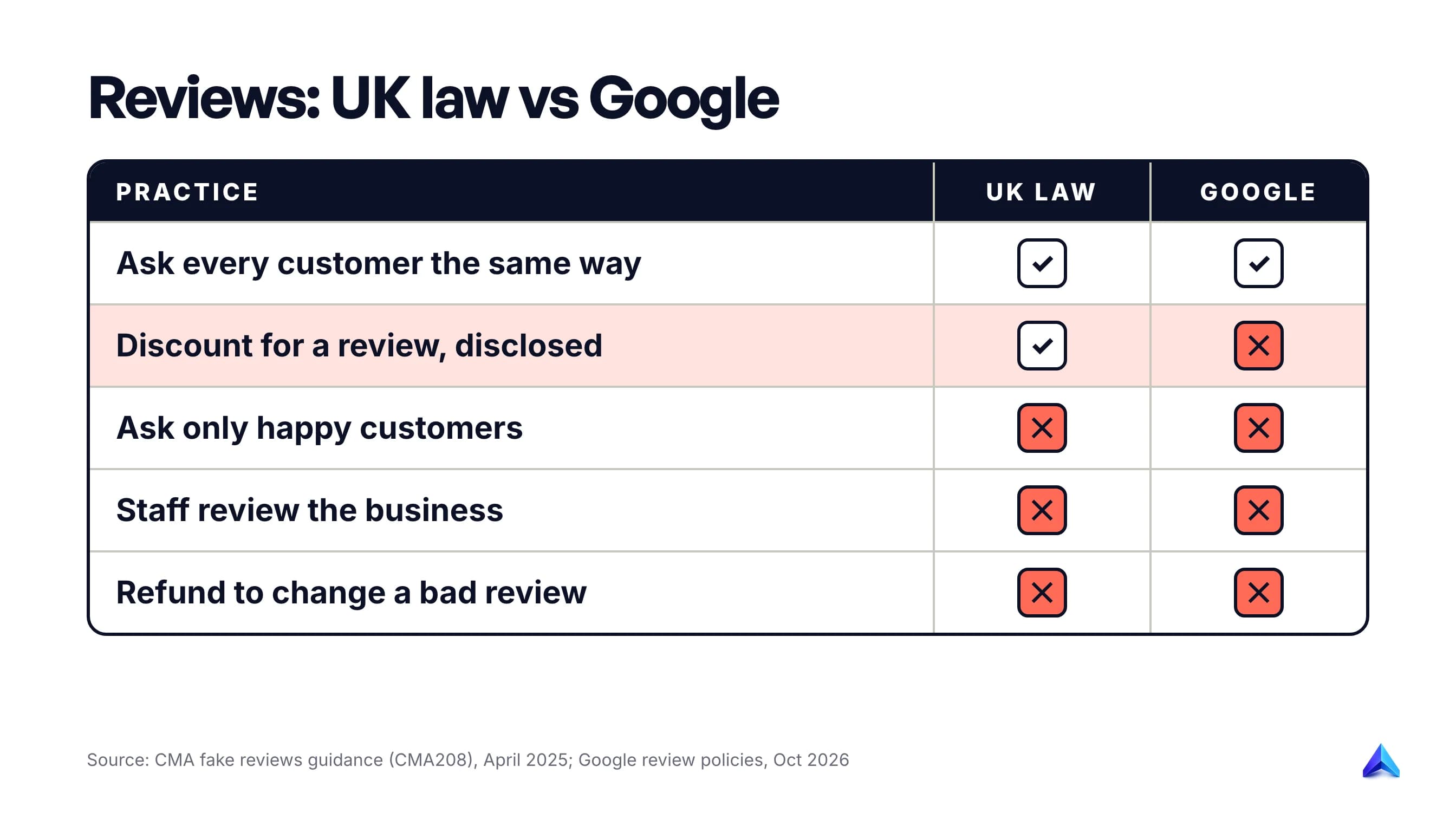
Since April 2025, the Digital Markets, Competition and Consumers Act 2024 has made fake reviews and concealed incentivised reviews banned practices, which means they are automatically unfair and illegal. The CMA's fake reviews guidance spells out what that covers, and some of it is everyday small-business behaviour:
- Asking staff to review the business counts as commissioning a review.
- Offering a customer a discount or freebie in exchange for a five-star review is banned.
- Offering a refund or gift card to someone if they change a negative review is banned.
- Asking only your happy customers to leave a review can count as cherry-picking.
The CMA can now decide cases itself and fine businesses up to 10% of global turnover. In March 2026 it opened five more investigations into fake and misleading reviews, across sectors including funerals and car sales, taking the number of businesses under review with its new consumer powers to 14.
Google's rules are stricter than the law
The CMA guidance says you can incentivise reviews if you tell readers the review was incentivised and it still reflects a genuine experience. It also says a prize draw is unlikely to count as commissioning.
Google is stricter. Its review policy calls any incentive, including a discount, in exchange for a review "fake engagement" and prohibits it outright, disclosed or not. The same policy bans selectively asking happy customers and pressuring people to review while they are still on the premises. Since Google is where your reviews live, Google's rule is the one you follow, and we would not run a prize draw for reviews either.
Google has also agreed undertakings with the CMA. UK businesses found boosting their ratings with fake reviews get a visible warning on their profile and have new reviews switched off. Repeat offenders have all their reviews deleted for six months or more. For a local business that lives on its star rating, that is worse than any fine.
How to ask for reviews properly
The CMA guidance says emailing customers generally to ask whether they would like to leave a review is fine. That is the whole method:
- Get the review request link or QR code from your Business Profile. Google offers both.
- Send the same short message to every customer after every job, whatever you think they will say. A text the same evening works well for trades.
- Do not ask for stars, keywords or a mention of a staff member's name.
- Reply to reviews that need a reply. Google's own advice is that you do not need to thank every reviewer publicly. Sign replies with your name, and take complaints offline without sharing anything personal.
Step 5: Make your website agree with the profile
Your Business Profile links to your website, and customers click through to check you. A profile that says "emergency plumber, Leeds" pointing at a homepage that never mentions Leeds is a weak match.
Put your details in text, not images. The name, trading address and phone number should appear as real text on the contact page and in the footer, matching the profile character for character. The basics in our on-page SEO guide apply here: a title tag that names the service and the town, and a clear H1.
Build one page per real service area, and only where you can say something different. A page for "boiler repair in Headingley" earns its place if it mentions jobs you have done there, the housing stock, parking or response times. A page that swaps the town name into the same 400 words is a doorway page. Keep the URLs short and readable; our notes on URL slug best practices cover the format.
Add LocalBusiness structured data. Google's documentation asks for the address as a full PostalAddress with as many properties as possible, and the phone number with the country code. For a UK business that looks like this:
{
  "@context": "https://schema.org",
  "@type": "Plumber",
  "name": "Hartley Heating",
  "telephone": "+44 113 496 0000",
  "url": "https://www.hartleyheating.co.uk",
  "address": {
    "@type": "PostalAddress",
    "streetAddress": "Unit 4, Kirkstall Road",
    "addressLocality": "Leeds",
    "addressRegion": "West Yorkshire",
    "postalCode": "LS4 2AB",
    "addressCountry": "GB"
  },
  "areaServed": ["Leeds", "Headingley", "Horsforth"]
}
Use the most specific schema type that fits (Plumber, Electrician, Dentist, AccountingService), and for a service-area business with a hidden address, leave the street address out rather than publishing what Google is keeping private.
Step 6: Measure whether it is working
Two free sources tell you whether this is paying off.
Business Profile performance. Once your profile is verified, the Performance view shows views, clicks and other interactions on Search and Maps, and you can download it as a spreadsheet. For most local firms, calls and direction requests are the numbers that matter. Check them monthly and compare like with like, because a garden centre's March will always beat its January.
Google Search Console. It shows which searches bring people to your website, including town-name searches for your location pages. Our guide to Google Search Console for SEO walks through setting it up. Add a UTM tag (such as ?utm_source=gbp) to the website link in your Business Profile so that visits from the map pack show up separately in your analytics.
If your location pages start to slip, Project Rankup's Rank Tracker reads the same Search Console data per page and labels why a page is losing clicks, which is useful once you have more than a handful of pages to watch.
A sudden drop in calls usually means something on the profile changed, such as hours, a category or a public edit Google accepted. Check the profile before anything else.
A weekly routine you can keep
Once the setup is done, local SEO is mostly maintenance.
| When | Task | Time |
|---|---|---|
| Every job | Send the same review request to the customer | 1 minute |
| Weekly | Reply to new reviews; post one photo of recent work | 15 minutes |
| Monthly | Check profile for public edits; check calls and directions | 20 minutes |
| Before each bank holiday | Set special hours on Google, Bing and Apple | 10 minutes |
| Quarterly | Check your citation spreadsheet; refresh one location page | 1 hour |
| After any move or new number | Update Google, Bing, Apple first, then every listing on the sheet | 1 to 2 hours |
Wider website work, such as keyword research or a technical audit, sits on top of this; our small business SEO guide covers that broader picture. Get the six steps right first, because they decide whether you appear in the map pack at all.
常见问题
Can I do local SEO myself?
Yes. Everything in this guide uses free tools: Google Business Profile, Bing Places, Apple Business, Search Console and a spreadsheet. Setup takes a few evenings, and maintenance takes well under an hour a week. An agency mainly saves time; it cannot buy you a better ranking, because Google says local ranking cannot be paid for.
How much does local SEO cost in the UK?
Doing it yourself costs your time plus any trade memberships you choose, such as Checkatrade. Agency prices vary too widely to quote fairly. Before paying anyone, ask which of the six steps they will actually do, since much of a typical package is work you can do yourself.
How long does local SEO take to work?
Google says service-area edits can take up to 48 hours to show. Ranking changes take longer, usually weeks, and depend on how many competitors are nearby and how many reviews they have. Reviews build up slowly by design, so judge progress over three to six months, not three weeks.
Can I use a virtual office address for Google Business Profile?
No. Google's guidelines say a rented postal address you do not operate from is not eligible, and PO boxes are not acceptable either. If you work from home and visit customers, set up as a service-area business: you verify with your home address, hide it, and list the areas you cover.
Can I offer a discount in exchange for a Google review?
Not on Google. UK law allows incentivised reviews if they are clearly disclosed and genuine, but Google's policy prohibits any incentive, including discounts, for posting or changing a review. Breaking it can get reviews removed and, under Google's undertakings with the CMA, a warning label on your profile.
Should my Google Business Profile name include "Ltd"?
Only if "Ltd" appears consistently on your real-world signage, cards and invoices. Google treats legal terms like "Ltd" as unnecessary information unless you can prove they are part of the name customers see. Use the trading name on your shopfront or van, and keep the registered company name for your website footer.