A page Google hasn't indexed can't rank, can't earn clicks, and can't be cited in AI Overviews. For an agency, that means a client paid for work nobody can find. The best seo software for agencies rapid index checker setup answers one question fast and in bulk: is each URL in Google's index right now, yes or no? Pair that check with a clear triage plan and you catch dead pages in days, not at the quarterly report.
This guide covers what these tools do and how they differ from indexers and Search Console. It also shows how to run checks across a client roster and what to do with the URLs that fail.
What does a rapid index checker do for an agency?
A rapid index checker takes a list of URLs and tells you which ones Google has indexed and which it hasn't. It works in bulk, so you can paste thousands of client pages or backlinks at once instead of testing them one by one. For agencies, the value is speed and scale. You prove new content is live in search, spot pages that dropped out, and verify links before you report on them.
The category has grown up fast. Rapid Index Checker, one tool in this space, launched as a bulk Google index checker built for SEO teams, agencies, and website owners, according to launch coverage on Yahoo Finance. A separate MarTech Cube launch report states it checks up to 200 URLs per second. The same report says teams can check index status and detect indexing issues for any page without Search Console access.
That last point matters more than the speed. Search Console only shows data for properties you own or have been granted. You won't get a client's GSC access on day one of a pitch, and you'll never get it for the third-party sites that host your backlinks. An outside checker fills both gaps.
Three jobs come up again and again in agency work:
- New content checks. Confirm that last week's 40 blog posts made it into the index.
- Backlink checks. A link on a page Google never indexed passes little value. Check before you count it.
- Drop-out checks. Find live pages that quietly fell out of the index after a migration, a theme change, or a noindex tag pushed by mistake.
Index checker, indexer, or Search Console: which one do you need?
You need each one for a different job, and mixing them up is the most common buying error agencies make. An index checker reports status. An indexer tries to push URLs into Google's crawl queue. Google Search Console is the source of truth for sites you own, with a reason for each excluded page. Use the checker for bulk status on any site, GSC for diagnosis on owned sites, and an indexer only with care.
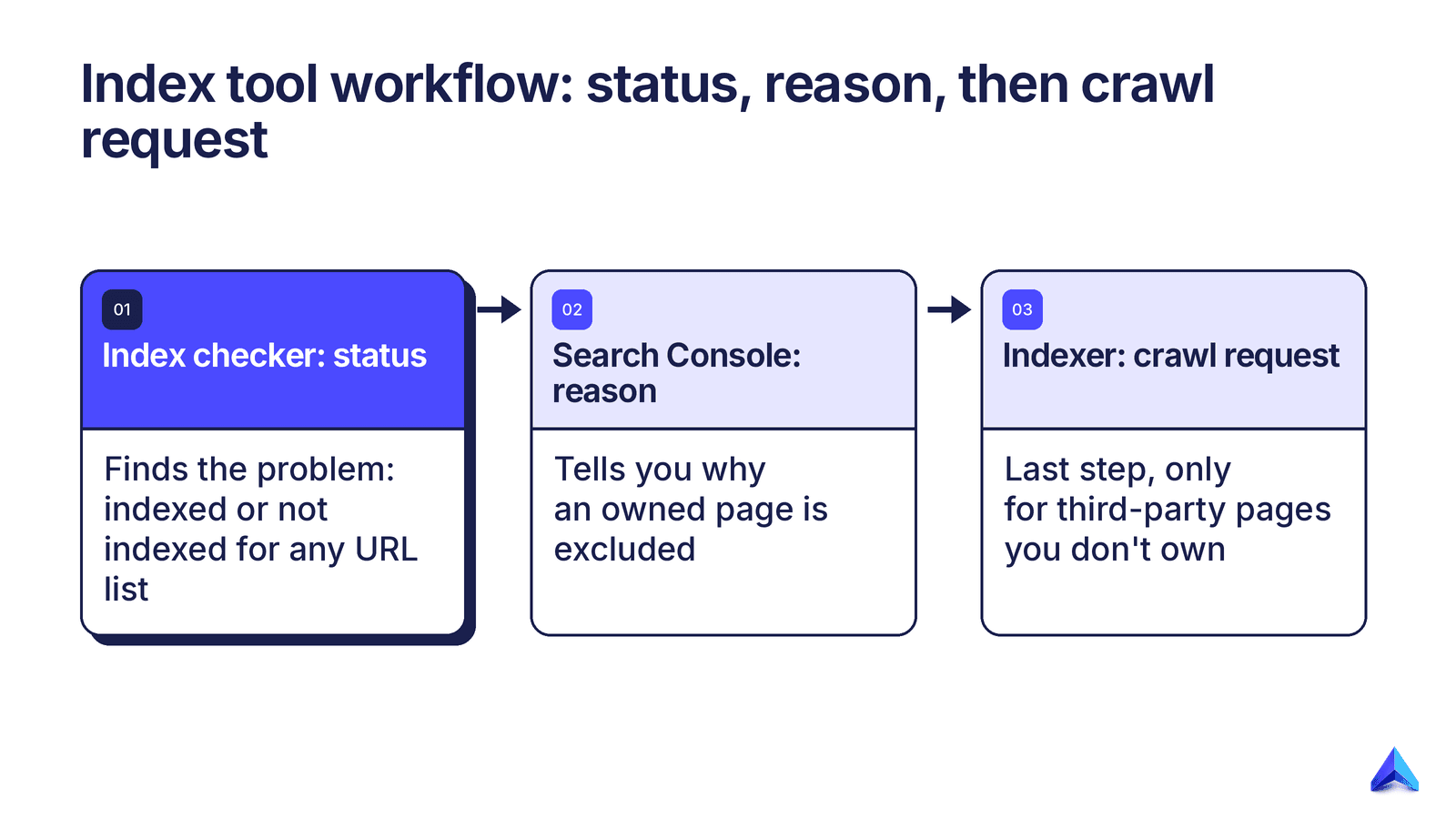
The table lays out where each tool earns its place and where it goes wrong.
| Tool type | What it does | Best for | Why it matters | Red flags |
|---|---|---|---|---|
| Rapid index checker | Reports indexed or not indexed for a URL list | Bulk audits, backlinks, prospect sites | Works on any URL, no site access needed | Vague results, no export, no stated rate |
| Indexer service | Tries to trigger crawls of submitted URLs | Third-party backlink pages you can't control | Can speed discovery of pages Google skipped | Promises of guaranteed indexing, spammy link networks |
| Google Search Console | Shows coverage, reasons, and URL Inspection for owned sites | Finding why a client page is excluded | Gives Google's own reason, such as 'Crawled, currently not indexed' | Inspection limits make it slow for big lists |
| site: search operator | Rough manual check in Google search | A quick spot check of one URL | Free and instant | Counts are estimates, useless at scale |
Read the table left to right as a workflow. The checker finds the problem, Search Console tells you why, and only then do you decide if a fix or a crawl request is worth it. An indexer sits at the very end, and only for pages you don't own. On a client's own site, a page that needs a third-party push to get indexed tends to have a quality or crawl problem the push won't fix.
How a rapid index checker fits into agency SEO software
A rapid index checker is one gate in a longer loop. Content moves from published to crawled to indexed to ranking to cited in AI answers. Each stage can fail, and each needs its own check. Good agency SEO software covers the whole loop, so an indexing failure shows up before anyone reads a flat rank report and blames the writing.
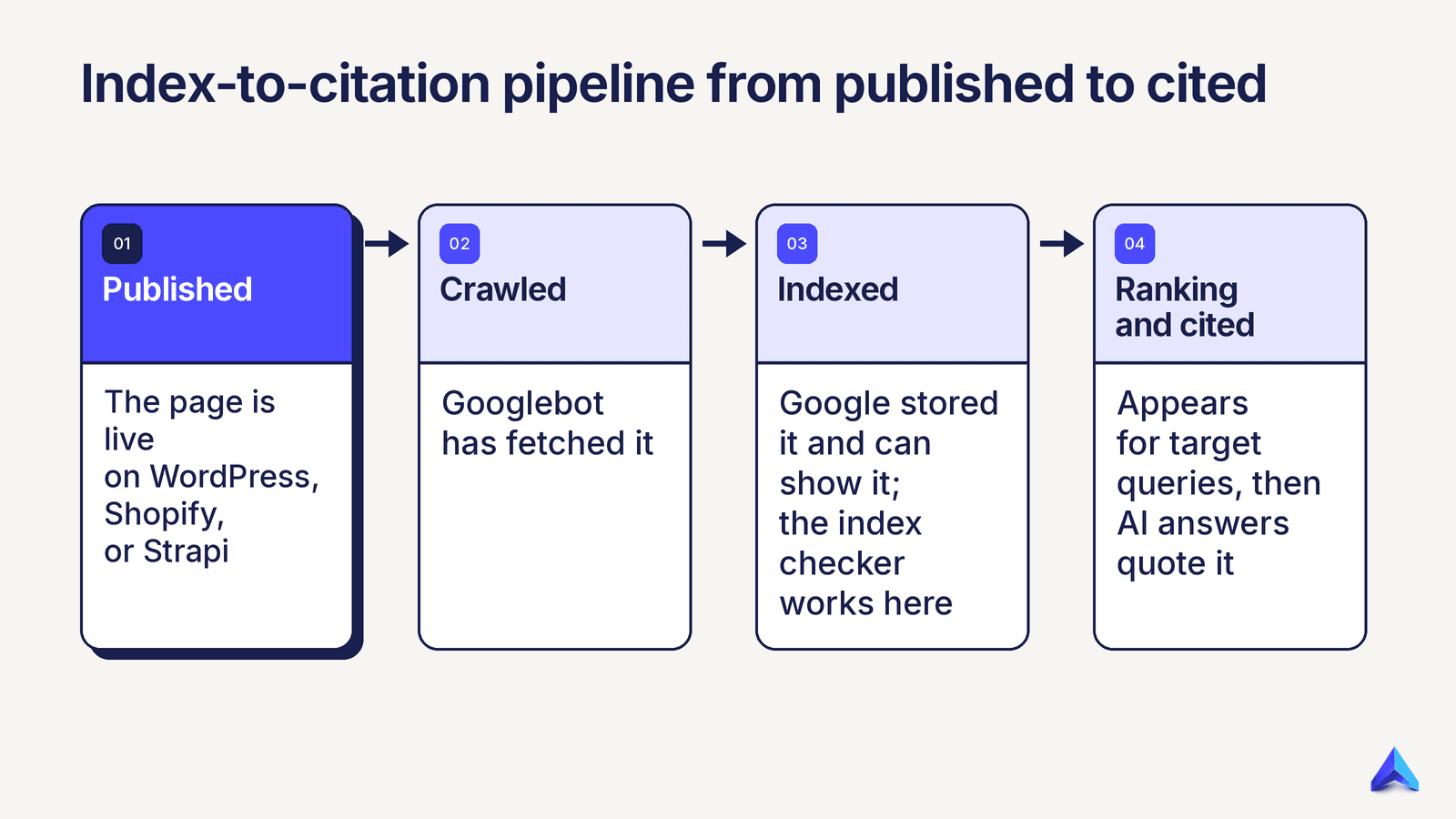
We think of it as an index-to-citation pipeline:
- Published. The page is live on WordPress, Shopify, or Strapi.
- Crawled. Googlebot has fetched it.
- Indexed. Google stored it and can show it. This is where an index checker works.
- Ranking. It appears for target queries. Rank tracking watches this stage.
- Cited. Google AI Overviews, ChatGPT, Gemini, or Perplexity quote it.
Stage three is the hinge. An unindexed page can't rank in Google, and it can't feed answers built on Google's index. If your goal is to rank in Google AI Overviews, indexing is the step you can't skip. Treat the seo software for agencies rapid index checker you pick as the stage-three sensor in that loop.
This is also where tool stacks get messy. Agency roundups such as One Little Web's 2026 list of the tools they use show how many separate apps a working agency juggles. Each hand-off is a spot where a failed page slips through. Content gets written in one app, published in another, and tracked in a third, while nobody checks index status.
Project Rankup was built to close those hand-offs. Content runs through pre-publish checks for direct answers, citable passages, and schema. Then it publishes to WordPress, Shopify, or Strapi in one click, with no unattended auto-publishing. Google Search Console data and rank tracking sit in the same workspace, so a page that went live but never shows a position stands out fast. A bulk index checker slots in as the outside check for pages and links beyond your GSC reach. If you're still comparing platforms, our guide to choosing SEO software for agencies covers the wider buying list.
How to run index checks across a client portfolio
Run index checks on a schedule tied to URL type, not on a whim. Check new pages 7 to 14 days after they go live. Check backlinks when built and again a month later, and run full-site sweeps monthly or after any migration. Export results per client, tag each failure by cause, and give it a named owner. That turns a status list into fixes.
A repeatable five-step routine
The routine below works with any seo software for agencies rapid index checker you choose.
- Build the URL list per client. Pull new URLs from your CMS or sitemap, plus backlinks from your link log. Keep one list per client so reports stay clean.
- Run the bulk check. At MarTech Cube's stated rate of 200 URLs per second, a 10,000 URL list would finish in under a minute on paper. Real runs vary with plan limits, so test with your own lists.
- Split results three ways. Indexed, not indexed, and too new to judge (under a week old).
- Find the cause for the not-indexed set. For owned sites, open URL Inspection in Google Search Console. For third-party pages, check that the page is live, linked, and not blocked.
- Assign and re-check. Give each failure an owner and a re-check date. Log the outcome so you learn which fixes work for which client.
Suggested check cadence
Use this cadence as a baseline, and tighten it for clients with heavy publishing or recent site changes.
| URL type | When to check | Re-check | Who owns the fix |
|---|---|---|---|
| New blog or landing pages | 7 to 14 days after publish | 30 days | Content lead |
| Product and category pages (e-commerce) | After each catalogue push | Monthly | Store manager or dev |
| Backlinks you built or bought | At handover | 30 days later | Link builder |
| Full site sweep | Monthly | After any migration or redesign | Technical SEO |
| Pages that lost rankings | Same day the drop shows | Weekly until fixed | Account lead |
The last row is the one that saves accounts. When a rank tracker flags a sudden drop, run an index check first. If the page fell out of the index, no amount of content tuning will help, and you'll know in seconds. Our piece on daily rank tracking explains why catching drops early pays off.
A worked example shows the scale. Picture an agency with 12 retainer clients, each publishing 20 pages and gaining 15 links a month. That's 420 URLs a month before any full-site sweep. Checking them one by one in Search Console burns a day. Even the URL Inspection API caps each property at 2,000 inspections per day and 600 per minute (Google Search Console API usage limits), and it only covers sites you can access. A bulk checker turns it into a short task inside the monthly report.
What should you do when a URL comes back not indexed?
First, confirm the page is old enough to judge, since Google can take days or weeks to index a new page. Then find the cause before you act: a noindex tag, a canonical pointing elsewhere, a robots.txt block, thin or duplicate content, or no internal links. Fix the cause, request indexing in Search Console for owned pages, and re-check in two weeks. A crawl push without a fix rarely sticks.
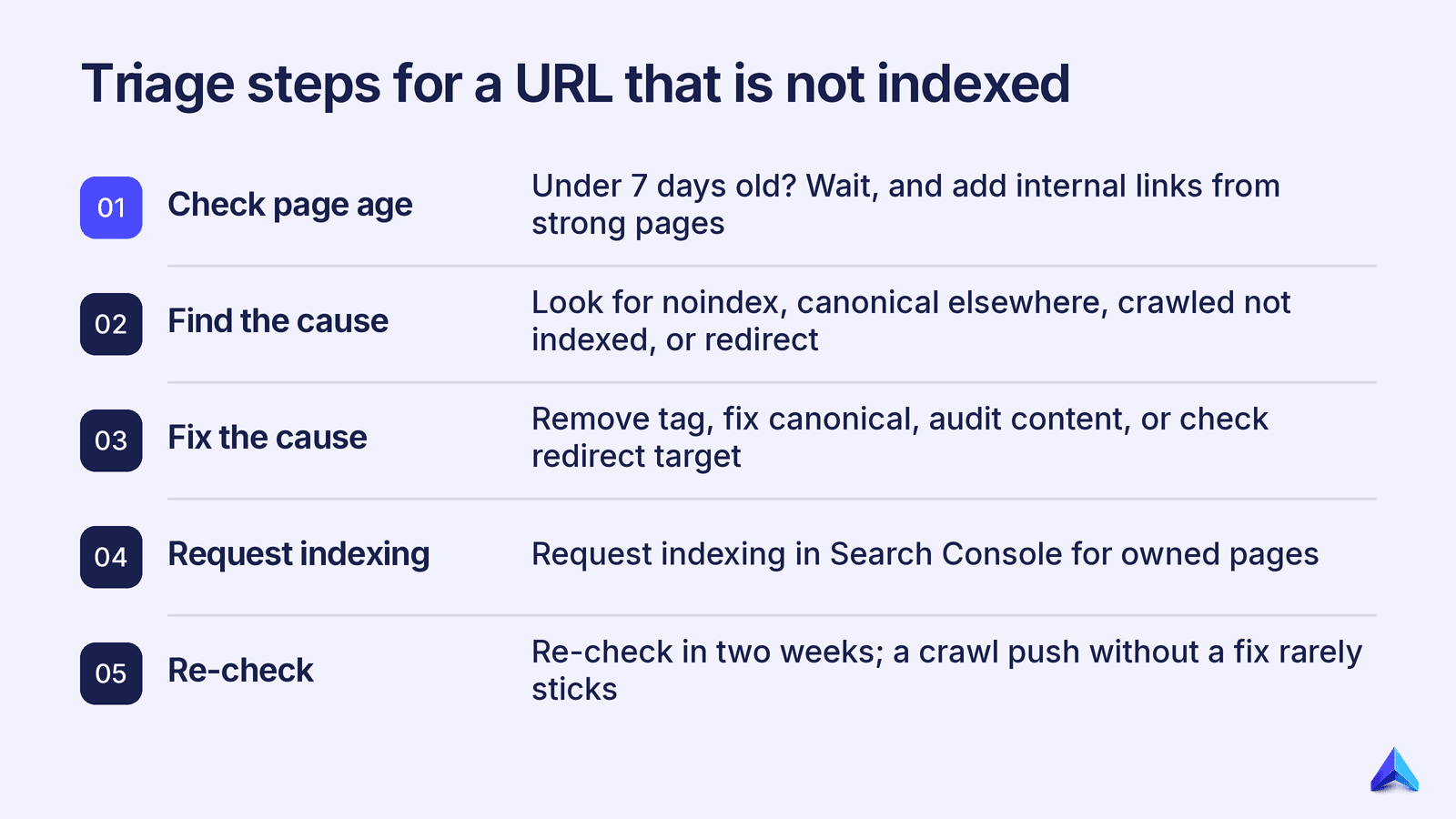
Use this triage table to match each symptom to a first move.
| Symptom | Likely cause | First move | Re-check |
|---|---|---|---|
| Page under 7 days old | Not yet crawled | Wait, and add internal links from strong pages | 7 days |
| 'Excluded by noindex tag' in GSC | Stray noindex from a plugin or staging setting | Remove the tag, request indexing | 7 days |
| 'Alternate page with proper canonical tag' | Canonical points to another URL | Fix the canonical or accept the merge | 14 days |
| 'Crawled, currently not indexed' | Google saw it and passed | Add depth, merge thin pages, add links | 30 days |
| 'Discovered, currently not indexed' | Crawl demand or weak signals | Add to sitemap, link from hub pages | 14 to 30 days |
| Third-party backlink page not indexed | Weak or orphaned host page | Ask the host for an internal link, or drop it from reports | 30 days |
| Redirected URL in the list | Old URL now redirects | Check the redirect target instead | Same day |
Two rows deserve more thought. 'Crawled, currently not indexed' is a quality signal, and it often points to a batch of pages that are too thin or too alike. That's a content audit job, not an indexing job. Our guide on how to do a content audit walks through spotting pages to merge, rework, or cut.
Redirects trip up agencies too, mostly after migrations. A list full of old URLs will look like an indexing crisis when it's a redirect map. If you're unsure which status code shipped, check the 301 vs 302 redirect rules before you raise an alarm with the client.
How to judge seo software for agencies rapid index checker features
Judge an index checker on accuracy, speed, scale, and how cleanly results flow into the rest of your stack. Speed figures grab the headlines, but a fast check with unclear results wastes more time than a slower one you trust. Ask how the tool decides a URL is indexed, what it costs at your real monthly volume, and whether you can export and group results per client.
Buyers keep asking what sets one checker apart from the next. Techjockey's buyer Q&A on Rapid Index Checker is one example of how often that question comes up. We'd weigh the criteria in this order.
| Criterion | What good looks like | Why it matters | Red flags |
|---|---|---|---|
| Result method | Checks a live result per URL | Cached or guessed data gives false passes | No word on how status is found |
| Clear output | Indexed or not indexed, nothing in between | Vague results force manual re-checks | A high share of 'unknown' results |
| Throughput | Handles your largest list in one run | Big e-commerce sites need full sweeps | Hard caps far below your catalogue size |
| Pricing model | Credits or plans that fit monthly volume | Agency volume spikes during audits | Per-check fees that balloon at scale |
| Export and grouping | CSV export, per-project lists | Feeds client reports and task tools | Results trapped in the app |
| Access needs | No site access required | Works for prospects and backlinks | Needs a login to each client's GSC |
Work down from the top. Result method and clear output decide whether you can trust the tool at all. Throughput and price decide whether it fits your size, and export and access decide how much time it saves each month. A freelancer with five clients can trade some speed for a lower bill. An agency running 50,000 URL e-commerce sweeps can't.
Roles weigh these points differently too. SaaS growth leads care most about new content checks after each launch. E-commerce managers on Shopify need throughput for product and category pages. Content and marketing teams need per-project export so reports line up with their calendar.
常見問題
How long does Google take to index a new page?
There's no fixed time. Many pages get indexed within days, while others take weeks, depending on site authority, internal links, and crawl demand. That's why a 7 to 14 day wait before the first check makes sense. Checking sooner tends to flag pages that would have indexed on their own anyway.
Is a rapid index checker safe to use on client sites?
Yes. A checker only reads status. It doesn't change anything on the site or send any signal to Google about the URL. Indexer services are a different matter: they try to trigger crawls, and some lean on low-quality link networks. Google's own Indexing API is meant only for job posting and livestream pages, with a default quota of 200 publish requests per day (Google Search Central, Indexing API quota). Use those with care, and never on core client pages without a clear reason.
Can I use the site: operator instead of a bulk checker?
For one or two URLs, yes. At scale, no. The site: operator is a manual search, its result counts are estimates, and running hundreds of them by hand eats hours. A bulk index checker does the same job for a full list and gives you an export you can share with the client.
Does indexing guarantee my page will appear in AI Overviews?
No. Indexing is the entry ticket, not the win. An Ahrefs study of over a billion pages found that 96.55% get no organic search traffic from Google at all (Ahrefs, 2020, search traffic study). Once indexed, a page still needs to rank and to hold clear, quotable passages that answer the query. Structure, direct answers, and schema all help, which is the focus of generative engine optimization.
Your index-check decision checklist
Match your situation to the next move, then build it into your monthly routine.
| If this is your situation | Do this |
|---|---|
| You publish new client content weekly | Bulk check each batch 7 to 14 days after publish |
| You build or buy backlinks | Check at handover and 30 days later, before you report |
| A page lost rankings overnight | Run an index check before any content changes |
| A URL shows 'Crawled, currently not indexed' | Treat it as a quality issue and audit the page |
| You lack a client's GSC access | Use an outside checker until access is granted |
| You manage 10 or more clients | Pick a tool with per-project export and volume pricing |
Indexing is one gate in the climb. If you want keyword research, pre-publish checks, one-click publishing, and rank tracking working as one loop, see how Project Rankup runs the full pipeline.